
Client Portal Software: 10 Best Platforms for 2026 (Complete Guide)
Compare the 10 best client portal software platforms for 2026. Features, pricing, and honest reviews for agencies, consultants, law firms, and professional services.
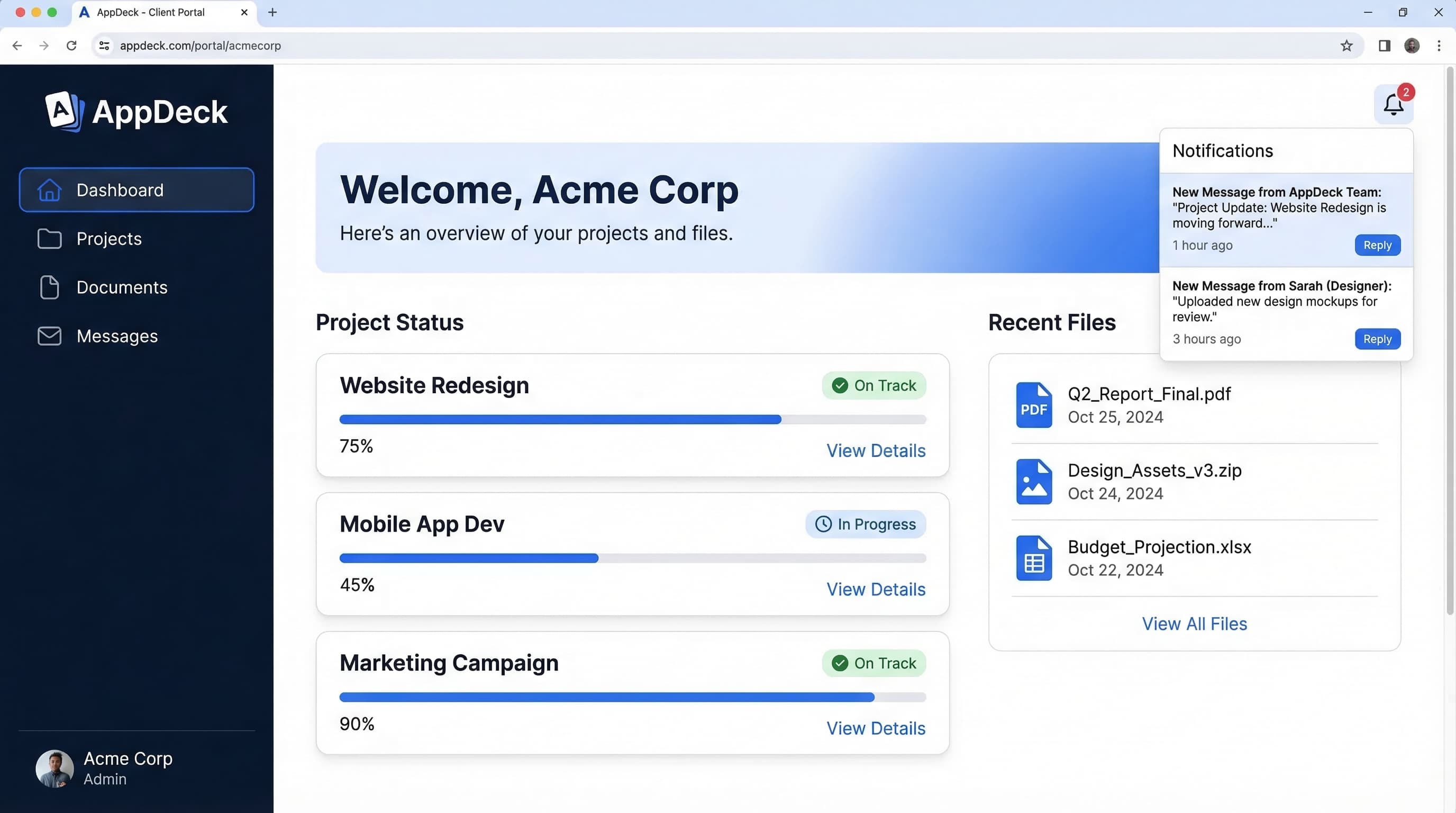
TL;DR: Compare the 10 best client portal software platforms for 2026. Features, pricing, and honest reviews for agencies, consultants, law firms, and professional services.
Introduction
Here's a pattern I've watched repeat across hundreds of service businesses: an operations manager spends 40% of their week forwarding emails, chasing down file versions, and answering the same three questions — "Where's my invoice?" "What's the project status?" "Can you resend that document?"
That was my reality too, across two decades of running B2B software companies. The breaking point came when a client told me they'd rather switch firms than keep digging through email threads for project updates. Not because our work was bad — the experience of working with us was bad.
Client portal software fixes this. It gives your clients a single, branded place to see everything — project status, documents, invoices, messages — without emailing your team. And in 2026, it's no longer a "nice-to-have." It's table stakes.
Self-service expectations have fully crossed over from B2C to B2B. Your clients use banking apps, order tracking dashboards, and real-time delivery maps in their personal lives. They expect the same from the firms they hire. Email-heavy client management feels broken to them — because it is.
I've spent the last six months evaluating client portal platforms across every dimension that matters: setup speed, branding control, security, integrations, and actual client adoption rates. This guide covers everything I found.
If you run an agency specifically, I also wrote a more focused comparison in my client portal software for agencies post. This guide is broader — it covers agencies, consultants, law firms, accountants, and any service business that manages client relationships.
What Is Client Portal Software?
Client portal software is a secure, branded platform where your clients log in to access project updates, documents, invoices, messages, and reports — all in one place. Think of it as a private hub for each client relationship, replacing the chaos of scattered emails, shared drives, and status meetings.
Core capabilities of a professional client portal:
- Document sharing and storage — Centralized file repository with version control, permissions, and audit trails
- Project tracking — Real-time status updates, milestones, and timelines visible to both your team and the client
- Messaging and communication — Threaded conversations tied to projects or deliverables, replacing email
- Invoicing and billing — Payment tracking, invoice history, and (in some platforms) direct payment collection
- Reporting and dashboards — Live data visualizations pulling from your existing tools like Salesforce, HubSpot, or QuickBooks
- White-label branding — Your logo, colors, domain, and brand experience — not the vendor's
Who uses client portal software?
Any business that manages ongoing client relationships benefits from a portal. The most common users:
- Agencies (marketing, creative, development, PR) — for project delivery and reporting
- Consultants and advisory firms — for deliverable sharing and engagement tracking
- Law firms — for secure document exchange and case updates
- Accounting and financial services — for document collection, report delivery, and compliance
- IT service providers — for ticket tracking and SLA reporting
- Architecture and engineering firms — for plan sharing, approvals, and project milestones
The difference between a client portal and a customer portal matters here. Customer portals (think Zendesk or Salesforce Experience Cloud) are designed for high-volume self-service at scale. Client portals are designed for deeper, relationship-driven interactions where the experience itself is part of your service delivery.
Key Features to Evaluate
Not all client portal platforms are built the same. Some are really project management tools with a client view bolted on. Others are document management systems marketed as portals. Here are the 10 features that actually separate great client portal software from mediocre options.
1. White-Label Branding
Your portal should look like your platform, not a third-party tool. That means custom domain (portal.yourcompany.com), your logo, your color scheme, and zero vendor branding visible to clients. Some platforms charge extra for this. Others make it standard. I wrote an entire guide to white-label portal software if this is a priority for you.
What to check:
- ✅ Custom domain support included
- ✅ Full color and logo customization
- ✅ Branded email notifications
- ❌ "Powered by [Vendor]" watermarks on free/lower tiers
- ❌ Custom domain only on enterprise plans
2. Document Sharing and Management
This is non-negotiable. Your portal needs secure file sharing with version control, folder organization, and granular permissions. Bonus points for preview support (PDFs, images, videos), so clients don't have to download everything.
3. Project Tracking
Clients want to see where things stand without asking. Look for milestone tracking, task visibility (at the right level of detail), and timeline views. The best platforms let you control exactly how much project detail clients see — because not every internal task needs to be client-facing.
4. Messaging and Communication
Threaded, contextual messaging tied to specific projects or documents. This replaces the "per my last email" problem. Some portals also support real-time chat, @mentions, and notification preferences.
5. Invoicing and Billing
If your portal includes billing, clients can view invoices, payment history, and make payments without leaving the platform. Not all portals have this built in — some require integrating with Stripe, QuickBooks, or your existing billing tool.
6. E-Signatures
For law firms, consultants, and anyone sending contracts or SOWs, built-in e-signature support saves a round-trip to DocuSign. Look for audit trails and legally binding compliance (ESIGN Act, eIDAS).
7. Integrations
Your client portal is only as useful as the data flowing into it. Essential integrations:
- CRM: Salesforce, HubSpot
- Accounting: QuickBooks, Xero
- Project management: Asana, Monday.com, Jira
- File storage: Google Drive, Dropbox, OneDrive
- Communication: Slack, Microsoft Teams
8. Mobile Experience
Your clients will check the portal from their phones. A responsive web app is the minimum. Native iOS/Android apps are better. Test the mobile experience before committing — many portals look great on desktop and fall apart on mobile.
9. Security and Compliance
For any business handling sensitive client data — especially legal, financial, and healthcare — security is make-or-break:
- ✅ SOC 2 Type II certification
- ✅ End-to-end encryption (in transit and at rest)
- ✅ Two-factor authentication (2FA)
- ✅ Role-based access controls
- ✅ Audit logs
- ❌ No published security certifications
- ❌ No 2FA option
10. Reporting and Dashboards
The best client portals don't just share static documents — they deliver live, interactive dashboards that pull real-time data from your business tools. This is the difference between a file locker and a genuine client experience platform.
The 10 Best Client Portal Software Platforms for 2026
I've tested each of these platforms with real client workflows — not just feature checklists. Here's what I found.
1. AppDeck
Best for: White-label portals with real-time dashboards
AppDeck is a portal platform built from the ground up for professional services firms that want to deliver a branded, premium client experience. Where most portals give you document sharing with some project tracking, AppDeck connects directly to your business tools — Salesforce, HubSpot, QuickBooks, Google Analytics — and surfaces live dashboards inside the portal.
The setup is genuinely fast. I had a branded portal running with real client data in under 30 minutes. No developer needed. The white-labeling is complete: custom domain, full brand customization, and zero AppDeck branding visible to clients.
Key features:
- Full white-label with custom domain (portal.yourcompany.com)
- Real-time dashboards pulling from 50+ data sources
- Document sharing with version control
- Client messaging and notifications
- AES-256 encryption and role-based permissions (designing for SOC 2 Type II audit readiness)
- Salesforce, HubSpot, QuickBooks, Xero integrations
- Role-based permissions and audit logs
Pricing: From $199/mo (unlimited clients)
Pros:
- ✅ 30-minute setup — no developer required
- ✅ True white-label on all plans
- ✅ Live dashboard integrations (not just static files)
- ✅ Security-first architecture (designing for SOC 2 Type II audit readiness)
- ✅ Flat pricing — no per-user fees for clients
Cons:
- ❌ Newer platform (launched 2024)
- ❌ Fewer native integrations than mature platforms (API available)
If dashboards and data visualization are central to your client experience — project reporting, financial dashboards, marketing analytics — AppDeck is purpose-built for that.
2. Copilot
Best for: Modern service businesses wanting an all-in-one client hub
Copilot has built a genuinely slick product. The UI is clean and modern, the onboarding flow is smooth, and they've bundled billing, contracts, messaging, and file sharing into a single portal experience. For solo consultants and small service firms, it's appealing.
Key features:
- Client portal with messaging, files, and billing
- Built-in invoicing and payment collection
- Contract and e-signature support
- Custom forms and intake workflows
- Helpdesk module
Pricing: From $39/mo per internal user
Pros:
- ✅ Beautiful, modern interface
- ✅ Built-in billing and contracts
- ✅ Good mobile experience
- ✅ Solid onboarding flow
Cons:
- ❌ Per-user pricing gets expensive as your team grows
- ❌ Limited white-label customization on lower plans
- ❌ Dashboard/reporting capabilities are basic
- ❌ Not ideal for data-heavy client reporting
3. SuiteDash
Best for: All-in-one business management on a budget
SuiteDash tries to be everything: client portal, CRM, project management, invoicing, email marketing, and learning management system. And honestly, for the price, it delivers a lot. If you're a small firm and want to consolidate five tools into one, SuiteDash is hard to beat on value.
The trade-off is the interface. It feels dated compared to newer platforms, and the learning curve is real. Plan on a week of setup time, not a few hours.
Key features:
- Client portal with white-label branding
- Built-in CRM and pipeline management
- Project management with Gantt charts
- Invoicing and payment processing
- Email marketing and drip campaigns
- LMS (learning management)
Pricing: From $19/mo (Startup), $49/mo (Business), $99/mo (Pinnacle)
Pros:
- ✅ Incredibly affordable for the feature set
- ✅ White-label available on all plans
- ✅ Replaces multiple tools (CRM, PM, invoicing)
- ✅ One-time lifetime deal occasionally available
Cons:
- ❌ UI feels outdated
- ❌ Steep learning curve
- ❌ Performance can lag with large datasets
- ❌ Support response times inconsistent
4. Clinked
Best for: Enterprise-grade file sharing and collaboration
Clinked is the platform you see referenced in "secure client portal" conversations, especially in legal, financial, and consulting contexts. The document management is strong — versioning, granular permissions, audit trails, and white-label branding that holds up well.
Where it falls short is project management. If you need task boards, milestones, and workflow automation, you'll need to pair Clinked with another tool.
Key features:
- White-label portal with custom domain
- Advanced document management and permissions
- Group collaboration and discussion boards
- Mobile apps (iOS and Android)
- Audit trails and activity tracking
- Microsoft 365 and Google Workspace integration
Pricing: From $119/mo (Lite), $299/mo (Standard), custom (Premium)
Pros:
- ✅ Strong document management and security
- ✅ Good white-label branding options
- ✅ Native mobile apps
- ✅ Established platform (10+ years)
Cons:
- ❌ Limited project management features
- ❌ No built-in invoicing or billing
- ❌ Pricing is high for what you get
- ❌ UI needs a refresh
5. Moxo
Best for: Financial services and regulated industries
Moxo (formerly Moxtra) positions itself as a "client interaction hub" with deep workflow automation. It's built for industries where compliance matters — banking, insurance, wealth management, accounting. The workflow engine lets you create multi-step client onboarding flows, document collection sequences, and approval chains.
If you're in financial services, Moxo understands your compliance requirements. If you're a marketing agency, it's probably overkill.
Key features:
- Workflow automation with multi-step sequences
- Secure messaging with end-to-end encryption
- Document management with compliance features
- Digital signature support
- Video meetings integrated into workflows
- White-label available
Pricing: Custom (enterprise-oriented — expect $500+/mo minimum)
Pros:
- ✅ Purpose-built for regulated industries
- ✅ Strong workflow automation engine
- ✅ Good compliance and security features
- ✅ Integrated video conferencing
Cons:
- ❌ Enterprise pricing — not accessible for small firms
- ❌ Overkill for simple client portal needs
- ❌ Opaque pricing (sales call required)
- ❌ Can feel heavy for clients who just need basics
6. Softr
Best for: Custom portal builders who want full control
Softr takes a different approach. Instead of a pre-built portal, it gives you a no-code builder connected to Airtable (or Google Sheets) as the backend. You design the portal layout, choose what data to display, and control the user experience from scratch.
This is powerful if you have specific requirements that no pre-built portal covers. It's also more work. You're essentially building your own portal — Softr just makes it possible without code.
Key features:
- No-code portal builder
- Airtable and Google Sheets as data backend
- Custom layouts, list views, detail pages
- User authentication and permissions
- Stripe integration for payments
- Embeddable components
Pricing: From $59/mo (Basic), $149/mo (Professional), $299/mo (Business)
Pros:
- ✅ Maximum flexibility — build exactly what you need
- ✅ No coding required
- ✅ Clean, modern templates
- ✅ Good for unique workflow requirements
Cons:
- ❌ Requires Airtable setup and maintenance
- ❌ No built-in messaging or communication
- ❌ Limited out-of-the-box portal features
- ❌ Client experience depends entirely on your design skills
7. Ahsuite
Best for: Freelancers and small agencies on a tight budget
Ahsuite is the scrappy underdog on this list. They offer a genuinely functional free tier, and the paid plans start at $8/mo. For solo consultants or small agencies that just need a clean client portal with task management, file sharing, and a branded experience — Ahsuite delivers without the price tag.
The limitations show up as you scale. Reporting is basic, integrations are limited, and you'll eventually outgrow it.
Key features:
- Client portal with branded workspace
- Task management and project tracking
- File sharing and document management
- Password manager for client credentials
- Website embedding and link sharing
- Free tier with core features
Pricing: Free (up to 10 workspaces), $8/mo (Professional), $16/mo (Agency)
Pros:
- ✅ Functional free tier
- ✅ Very affordable paid plans
- ✅ Simple, clean interface
- ✅ Good for freelancers getting started
Cons:
- ❌ Limited reporting and analytics
- ❌ Few integrations
- ❌ Not suitable for teams over 10 people
- ❌ No invoicing or billing features
8. Zoho Creator
Best for: Businesses already in the Zoho ecosystem
Zoho Creator isn't a client portal — it's a low-code app builder that you can use to build one. If your business already runs on Zoho CRM, Zoho Books, Zoho Projects, and the rest of the Zoho suite, Creator lets you build a connected client portal that pulls data from across your Zoho ecosystem.
If you're not on Zoho already, don't start here. The value is in the ecosystem integration, not the standalone portal experience.
Key features:
- Low-code app builder with drag-and-drop
- Deep integration with all Zoho products
- Custom workflows and automation
- Mobile app generation
- REST API for external integrations
- Multi-language support
Pricing: From $8/user/mo (Standard), $20/user/mo (Professional), $25/user/mo (Enterprise)
Pros:
- ✅ Deep Zoho ecosystem integration
- ✅ Highly flexible — build anything
- ✅ Affordable per-user pricing
- ✅ Mobile apps auto-generated from your designs
Cons:
- ❌ Requires significant setup and configuration
- ❌ Only valuable within the Zoho ecosystem
- ❌ Steep learning curve for non-technical users
- ❌ Not a purpose-built portal experience
9. MyDocSafe
Best for: Document-heavy workflows and compliance
MyDocSafe is built around document management — contracts, proposals, onboarding forms, compliance documents, and e-signatures. If your client interaction is primarily about exchanging, signing, and storing documents (think legal, accounting, HR consulting), MyDocSafe handles it well.
It's not a project management portal. Don't expect task boards, Gantt charts, or real-time dashboards. It's a document portal with strong security.
Key features:
- Document management with e-signatures
- Client onboarding workflows
- Secure document exchange
- Compliance document tracking
- Multi-party signing
- Automated document workflows
Pricing: From $25/mo (Starter), $87/mo (Small Business), custom (Enterprise)
Pros:
- ✅ Strong e-signature and document security
- ✅ Good for regulated industries (legal, finance)
- ✅ Automated document workflows
- ✅ GDPR compliant
Cons:
- ❌ Limited project tracking features
- ❌ No built-in messaging or chat
- ❌ UI is functional but not modern
- ❌ Focused narrowly on documents
10. Plutio
Best for: Freelancers wanting an all-in-one workspace
Plutio combines proposals, contracts, invoicing, project management, and a client portal into one platform. For solopreneurs and freelancers, it's a compelling package — you manage your entire client lifecycle in a single tool.
The client portal component is a subset of the overall platform. It works, but it's not as polished or feature-rich as dedicated portal solutions. Teams of 5+ will likely outgrow it.
Key features:
- Client portal with project visibility
- Proposals and contracts with e-signatures
- Time tracking and invoicing
- Task management and project boards
- Custom forms and intake
- White-label on higher plans
Pricing: From $19/mo (Solo), $39/mo (Studio), $99/mo (Agency)
Pros:
- ✅ All-in-one for freelancers (proposals through invoicing)
- ✅ Affordable entry point
- ✅ Good for managing the full client lifecycle
- ✅ Clean, modern interface
Cons:
- ❌ Portal features are basic compared to dedicated solutions
- ❌ Limited scalability for growing teams
- ❌ Integrations are limited
- ❌ White-label only on higher tiers
Comparison Table
| Platform | Best For | White-Label | Billing | Dashboards | Security | Starting Price |
|---|---|---|---|---|---|---|
| AppDeck | Data-driven portals | ✅ Full | Via integration | ✅ Live | SOC 2 (in development) | $199/mo |
| Copilot | Modern service firms | Partial | ✅ Built-in | Basic | Standard | $39/user/mo |
| SuiteDash | Budget all-in-one | ✅ Full | ✅ Built-in | Basic | Standard | $19/mo |
| Clinked | File sharing | ✅ Full | ❌ | ❌ | Strong | $119/mo |
| Moxo | Financial services | ✅ Full | ❌ | ❌ | Enterprise | Custom |
| Softr | Custom builders | Partial | Via Stripe | Custom | Standard | $59/mo |
| Ahsuite | Freelancers | Partial | ❌ | ❌ | Basic | Free |
| Zoho Creator | Zoho users | Custom build | Via Zoho | Custom build | Standard | $8/user/mo |
| MyDocSafe | Document workflows | Partial | ❌ | ❌ | Strong | $25/mo |
| Plutio | Solo freelancers | Higher tiers | ✅ Built-in | ❌ | Standard | $19/mo |
How to Choose by Business Type
The "best" client portal depends on your business model. Here's what matters most for each type:
Agencies (Marketing, Creative, Development)
Top priorities: White-label branding, project tracking, deliverable sharing, real-time reporting
Agencies live and die by their client experience. Your portal is a direct extension of your brand. You need strong white-labeling, project milestone visibility, and ideally live dashboards showing campaign or project performance.
Best options: AppDeck (dashboard-centric), Copilot (modern UI), SuiteDash (budget)
I cover this in detail in my agency-specific portal comparison.
Law Firms and Legal Services
Top priorities: Security, document management, e-signatures, audit trails, compliance
Legal portals handle privileged and confidential documents. SOC 2 certification, end-to-end encryption, granular permissions, and complete audit trails are non-negotiable. E-signature support saves significant time on engagement letters, NDAs, and contracts.
Best options: Clinked (document security), Moxo (compliance workflows), MyDocSafe (e-signatures)
See my secure client portal guide for a deeper dive on security requirements.
Consultants and Advisory Firms
Top priorities: Dashboards and reporting, document sharing, professional branding, billing
Consultants need to show the impact of their work. Live dashboards that pull data from client CRMs, analytics tools, or financial systems are far more compelling than static PDF reports emailed monthly. Billing integration matters too — clients should see invoices alongside deliverables.
Best options: AppDeck (live dashboards), Copilot (billing + portal), Plutio (solo consultants)
Accountants and Financial Advisors
Top priorities: Security, document exchange, compliance, billing
Accountants exchange sensitive financial documents constantly — tax returns, financial statements, compliance filings. The portal needs rock-solid security, easy document upload/download, and clear organization by tax year or engagement type.
Best options: Moxo (compliance), MyDocSafe (documents), Clinked (file sharing)
IT Service Providers
Top priorities: Ticket tracking, SLA reporting, project visibility, integrations
IT firms need portals that connect to their existing PSA and ticketing tools. The ability to show open tickets, SLA compliance, and project status in a branded client view is essential.
Best options: AppDeck (integrations + dashboards), Zoho Creator (if on Zoho), Softr (custom build)
Client Portal Software for Small Business
Small businesses have different requirements than agencies or enterprises. You need something affordable, fast to set up, and simple enough that you don't need a dedicated admin. Here's what to prioritize when choosing client portal software for a small business:
Must-haves:
- Flat or low monthly pricing (not per-client fees that scale with growth)
- Setup in hours, not weeks — you don't have an IT team
- White-label branding so clients see your brand, not the software vendor
- Document sharing with version control
- Basic invoicing or payment collection
- Mobile-friendly for clients on the go
Nice-to-haves:
- Project tracking for deliverable visibility
- E-signature for contracts and approvals
- Reporting dashboards for client KPIs
- Integrations with QuickBooks, Stripe, or your existing tools
Best client portal software for small businesses:
- AppDeck ($299/mo flat) — Best overall for small businesses. Unlimited clients, white-label branding, real-time dashboards, and 30-minute setup. No per-client fees means predictable costs as you grow.
- Ahsuite (Free–$24/mo) — Best for solopreneurs and freelancers. Limited features but hard to beat on price for a one-person operation.
- Plutio ($19–$39/mo) — Good for freelancers who need proposals + invoicing + portal in one tool. Gets cluttered as you scale.
- SuiteDash ($19–$99/mo) — All-in-one with CRM, portal, and invoicing. Steeper learning curve but comprehensive.
What to avoid: Enterprise platforms like Moxo or Clinked that charge per-user fees — they're built for mid-market companies and will cost you more than the value they deliver at a small business scale.
Implementation Best Practices
Buying the software is the easy part. Getting clients to actually use it is where most firms struggle. Here's what I've learned from implementing portals across multiple businesses.
1. Invest in Branded Setup
Spend the first day getting the branding right. Custom domain, logo, colors, branded email templates. The portal should feel like a natural extension of your website — not a third-party tool you're sending clients to.
Quick checklist:
- ✅ Custom domain configured (portal.yourcompany.com)
- ✅ Logo and brand colors applied
- ✅ Welcome email template customized
- ✅ Login page branded
- ✅ Client-facing language reviewed (no internal jargon)
2. Start with Your Best Clients
Don't roll out to everyone at once. Pick 3-5 clients who are collaborative and tech-comfortable. Get their feedback, refine the experience, then expand.
What to ask in your pilot:
- "Was anything confusing when you first logged in?"
- "What did you look for that you couldn't find?"
- "Would you use this instead of emailing us for updates?"
3. Migrate Content Strategically
Don't dump your entire file archive into the portal on day one. Start with active projects and current documents. Migrate historical files only as clients request them — or organize them into a clear archive section.
4. Train Your Team First
Your team needs to live in the portal before your clients do. If your account managers keep sending email updates instead of posting in the portal, clients will ignore the portal too.
The rule: If it's client-facing information, it goes in the portal first. Email becomes the notification, not the delivery mechanism.
5. Make the Portal Part of Onboarding
For new clients, the portal should be introduced during onboarding — not as an afterthought three months into the engagement. Include portal login in your welcome package, walk through it on your kickoff call, and make it the default way you share deliverables.
This is one of the most effective ways to reduce client status meetings — when clients can self-serve updates, they stop scheduling "quick check-in" calls.
Frequently Asked Questions
How much does client portal software cost?
Pricing ranges widely. Free options exist (Ahsuite) for freelancers, mid-range platforms run $19-$119/mo, and enterprise solutions like Moxo are $500+/mo. The real cost depends on pricing model — flat monthly fee vs. per-user pricing. Per-user pricing (like Copilot at $39/user/mo) can get expensive quickly as your team grows. Flat-rate platforms like AppDeck keep costs predictable.
Can I white-label a client portal with my own branding?
Yes, but the depth varies significantly. Some platforms offer full white-labeling (custom domain, complete brand customization, zero vendor branding) on all plans. Others restrict it to enterprise tiers or charge extra for custom domain support. I recommend reading my white-label portal software guide for a thorough breakdown.
What's the difference between a client portal and a customer portal?
Client portals are designed for relationship-driven service businesses — agencies, consultants, law firms. Customer portals are designed for high-volume self-service — think support ticketing, knowledge bases, account management at scale. Different tools for different problems. I wrote a full client portal vs. customer portal comparison that covers this in depth. You can also explore customer portal software if that's a better fit.
How long does it take to set up a client portal?
Anywhere from 30 minutes to several weeks, depending on the platform and complexity. Pre-built portals like AppDeck or Copilot can be live the same day. Custom-built portals using Softr or Zoho Creator take 1-4 weeks of design and configuration. The portal itself is fast — migrating content and training your team takes longer.
Do my clients need to install anything?
No. Modern client portals are web-based — clients access them through a browser on any device. Some platforms (Clinked, Moxo) also offer native mobile apps, which is a nice bonus but not required.
Is client portal software secure enough for sensitive data?
The best platforms are. Look for SOC 2 Type II certification, end-to-end encryption, 2FA, and role-based access controls. For regulated industries (legal, financial, healthcare), confirm the platform meets your specific compliance requirements (HIPAA, GDPR, etc.) before committing.
Can a client portal replace email communication with clients?
Not entirely — but it can replace 80% of it. Status updates, document sharing, feedback requests, and project discussions all move to the portal. Email becomes the notification layer ("You have a new message in your portal") rather than the communication medium. The result is fewer lost messages, better organization, and a clear audit trail.
How do I get clients to actually use the portal?
This is the number one question I hear. The answer: make the portal the only place they can find what they need. Stop emailing documents directly. Stop sending status updates via email. Post everything in the portal and send a notification. Clients adopt the portal when it's the easiest path to the information they want.
What to Do Next
If you're evaluating client portal software, here's my recommended approach:
- Define your use case — Are you primarily sharing documents, delivering reports, managing projects, or all three?
- Shortlist 2-3 platforms from this guide based on your business type
- Run a real pilot — Set up a test portal with one client before committing
- Prioritize adoption — The best software is the one your clients actually use
If dashboards, integrations, and white-label branding are priorities, start with AppDeck — you can have a branded portal running in 30 minutes. For a broader look at the portal landscape, check out the complete client portal guide.
Related Reading
- Client Portal Software for Law Firms — Best platforms for attorneys and legal practices
- Client Portal Software for Accountants — Best platforms for CPAs, bookkeepers, and tax firms
- Client Portal Software for Agencies — Agency-specific comparison with project management focus
- Client Onboarding Portal Guide — Automate intake and reduce time-to-value by 50%
- Secure Client Portal Guide — Security requirements, compliance, and best practices
- Client Portal vs. Customer Portal — Which type of portal fits your business model
- How to Reduce Client Status Meetings by 80% — Practical tactics for cutting meeting overhead
- White Label Portal Software Guide — Complete guide to branded portal experiences
- Partner Portal Software: 7 Best Platforms — For channel partners and resellers rather than clients

Founder & CEO, AppDeck
Serial entrepreneur with 20+ years building B2B software companies. Former executive managing 2,800+ employees across three continents. Vik reviews all AppDeck content for accuracy and practical relevance.
Share this article
Explore Related Solutions
Related Articles
Client Portal Software for Agencies: Features, Pricing & Comparison (2026)
Compare the best client portal software for agencies. Features, pricing, and real reviews of top platforms to reduce status meetings and improve client communication.
Client Onboarding Portal: How to Build One That Reduces Time-to-Value by 50%
Learn how to build a client onboarding portal that automates intake, collects documents, and gets clients to value faster. Step-by-step guide with examples and tool recommendations.
12 Client Portal Examples: Real Designs That Impress Clients
12 client portal examples from agencies, accounting firms, law firms, and consultants. See real portal designs with features, layouts, and what makes each one effective.