
Client Portal Software for Law Firms: 7 Best Platforms (2026)
Compare the best client portal software for law firms. Secure document sharing, case updates, billing transparency, e-signatures, and client communication tools for attorneys.
TL;DR: Compare the best client portal software for law firms. Secure document sharing, case updates, billing transparency, e-signatures, and client communication tools for attorneys.
Introduction
Law firms operate under a communication burden that most industries never have to think about. Every client interaction carries the weight of attorney-client privilege. Every document you share could end up as evidence. Every missed update erodes trust with someone who's paying you hundreds of dollars an hour and genuinely worried about the outcome.
And yet, most firms still run client communication through email.
I've spent 20+ years building B2B software, and the pattern I see in legal is the same one I've watched play out in consulting, finance, and professional services: firms deliver excellent work, but the experience of being a client feels opaque and frustrating. Clients call to ask about case status. They email to request invoices. They have no idea where their documents are. The attorneys are doing great work behind the scenes — the clients just can't see it.
A law firm client portal solves this. It gives every client a secure, branded login where they can check case updates, access documents, review invoices, sign forms, and message their attorney — without a single phone call or email. For the firm, it means fewer interruptions, better documentation, and a client experience that actually matches the quality of the legal work.
But here's the challenge: not all client portal software is built for the realities of legal practice. Confidentiality requirements are non-negotiable. Billing structures are unique. Compliance obligations vary by jurisdiction. You need a platform that either understands legal workflows natively or is flexible enough to adapt to them.
I evaluated seven platforms that law firms are actively using in 2026. Some are purpose-built for legal. Others are general-purpose portals that work well for firms with the right setup. Here's what I found.
What Law Firms Need in a Client Portal
Before jumping into specific platforms, let me outline the six capabilities that separate a good law firm client portal from a generic project management tool with a client login.
1. Attorney-Client Privilege and Security
This is the non-negotiable. Your portal stores privileged communications and confidential documents. You need end-to-end encryption, granular access controls, audit trails, and SOC 2 compliance at minimum. Some firms also require HIPAA compliance (healthcare-related cases) or adherence to specific state bar regulations around electronic communication.
What to look for: AES-256 encryption at rest, TLS 1.3 in transit, role-based permissions, two-factor authentication, and detailed audit logs showing who accessed what and when.
2. Case Status Updates
Clients want to know what's happening with their matter without calling you. A good portal lets you post structured status updates — milestones, next steps, upcoming deadlines — that clients can check on their own time. This alone can eliminate 30-40% of routine client phone calls.
3. Document Sharing with Version Control
Legal work generates a lot of documents, and version control matters enormously. You need a portal that supports organized folder structures, version history, permission-based access (some documents are attorney-eyes-only), and ideally some form of document tagging or categorization.
4. Billing and Invoice Transparency
Billing disputes are one of the top reasons clients leave law firms. A portal that surfaces invoices, payment history, trust account balances, and billing summaries gives clients visibility without requiring your billing coordinator to field calls. The best legal portals integrate directly with your billing software (Clio, QuickBooks, LEDES-format systems).
5. E-Signatures
Engagement letters, settlement agreements, affidavits, consent forms — law firms send a lot of documents that need signatures. Built-in e-signature capability (or tight integration with DocuSign/Adobe Sign) saves time and keeps the entire transaction inside the portal.
6. Secure Messaging
Email is not secure enough for privileged communications, full stop. Your portal needs encrypted, threaded messaging tied to specific matters. Bonus points if it supports read receipts and message retention policies that align with your firm's records management obligations.
7 Best Client Portal Platforms for Law Firms
1. AppDeck
Best for: Firms that want a premium, white-labeled client experience alongside their existing practice management software.
AppDeck is the portal platform I built, so I'll be transparent about both what it does well and where it falls short for legal.
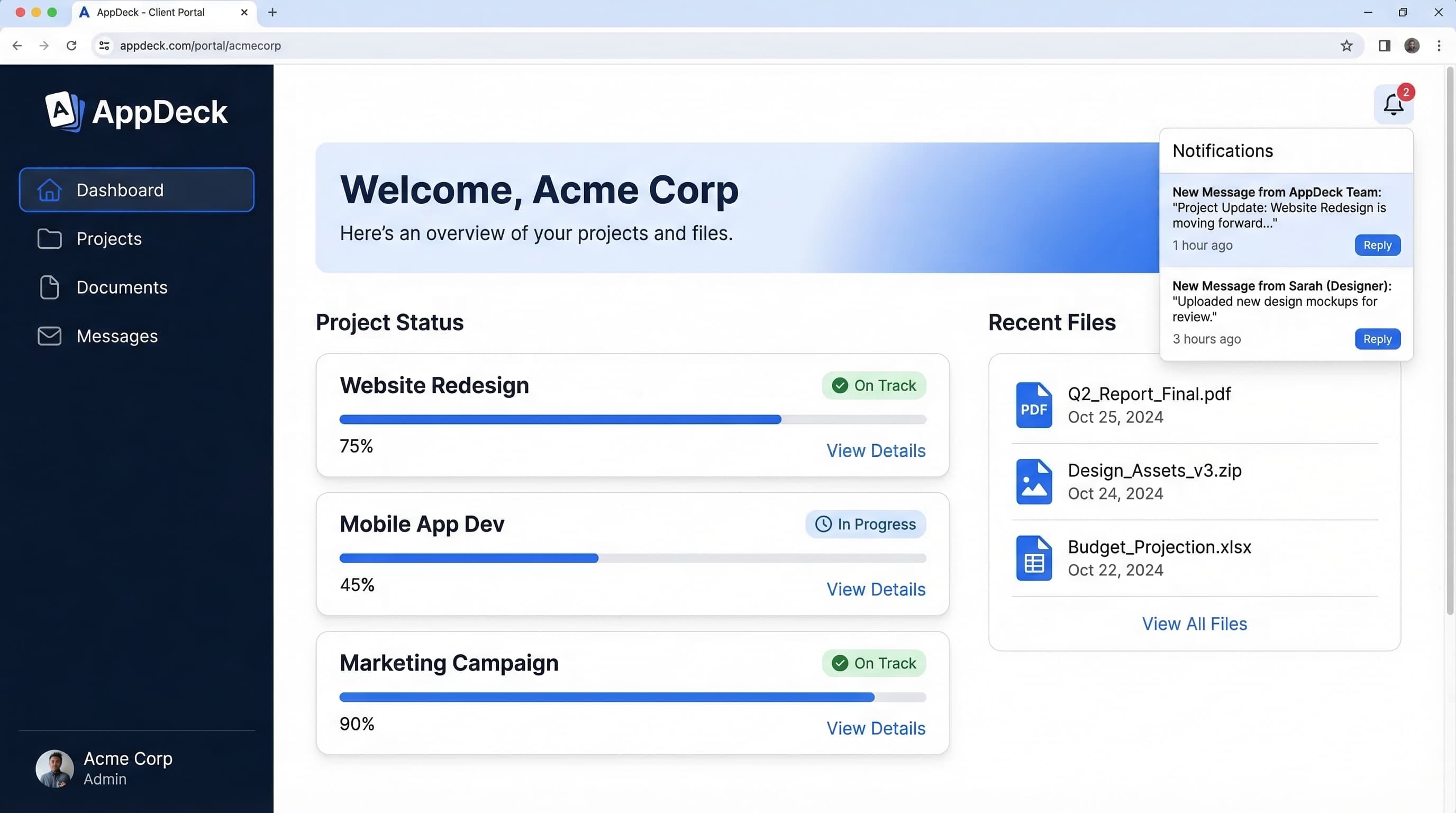
AppDeck is a general-purpose portal platform designed for professional services firms. It gives you a fully branded client hub — your domain, your logo, your colors — where clients can access documents, view real-time dashboards, see project updates, and communicate securely. It integrates with the tools you already use (QuickBooks, Salesforce, HubSpot, Google Workspace, and others) and pulls live data into client-facing dashboards.
For law firms, AppDeck works best as a client experience layer that sits on top of your existing practice management tool. You handle case management in Clio or PracticePanther; your clients interact through AppDeck's polished, branded portal.
Key strengths:
- Full white-label branding with custom domain (portal.yourfirm.com) — no vendor branding visible to clients
- Flat pricing regardless of client count — you don't pay more as your client base grows
- Real-time dashboards that can pull data from multiple sources
- Clean, modern interface that impresses clients (especially compared to clunky legal software portals)
- SOC 2 compliant with AES-256 encryption and role-based access controls
- Secure document sharing with granular permissions and audit trails
- Works across industries, so multi-practice firms and firms with non-legal business clients can use one portal for everything
Limitations:
- Not legal-specific — no native practice management, matter tracking, court filing integration, or legal billing (LEDES, trust accounting)
- No built-in e-signature — requires integration with DocuSign or Adobe Sign
- You'll need to pair it with a legal practice management tool for case workflows
- No native legal calendar or deadline tracking
Pricing: Starts at $99/month (flat rate). No per-user or per-client fees.
Bottom line: If your firm already runs on a practice management platform and you want a client portal that looks significantly better than what Clio or MyCase offers natively, AppDeck is worth a serious look. It won't replace your legal software — but it will give your clients an experience that feels premium and professional.
2. Clio
Best for: Firms that want an all-in-one practice management and client portal solution.
Clio is the 800-pound gorilla of legal practice management, and for good reason. Their client portal (Clio Connect) is built directly into the practice management platform, which means case updates, documents, invoices, and messages all flow seamlessly between attorney workflows and the client-facing view.
For firms that want a single system handling everything from intake to billing to client communication, Clio is the default choice. The portal is functional, well-integrated, and steadily improving.
Key strengths:
- Tight integration with Clio Manage — documents, invoices, messages, and tasks sync automatically
- Built-in online payments with trust accounting (IOLTA compliance)
- Client intake forms and e-signatures included
- Extensive third-party integration marketplace (200+ integrations)
- Mobile app for both attorneys and clients
- Strong reporting and analytics for firm management
- Court filing integrations and legal calendar with deadline calculations
Limitations:
- Portal branding is limited — Clio's branding is visible on lower tiers, and full white-labeling is not available
- The client-facing portal UX is functional but not particularly polished or modern
- Per-user pricing gets expensive as firms grow (especially on higher tiers)
- The portal is secondary to the practice management features — it's good, but it's not the core product
- Clients report the portal can feel overwhelming if they only need basic document access
Pricing: Starts at $49/user/month (EasyStart). Suite plan at $99/user/month. Complete plan at $149/user/month. Clio Connect is included in all plans, but advanced portal features require higher tiers.
Bottom line: If you don't already have a practice management system, Clio is the safest bet because you get everything in one place. The client portal won't blow anyone away aesthetically, but it works, it's secure, and it's deeply integrated with your legal workflows.
3. MyCase
Best for: Small to mid-size firms (under 30 attorneys) that want an affordable, easy-to-use portal with solid legal features.
MyCase is one of the more approachable legal platforms on the market. The client portal is clean, straightforward, and gives clients exactly what they need: case updates, documents, invoices, and messaging. Nothing more, nothing less. For solo practitioners and small firms, the simplicity is a feature, not a limitation.
Key strengths:
- Very intuitive client experience — minimal learning curve for both attorneys and clients
- Built-in text messaging (two-way SMS) in addition to portal messaging
- Integrated payments with trust accounting support
- Lead tracking and intake forms built into the platform
- Affordable per-user pricing with no hidden fees
- Document sharing with e-signature capability included
- Solid mobile experience for clients checking case status on the go
Limitations:
- Reporting and analytics are basic compared to Clio or PracticePanther
- Limited customization options for the client portal appearance
- Fewer third-party integrations than Clio
- Document management is adequate but lacks advanced version control and tagging
- Not ideal for complex, multi-practice firms with sophisticated workflow needs
Pricing: Starts at $39/user/month (Basic). Pro plan at $69/user/month. Advanced at $89/user/month.
Bottom line: MyCase hits the sweet spot for small firms that want a modern client portal without the complexity (or cost) of Clio. The two-way texting feature is genuinely useful for firms whose clients prefer text over email.
4. PracticePanther
Best for: Growing firms that need strong automation alongside their client portal.
PracticePanther has carved out a niche as the "automation-first" legal practice management platform. The client portal is solid, but where PracticePanther really shines is in workflow automation — automatic reminders, follow-ups, task assignments, and document generation that reduce the administrative load on your team.
Key strengths:
- Powerful workflow automation engine — trigger emails, tasks, and status updates based on case milestones
- Client portal with document sharing, messaging, invoicing, and e-signatures
- Built-in payment processing with credit card and ACH support
- Strong calendar management with court rule deadline calculations
- Integrations with QuickBooks, Zapier, Mailchimp, and others
- Customizable intake forms that feed directly into case creation
- HIPAA-compliant option for health law practices
Limitations:
- The user interface can feel cluttered, especially for new users
- Client portal customization is limited — you can add your logo but can't deeply brand the experience
- Per-user pricing scales up quickly for mid-size firms
- Mobile app has received mixed reviews for reliability
- Automation setup has a learning curve — powerful once configured, but not plug-and-play
Pricing: Starts at $59/user/month (Solo). Essential plan at $89/user/month. Business plan at $99/user/month.
Bottom line: If your firm's biggest pain point is repetitive administrative work and you want a portal that automatically keeps clients updated as cases progress, PracticePanther's automation capabilities justify the price.
5. Smokeball
Best for: Firms focused on productivity tracking and automatic time capture.
Smokeball takes a different approach to legal software. Its headline feature is automatic time tracking — the software runs in the background and captures every activity (emails sent, documents opened, phone calls made) and automatically generates time entries. The client portal is part of a broader platform focused on making small firms more productive and profitable.
Key strengths:
- Automatic time capture eliminates the biggest revenue leak in small law firms
- Client portal provides document access, messaging, and invoice viewing
- Deep integration with Microsoft 365 (Outlook, Word, Excel)
- Extensive legal form library with document automation
- Built-in accounting and trust management (no QuickBooks needed)
- Performance dashboards that show firm profitability by matter, attorney, and practice area
- Strong onboarding and customer support team
Limitations:
- The client portal is basic compared to Clio Connect or MyCase — it handles documents and messages but lacks the polish of dedicated portal platforms
- Primarily designed for small firms (under 25 attorneys) — larger firms may outgrow it
- Pricing is not publicly listed and requires a demo/consultation
- The automatic time tracking, while powerful, can initially feel intrusive to attorneys
- Less flexible for non-litigation practice areas compared to Clio or PracticePanther
Pricing: Not publicly listed. Plans reportedly start around $49/user/month but vary based on firm size and feature requirements. Contact Smokeball for a quote.
Bottom line: If your firm is losing revenue to under-billed hours (and most small firms are), Smokeball's automatic time capture can pay for itself many times over. The client portal gets the job done, but it's not the reason you'd choose this platform.
6. CosmoLex
Best for: Small firms that want built-in legal accounting and compliance without separate software.
CosmoLex is unique because it combines practice management, client portal, and full legal accounting (including trust accounting and three-way reconciliation) in a single platform. Most other platforms require QuickBooks or a separate accounting tool — CosmoLex doesn't.
Key strengths:
- Built-in legal accounting with trust accounting, three-way reconciliation, and IOLTA compliance
- Client portal with document sharing, secure messaging, and invoice access
- Eliminates the need for QuickBooks or other external accounting software
- Integrated time tracking and billing with LEDES support
- Compliance tools for state bar requirements (CPA-designed accounting)
- Calendar management with court rules and deadline calculations
- Affordable all-in-one pricing for solo and small firm practitioners
Limitations:
- The user interface feels dated compared to Clio or MyCase
- Client portal functionality is basic — functional but not feature-rich
- Limited third-party integrations compared to larger platforms
- Reporting is adequate for small firms but may not satisfy data-driven larger practices
- The platform can feel slow during peak usage times based on user reports
- Branding and customization options for the portal are minimal
Pricing: Starts at $89/user/month for the full platform (practice management + accounting + portal). CosmoLex CRM add-on available for additional cost.
Bottom line: If you're a solo practitioner or small firm tired of juggling QuickBooks alongside your practice management software, CosmoLex consolidates everything — including compliant legal accounting — into one platform. The client portal is a useful feature, not the star of the show.
7. ClientRock
Best for: Solo attorneys and boutique firms that want a lightweight, dedicated client portal without practice management overhead.
ClientRock is the newest platform on this list and takes a deliberately minimalist approach. It's not a practice management system. It's not a billing platform. It's purely a client portal — and it does that one job with clarity and focus. For attorneys who already have their workflows dialed in and just need a better way to communicate with clients, ClientRock is refreshingly simple.
Key strengths:
- Purpose-built as a client communication portal — no bloat or unnecessary features
- Clean, modern client experience with an intuitive interface
- Secure document sharing with organized folder structures
- Built-in e-signatures for engagement letters and agreements
- Encrypted messaging with read receipts
- Quick setup — most firms are live within a day
- Affordable pricing with no per-client limits
Limitations:
- No practice management features — you'll need a separate system for matter tracking, calendaring, and workflows
- No billing or invoicing capabilities
- Limited integrations with legal-specific tools
- Relatively new platform with a smaller user base and less proven track record
- Reporting and analytics are minimal
- Feature set may not keep pace with growing firm needs
Pricing: Starts at $29/month for solo practitioners. Team plans available at $79/month.
Bottom line: ClientRock is the right choice if you want a standalone client portal that's fast to set up, easy for clients to use, and doesn't try to replace your existing tools. It's not the platform for a 50-attorney firm — but for solos and boutiques, it's elegant.
Comparison Table
| Platform | Type | Client Portal Quality | E-Signatures | Legal Billing | White-Label | Pricing (Starting) |
|---|---|---|---|---|---|---|
| AppDeck | General portal | Excellent | Via integration | No | Full | $99/mo flat |
| Clio | Practice mgmt | Good | Built-in | Yes | Limited | $49/user/mo |
| MyCase | Practice mgmt | Good | Built-in | Yes | Limited | $39/user/mo |
| PracticePanther | Practice mgmt | Good | Built-in | Yes | Limited | $59/user/mo |
| Smokeball | Practice mgmt | Basic | Built-in | Yes | No | ~$49/user/mo |
| CosmoLex | Practice mgmt + accounting | Basic | Built-in | Yes (full accounting) | No | $89/user/mo |
| ClientRock | Standalone portal | Very Good | Built-in | No | Partial | $29/mo |
How to Choose: A Decision Framework
Picking the right client portal for your law firm depends on where you are today and what problem you're solving first. Here's how I'd think about it.
Choose AppDeck if you already have a practice management system you're happy with (Clio, PracticePanther, or anything else) and your primary goal is giving clients a significantly better experience. AppDeck's white-label branding and dashboard capabilities create a client-facing layer that looks and feels premium. You won't get legal-specific features, but you'll get the best-looking portal on this list.
Choose Clio if you need a complete practice management platform and want everything under one roof. Clio is the market leader for a reason — it covers intake, matter management, billing, and client communication in a single system. The portal is good (not great), but the integration depth makes up for it.
Choose MyCase if you're a small firm that wants simplicity and affordability. The two-way texting feature alone makes it worth considering for firms whose clients prefer texting over logging into a portal. It's the easiest platform on this list to get up and running.
Choose PracticePanther if you want automation to reduce your administrative burden. If your staff spends too much time on manual follow-ups, status updates, and task management, PracticePanther's workflow automation can reclaim those hours.
Choose Smokeball if your firm's revenue problem is under-billing. Automatic time capture is a game-changer for small firms that leave money on the table because attorneys don't record every phone call, email, and document review.
Choose CosmoLex if you want to eliminate QuickBooks from your life. Having practice management and full legal accounting (with trust accounting compliance) in one system is genuinely valuable for solo and small firm practitioners.
Choose ClientRock if you want the simplest possible client portal with no additional baggage. It's fast, affordable, and does exactly one thing well.
Frequently Asked Questions
What is a law firm client portal?
A law firm client portal is a secure, attorney-branded web application that lets clients log in to view case status, download documents, pay invoices, sign forms, and message their attorney without sending email. It encrypts communications, maintains an audit trail for ethics compliance, and replaces the patchwork of email, Dropbox links, and phone calls most firms use today. The portal sits either inside a practice management platform like Clio or MyCase, or as a standalone product like ClientRock or AppDeck that integrates with the firm's existing systems. Clients see one front door to their matter rather than digging through their inbox.
Is Clio's built-in portal good enough, or should I buy a separate portal?
For most small and mid-sized firms, Clio's built-in portal is sufficient and easier to administer because it shares data with matter management and billing. Buy a separate portal when your firm cares deeply about brand experience — high-end boutique, complex commercial litigation, immigration practices serving sophisticated buyers — and the practice management portal feels generic. A separate portal also makes sense if you've already invested in a practice management system that lacks a modern client interface, and ripping it out isn't realistic. Many firms run both: Clio internally, a branded portal for client-facing interactions, with documents syncing between them.
How much does a law firm client portal cost?
Practice management platforms with built-in portals run $39-$89 per user per month (Clio, MyCase, PracticePanther, Smokeball, CosmoLex). Standalone portals are typically flat-rate: ClientRock starts at $29/month for solos and AppDeck at $99/month. For a 5-attorney firm, expect $200-$450/month for an integrated platform versus $99-$200/month for a standalone portal layered on existing software. Setup costs are minimal if your matters are already in your practice management system; expect 10-20 hours of configuration plus a half-day training session for staff.
Are client portals compliant with attorney-client privilege and bar ethics rules?
The major legal client portals are built around privilege and ethics requirements: encryption in transit and at rest, access logging, role-based permissions, and trust accounting safeguards where applicable. ABA Model Rule 1.6(c) requires reasonable efforts to prevent unauthorized disclosure — using a vetted portal generally meets that standard better than email. State bar opinions in California, New York, Texas, and Florida have all greenlit portal-based communication when the firm verifies the vendor's security practices and the client has informed consent. Avoid consumer file-sharing tools (personal Dropbox, free WeTransfer) for privileged documents — they create real ethics exposure.
When should a solo or small firm skip a client portal entirely?
If you're a solo practitioner with under 20 active matters at a time, mostly handle one-off transactions (simple wills, single document review), and your clients are non-technical individuals who prefer phone calls, a portal may sit unused while still charging you $30-$50 a month. Firms with revenue under $200K should focus first on practice management software for time tracking and billing — the portal can wait. The flip side: as soon as you handle ongoing matters lasting more than 60 days or your clients are sophisticated businesses, the portal pays for itself in reduced status-update calls within the first two months.
Conclusion
The law firm client portal market in 2026 is split into two camps: practice management platforms with built-in portals (Clio, MyCase, PracticePanther, Smokeball, CosmoLex) and dedicated portal platforms (AppDeck, ClientRock) that focus purely on the client experience.
Neither camp is universally better. It comes down to your firm's situation.
If you're choosing your first practice management system, pick the one whose portal and workflow features match your practice. Clio and MyCase are the safest starting points for most firms.
If you already have practice management software and want a client portal that actually impresses your clients — one with your branding, your domain, and a modern interface — a dedicated portal like AppDeck gives you more control over the experience.
Whatever you choose, the key metric is adoption. A beautiful portal that clients never log into is worthless. Start with the minimum feature set your clients need (usually documents, invoices, and messaging), make the onboarding frictionless, and expand from there.
Your clients are already wondering why they can track a pizza delivery in real time but can't get a status update on their legal matter without calling your office. Give them the portal, and they'll stop wondering.
Related Reading

Founder & CEO, AppDeck
Serial entrepreneur with 20+ years building B2B software companies. Former executive managing 2,800+ employees across three continents. Vik reviews all AppDeck content for accuracy and practical relevance.
Share this article
Explore Related Solutions
Related Articles
Client Portal Software for Accountants: 7 Best Platforms (2026)
Compare the best client portal software for accounting firms. Secure document sharing, e-signatures, billing integration, and client communication tools for CPAs and bookkeepers.
Client Portal Software: 10 Best Platforms for 2026 (Complete Guide)
Compare the 10 best client portal software platforms for 2026. Features, pricing, and honest reviews for agencies, consultants, law firms, and professional services.
Client Onboarding Portal: How to Build One That Reduces Time-to-Value by 50%
Learn how to build a client onboarding portal that automates intake, collects documents, and gets clients to value faster. Step-by-step guide with examples and tool recommendations.