
Customer Portal vs Client Portal: What's the Difference?
Customer portal vs client portal - understand the key differences, use cases, and which type of portal your business needs. Complete comparison guide for 2026.
TL;DR: Customer portal vs client portal - understand the key differences, use cases, and which type of portal your business needs. Complete comparison guide for 2026.
Introduction
"Customer portal" and "client portal" get tossed around like they mean the same thing. They don't.
These two types of portals serve fundamentally different purposes, different audiences, and different business models. Choosing the wrong one means wasted budget, frustrated users, and a tool that doesn't fit your workflow.
After helping dozens of companies implement portals over the past 12 years, I've seen this confusion cost businesses real money. One agency spent six months building out a customer portal with ticketing and knowledge base features, only to realize what their clients actually needed was a collaborative workspace for reviewing deliverables.
This guide breaks down exactly what separates customer portals from client portals, when to use each, and how to decide which one fits your business.
Quick Answer
If you're short on time, here's the distinction in two sentences:
-
Customer Portal: A self-service hub where customers manage their accounts, get support, view billing, and access resources. Think B2C or high-volume B2B — the goal is efficiency at scale.
-
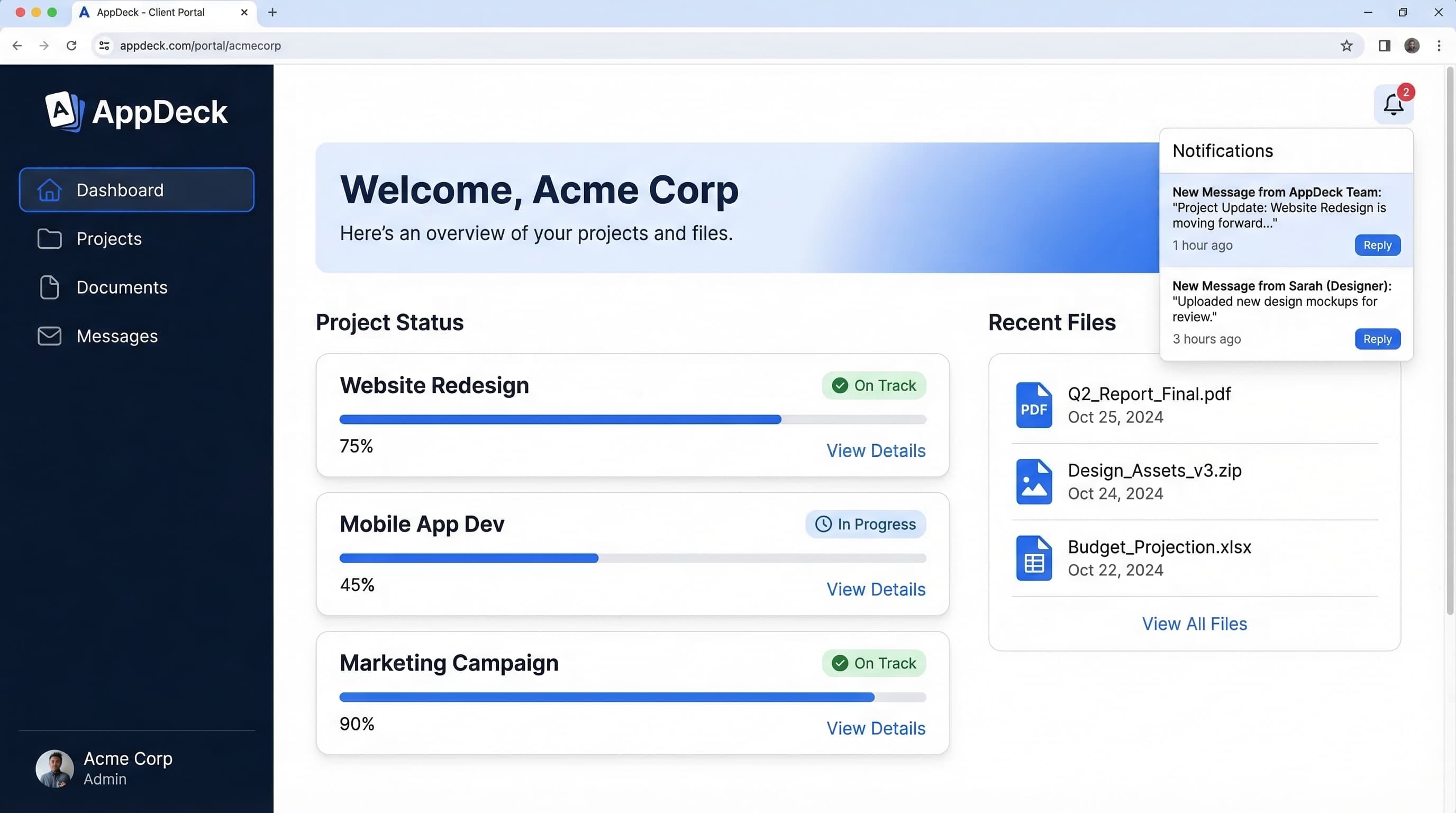
Client Portal: A collaborative workspace where agencies, consultants, and professional services firms share deliverables, project updates, and reports with clients. Think relationship-driven services — the goal is a premium client experience.
The simplest test: If your users primarily need to help themselves, you need a customer portal. If your users primarily need to collaborate with your team, you need a client portal.
What is a Customer Portal?
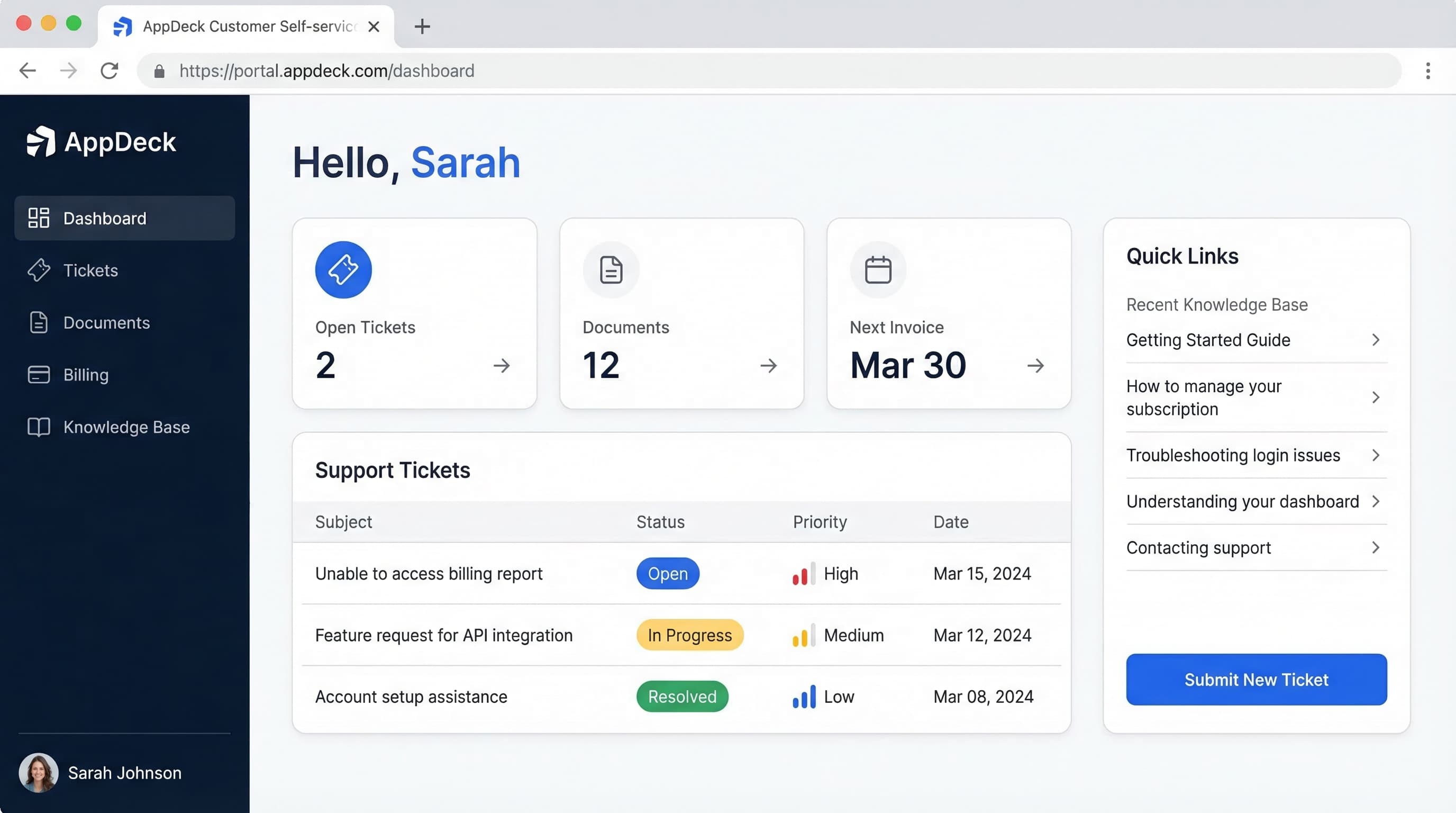
A customer portal is a secure, self-service platform that gives customers direct access to their account information, support resources, and transaction history — without needing to contact your team.
The defining characteristic of a customer portal is scale. It's designed to serve hundreds, thousands, or even millions of users with a standardized experience that reduces the load on your support and operations teams.
Core Features of a Customer Portal
Self-service account management
- Profile updates (name, email, password, preferences)
- Subscription management (upgrade, downgrade, cancel)
- Account settings and notification preferences
Support ticket submission and tracking
- Submit new support requests
- Track ticket status and history
- View responses from support agents
- Escalation options
Knowledge base and FAQ access
- Searchable help articles and documentation
- Troubleshooting guides and how-tos
- Video tutorials and walkthroughs
- Community forums and discussions
Billing, invoices, and payment history
- View and download invoices
- Update payment methods
- Set up auto-pay
- Review payment history and receipts
Usage dashboards and metrics
- Service usage (API calls, storage, bandwidth)
- Usage trends over time
- Alerts for approaching limits
- Cost projections and estimates
Automated notifications
- Order status updates
- Service outage alerts
- Billing reminders
- Product updates and announcements
Customer Portal Examples
SaaS company support portal: Customers log in to manage their subscription, check usage metrics, browse the knowledge base, and submit support tickets when something goes wrong.
Telecom account management: Customers view their data usage, pay monthly bills, upgrade their plan, and troubleshoot connectivity issues through self-service guides.
Insurance policy portal: Policyholders review coverage details, download ID cards, file claims, and track claim status — all without calling an agent.
Utility company self-service: Customers check their energy usage, pay bills, set up autopay, report outages, and manage their account preferences.
Key Characteristic
Customer portals are high volume and self-service focused. The primary business goal is reducing support costs while giving customers 24/7 access to information they'd otherwise need to call or email about. Every support ticket deflected by a good knowledge base article saves your team time and your business money.
What is a Client Portal?
A client portal is a secure, branded workspace where service providers share deliverables, project updates, and reports with their clients. It's a collaboration tool, not a self-service tool.
The defining characteristic of a client portal is relationship depth. It's designed to serve fewer users — but with a highly personalized, high-touch experience that strengthens client relationships and streamlines project delivery.
Core Features of a Client Portal
Project deliverable sharing
- Upload and organize files by project
- Share reports, designs, documents, and presentations
- Download links with version tracking
- Secure access to confidential materials
Real-time project status and milestones
- Visual project timelines
- Milestone tracking with completion status
- Task lists and progress indicators
- Upcoming deadlines and next steps
Branded workspace per client
- Custom domain (portal.yourcompany.com)
- Your logo, colors, and branding
- White-labeled experience with zero vendor branding
- Each client sees only their own projects and data
Document collaboration
- Shared document libraries organized by project
- Version control and revision history
- Comments and annotations on documents
- Secure sharing with access controls
Feedback and approval workflows
- Clients review and approve deliverables directly in the portal
- Structured feedback forms and comment threads
- Approval status tracking (pending, approved, revision requested)
- Notification when action is needed
Client communication
- Direct messaging between your team and the client
- Threaded conversations tied to specific projects or deliverables
- @mentions for specific team members
- Email notifications for new messages
Client Portal Examples
Marketing agency sharing campaign reports: Agency uploads monthly performance reports, creative assets for review, and campaign analytics. Clients log in to see results, provide feedback on creative, and approve next steps.
Consulting firm sharing deliverables: Consultants upload strategy documents, research findings, and implementation plans. Clients track project milestones and review deliverables on their own schedule.
Accounting firm sharing tax documents: Accountants upload completed tax returns, financial statements, and advisory reports. Clients review, ask questions, and approve filings — all in a secure, organized workspace.
Law firm sharing case updates: Attorneys share case documents, court filings, and legal analyses. Clients stay informed on case progress without needing to call the office.
Key Characteristic
Client portals are relationship-focused and deliverable-oriented. The primary business goal is enhancing the client experience, demonstrating professionalism, and keeping projects organized. A great client portal makes clients feel like they're getting premium service — because they are.
Side-by-Side Comparison
| Feature | Customer Portal | Client Portal |
|---|---|---|
| Primary purpose | Self-service & support | Collaboration & deliverables |
| Typical users | Hundreds to thousands | Dozens to hundreds |
| Relationship type | Transactional / subscription | Project-based / retainer |
| Key features | Ticketing, knowledge base, billing | Project tracking, file sharing, approvals |
| Branding | Company branded | Often white-labeled per client |
| Communication | Support tickets, chat | Direct messaging, comments |
| Content type | Help articles, account data | Deliverables, reports, updates |
| Typical industries | SaaS, telecom, insurance, utilities | Agencies, consulting, legal, accounting |
| Pricing model | Per-customer or flat | Per-client or flat |
| Primary goal | Efficiency and scale | Client satisfaction and retention |
When to Choose a Customer Portal
A customer portal is the right choice when your business needs to serve a large number of users efficiently. Here are the signals:
- ✅ You have 100+ customers who need self-service access
- ✅ Your support ticket volume is high and growing
- ✅ Customers need to manage their accounts and billing independently
- ✅ You want to reduce support costs by deflecting common questions
- ✅ You're a SaaS, e-commerce, subscription, or service business with standardized offerings
- ✅ Your interactions are primarily transactional (buy, use, get help)
- ✅ You need a scalable solution that works the same for 100 or 10,000 users
Industries That Benefit Most
- SaaS companies — subscription management, usage tracking, support
- E-commerce — order history, returns, shipping tracking
- Telecom providers — plan management, billing, usage monitoring
- Insurance companies — policy management, claims filing, document access
- Utilities — billing, usage tracking, outage reporting
- Financial services — account access, transaction history, statements
- Healthcare — appointment scheduling, medical records, billing
The Bottom Line
If your primary goal is efficiency and scale — helping more customers help themselves without adding headcount — a customer portal is what you need.
When to Choose a Client Portal
A client portal is the right choice when your business revolves around delivering customized work to a smaller number of higher-value clients. Here are the signals:
- ✅ You work with fewer, higher-value clients (typically under 100)
- ✅ Deliverables and project updates are the core use case
- ✅ Each client needs a unique, branded workspace
- ✅ Collaboration and feedback are central to your workflow
- ✅ You're an agency, consultancy, or professional services firm
- ✅ Client relationships are ongoing and project-based (not transactional)
- ✅ You want to differentiate your service with a premium experience
Industries That Benefit Most
- Marketing and creative agencies — campaign reports, creative reviews, approvals
- Management consulting — strategy deliverables, project tracking, research sharing
- Accounting and tax firms — financial statements, tax returns, advisory reports
- Law firms — case documents, legal analyses, court filings
- Architecture and engineering — design files, project milestones, approvals
- IT and software development agencies — sprint updates, deliverable reviews, documentation
- Financial advisors — portfolio reports, investment recommendations, planning documents
The Bottom Line
If your primary goal is client satisfaction and retention — making every client feel like your most important client — a client portal is what you need.
When You Need Both
Some businesses don't fit neatly into one category. Here are scenarios where you might need elements of both:
Professional Services Firms with Scale
A growing consulting firm with 200+ clients may need client portal features (deliverable sharing, project tracking) but also customer portal features (self-service onboarding, knowledge base, billing management). As client volume increases, self-service becomes essential.
SaaS Companies with Enterprise Clients
A SaaS product might serve thousands of self-service customers through a customer portal, but their enterprise clients need dedicated project spaces, custom onboarding workflows, and collaborative implementation tracking — classic client portal territory.
Hybrid Service + Product Businesses
A company that sells both a software product (needing a customer portal) and consulting services around that product (needing a client portal) faces this dual requirement directly.
The Solution
Rather than stitching together two separate platforms, look for a solution that handles both use cases under one roof. AppDeck supports both — use the Customer Portal for self-service account management, ticketing, and knowledge base, and the Client Portal for project collaboration, deliverable sharing, and branded workspaces. Same platform, different configurations.
How AppDeck Handles Both
AppDeck is built to support both customer portal and client portal use cases on a single platform. Here's how it maps:
Customer Portal Capabilities
AppDeck Customer Portal provides:
- Self-service account management and settings
- Support ticket submission and tracking
- Knowledge base and resource library
- Billing, invoices, and payment history
- Usage dashboards and automated notifications
- Scalable to hundreds or thousands of users
Ideal for: SaaS companies, subscription businesses, and any organization that needs to scale self-service support.
Client Portal Capabilities
AppDeck Client Portal provides:
- Project deliverable sharing and organization
- Branded, white-labeled workspaces per client
- Real-time project status and milestone tracking
- Feedback and approval workflows
- Direct client communication and collaboration
- Secure document management with version control
Ideal for: Agencies, consultancies, accounting firms, law firms, and any professional services business.
Why One Platform Matters
Using one platform for both means:
- Single login for your team (no switching between tools)
- Consistent branding across all client and customer touchpoints
- Unified billing instead of paying for two separate products
- Simpler administration with one set of users, permissions, and settings
- Flexibility to grow — start with one portal type and add the other when you need it
Choosing the Right Portal: Decision Framework
Not sure which type you need? Walk through these questions:
Question 1: What is your primary need?
- Support and self-service (customers helping themselves) → Customer Portal
- Sharing deliverables and project updates (collaboration with clients) → Client Portal
- Both → AppDeck (supports both on one platform)
Question 2: How many users will you serve?
- 100+ users with standardized needs → Customer Portal likely
- Under 100 users with high-touch, personalized service → Client Portal likely
- Mix of both → Consider a platform that handles both
Question 3: What type of relationship do you have?
- Transactional / subscription (customers buy, use, get support) → Customer Portal
- Project-based / retainer (clients receive custom deliverables) → Client Portal
Question 4: What content are you sharing?
- Help articles, account data, billing information → Customer Portal
- Reports, deliverables, project files, creative assets → Client Portal
Question 5: Is white-label branding important?
- No (your company brand is fine) → Customer Portal
- Yes (each client should see a branded experience) → Client Portal
Question 6: What's your primary business goal?
- Reduce support costs and scale efficiently → Customer Portal
- Improve client satisfaction and retention → Client Portal
- Both → You need a platform that does both
Quick Decision Summary
| If you are... | You likely need... |
|---|---|
| A SaaS company with 500+ users | Customer Portal |
| A marketing agency with 30 clients | Client Portal |
| An accounting firm with 80 clients | Client Portal |
| An e-commerce business | Customer Portal |
| A consulting firm with enterprise + SMB clients | Both |
| A telecom or insurance company | Customer Portal |
| A law firm managing cases | Client Portal |
| A subscription business at scale | Customer Portal |
Common Mistakes to Avoid
Mistake #1: Using Customer Portal Software for Client Work
What happens: An agency buys customer portal software (designed for self-service and ticketing) and tries to use it for sharing campaign deliverables with clients.
The result: No project management features. No approval workflows. No per-client branding. Clients get a generic, impersonal experience. The agency looks less professional, not more.
The fix: Use a client portal designed for collaboration and deliverables.
Mistake #2: Using Client Portal Software for High-Volume Self-Service
What happens: A SaaS company with 2,000 customers buys client portal software and tries to use it for support ticketing and account management.
The result: Per-client pricing makes it prohibitively expensive at scale. No knowledge base. No self-service features. Customers can't help themselves. Support costs stay high.
The fix: Use a customer portal designed for self-service at scale.
Mistake #3: Assuming the Terms Are Interchangeable
What happens: A company searches for "client portal software" when they actually need a customer portal (or vice versa), evaluates the wrong tools, and ends up with a poor fit.
The fix: Use this guide to identify which type matches your actual use case before evaluating software.
Mistake #4: Building Two Separate Portals
What happens: A company that needs both types buys two different platforms — one for customer self-service, one for client collaboration.
The result: Double the cost, double the administration, inconsistent branding, and a fragmented experience for everyone.
The fix: Use a single platform like AppDeck that supports both use cases natively.
Frequently Asked Questions
Can a customer portal also be a client portal?
Not really. While there's some feature overlap (both have document sharing and user logins), the core design philosophy is different. Customer portals optimize for self-service at scale. Client portals optimize for collaboration and personalization. Trying to make one do the other's job leads to a mediocre experience.
Which type is more expensive to build?
It depends on scale. Customer portals tend to have higher infrastructure costs (more users, more data, more support tickets) but lower per-user costs. Client portals have lower total user counts but higher per-client customization costs. Off-the-shelf solutions like AppDeck eliminate most of these cost concerns.
Do I need a portal at all, or can I use email?
Email works until it doesn't. Once you have more than a handful of clients or customers, email becomes a liability — lost files, missed messages, no audit trail, security risks. A portal centralizes everything, improves security, and creates a professional experience. Most companies that implement a portal see the ROI within the first quarter.
How long does it take to set up a portal?
With a platform like AppDeck, you can be up and running in under an hour. Custom-built solutions can take months. The fastest path is choosing a purpose-built platform that matches your use case.
Conclusion
Customer portals and client portals may sound similar, but they solve different problems for different businesses:
Customer Portal = Self-service at scale. Ticketing, knowledge base, billing, account management. Built for hundreds or thousands of users who need to help themselves efficiently.
Client Portal = Collaboration and deliverables. Project tracking, file sharing, approvals, branded workspaces. Built for fewer, higher-value clients who need a premium, personalized experience.
The decision comes down to two questions:
- Are your users primarily helping themselves, or collaborating with your team?
- Are you optimizing for scale, or for relationship depth?
If the answer is "both," you're not alone — and you don't need two separate tools. AppDeck supports both customer portal and client portal use cases on a single platform.
Explore your options:
- AppDeck Customer Portal — Self-service account management, support, and billing at scale
- AppDeck Client Portal — Project deliverables, branded workspaces, and collaboration for professional services
Related Resources:

Founder & CEO, AppDeck
Serial entrepreneur with 20+ years building B2B software companies. Former executive managing 2,800+ employees across three continents. Vik reviews all AppDeck content for accuracy and practical relevance.
Share this article
Explore Related Solutions
Related Articles
Customer Portal Software Comparison 2026: 10 Best Platforms Reviewed
Compare the best customer portal software for 2026. Zendesk, Salesforce, Freshdesk, AppDeck, and 6 others reviewed. Features, pricing, and ratings.
Customer Portal Examples: 15 Real-World Designs That Drive Adoption
15 customer portal examples from SaaS, e-commerce, healthcare, finance, and professional services. See what works, key features, and design patterns that boost self-service adoption.
How to Reduce Support Tickets by 40% with a Customer Portal
Proven strategies to reduce support ticket volume using self-service customer portals. Knowledge bases, account management, billing portals, and automation tactics.