
12 Client Portal Examples: Real Designs That Impress Clients
12 client portal examples from agencies, accounting firms, law firms, and consultants. See real portal designs with features, layouts, and what makes each one effective.
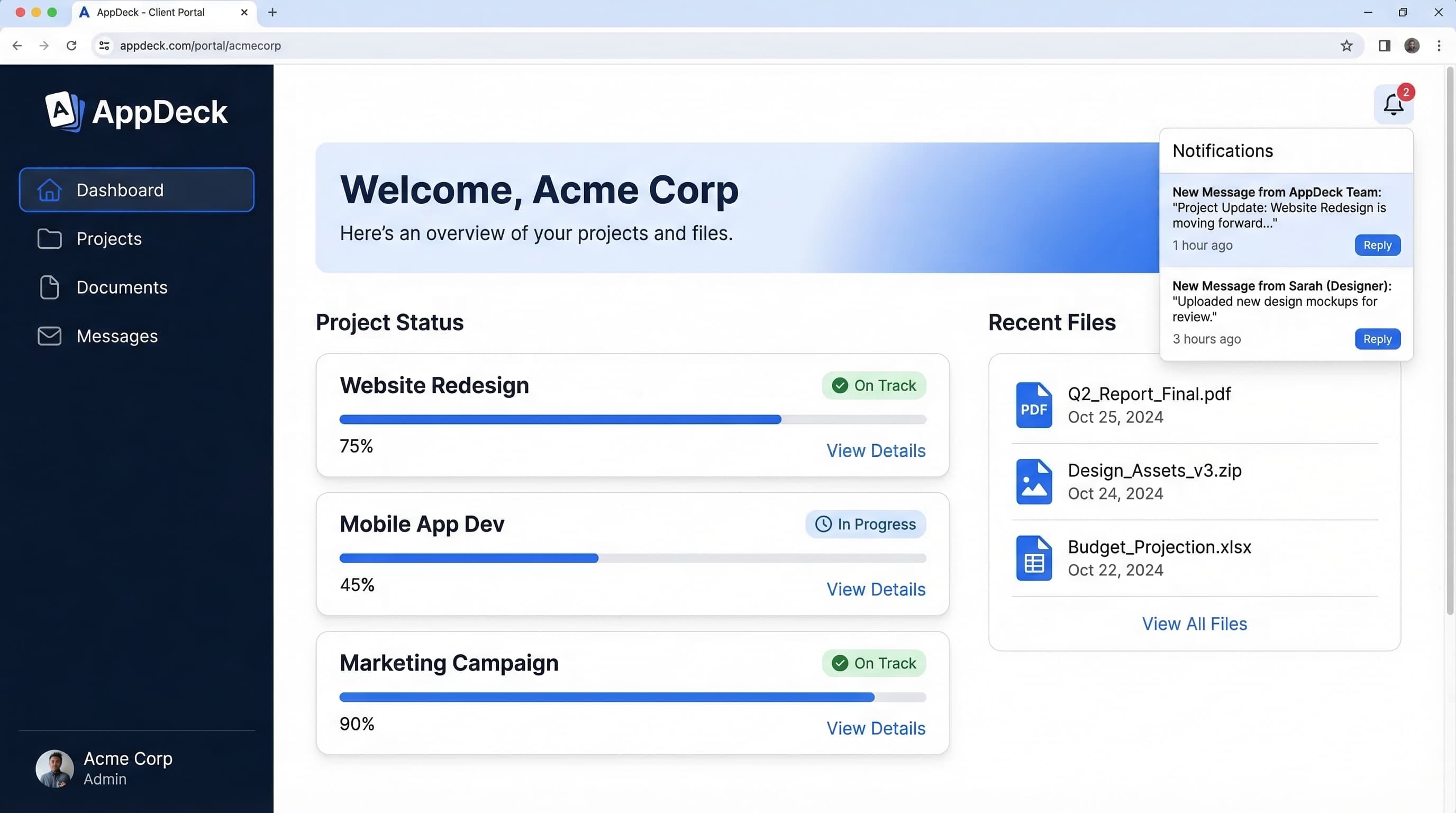
TL;DR: 12 client portal examples from agencies, accounting firms, law firms, and consultants. See real portal designs with features, layouts, and what makes each one effective.
Introduction
When I started building client portals for our customers, I made the mistake most people make: I guessed. I put together a layout based on what I thought clients wanted, shipped it, and then watched as login rates flatlined after the first week.
The problem wasn't the technology. The problem was that I had never studied what actually works. I hadn't looked at real client portal examples across different industries to understand the patterns that drive adoption. I was designing in the dark.
Seeing real client portal designs changes how you think about your own. You notice things you'd never consider on your own — how an accounting firm structures document sharing differently from a creative agency, why law firms prioritize secure messaging over flashy dashboards, or how the best consulting portals make status updates feel effortless instead of like another task on your to-do list.
In this guide, I've gathered 12 client portal examples across five industries. For each one, I'll show you the portal layout, the features that make it effective, what the team got right, and one thing they could improve. Whether you're building your first client portal or redesigning one that clients ignore, these examples — alongside our client portal guide — will give you a concrete starting point.
What Makes a Great Client Portal?
Before diving into examples, let me share the five design principles that show up in every effective client portal I've studied. These aren't theoretical ideals — they're patterns extracted from portals with high adoption rates and clients who actually log in.
1. Clean, Uncluttered Design
The best client portals look simple even when they're powerful. That means generous whitespace, clear typography, and no more than five to seven navigation items. Clients aren't power users. They log in once or twice a week. If the interface overwhelms them, they'll revert to emailing you instead.
2. Self-Service First
Every feature should answer the question: "Does this reduce the number of times a client needs to contact us?" If a client can check project status, download an invoice, or approve a deliverable without sending an email, the portal is doing its job. If they still need to call you for basic information, the portal is just a fancy login page.
3. Branded Experience
Your portal should look like your company, not like a generic SaaS tool. Custom colors, your logo, your domain (portal.yourcompany.com) — these details signal professionalism. Clients notice when the portal they log into matches the brand they hired. It builds trust.
4. Mobile-Friendly
Over half of client portal sessions happen on mobile devices. If your portal requires a laptop to be usable, you're locking out clients who check updates between meetings, during commutes, or on job sites. Responsive design isn't optional.
5. Secure and Private
Clients share sensitive information through portals — financial documents, legal files, business strategies. They need to trust that their data is safe. SSL encryption, role-based permissions, and clear privacy controls aren't just features. They're the foundation of the entire relationship.
Agency Portals (Examples 1-3)
Agencies deal with multiple clients, multiple projects, and constant demands for status updates. A great agency client portal eliminates the "Where are we on this?" emails and gives clients real-time visibility into their work.
Example 1: Creative Agency Project Portal
Company type: 25-person branding and design agency serving mid-market companies
Portal layout:
━━━━━━━━━━━━━━━━━━━━━━━━━━━━━━━━━━━━━━━━━━━━━━━━━━━━━━━
   🏢 Agency Logo    Projects  Files  Invoices  Chat
━━━━━━━━━━━━━━━━━━━━━━━━━━━━━━━━━━━━━━━━━━━━━━━━━━━━━━━
                  Welcome back, Sarah
   PROJECTS
   ● Rebrand      ━━━━━━━━━━━ ━━━━━━━━━━━ ━━━━━━━━━━
   ○ Website        Rebrand     Website     Social
   ○ Social         72% ████    40% ██      15% █
                    Due 4/15    Due 5/01    Due 6/1
   RECENT         ━━━━━━━━━━━ ━━━━━━━━━━━ ━━━━━━━━━━
   FILES
   📄 Logo v3     Current Phase: Concept Review
   📄 Brief       ━━━━━━━━━━━━━━━━━━━━━━━━━━━━━━━━━━━━
   📄 Contract      ✅ Discovery  ✅ Moodboard
                    🔄 Concepts  ○ Refinement
                    ○ Final Design  ○ Delivery
                  ━━━━━━━━━━━━━━━━━━━━━━━━━━━━━━━━━━━━
━━━━━━━━━━━━━━━━━━━━━━━━━━━━━━━━━━━━━━━━━━━━━━━━━━━━━━━
   3 items need your review          [View All →]
━━━━━━━━━━━━━━━━━━━━━━━━━━━━━━━━━━━━━━━━━━━━━━━━━━━━━━━
Key features that make it work:
- Visual progress tracking — Each project shows percentage complete with a progress bar and phase timeline. Clients see exactly where things stand without asking.
- Approval workflow — Deliverables are uploaded directly to the portal. Clients review, leave comments on specific elements, and approve or request changes — all in one place.
- File versioning — Every file shows its version history. Clients can compare the current version against previous ones without digging through email attachments.
- Activity feed — A chronological stream of updates: "Logo concepts uploaded," "Invoice #1042 paid," "Meeting notes added." Clients see what happened since their last login.
What they got right: The approval workflow is the standout feature. Instead of emailing PDFs back and forth, the client reviews designs directly in the portal with annotation tools. Comments are pinned to specific areas of the design, so feedback is precise. This alone cut their revision cycles from an average of 4.2 rounds to 2.1 rounds.
One thing to improve: The portal lacks a calendar view showing upcoming milestones. Clients can see what phase they're in, but not when upcoming deliverables are expected. Adding a simple timeline would reduce "When will we see the next round?" messages.
Example 2: Digital Marketing Agency Dashboard
Company type: Performance marketing agency managing paid media, SEO, and content for 40+ clients
Portal layout:
━━━━━━━━━━━━━━━━━━━━━━━━━━━━━━━━━━━━━━━━━━━━━━━━━━━━━━━
   Logo    Dashboard  Reports  Assets  Messages  ⚙️
━━━━━━━━━━━━━━━━━━━━━━━━━━━━━━━━━━━━━━━━━━━━━━━━━━━━━━━
   March 2026 Performance          [PDF Export 📥]

   ━━━━━━━━━━━━━ ━━━━━━━━━━━━━ ━━━━━━━━━━━━━
     Leads         Spend         ROAS
     847 ↑12%      $24.5K        3.4x ↑8%
   ━━━━━━━━━━━━━ ━━━━━━━━━━━━━ ━━━━━━━━━━━━━

   ━━━━━━━━━━━━━━━━━━━━━━━━━━━━━━━━━━━━━━━━━━━━
      Leads by Channel (Bar Chart)
      Google Ads ████████████ 412
      Meta Ads   ██████ 234
      SEO        █████ 201
   ━━━━━━━━━━━━━━━━━━━━━━━━━━━━━━━━━━━━━━━━━━━━

   Upcoming Tasks
   ☐ Q2 strategy review — Apr 3
   ☐ New landing page approval — Apr 7
   ☐ Monthly report call — Apr 10
━━━━━━━━━━━━━━━━━━━━━━━━━━━━━━━━━━━━━━━━━━━━━━━━━━━━━━━
Key features that make it work:
- Live KPI dashboard — Key metrics (leads, spend, ROAS, CPA) update daily with trend arrows showing month-over-month changes. Clients see performance at a glance without waiting for a monthly report.
- Report library — Monthly and quarterly reports stored in a searchable archive. Clients access any historical report with one click instead of searching email for last quarter's PDF.
- Asset management — All ad creatives, landing page designs, and copy documents organized by campaign. Clients approve assets before they go live.
- Budget transparency — Real-time spend tracking against monthly budget with alerts when spending approaches the limit.
What they got right: The daily-updating KPI dashboard is what keeps clients logging in. Instead of waiting until the monthly report call to learn how campaigns are performing, clients check the portal whenever they want. This actually made report calls more productive — clients come prepared with specific questions instead of spending the first 20 minutes reviewing basic metrics.
One thing to improve: The portal doesn't show competitive benchmarks. Clients often ask "Is a 3.4x ROAS good for our industry?" Adding benchmark data alongside client metrics would answer that question proactively and position the agency as a strategic partner, not just an executor.
Example 3: Development Agency Sprint Portal
Company type: 15-person software development agency building custom web and mobile applications
Portal layout:
━━━━━━━━━━━━━━━━━━━━━━━━━━━━━━━━━━━━━━━━━━━━━━━━━━━━━━━
   Logo    Sprints  Backlog  Releases  Docs  Budget
━━━━━━━━━━━━━━━━━━━━━━━━━━━━━━━━━━━━━━━━━━━━━━━━━━━━━━━
   Sprint 14      Sprint Progress
   Mar 18-29      ████████░░ 78% (14/18 stories)

   STORIES        ━━━━━━━━━━━━━━━━━━━━━━━━━━━━━━━━━
   ✅ Login         To Do     In Prog    Done
   ✅ Auth
   ✅ Profile       Search    Payment    Login
   🔄 Payment      Export    Notif.     Auth
   🔄 Notif.                            Profile
   ☐ Search                             ...+11
   ☐ Export      ━━━━━━━━━━━━━━━━━━━━━━━━━━━━━━━━━

   BURN RATE      Budget: $84,000 / $120,000 used
   $120K total    ████████████░░░░ 70%
   $84K used      Est. remaining: 3 sprints
   $36K left
━━━━━━━━━━━━━━━━━━━━━━━━━━━━━━━━━━━━━━━━━━━━━━━━━━━━━━━
Key features that make it work:
- Kanban board — Client-facing view of the current sprint with cards showing story status (to do, in progress, done). Technical jargon is stripped out — stories are described in plain language the client understands.
- Budget burn tracker — Real-time view of hours and dollars spent against the total project budget. No surprises. No awkward conversations when the budget runs low.
- Release notes — Each completed sprint includes a summary of what was built, with screenshots and links to staging environments. Clients see tangible progress, not just status updates.
- Decision log — Every design or technical decision that involves the client is recorded with context, options considered, and the final decision. Six months later, nobody's asking "Why did we do it this way?"
What they got right: The budget burn tracker is the trust-builder. Development projects are notorious for going over budget, and clients are always anxious about spending. By making the budget visible in real-time — not just at invoicing time — the agency eliminates that anxiety. Clients can see exactly how each sprint affects the remaining budget and make informed decisions about scope.
One thing to improve: The portal doesn't include a staging environment link with each sprint delivery. Clients have to ask for the URL to test new features. Embedding a persistent link to the latest staging build (with credentials) would streamline the review process.
Accounting and Finance Portals (Examples 4-5)
Accounting and financial advisory portals prioritize security, document management, and compliance. Clients need a safe place to exchange sensitive financial information without resorting to email attachments or unsecured file sharing.
Example 4: CPA Firm Document Portal
Company type: Regional CPA firm with 200+ small business clients, handling bookkeeping, tax prep, and advisory
Portal layout:
━━━━━━━━━━━━━━━━━━━━━━━━━━━━━━━━━━━━━━━━━━━━━━━━━━━━━━━
   CPA Firm Logo   Documents  Tax Center  Messages  ?
━━━━━━━━━━━━━━━━━━━━━━━━━━━━━━━━━━━━━━━━━━━━━━━━━━━━━━━
   Action Required (2)
   ━━━━━━━━━━━━━━━━━━━━━━━━━━━━━━━━━━━━━━━━━━━━━━━
     ⚠️ Upload Q1 2026 bank statements  [Upload]
     ⚠️ Sign engagement letter           [Sign]
   ━━━━━━━━━━━━━━━━━━━━━━━━━━━━━━━━━━━━━━━━━━━━━━━

   Documents                    [Upload New 📤]
   ━━━━━━━━━━━━━━━━━━━━━━━━━━━━━━━━━━━━━━━━
     Name             Date       Status
     2025 Tax Return  Feb 15     ✅ Filed
     Q4 Financials    Jan 30     ✅ Final
     W-2 Forms        Jan 15     ✅ Recv
     Q1 Estimates     Mar 20     🔄 Draft
   ━━━━━━━━━━━━━━━━━━━━━━━━━━━━━━━━━━━━━━━━

   Tax Timeline
   ✅ Jan 31 — W-2s submitted
   ✅ Mar 15 — S-Corp extension filed
   🔄 Apr 15 — Q1 estimated payment due
   ○ Sep 15 — Extended return due
━━━━━━━━━━━━━━━━━━━━━━━━━━━━━━━━━━━━━━━━━━━━━━━━━━━━━━━
Key features that make it work:
- Action items banner — The most important element: a persistent banner at the top showing exactly what the client needs to do right now. No digging through menus. No missed deadlines because a request was buried in email.
- Secure document exchange — Bank-level encryption for all file uploads. Documents are organized by year and category. Clients upload tax documents directly instead of emailing sensitive W-2s and bank statements.
- E-signature integration — Engagement letters, tax returns, and other documents that need signatures are completed within the portal. No printing, signing, scanning, and emailing back.
- Tax deadline tracker — A visual timeline showing upcoming deadlines with status indicators. Clients know exactly what's been filed and what's coming next.
What they got right: The action items banner is brilliant in its simplicity. Accounting clients often don't know what their accountant needs from them. By surfacing outstanding requests at the top of the portal — with one-click actions to respond — the firm reduced document chase time by over 60%. Tax season became significantly less stressful for both sides.
One thing to improve: The portal doesn't include a financial dashboard with key metrics from the client's books (revenue, expenses, cash balance). Adding even basic financial snapshots would transform the portal from a document exchange into an ongoing advisory tool.
Example 5: Financial Advisor Client Hub
Company type: Independent financial advisory firm managing portfolios for high-net-worth individuals
Portal layout:
━━━━━━━━━━━━━━━━━━━━━━━━━━━━━━━━━━━━━━━━━━━━━━━━━━━━━━━
   Advisor Logo   Portfolio  Planning  Vault  Contact
━━━━━━━━━━━━━━━━━━━━━━━━━━━━━━━━━━━━━━━━━━━━━━━━━━━━━━━
   Portfolio Overview         as of Mar 24, 2026
   ━━━━━━━━━━━━━━━━━━━━━━━━━━━━━━━━━━━━━━━━━━━━
      Total Value: $2,847,000  ↑ 4.2% YTD
      ━━━━━━━━
        🟦🟦   60% Equities
        🟩🟩   25% Fixed Income
        🟨     10% Alternatives
        ⬜      5% Cash
      ━━━━━━━━
   ━━━━━━━━━━━━━━━━━━━━━━━━━━━━━━━━━━━━━━━━━━━━

   Recent Activity
   Mar 22 — Rebalanced equity allocation
   Mar 15 — Quarterly review notes uploaded
   Mar 01 — RMD distribution processed

   Upcoming
   Apr 10 — Q2 Review Meeting  [Reschedule]
   Apr 15 — Estimated tax payment due
━━━━━━━━━━━━━━━━━━━━━━━━━━━━━━━━━━━━━━━━━━━━━━━━━━━━━━━
Key features that make it work:
- Portfolio visualization — Asset allocation displayed as a clear chart with total value and year-to-date performance. Clients see the big picture immediately.
- Document vault — All financial documents (statements, tax documents, estate plans, insurance policies) stored securely in one place. No more filing cabinets or scattered PDFs.
- Financial plan tracker — Goals (retirement, college funding, estate planning) with progress indicators showing how the client is tracking against each one.
- Meeting scheduler — Book, reschedule, or cancel review meetings directly in the portal. Meeting notes and action items from previous meetings are linked for reference.
What they got right: The portfolio overview as the landing page is the right call. When a high-net-worth client logs in, they want to see one thing: how their money is doing. Showing total value, performance, and allocation immediately — before anything else — respects their time and answers their primary question.
One thing to improve: The portal should surface relevant market commentary or advisor insights tied to portfolio performance. When markets drop 5%, clients get anxious. A brief note from their advisor explaining what happened and why the plan hasn't changed would reduce panicked phone calls.
Law Firm Portals (Examples 6-7)
Law firm portals must balance accessibility with confidentiality. Clients need visibility into their cases, but the portal must enforce strict access controls given the sensitivity of legal matters.
Example 6: Corporate Law Matter Portal
Company type: Mid-size corporate law firm handling M&A, contracts, and compliance for business clients
Portal layout:
━━━━━━━━━━━━━━━━━━━━━━━━━━━━━━━━━━━━━━━━━━━━━━━━━━━━━━━
   Firm Logo    Matters  Documents  Billing  Messages
━━━━━━━━━━━━━━━━━━━━━━━━━━━━━━━━━━━━━━━━━━━━━━━━━━━━━━━
   ACTIVE         Matter: Series B Financing
   MATTERS        Attorney: J. Martinez
                  Status: 🟢 Active
   ● Series B
   ● NDA Review   Key Dates
   ● IP Filing    Mar 28 — Draft term sheet review
                  Apr 05 — Due diligence deadline
   CLOSED         Apr 15 — Target closing date
   ○ Lease Agmt
   ○ Corp Reorg   Documents (12)      [Upload 📤]
                  📁 Term Sheet — Draft v3
                  📁 Due Diligence Checklist
                  📁 Cap Table — Updated
                  📁 Board Resolution

   BILLING        Fees This Matter
   $47,200 YTD    $12,400 this month / $47,200 total
                  ████████████░░░░ vs $75K estimate
━━━━━━━━━━━━━━━━━━━━━━━━━━━━━━━━━━━━━━━━━━━━━━━━━━━━━━━
Key features that make it work:
- Matter-centric navigation — Everything is organized by matter (case), not by document type or date. Clients working on a financing deal see all related documents, communications, and billing in one place.
- Fee tracking — Real-time visibility into legal fees against the estimated budget for each matter. No more invoice shock at the end of the month.
- Secure document collaboration — Documents are shared with version tracking and access logs. The firm knows exactly who viewed what and when — critical for sensitive transactions.
- Key date tracking — Upcoming deadlines and milestones for each matter, with the ability to sync to the client's calendar.
What they got right: Fee transparency is the feature that wins client loyalty. Legal billing is one of the biggest sources of friction in client-firm relationships. By showing fees in real-time — not just on a monthly invoice — the firm gives clients control. Clients can see how hours are being spent and raise concerns before costs escalate.
One thing to improve: The portal doesn't provide a client-friendly summary of the matter's current status in plain language. Adding a brief weekly narrative (two to three sentences explaining what happened and what's next) would make the portal accessible to clients who aren't familiar with legal terminology.
Example 7: Family Law Client Portal
Company type: Family law practice handling divorce, custody, and estate matters
Portal layout:
━━━━━━━━━━━━━━━━━━━━━━━━━━━━━━━━━━━━━━━━━━━━━━━━━━━━━━━
   Firm Logo       My Case  Documents  Messages  Help
━━━━━━━━━━━━━━━━━━━━━━━━━━━━━━━━━━━━━━━━━━━━━━━━━━━━━━━
   Case: Dissolution of Marriage
   Attorney: K. Thompson    Paralegal: R. Davis
   Status: Discovery Phase

   ━━━━━━━━━━━━━━━━━━━━━━━━━━━━━━━━━━━━━━━━━━━━
     ✅ Filing  ✅ Response  🔄 Discovery
     ○ Mediation  ○ Settlement  ○ Finalize
   ━━━━━━━━━━━━━━━━━━━━━━━━━━━━━━━━━━━━━━━━━━━━

   📋 Your To-Do List
   ☐ Upload last 3 years of tax returns
   ☐ Complete financial disclosure form
   ☐ Review proposed parenting schedule

   💬 Secure Messages (2 unread)
   K. Thompson — "Updated discovery responses..."
   R. Davis — "Financial disclosure form attached..."

   📅 Upcoming
   Apr 12 — Mediation session (10am, Rm 204)
   Apr 20 — Discovery deadline
━━━━━━━━━━━━━━━━━━━━━━━━━━━━━━━━━━━━━━━━━━━━━━━━━━━━━━━
Key features that make it work:
- Simplified case tracker — A phase-based progress indicator showing where the case stands in plain language. No legal jargon. Clients see "Discovery Phase" not "Interrogatories Pending Response."
- Client to-do list — Clear tasks the client needs to complete, with deadlines and instructions. Family law cases require extensive documentation from clients, and this keeps everything organized.
- Secure messaging — End-to-end encrypted communication with the legal team. Essential for the sensitive nature of family law matters. No conversations happen over unencrypted email.
- Resource library — FAQs, guides explaining legal processes in plain language, and checklists for common tasks (preparing for mediation, gathering financial documents).
What they got right: The emotional sensitivity of the design. Family law clients are going through one of the hardest experiences of their lives. This portal uses calm colors, clear language, and a supportive tone throughout. The to-do list feels helpful rather than demanding. The case tracker shows progress, which gives clients a sense that things are moving forward even when the process feels slow.
One thing to improve: The portal could include a cost estimator showing approximate costs for upcoming phases. Family law clients are often navigating financial uncertainty, and knowing roughly what the next phase will cost helps them plan.
Consulting Portals (Examples 8-9)
Consulting portals need to demonstrate value. Clients pay premium rates and expect to see where their money is going. The best consulting portals make the engagement's impact visible and measurable.
Example 8: Management Consulting Engagement Portal
Company type: Strategy consulting firm working on 3-6 month engagements with enterprise clients
Portal layout:
━━━━━━━━━━━━━━━━━━━━━━━━━━━━━━━━━━━━━━━━━━━━━━━━━━━━━━━
   Firm Logo   Overview  Deliverables  Team  Reports
━━━━━━━━━━━━━━━━━━━━━━━━━━━━━━━━━━━━━━━━━━━━━━━━━━━━━━━
   Engagement: Supply Chain Optimization
   Phase 2 of 4: Analysis & Recommendations
   ████████████░░░░░░░░ 55% Complete

   Key Metrics
   ━━━━━━━━━━━━━ ━━━━━━━━━━━━━ ━━━━━━━━━━━━━━━━
     $2.4M         12            3 of 4
     Identified    Interviews    Workstreams
     Savings       Completed     On Track
   ━━━━━━━━━━━━━ ━━━━━━━━━━━━━ ━━━━━━━━━━━━━━━━

   Recent Deliverables
   📄 Current State Assessment — Final
   📄 Stakeholder Interview Summary — v2
   📄 Preliminary Recommendations — Draft

   This Week's Focus
   • Finalizing vendor analysis for top 3 suppliers
   • Building implementation roadmap for Phase 3
   • Preparing steering committee presentation
━━━━━━━━━━━━━━━━━━━━━━━━━━━━━━━━━━━━━━━━━━━━━━━━━━━━━━━
Key features that make it work:
- Value quantification — The portal prominently displays measurable outcomes (identified savings, efficiency gains, revenue opportunities). Clients see the ROI of the engagement in real-time, not just at the final presentation.
- Deliverable tracker — Every deliverable is listed with its status, version, and approval state. Clients download, review, and provide feedback without scheduling a meeting.
- Weekly focus updates — A brief, plain-language summary of what the consulting team is working on this week. Keeps the client informed without requiring a status call.
- Steering committee prep — Materials for executive presentations are uploaded to the portal ahead of meetings, giving stakeholders time to review.
What they got right: Leading with quantified value is a power move. When a client logs in and the first thing they see is "$2.4M in identified savings," the engagement's worth is reinforced every single time. This isn't just a reporting feature — it's a retention strategy. Clients who see measurable results renew engagements.
One thing to improve: The portal should include a risk and issue tracker visible to the client. Consulting engagements always hit snags (delayed data access, stakeholder availability, scope changes). A transparent issue log shows the firm is proactively managing problems rather than hiding them.
Example 9: IT Consulting Project Portal
Company type: IT consulting firm handling infrastructure migrations, security audits, and system implementations
Portal layout:
━━━━━━━━━━━━━━━━━━━━━━━━━━━━━━━━━━━━━━━━━━━━━━━━━━━━━━━
   Logo    Projects  Tickets  Knowledge Base  Reports
━━━━━━━━━━━━━━━━━━━━━━━━━━━━━━━━━━━━━━━━━━━━━━━━━━━━━━━
   PROJECTS       Cloud Migration — Phase 2
   ● Cloud        Status: 🟢 On Schedule
     Migration
   ○ Security     Environment Status
     Audit        ━━━━━━━━━━━━━━━━━━━━━━━━━━━━
                    Dev      Stage    Prod
   OPEN             🟢 Up    🟢 Up    🟢 Up
   TICKETS        ━━━━━━━━━━━━━━━━━━━━━━━━━━━━
   #412 VPN
   #408 SSL       Migration Progress
                  Servers:    ████████████░░ 85%
   SLA STATUS     Databases:  ██████████░░░░ 70%
   99.8%          Apps:       ██████░░░░░░░░ 45%
   uptime
                  Next Milestone
                  Apr 5 — Database cutover (weekend)
                  [View Runbook]
━━━━━━━━━━━━━━━━━━━━━━━━━━━━━━━━━━━━━━━━━━━━━━━━━━━━━━━
Key features that make it work:
- Environment status dashboard — Real-time health indicators for development, staging, and production environments. Green/yellow/red status at a glance. Clients know if something is down before their team reports it.
- Migration progress tracking — Granular progress bars for each workstream (servers, databases, applications, networking). Clients see exactly how far along the migration is.
- Ticket management — Clients submit support tickets and track resolution. SLA compliance is displayed prominently, reinforcing the firm's accountability.
- Runbook access — Detailed plans for major changes (cutovers, deployments) are shared with the client ahead of time, building confidence in the process.
What they got right: The environment status dashboard is what keeps IT leaders sleeping at night. During a cloud migration, the biggest fear is downtime. By showing real-time status of all environments, the consulting firm provides constant reassurance. When something does go yellow or red, the client can see the associated ticket and resolution progress without making a panicked call.
One thing to improve: The portal should include a change log showing every configuration change made to the client's environments. IT leaders need an audit trail, and having it in the portal (rather than buried in a ticketing system) demonstrates transparency.
SaaS and Tech Portals (Examples 10-12)
SaaS companies use client portals for onboarding, ongoing support, and partner management. These portals need to scale across hundreds or thousands of users while still feeling personalized.
Example 10: Customer Onboarding Portal
Company type: Enterprise SaaS company with 60-90 day implementation cycles
Portal layout:
━━━━━━━━━━━━━━━━━━━━━━━━━━━━━━━━━━━━━━━━━━━━━━━━━━━━━━━
   Logo   Onboarding  Resources  Team  Support
━━━━━━━━━━━━━━━━━━━━━━━━━━━━━━━━━━━━━━━━━━━━━━━━━━━━━━━
   Welcome to Your Implementation
   Go-Live Target: May 15, 2026 (52 days remaining)
   ████████████████░░░░░░░░░░░░ 42% complete

   Phase 2: Configuration            [Expand All]
   ━━━━━━━━━━━━━━━━━━━━━━━━━━━━━━━━━━━━━━━━━━━━━━━
     ✅ Account setup — Complete (Mar 12)
     ✅ SSO configuration — Complete (Mar 18)
     🔄 Data import — In progress (You: upload)
     ○ Workflow setup — Starts Mar 28 (Us)
     ○ User training — Starts Apr 10 (Joint)
   ━━━━━━━━━━━━━━━━━━━━━━━━━━━━━━━━━━━━━━━━━━━━━━━

   Your CSM: Alex Chen    [Schedule Call]
   Last check-in: Mar 21  Next: Mar 28

   Resources for Current Phase
   📹 Data Import Tutorial (4 min)
   📄 CSV Template — Download
   📄 Data Mapping Guide
━━━━━━━━━━━━━━━━━━━━━━━━━━━━━━━━━━━━━━━━━━━━━━━━━━━━━━━
Key features that make it work:
- Go-live countdown — The target date and days remaining are always visible. This creates urgency and shared accountability between the vendor and the client.
- Task ownership — Each task is clearly labeled with who's responsible: "You" (client), "Us" (vendor), or "Joint." No ambiguity about who's holding up progress.
- Phase-gated resources — Instead of dumping all documentation on the client at once, resources are surfaced based on the current phase. During data import, clients see the CSV template and data mapping guide — not the user training materials they won't need for three weeks.
- CSM integration — The assigned customer success manager's photo, availability, and a one-click scheduling link are always accessible.
What they got right: Task ownership labels are the feature that every onboarding portal should steal. The biggest source of onboarding delays is ambiguity about who needs to do what next. When a task says "You: upload CSV file" with a deadline, there's no confusion. When it says "Us: configure workflows," the client knows the vendor is handling it. Simple, powerful, and it cut average onboarding time by 22%.
One thing to improve: The portal should include a "blockers" section where either side can flag dependencies that are holding up progress. Currently, blockers get buried in messages. A visible blocker log would surface issues faster.
Example 11: Technical Support Portal
Company type: B2B SaaS company with 2,000+ customers needing tiered support
Portal layout:
━━━━━━━━━━━━━━━━━━━━━━━━━━━━━━━━━━━━━━━━━━━━━━━━━━━━━━━
   Logo    Tickets  Knowledge Base  Status  Community
━━━━━━━━━━━━━━━━━━━━━━━━━━━━━━━━━━━━━━━━━━━━━━━━━━━━━━━
   ━━━━━━━━━━━━━━━━━━━━━━━━━━━━━━━━━━━━━━━━━
     🔍 Search help articles...
   ━━━━━━━━━━━━━━━━━━━━━━━━━━━━━━━━━━━━━━━━━

   Your Tickets                  [+ New Ticket]
   ━━━━━━━━━━━━━━━━━━━━━━━━━━━━━━━━━━━━━━━━━━━
     #892   API timeout err  🟡 Open    2h
     #876   CSV export bug   🟢 Solved  Done
     #851   SSO config help  🟢 Solved  Done
   ━━━━━━━━━━━━━━━━━━━━━━━━━━━━━━━━━━━━━━━━━━━

   System Status           All Systems Operational 🟢
   API ......... 🟢  Dashboard ..... 🟢
   Webhooks .... 🟢  Integrations .. 🟢

   Popular Articles
   📄 Getting started with the API
   📄 How to configure SSO
   📄 Troubleshooting webhook failures
━━━━━━━━━━━━━━━━━━━━━━━━━━━━━━━━━━━━━━━━━━━━━━━━━━━━━━━
Key features that make it work:
- Search-first design — The search bar is the largest element on the page. Most support questions have existing answers in the knowledge base. Making search prominent deflects tickets before they're created.
- Ticket tracking — Open tickets show priority, status, and time elapsed. Clients see exactly where their issue stands without emailing to ask for updates.
- System status page — Real-time operational status of all product components. When something is degraded, it shows here before the client reports it, reducing inbound tickets during incidents.
- Suggested articles — When a client starts typing a new ticket, the portal suggests relevant help articles. This alone can deflect 20-30% of tickets.
What they got right: The search-first layout is the highest-ROI design decision in the entire portal. By making it easier to find an existing answer than to submit a ticket, the portal naturally drives self-service behavior. Clients who find answers in the knowledge base are faster to resolve their issues and more satisfied than clients who wait for a ticket response.
One thing to improve: The portal should show estimated response times based on ticket priority and current queue depth. Telling a client "We'll get back to you soon" is less useful than "Estimated response: 2 hours based on current volume."
Example 12: Partner Portal
Company type: SaaS company with a channel partner program (resellers, agencies, integrators)
Portal layout:
━━━━━━━━━━━━━━━━━━━━━━━━━━━━━━━━━━━━━━━━━━━━━━━━━━━━━━━
   Logo   Dashboard  Deals  Resources  Commissions
━━━━━━━━━━━━━━━━━━━━━━━━━━━━━━━━━━━━━━━━━━━━━━━━━━━━━━━
   Partner: Acme Digital     Tier: 🥇 Gold

   Q1 2026 Performance
   ━━━━━━━━━━━━━ ━━━━━━━━━━━━━ ━━━━━━━━━━━━━━━━
     12 Deals      $184K         $27.6K
     Registered    Pipeline      Commissions
   ━━━━━━━━━━━━━ ━━━━━━━━━━━━━ ━━━━━━━━━━━━━━━━

   Deal Pipeline                   [Register Deal]
   ━━━━━━━━━━━━━━━━━━━━━━━━━━━━━━━━━━━━━━━━━━━━━
     Acme Corp        $45K      🟡 Proposal
     Widget Inc       $32K      🟢 Closed Won
     DataCo           $28K      🟡 Demo
   ━━━━━━━━━━━━━━━━━━━━━━━━━━━━━━━━━━━━━━━━━━━━━

   Sales Resources
   📄 Product one-pager (updated Mar 2026)
   📄 Competitive battle card — vs. CompetitorX
   📹 Demo recording — New features (12 min)
   📄 Co-branded email templates
━━━━━━━━━━━━━━━━━━━━━━━━━━━━━━━━━━━━━━━━━━━━━━━━━━━━━━━
Key features that make it work:
- Deal registration — Partners register deals to protect their pipeline and earn commissions. The process is streamlined to a single form with auto-populated fields for known accounts.
- Commission tracking — Transparent view of earned and pending commissions with payment history. Partners see exactly what they'll earn from each deal.
- Co-branded resources — Sales materials (decks, one-pagers, email templates) automatically branded with the partner's logo and contact information. Partners can sell effectively without creating their own materials.
- Performance dashboard — Metrics that matter to partners: deals registered, pipeline value, closed revenue, and commission earned. Tier status and progress toward the next tier are always visible.
What they got right: Commission transparency is the loyalty driver. Partners work with multiple vendors. The vendors who make it easy to see earnings and get paid on time earn more partner mindshare. This portal shows commissions by deal with clear payment dates. No guessing. No "Where's my payment?" emails.
One thing to improve: The portal should include co-marketing opportunities — joint webinars, event sponsorships, and content collaboration. Currently, partners have to ask their partner manager about marketing support. Surfacing available programs in the portal would increase participation.
Key Takeaways: 7 Design Patterns That Work
After studying these 12 client portal examples, here are the design patterns that consistently drive adoption and client satisfaction.
1. Lead With What Matters Most
Every effective portal opens to the single most important piece of information for that client type. Portfolio value for financial clients. Project status for agency clients. Outstanding tasks for accounting clients. Don't make clients click to find the answer to their primary question.
2. Surface Actions, Not Just Information
The best portals don't just show information — they prompt action. "Upload your bank statements." "Approve this design." "Review the proposal." When a client logs in and sees exactly what they need to do, adoption sticks.
3. Show Progress Visually
Progress bars, phase trackers, and percentage indicators appear in 10 of the 12 examples for a reason. Clients want to know where things stand at a glance. A visual progress tracker communicates more in one second than a paragraph of text.
4. Make Budgets and Fees Transparent
The portals that earned the highest client trust (the development agency, the law firm, the consulting firm) all made fees and budgets visible in real-time. Financial transparency isn't just a nice-to-have. It's a competitive advantage.
5. Keep Navigation Shallow
None of these portals have more than five to six main navigation items. Most put everything one click from the dashboard. Deep navigation hierarchies are where client portals go to die. If a client has to click more than twice to find something, they'll email you instead.
6. Personalize the Experience
Generic portals get ignored. Every example here shows information specific to the logged-in client: their projects, their documents, their cases, their portfolio. Personalization is the difference between a portal clients visit and a portal clients forget exists.
7. Design for Mobile
This bears repeating because it's so often overlooked. Card-based layouts, collapsible sidebars, large touch targets, and stacked navigation — these patterns ensure the portal works on a phone screen. Test every feature on mobile before you launch.
How to Build Your Own Client Portal
If these examples have inspired you to build a client portal for your business, you have three options.
Build from scratch. Full control, but expensive. Expect $50,000 or more in development costs and months of build time. Only makes sense if you need truly unique functionality that no existing platform offers.
Use a generic project management tool. Platforms like Basecamp or Monday.com can function as basic client portals. They're affordable but limited — you'll sacrifice branding, security controls, and the polished client experience that makes portals effective.
Use a dedicated portal platform. This is where AppDeck fits. You get a branded, secure client portal with document sharing, project tracking, messaging, and approval workflows out of the box. No development team required. Your portal can be live in days, not months — and it'll look like the examples in this guide, not like a project management tool with a login page bolted on.
The right choice depends on your budget, timeline, and how central the portal is to your client experience. But I'll say this: after building portals for years, the fastest path to a portal clients actually use is starting with a platform designed for the job and customizing it to match your workflow.
Frequently Asked Questions
What features should every client portal include regardless of industry?
Every effective client portal includes five core elements: a clean uncluttered dashboard with the most important information surfaced first, secure document exchange with role-based permissions, transparent progress or status tracking, a self-service knowledge base or FAQ to deflect routine questions, and built-in messaging to keep communication off email. The specific implementations vary by industry—an accounting portal leads with an action items banner, a financial advisor portal leads with portfolio value—but the underlying pattern is the same: lead with what matters most to that client type and prompt clear actions.
What's the difference between a client portal, a customer portal, and a partner portal?
A client portal serves a small number of high-value accounts in professional services (agencies, law firms, accountants, consultants) and is typically white-labeled with each client seeing only their own projects. A customer portal serves a large base of self-service users in SaaS or e-commerce, optimized for ticket deflection through search and a knowledge base. A partner portal serves resellers, integrators, and channel partners with deal registration, commission tracking, and co-branded sales materials. The boundaries blur, but the core difference is volume and depth: clients are few and deep, customers are many and shallow, partners are revenue-generating extensions of your sales team.
How much should a small agency or firm budget for a client portal?
Dedicated portal platforms range from $50 to $500 per month for small firms, including branding, document storage, and basic integrations. Generic project management tools like Basecamp or Monday.com start around $15 to $25 per user per month but sacrifice branding and security polish. Custom-built portals cost $50,000 or more in development and only make sense for firms with truly unique workflow needs. Most professional services firms with 5 to 50 employees land in the $99 to $299 monthly range, with payback typically coming within 60 to 90 days from saved support time and reduced status meetings.
Who on the client side actually uses the portal—and how often?
Portal logins typically come from the primary client point of contact (project manager, CFO, in-house counsel, or general manager) one to three times per week, plus occasional logins from executives or finance team members to review deliverables, approve work, or download invoices. Mobile sessions account for more than half of all logins in most professional services portals. The fastest way to kill adoption is forcing every contact on the client side to log in to find basic information—surface key updates via email or Slack notifications and use the portal as the destination, not the only channel.
When does a client portal stop being worth it?
A portal isn't worth the investment when client engagements are one-off transactions with no ongoing relationship, when your client base is fewer than 5 to 10 active accounts and you communicate primarily through Slack or a shared channel, or when clients explicitly resist new logins and you can't drive adoption above 30 percent. In those cases, a polished shared folder, a Notion workspace, or a recurring email digest delivers most of the benefit without the overhead. Reconsider the portal once recurring engagements pass the 10-client threshold or when document chase and status meetings start consuming more than 5 hours per week.
Conclusion
The best client portals share a common thread: they're designed around what clients need, not what's easiest to build. Clean layouts, self-service features, transparent billing, and secure document sharing — these patterns show up across every industry because they solve real problems that every professional services firm faces.
You don't need to implement everything you've seen in these 12 examples. Start with the features that solve your biggest client communication problem. If clients constantly ask for status updates, build a progress dashboard. If document exchange is your bottleneck, start with a secure file sharing portal. If billing disputes eat up your time, add fee transparency.
The portals that succeed aren't the ones with the most features. They're the ones that eliminate one more reason for a client to email or call you. Start there, measure adoption, and iterate.
Related Reading

Founder & CEO, AppDeck
Serial entrepreneur with 20+ years building B2B software companies. Former executive managing 2,800+ employees across three continents. Vik reviews all AppDeck content for accuracy and practical relevance.
Share this article
Explore Related Solutions
Related Articles
Client Onboarding Portal: How to Build One That Reduces Time-to-Value by 50%
Learn how to build a client onboarding portal that automates intake, collects documents, and gets clients to value faster. Step-by-step guide with examples and tool recommendations.
Client Portal Software for Agencies: Features, Pricing & Comparison (2026)
Compare the best client portal software for agencies. Features, pricing, and real reviews of top platforms to reduce status meetings and improve client communication.
Client Portal Software: 10 Best Platforms for 2026 (Complete Guide)
Compare the 10 best client portal software platforms for 2026. Features, pricing, and honest reviews for agencies, consultants, law firms, and professional services.