
The Complete Guide to Client Portals
Everything you need to know about client portal software — from white-label branding and project tracking to implementation and software comparison.
In This Guide
What is a Client Portal?
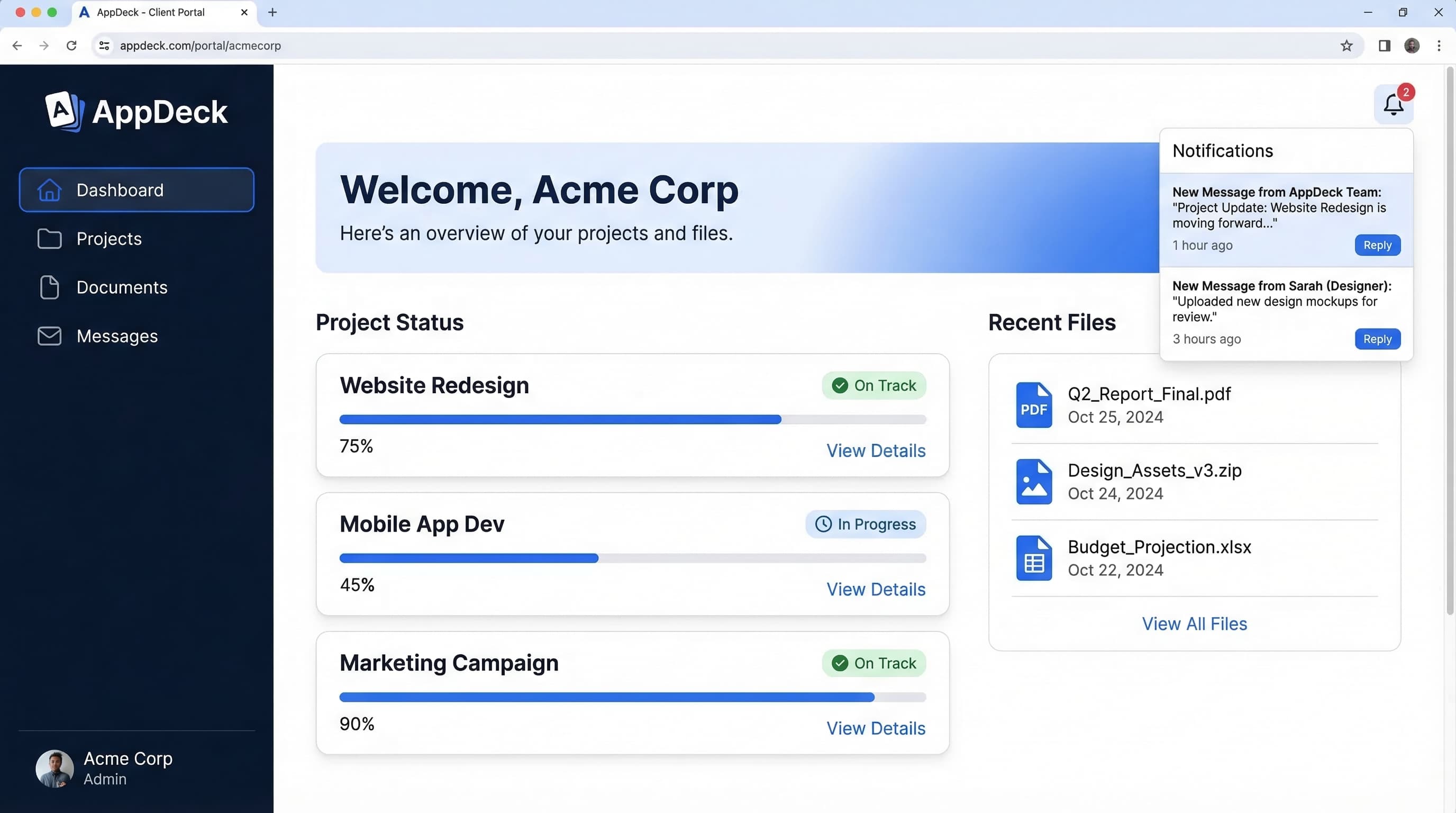
A client portal is a secure, branded digital workspace where businesses share project updates, deliverables, documents, and real-time data with their clients. It replaces scattered email threads, shared drives, and endless status meetings with a single, organized hub.
Client portals are used by agencies, consultants, freelancers, and professional services firms to give clients self-service access to everything they need — project progress, files, invoices, reports, and feedback tools — without a phone call or email.
Modern client portals go beyond simple file sharing. They include white-label branding so the portal looks like your own product, real-time dashboards connected to live data sources, and built-in collaboration tools for approvals and feedback.
Why Agencies Need Client Portals
Most agencies rely on a patchwork of emails, Slack messages, shared drives, and weekly status calls to keep clients informed. This approach wastes hours every week, creates communication gaps, and makes your team look less professional than the work you deliver.
A client portal solves this by giving every client a single place to check project status, download deliverables, leave feedback, and view reports. Your team stops answering repetitive "where are we on this?" emails and starts focusing on the work that matters.
Fewer Status Meetings
When clients can check project progress on demand, the need for weekly check-in calls drops dramatically — freeing hours for billable work.
Faster Approvals
Built-in feedback and approval workflows mean clients can review and sign off on deliverables in the portal instead of through back-and-forth email chains.
Professional Brand Experience
White-label branding transforms your portal into a branded client experience that reinforces your agency's professionalism and premium positioning.
Higher Client Retention
Clients who have transparent visibility into your work and easy access to deliverables are far more likely to renew and refer new business.
Essential Client Portal Features
The capabilities every client portal should include to deliver a seamless client experience.
Project Tracking
Give clients real-time visibility into project milestones, deliverables, and timelines without a single status call.
File Delivery
Share deliverables, assets, and documents in organized folders. Clients download what they need without digging through email threads.
White-Label Branding
Present a fully branded experience with your logo, colors, and custom domain. Clients see your brand, not your tools.
Real-Time Dashboards
Connect live data sources so clients can monitor campaign performance, KPIs, and project metrics on demand.
Comments & Feedback
Clients leave feedback directly on deliverables with threaded comments. No more scattered email replies or lost Slack messages.
Notifications & Alerts
Automatic notifications when files are uploaded, milestones are reached, or feedback is needed. Everyone stays in the loop.
Document Sharing
Secure document repository with version control, access permissions, and download tracking for contracts, briefs, and reports.
Mobile Access
Clients review deliverables, approve work, and check project status from any device — phone, tablet, or desktop.
Client Portal vs Customer Portal
The terms "client portal" and "customer portal" are often used interchangeably, but they serve different audiences and workflows. Client portals are designed for high-touch, project-based relationships — agencies serving clients, consultants working with retainer accounts, and professional services firms managing engagements.
Customer portals, on the other hand, are built for high-volume, self-service interactions — SaaS companies providing account management, e-commerce brands handling orders and support, and subscription businesses managing billing. The feature sets, branding requirements, and user expectations differ significantly.
How to Reduce Client Status Meetings
Status meetings are one of the biggest time drains for agencies and consultancies. Most exist because clients lack visibility into what is happening with their projects. A client portal with real-time project tracking, automated notifications, and on-demand reporting eliminates the need for most recurring check-ins.
The agencies that have made this shift report reclaiming 5-10 hours per client per month — time that goes directly back into billable work or business development.
White-Label Branding Guide
White-label branding is one of the most important features for agencies and consultancies choosing a client portal. Your clients should see your brand — your logo, your colors, your custom domain — not the name of your software vendor.
A white-labeled portal reinforces your professionalism, justifies premium pricing, and creates a cohesive experience from the first pitch deck to the final deliverable. It also increases switching costs, which improves client retention.
Client Portal Software Comparison
Choosing the right client portal software depends on your business type, client volume, and the level of branding and customization you need. The best platforms combine project tracking, file sharing, white-label branding, and real-time dashboards in a single, easy-to-use interface.
Avoid tools that require developer resources to set up or charge per-client fees that scale unpredictably. Look for transparent pricing, fast setup, and the ability to create a polished experience for every client without custom code.
Implementation Guide
Launching a client portal does not have to be a complex IT project. With the right platform, you can go from signup to a fully branded client portal in under an hour. Here is the typical implementation path:
- Set up your branding — Upload your logo, set your brand colors, and connect your custom domain so the portal looks like your own product.
- Create your first client workspace — Set up a project with deliverables, milestones, and relevant documents.
- Configure permissions — Define what each client can see and access. Keep internal notes private while sharing progress and files.
- Invite your client — Send a branded invitation. Clients get guided onboarding so they are productive from day one.
- Connect live data — Link dashboards to analytics platforms, project management tools, or custom data sources for real-time reporting.
Related Guides
Go deeper with our in-depth guides
Ready to Launch Your Client Portal?
Join agencies and consultancies that have transformed their client experience with AppDeck. Set up in under an hour, no developer required.
Free 14-day trial -- now in beta -- White-label branding included