
B2B Portal: What It Is, Why You Need One, and How to Choose the Right Platform
Everything you need to know about B2B portals. Types of portals (client, vendor, partner, investor), key features, how to evaluate platforms, and implementation best practices.
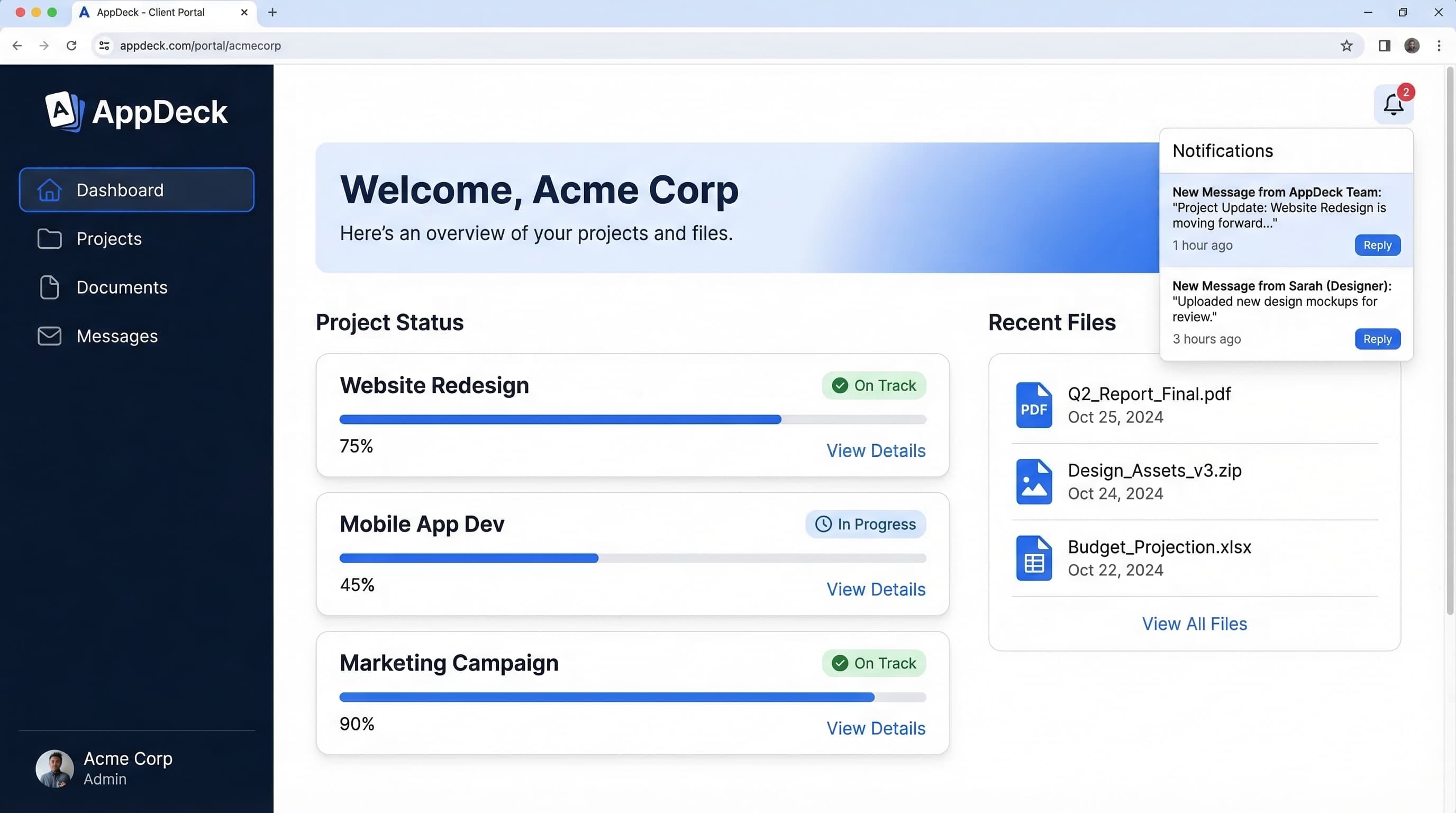
TL;DR: Everything you need to know about B2B portals. Types of portals (client, vendor, partner, investor), key features, how to evaluate platforms, and implementation best practices.
Introduction
Every B2B relationship eventually drowns in email. It starts small — a shared document here, a status update there. Then it compounds. Within six months, your team is forwarding attachments, hunting for the latest version of a contract, and answering the same questions from three different stakeholders across four different email threads.
I've lived this pattern for over 20 years across multiple B2B companies. The operational cost is staggering, but the real damage is subtler: your clients, vendors, and partners start to feel like working with you is harder than it needs to be. They don't complain about your deliverables. They complain about the experience of getting to them.
A B2B portal solves this by giving every external stakeholder a single place to find what they need — documents, reports, project updates, invoices, approvals — without emailing your team. It sounds simple because it is. The hard part is choosing the right type of portal, the right platform, and the right implementation approach.
This guide covers all of it. I'll walk through what a B2B portal actually is, the eight most common types, why they matter, the features that separate good platforms from bad ones, how to evaluate vendors, and how to roll one out without disrupting your existing workflows.
See also: Partner Portal Software Guide — 7 platforms for channel and reseller management.
What Is a B2B Portal?
A B2B portal is a secure, web-based platform where businesses share information, documents, and tools with external stakeholders — clients, vendors, partners, investors, board members, or any other outside party involved in an ongoing business relationship.
Think of it as a private digital workspace for each relationship your company manages. Instead of scattering information across email, shared drives, Slack channels, and spreadsheets, everything lives in one authenticated environment where the right people see the right things.
The defining characteristics of a B2B portal:
- Secure access — Users log in with credentials. Data is encrypted in transit and at rest. You control who sees what.
- Role-based permissions — A client sees their projects. A vendor sees their purchase orders. A board member sees board materials. Nobody sees what they shouldn't.
- Self-service — External stakeholders can find answers, download documents, and check status without contacting your team.
- Centralized information — One source of truth replaces dozens of email threads and file shares.
- Branded experience — The portal looks like your platform, not a third-party tool. Your domain, your logo, your colors.
What a B2B portal is not: it's not a generic project management tool, a CRM, or a shared Google Drive folder. Those tools serve internal purposes. A B2B portal is purpose-built for external stakeholder interactions — designed from the ground up for people outside your organization.
The B2B portal market has matured significantly in the last two years. You no longer need a six-figure custom development project to launch one. Modern portal platforms let you configure and deploy a professional, branded portal in days rather than months.
8 Types of B2B Portals
Not every business relationship needs the same portal. The type you need depends on who you're serving and what information you're exchanging. Here are the eight most common B2B portal types, what each one does, and who benefits most.
1. Client Portal
What it does: Gives your clients a branded, secure place to access project updates, deliverables, reports, invoices, and communications — all without emailing your team.
Who uses it: Agencies, consultancies, law firms, accounting firms, IT service providers, and any professional services business that manages ongoing client relationships.
Key features:
- Project status tracking and milestone visibility
- Document sharing with version control
- Branded dashboards pulling live data from tools like HubSpot, Google Analytics, or QuickBooks
- Threaded messaging tied to specific projects or deliverables
- Invoice history and payment tracking
A client portal replaces the "Where's my report?" and "Can you resend that document?" emails that eat your team's time. It also makes your firm look more professional — clients see a polished, branded experience instead of a messy inbox.
Learn more on our client portal product page.
2. Vendor Portal
What it does: Centralizes every aspect of the vendor relationship — onboarding, document management, purchase orders, invoicing, compliance tracking, and performance reviews.
Who uses it: Procurement teams, operations leaders, and supply chain managers at mid-market and enterprise companies.
Key features:
- Vendor self-registration and onboarding workflows
- Document collection (W-9s, certificates of insurance, contracts)
- Compliance tracking with expiration alerts
- Purchase order management and invoice submission
- Vendor performance scorecards
Managing 50 or more vendors through email is a compliance risk waiting to happen. A vendor portal shifts the burden of document submission and status tracking to the vendors themselves, so your procurement team can focus on strategy instead of paperwork.
Learn more on our vendor portal product page.
3. Customer Portal
What it does: Provides a self-service hub where customers can manage their accounts, track orders, submit support tickets, access knowledge bases, and view billing history.
Who uses it: SaaS companies, e-commerce businesses, subscription services, and any company with a large customer base that needs scalable self-service.
Key features:
- Account management and profile settings
- Order tracking and history
- Support ticket submission and status tracking
- Knowledge base and FAQ access
- Billing and subscription management
The distinction between a client portal and a customer portal matters. Client portals serve high-touch, relationship-driven interactions. Customer portals serve high-volume, self-service interactions at scale. If you manage hundreds or thousands of customers, you need a customer portal.
Learn more on our customer portal product page.
4. Investor Data Room
What it does: Provides a secure environment for sharing sensitive financial documents, due diligence materials, cap tables, and investor updates with current and prospective investors.
Who uses it: Startups raising capital, private equity firms, venture-backed companies, and any business that shares confidential financial information with investors.
Key features:
- Granular document permissions (view-only, download-restricted, watermarked)
- Activity tracking — see exactly who viewed which document and for how long
- Structured folder organization for due diligence workflows
- Investor update distribution and tracking
- NDA management and e-signature integration
Emailing sensitive financials as PDF attachments is a security failure that most companies tolerate until they can't. An investor data room gives you control, visibility, and an audit trail that email will never provide.
Learn more on our investor data room product page.
5. Board Portal
What it does: Gives board members a secure, centralized place to access meeting agendas, board books, resolutions, minutes, and governance documents.
Who uses it: Corporate boards, nonprofit boards, advisory boards, and governance teams responsible for board administration.
Key features:
- Board book assembly and distribution
- Meeting scheduling and agenda management
- Resolution tracking and e-voting
- Secure document repository with access controls
- Audit trail for compliance and governance requirements
Board members are busy people who sit on multiple boards. They need information organized, accessible, and secure — not buried in email attachments. A board portal also simplifies compliance by maintaining a complete record of every document shared and every action taken.
Learn more on our board portal product page.
6. Membership Portal
What it does: Provides members of an association, professional organization, alumni network, or community with a private hub for resources, events, directories, and communications.
Who uses it: Trade associations, professional organizations, alumni associations, chambers of commerce, and membership-based nonprofits.
Key features:
- Member directory with searchable profiles
- Event registration and calendar management
- Resource library (webinars, publications, templates)
- Membership renewal and dues management
- Discussion forums and community features
Membership organizations live and die by engagement. A portal gives members a reason to stay connected between events and provides the organization with data on what resources members actually use.
Learn more on our membership portal product page.
7. Project Portal
What it does: Provides external collaborators — contractors, freelancers, partner firms — with visibility into project timelines, deliverables, tasks, and shared resources.
Who uses it: Construction firms, engineering companies, development agencies, and any business that manages complex projects with external contributors.
Key features:
- Project timeline and milestone tracking
- Task assignment and status updates
- Document sharing with version control
- Resource allocation visibility
- Comment threads tied to specific deliverables
When a project involves multiple external parties, communication fractures across email, Slack, and various project management tools. A project portal creates a single, neutral workspace where everyone sees the same status.
Learn more on our project portal product page.
8. Executive Dashboard
What it does: Aggregates key business metrics from multiple sources into a single, real-time dashboard that executives and stakeholders can access without requesting reports from analysts.
Who uses it: C-suite executives, department heads, board members, and investors who need on-demand access to business performance data.
Key features:
- Real-time data visualization from multiple sources
- KPI tracking with trend analysis and alerts
- Customizable views for different stakeholder roles
- Scheduled report distribution
- Drill-down capabilities from summary to detail
An executive dashboard eliminates the weekly ritual of analysts pulling data from five different tools to build a PowerPoint deck. Instead, stakeholders see live data whenever they want it.
Learn more on our executive dashboard product page.
Why B2B Companies Need Portals
You can survive without a B2B portal. Plenty of companies do. But "surviving" means your team spends hours every week on tasks that a portal handles automatically. Here are the five most compelling reasons to make the switch.
1. Reduce Email Chaos
The average B2B relationship generates hundreds of emails per quarter. Important documents get buried. Version control is nonexistent. Context gets lost when someone is CC'd halfway through a thread. A portal replaces all of this with a structured, searchable, organized workspace.
2. Self-Service Saves Time
Every time a client emails asking for their latest invoice, or a vendor calls to check on payment status, or a board member requests last quarter's financials — someone on your team stops what they're doing to respond. A portal makes all of this information available on demand. The most common support questions disappear entirely.
3. Better Security Than Email Attachments
Email is the least secure way to share sensitive business documents. Attachments can be forwarded to anyone. There is no access revocation. There is no audit trail. A B2B portal gives you encrypted storage, role-based access controls, activity logging, and the ability to revoke access instantly.
4. Professional Branded Experience
A white-labeled portal with your domain, logo, and brand colors signals that you take the relationship seriously. It tells your clients, vendors, and partners that you've invested in infrastructure to make working with you easier. This matters more than most companies realize — especially in competitive markets where the service experience differentiates you.
5. Audit Trail and Compliance
Regulated industries require documentation of who accessed what, when, and what actions they took. Even outside regulated industries, an audit trail protects you during disputes. A portal logs every login, document view, download, and approval automatically.
Key Features to Look For
Not all B2B portal platforms are created equal. Some are document repositories with a login page. Others are full platforms with the depth to handle complex stakeholder workflows. Here are the eight features that matter most.
1. Role-Based Access Control
Different stakeholders need different views. A client should see their projects. A vendor should see their purchase orders. An investor should see financials. The platform must support granular permissions so you can control exactly what each user sees, down to the individual document or dashboard level.
2. Document Management
Centralized document storage with version control, folder organization, search, and access permissions. Look for platforms that support drag-and-drop upload, bulk operations, and automatic file type previews. Bonus: watermarking and download restrictions for sensitive documents.
3. Real-Time Dashboards
Static reports are already stale by the time you distribute them. Modern B2B portals should integrate with your existing tools — CRMs, accounting software, analytics platforms, project management tools — and display live data in customizable dashboards.
4. White-Label Branding
Your portal should be indistinguishable from a platform you built in-house. That means custom domain (portal.yourcompany.com), your logo, your color palette, branded email notifications, and zero visible vendor branding. If the platform puts a "Powered by" badge on your portal, keep looking.
5. Integrations
A portal is only as useful as the data it can access. Look for native integrations with the tools your business already uses: Salesforce, HubSpot, QuickBooks, Xero, Google Workspace, Microsoft 365, Jira, Asana, and others. API access is essential for custom integrations.
6. Mobile Access
Your stakeholders will access the portal from their phones. The platform must be fully responsive or offer a dedicated mobile experience. This is non-negotiable — a portal that only works well on desktop will see poor adoption.
7. Audit Logs
Every action in the portal should be logged: logins, document views, downloads, uploads, approvals, and changes. These logs serve compliance requirements, but they also give you visibility into stakeholder engagement. If an investor viewed your pitch deck six times, that's a signal.
8. Single Sign-On (SSO)
Enterprise stakeholders expect SSO. Supporting SAML 2.0 and OAuth integrations with identity providers like Okta, Azure AD, and Google Workspace reduces friction and improves security. If your portal requires separate credentials, adoption will suffer.
How to Choose a B2B Portal Platform
Choosing a B2B portal platform is not a software purchase — it's an infrastructure decision that affects every external relationship your company manages. Here's a framework for making the right choice.
Assess Your Use Case
Start by answering three questions:
- Who are your primary external stakeholders? Clients, vendors, investors, board members, partners, members — each group has different needs.
- What information do they need access to? Documents, dashboards, project status, invoices, reports — map the specific data flows.
- How many stakeholders and what frequency? A board portal serving 12 directors has different requirements than a customer portal serving 10,000 accounts.
Your answers determine which type (or types) of portal you need. Many businesses discover they need more than one — a client portal and a vendor portal, for example. This is where platform breadth matters.
Evaluate Build vs. Buy
Building a custom portal gives you total control but costs six to twelve months of development time and ongoing maintenance. Buying a platform gets you live in days or weeks but requires flexibility on customization.
The math almost always favors buying. Custom portals cost $100,000 to $500,000 to build and $50,000 or more per year to maintain. A SaaS portal platform costs a fraction of that and handles security, uptime, and feature updates for you.
The exception: if your portal requirements are genuinely unique and can't be served by any existing platform, custom development may be justified. In my experience, this is rarer than most CTOs think.
Key Questions to Ask Vendors
When evaluating B2B portal platforms, ask these questions:
- How many portal types does the platform support? If you need a client portal today and a vendor portal in six months, a platform that handles both saves you from managing two separate tools.
- What does white-labeling include? Custom domain, logo, colors, email templates — or just a logo swap?
- What integrations are available out of the box? And how robust is the API for custom integrations?
- What's the security posture? SOC 2 compliance, encryption standards, SSO support, data residency options.
- How is pricing structured? Per user, per portal, flat rate? Watch for hidden costs on storage, SSO, or white-labeling.
- What does implementation support look like? Self-service setup, guided onboarding, or dedicated implementation team?
At AppDeck, we built the platform to cover all eight portal types from a single workspace. The logic is straightforward: your business manages multiple types of external relationships, and they shouldn't require multiple disconnected tools.
B2B Portal Implementation Best Practices
Rolling out a B2B portal doesn't need to be a massive IT project. But it does require a deliberate approach. Here are five best practices from companies that have done it well.
1. Start With One Use Case
Don't try to launch every portal type at once. Pick the use case with the highest pain and the clearest ROI. For most companies, that's either a client portal (if you're a services business) or a vendor portal (if you're managing a large supplier base). Get one right, prove the value, then expand.
2. Migrate Gradually
Don't flip a switch and tell every stakeholder to stop using email. Start by sharing the portal link alongside your normal communication. "Here's the report — and you can always find the latest version in your portal." Over time, stakeholders develop the habit of checking the portal first.
3. Train Your Internal Team First
Your internal team needs to be fluent in the portal before you invite external stakeholders. They need to know how to upload documents, create dashboards, set permissions, and troubleshoot basic issues. A confused internal team will confuse your stakeholders.
4. Measure Adoption
Track login frequency, document views, and feature usage from day one. If adoption is low, diagnose why. Is it a training issue? A content issue? A UX issue? The data will tell you. Set a 30-day adoption target and hold your team accountable for hitting it.
5. Iterate Based on Feedback
Your first portal configuration won't be perfect. Ask stakeholders what's working and what's missing after the first two weeks, then again after 60 days. The best portals evolve continuously based on how people actually use them.
Frequently Asked Questions
What is a B2B portal?
A B2B portal is a secure, branded web application that businesses use to interact with external stakeholders -- clients, vendors, investors, partners, board members, or customers -- in a structured, self-service environment. It replaces the email-and-attachment workflow with role-based access, document sharing, dashboards, notifications, and audit trails. A modern B2B portal platform typically supports multiple portal types (client, vendor, investor, partner) from one workspace, so the same business does not need separate tools for each relationship.
Should I build a custom B2B portal or buy a SaaS platform?
For 95% of mid-market businesses, buying wins on cost and time-to-value. Custom portals cost $100K-$500K to build and $50K+ per year to maintain in security patches, uptime, and feature work. A SaaS B2B portal platform costs a fraction of that and handles infrastructure for you. Custom development is only justified when requirements are genuinely unique -- regulated industry workflows, deeply embedded ERP logic, or specific compliance regimes that no platform supports. In most CTO conversations, "we need custom" turns out to mean "we need configurability," which good platforms already provide.
How long does B2B portal implementation typically take?
A focused single-use-case rollout on a modern platform takes 2-6 weeks: 1 week of configuration, 1-2 weeks of internal team training, then a phased external rollout over 30-60 days. Multi-portal deployments (client + vendor, for example) typically take 8-12 weeks total when sequenced correctly. The legacy benchmark of "6+ month portal projects" reflects custom builds and on-prem enterprise software; it is not the standard for SaaS portal platforms in 2026.
Which businesses get the most value from a B2B portal?
Mid-market companies (50-500 employees) running structured external relationships -- professional services firms with 20+ active clients, manufacturers with 50+ suppliers, agencies managing brand portfolios, or any business that finds itself emailing the same files to the same stakeholders every month. Sub-20-employee startups can usually get by with shared Google Drives. Large enterprises (5,000+ employees) often need enterprise-specific platforms like SAP Ariba or Salesforce Experience Cloud. The sweet spot is the band where email is breaking down but enterprise software is overkill.
When should I add a second portal type to my deployment?
Once your first portal has 60%+ stakeholder adoption and is operating without daily admin firefighting -- usually 60-90 days post-launch. Adding a second portal too early splits attention and dilutes the change-management effort. If you launched a client portal and your operations team is now confidently running it, that is the green light to extend to vendors or investors. Resist the temptation to launch all portal types simultaneously; sequencing wins on adoption every time.
Conclusion
B2B portals are not new. But the gap between companies that use them and companies that don't is widening. Businesses that give their clients, vendors, investors, and partners a professional, self-service experience are building stronger relationships and operating more efficiently. Businesses still managing everything through email are falling behind.
The good news is that launching a B2B portal in 2026 is faster, cheaper, and less risky than it was even two years ago. You don't need a custom build. You don't need a six-month implementation timeline. You need a platform that covers your use cases, integrates with your tools, and looks like it belongs to your brand.
If you're ready to explore what a B2B portal could look like for your business, start with the portal type that addresses your biggest pain point and go from there.
Related Reading

Founder & CEO, AppDeck
Serial entrepreneur with 20+ years building B2B software companies. Former executive managing 2,800+ employees across three continents. Vik reviews all AppDeck content for accuracy and practical relevance.
Share this article
Explore Related Solutions
Related Articles
How to Build a Portal Website: Step-by-Step Guide for Businesses
Learn how to build a portal website for your business. Step-by-step guide covering planning, features, design, build vs. buy decisions, launch, and measuring success.
B2B Partner Portal Software: 7 Best Platforms for Channel & Reseller Management
Compare the best B2B partner portal software and platforms for managing channel partners, resellers, and affiliates. Deal registration, co-marketing, training, and performance tracking.
Client Onboarding Portal: How to Build One That Reduces Time-to-Value by 50%
Learn how to build a client onboarding portal that automates intake, collects documents, and gets clients to value faster. Step-by-step guide with examples and tool recommendations.