
What Is a Vendor Portal? The Complete Guide to Vendor Management Portals
Everything you need to know about vendor portals: what they are, key features, benefits, how to set one up, and software comparison. The definitive guide for procurement and operations teams.
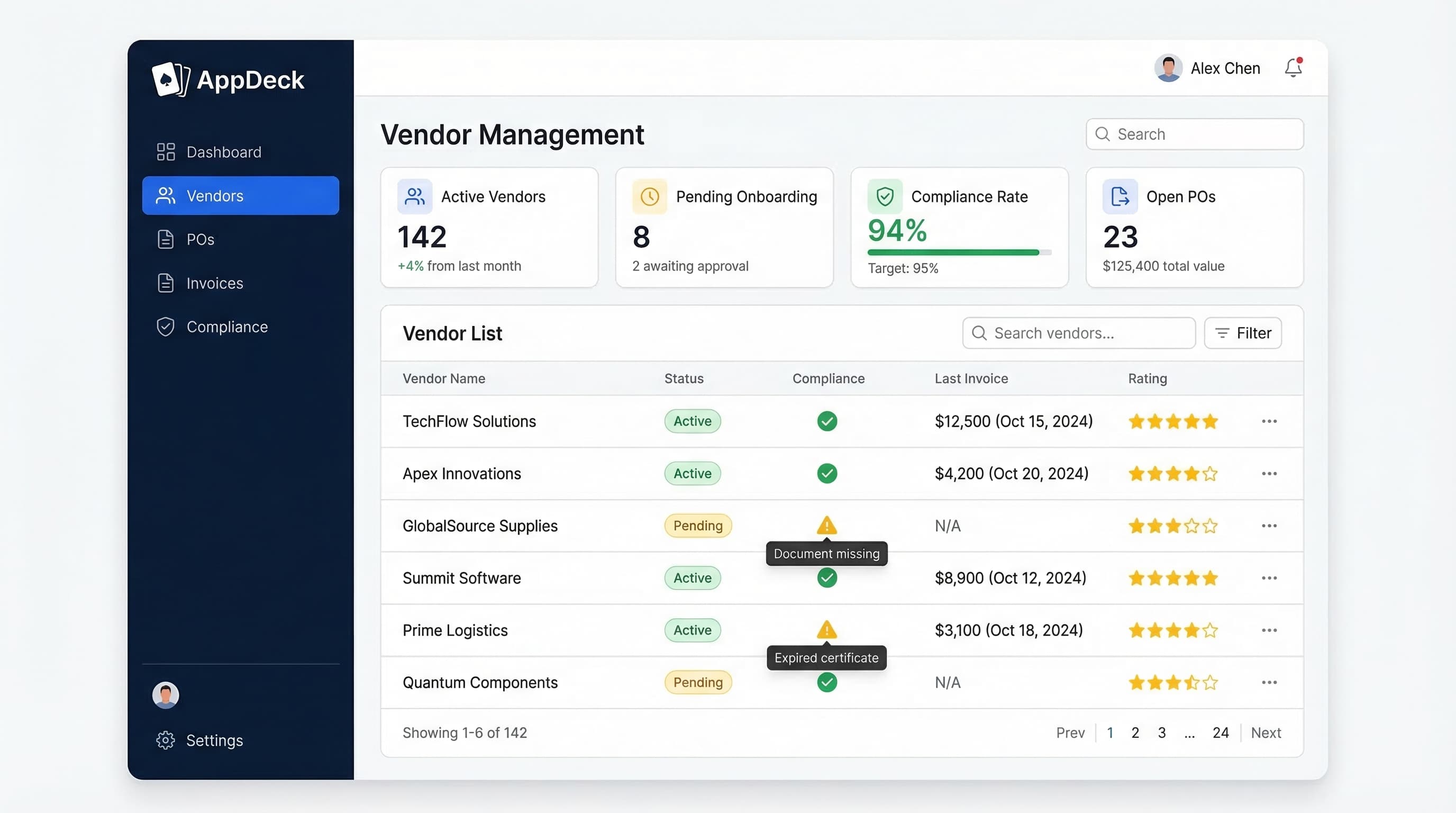
TL;DR: Everything you need to know about vendor portals: what they are, key features, benefits, how to set one up, and software comparison. The definitive guide for procurement and operations teams.
Introduction
Here's a scenario every procurement leader knows too well: A vendor emails their updated certificate of insurance to your accounts payable coordinator. That coordinator is on PTO. The email sits unread for nine days. Meanwhile, the vendor's old certificate expires. Your company is now exposed to uninsured liability — and nobody knows it until an auditor flags the gap three months later.
This isn't an edge case. It's Tuesday.
I've spent 20 years building B2B software and managing vendor relationships across three continents. The single biggest operational failure I see in mid-market and enterprise companies isn't poor vendor selection — it's poor vendor management infrastructure. The relationships are fine. The systems are broken.
Most companies manage their vendor operations through some combination of email, shared drives, spreadsheets, and manual follow-ups. A few heroic procurement staff hold it all together through sheer willpower. But the cracks are everywhere: expired certifications nobody tracks, invoices lost in approval chains, onboarding processes that take six weeks when they should take six days, and zero visibility into which vendors are actually performing.
A vendor portal fixes this. Not partially — fundamentally.
In this guide, I'll cover everything you need to know about vendor portals: what they are, how they work, who needs one, the features that matter, how to set one up, and how to evaluate vendor portal software. Whether you manage 20 vendors or 2,000, this is the definitive resource for understanding vendor management portals in 2026.
What you'll learn:
- A clear definition of what a vendor portal is (and what it isn't)
- The 10 features that separate great vendor portals from mediocre ones
- Quantified benefits with real numbers from procurement teams
- Detailed use cases across manufacturing, healthcare, construction, financial services, and retail
- A step-by-step setup guide you can follow this quarter
- How to evaluate and choose vendor portal software
- Answers to the most common vendor portal questions
What Is a Vendor Portal?
A vendor portal is a secure, centralized web platform where your organization and its vendors collaborate on every aspect of the vendor relationship — from onboarding and document management to purchase orders, invoicing, compliance tracking, and performance reviews.
Think of it as a dedicated workspace that replaces the chaos of email threads, spreadsheets, and shared drives with a single source of truth for all vendor interactions.
Here's what happens inside a vendor portal:
For your vendors:
- Self-register and complete onboarding forms
- Upload and update documents (W-9s, certificates of insurance, contracts, certifications)
- View and acknowledge purchase orders
- Submit invoices and track payment status
- Receive RFQs and submit bids
- Access company policies, guidelines, and announcements
- Update their own contact information, banking details, and capabilities
For your procurement and operations teams:
- Manage vendor onboarding workflows with approval chains
- Track document expiration dates and compliance status across all vendors
- Issue and manage purchase orders
- Route invoices through approval workflows
- Score vendor performance against defined KPIs
- Run spend analysis and vendor risk reports
- Communicate with vendors through a centralized channel
- Maintain a complete audit trail of every interaction
The critical distinction is self-service. A vendor self-service portal shifts the burden of data entry, document submission, and status tracking from your internal team to the vendors themselves. Your team stops being a bottleneck and starts being a control function.
This isn't a minor operational improvement. When vendors can log in, see what's needed, submit what's required, and track their own status — the entire dynamic changes. Your procurement team moves from chasing paperwork to managing relationships.
If you're already thinking about implementation, our vendor portal product page walks through AppDeck's approach to building vendor portals in detail.
Vendor Portal vs. Email and Spreadsheets
Let's make this concrete. Here's what vendor management looks like without a portal versus with one:
Document Management
-
❌ Vendor sends W-9 via email attachment — gets buried in someone's inbox
-
❌ AP coordinator saves the file to a shared drive folder that three people know about
-
❌ Nobody tracks when the document was received, who reviewed it, or when it expires
-
❌ Six months later, auditor asks for the W-9 and you spend two hours searching
-
✅ Vendor logs into the portal and uploads their W-9 to a designated document section
-
✅ The system auto-tags, timestamps, and files the document
-
✅ Your team gets notified, reviews it, and approves it — all tracked
-
✅ Auditor asks for the W-9, you pull it up in 10 seconds with full version history
Onboarding
-
❌ New vendor receives a 12-page PDF form via email
-
❌ Vendor fills it out, emails it back, your team manually enters data into three different systems
-
❌ Missing fields discovered two weeks later — another round of emails
-
❌ Average onboarding time: 4-6 weeks
-
✅ Vendor receives a portal invite and completes a guided onboarding form
-
✅ Required fields enforced — nothing moves forward until the submission is complete
-
✅ Data flows automatically to your systems of record
-
✅ Average onboarding time: 3-5 business days
Compliance Tracking
-
❌ Insurance certificates tracked in a spreadsheet that one person maintains
-
❌ Expiration dates missed because nobody checked the spreadsheet this month
-
❌ Vendor operates for 90 days with an expired COI — discovered during a claim
-
❌ Your legal team has some strong words for procurement
-
✅ Portal tracks every document expiration date automatically
-
✅ 60-day, 30-day, and 7-day alerts sent to both the vendor and your team
-
✅ Vendor uploads the renewal before expiration — zero gap in coverage
-
✅ Compliance dashboard shows real-time status across all 200+ vendors
Invoice Processing
-
❌ Vendor emails an invoice to AP
-
❌ AP manually checks it against the PO
-
❌ Discrepancy found — email chain begins
-
❌ Invoice sits in limbo for 3 weeks — vendor calls asking where their payment is
-
❌ Average invoice cycle: 30-45 days
-
✅ Vendor submits invoice through the portal, linked to the PO
-
✅ System flags discrepancies automatically before routing for approval
-
✅ Approvers get notifications, approve or reject with one click
-
✅ Vendor sees real-time payment status — no more "where's my check?" calls
-
✅ Average invoice cycle: 7-12 days
The pattern is the same across every workflow: the portal replaces ad-hoc, email-based processes with structured, trackable, self-service workflows. The result is speed, accuracy, visibility, and an audit trail that makes your compliance team actually smile.
For a deeper dive into optimizing your vendor workflows, check out our guide on vendor management best practices.
Who Needs a Vendor Portal?
The short answer: any organization that manages more than about 20 active vendor relationships. Below that threshold, you can probably get by with email and a well-maintained spreadsheet. Above it, the complexity grows exponentially and manual processes break down.
Here's a more nuanced breakdown by company profile:
By Company Size
Small businesses (20-50 vendors): You're starting to feel the pain. Onboarding is inconsistent, document tracking is spotty, and your AP person spends 30% of their time chasing vendor paperwork. A vendor portal pays for itself in time savings alone.
Mid-market companies (50-500 vendors): This is where vendor portals become essential infrastructure, not optional tooling. You have multiple people touching vendor relationships, compliance requirements are increasing, and manual processes create real risk. Most mid-market companies that implement a vendor portal report ROI within the first quarter.
Enterprise organizations (500-5,000+ vendors): At this scale, operating without a vendor management portal isn't a choice — it's a liability. You need automated compliance tracking, tiered approval workflows, spend analytics, and integration with your ERP. The question isn't whether you need a portal; it's how quickly you can deploy one.
By Industry
Manufacturing: Manufacturers typically manage hundreds of component suppliers, each with quality certifications, delivery performance requirements, and compliance documentation. A supplier portal is non-negotiable for tracking ISO certifications, quality inspection reports, material test certificates, and delivery scorecards.
Healthcare: HIPAA compliance, business associate agreements, credentialing, and insurance verification create a web of vendor documentation requirements. One missed BAA and you're looking at regulatory exposure. Healthcare organizations need vendor portals with compliance automation baked in.
Construction: General contractors manage dozens of subcontractors per project, each requiring current insurance certificates, safety training records, licensing, and bonding. A vendor compliance checklist is just the starting point — you need a system to enforce it.
Financial services: Third-party risk management (TPRM) is a regulatory requirement, not a nice-to-have. Banks, insurance companies, and fintech firms need vendor portals that support risk assessment workflows, SOC 2 report tracking, and regulatory audit documentation. See our vendor risk assessment template for a framework you can implement immediately.
Government and public sector: Transparency requirements, minority and disadvantaged business tracking, procurement regulations, and audit obligations make structured vendor management a legal mandate.
Retail and e-commerce: Scaling supplier onboarding while maintaining quality and compliance standards is the central challenge. A vendor portal lets you onboard 50 new suppliers a quarter without adding procurement headcount.
If your organization is in any of these categories and you're still managing vendors through email, you're already behind. The organizations you compete with have been automating vendor management for years.
10 Key Features of a Vendor Portal
Not all vendor portals are created equal. After evaluating dozens of platforms and building AppDeck's vendor portal, here are the 10 features that separate effective vendor management portals from glorified file-sharing systems.
1. Vendor Self-Registration and Onboarding
The foundation of any vendor portal. Vendors should be able to register themselves, complete onboarding forms, submit required documentation, and move through an approval workflow — all without your team doing manual data entry.
What great looks like:
- Customizable registration forms by vendor category
- Required field validation (nothing moves forward with missing data)
- Multi-step onboarding workflows with status tracking
- Automatic routing to the right approver based on vendor type, spend category, or risk level
- Vendor sees exactly where they are in the process
A strong vendor onboarding process is the backbone of vendor management. Your portal should enforce it automatically.
2. Document Management
Every vendor relationship generates documents: W-9s, certificates of insurance, contracts, NDAs, compliance certifications, quality reports. Your portal needs to collect, organize, version-control, and make all of these searchable.
What great looks like:
- Document upload by category with required document types per vendor category
- Automatic version control (old versions archived, current version displayed)
- Full-text search across all vendor documents
- Expiration date tracking with automated alerts
- Secure, permission-based access (vendors only see their own documents)
3. Compliance Tracking and Alerts
This is where vendor portals deliver the most immediate ROI. Manual compliance tracking is a ticking time bomb — it only works until it doesn't.
What great looks like:
- Dashboard showing compliance status across all vendors at a glance
- Automated expiration alerts: 90-day, 60-day, 30-day, 7-day, and overdue
- Alerts sent to both the vendor (to renew) and your team (to follow up)
- Automatic vendor status changes (e.g., vendor moved to "restricted" if COI expires)
- Compliance reporting for audits — generate a full compliance snapshot in seconds
4. Purchase Order Management
Vendors need to see their POs, acknowledge receipt, and communicate about delivery schedules. Your team needs to track PO status, modifications, and fulfillment.
What great looks like:
- PO creation and issuance through the portal
- Vendor acknowledgment workflow
- Line-item visibility for vendors
- Delivery schedule tracking
- Change order management with full history
- Integration with your ERP or accounting system
5. Invoice Submission and Approval Workflows
Getting invoices from vendors into your AP system and through your approval chain is one of the most time-consuming manual processes in vendor management. A vendor portal streamlines this end-to-end.
What great looks like:
- Vendors submit invoices through the portal (not email)
- Automatic three-way matching: PO, receipt, and invoice
- Discrepancy flagging before the invoice enters your approval chain
- Multi-level approval workflows based on dollar amount or department
- Real-time payment status visibility for vendors
- Integration with accounting systems (QuickBooks, NetSuite, SAP, Xero)
6. Performance Scorecards and Ratings
You can't improve what you don't measure. A vendor portal should track and display vendor performance against the KPIs that matter to your business.
What great looks like:
- Customizable scorecards by vendor category
- Metrics like on-time delivery, quality scores, responsiveness, pricing competitiveness
- Quarterly or annual review workflows
- Trend reporting (is this vendor getting better or worse?)
- Vendor access to their own scores (transparency drives improvement)
- Aggregate reporting for board-level visibility into vendor performance
7. Communication Hub
Every vendor relationship involves ongoing communication: RFQ distributions, policy updates, announcements, ad-hoc questions. A vendor portal centralizes all of this so nothing gets lost.
What great looks like:
- Messaging between your team and individual vendors, threaded and searchable
- Broadcast announcements to all vendors or specific categories
- RFQ distribution and bid collection
- Notification preferences (email, in-portal, both)
- Full audit trail of all communications
8. Reporting and Analytics
Data-driven vendor management requires actual data. Your portal should generate the reports your procurement, finance, and risk teams need.
What great looks like:
- Spend analysis by vendor, category, department, and time period
- Vendor risk dashboards (compliance gaps, performance issues, concentration risk)
- Onboarding pipeline reporting
- Invoice and payment cycle analytics
- Custom report builder for ad-hoc analysis
- Export capabilities for integration with BI tools
9. Integration with ERP and Accounting Systems
A vendor portal that doesn't connect to your financial systems creates data silos and double-entry work. Integration isn't optional — it's table stakes.
What great looks like:
- Native integrations with major ERPs (SAP, Oracle, NetSuite, Microsoft Dynamics)
- Accounting system integration (QuickBooks, Xero, Sage)
- API access for custom integrations
- Two-way data sync (vendor master data, POs, invoices, payments)
- Webhook support for real-time event triggers
10. Mobile Access
Vendors and your field team need portal access from their phones. If your vendor portal is desktop-only, adoption will suffer.
What great looks like:
- Fully responsive web interface (works on any device)
- Core workflows accessible on mobile: document upload, PO acknowledgment, invoice submission
- Push notifications for time-sensitive actions
- Offline capability for document viewing
For a comparison of platforms that deliver on these features, see our vendor portal software comparison for 2026.
Benefits of a Vendor Portal
Let's quantify what a vendor management portal actually delivers. These numbers are based on industry benchmarks and what I've observed across hundreds of vendor portal implementations.
1. 60% Reduction in Vendor Onboarding Time
The average manual vendor onboarding process takes 4-6 weeks. A portal-driven onboarding process takes 3-7 business days. The biggest time savings come from eliminating manual data entry, enforcing required fields upfront (no back-and-forth), and automating approval routing.
The math: If you onboard 50 vendors per year and each one takes 8 hours of internal staff time manually vs. 3 hours with a portal, that's 250 hours saved — roughly 6 weeks of full-time work.
2. 40% Fewer Compliance Gaps
Automated expiration tracking and vendor self-service renewals eliminate the compliance gaps that plague spreadsheet-based tracking. When a certificate is about to expire, the vendor gets notified. When it does expire, the vendor's status is automatically restricted. No human has to remember to check the spreadsheet.
The math: If you have 200 vendors with an average of 3 tracked documents each, that's 600 compliance items. A 40% reduction in gaps means roughly 50 fewer compliance exposures per year — any one of which could result in fines, legal liability, or failed audits.
3. 75% Less Email Back-and-Forth
This is the benefit procurement teams feel most acutely. When vendors can self-serve — checking PO status, viewing payment timelines, uploading documents, updating their information — they stop emailing your team to ask. Every self-service interaction is an email your procurement team doesn't have to write.
The math: If your procurement team handles 100 vendor-related emails per week and 75% of those become self-service portal interactions, that's 75 fewer emails per week — 3,900 per year. At an average of 5 minutes per email, that's 325 hours of recovered productivity.
4. Real-Time Visibility into Vendor Performance
Without a portal, vendor performance data is scattered across spreadsheets, ERP transaction logs, quality reports, and tribal knowledge. A portal aggregates this into dashboards and scorecards that give you a real-time picture of how each vendor is performing.
This visibility drives better decisions: renegotiate with underperformers, allocate more volume to top performers, identify risk before it becomes a crisis.
5. Audit-Ready Documentation
Every action in a vendor portal is timestamped and logged. Document uploads, approval decisions, communication threads, compliance status changes — all of it creates an automatic audit trail. When your auditor asks for evidence of your vendor management controls, you export a report instead of spending three weeks reconstructing records from emails and file folders.
6. Faster Invoice Processing and Better Cash Flow Management
Reducing invoice cycle time from 30-45 days to 7-12 days has a direct impact on your vendor relationships and your negotiating position. Vendors who get paid reliably and quickly give you better pricing, priority allocation, and more flexibility. It also gives your finance team better cash flow visibility.
7. Better Vendor Relationships Through Transparency
This one is underrated. Vendors hate being in the dark. When they can log into a portal and see their PO status, payment timeline, compliance standing, and performance scores — trust increases. They feel like partners, not supplicants. That transparency leads to stronger, more productive relationships.
8. Scalability Without Adding Headcount
This is the strategic benefit. A vendor portal lets you grow your vendor base without proportionally growing your procurement team. The self-service model means each new vendor adds minimal administrative burden. Companies that implement vendor portals typically increase their vendor capacity by 2-3x without adding procurement staff.
Vendor Portal Use Cases
Let's look at how vendor portals work in practice across different industries.
Manufacturing: Supplier Certification and Quality Tracking
A mid-market manufacturer with 350 component suppliers implemented a supplier portal to solve a specific problem: tracking ISO 9001 certifications, material test certificates, and first-article inspection reports across their supply base.
Before the portal:
- ❌ Supplier certifications tracked in an Excel file maintained by one quality engineer
- ❌ 15% of active suppliers had expired certifications at any given time
- ❌ Material test certificates arrived as email attachments with no standardized naming
- ❌ Quality audits required weeks of document gathering
After the portal:
- ✅ Every supplier uploads their own certifications through the portal
- ✅ Automatic 60-day and 30-day expiration alerts to suppliers and the quality team
- ✅ Expired certifications automatically restrict PO issuance to that supplier
- ✅ Audit preparation reduced from 3 weeks to 2 days
Healthcare: HIPAA-Compliant Vendor Management
A regional hospital network managing 200+ vendors — from medical device suppliers to IT service providers to janitorial services — needed a vendor management portal that enforced HIPAA business associate agreement (BAA) compliance.
Key capabilities:
- BAA status tracking for every vendor with access to protected health information
- Automatic BAA renewal workflows triggered 90 days before expiration
- Role-based access ensuring clinical, IT, and procurement staff see only relevant vendor data
- Complete audit trail satisfying HIPAA administrative safeguard requirements
- Vendor credentialing and background check documentation storage
The hospital network reduced BAA compliance gaps from 22% to under 3% within six months of portal deployment.
Construction: Subcontractor Compliance and Insurance Tracking
A commercial general contractor managing 150+ subcontractors across 12 active projects needed real-time visibility into subcontractor insurance, licensing, and safety training status.
Key capabilities:
- Per-project subcontractor onboarding with project-specific requirements
- Insurance certificate tracking with automatic Accord form parsing
- Safety training record verification and expiration tracking
- OSHA compliance documentation management
- Daily log integration for subcontractor performance tracking
Result: The contractor eliminated job-site shutdowns caused by subcontractors with expired insurance — an issue that had cost them an average of $45,000 per incident in project delays.
Financial Services: Third-Party Risk Management
A mid-market bank with 400+ third-party vendors needed a vendor portal that supported their OCC and FDIC third-party risk management requirements.
Key capabilities:
- Vendor risk tiering (critical, significant, limited) with different requirements per tier
- SOC 2 report collection and review workflows
- Financial stability monitoring with annual financial statement collection
- Business continuity plan documentation
- Incident reporting and escalation workflows
- Board-level vendor risk reporting
The bank's examiners specifically cited the vendor portal as a strength in their next regulatory examination. For more on third-party risk management, see our vendor risk assessment template.
Retail: Supplier Onboarding at Scale
A specialty retailer expanding from 200 to 800 suppliers over 18 months needed to scale supplier onboarding without adding procurement staff.
Key capabilities:
- Self-service supplier registration with automated verification
- Product catalog submission and review workflows
- EDI setup and testing through the portal
- Routing guide and compliance documentation distribution
- Vendor scorecard based on fill rate, on-time delivery, and quality metrics
Result: The retailer onboarded 600 new suppliers in 18 months with the same 3-person procurement team, reducing average onboarding time from 5 weeks to 8 business days.
How to Set Up a Vendor Portal
Here's a practical, step-by-step process for implementing a vendor portal. This framework works whether you're rolling out to 50 vendors or 5,000.
Step 1: Define Your Vendor Categories and Workflows
Before you touch any software, map out how your vendor relationships actually work.
Actions:
- List all vendor categories (suppliers, service providers, contractors, consultants, etc.)
- Document the current onboarding process for each category
- Identify required documents by category (W-9, COI, NDAs, certifications, etc.)
- Map approval workflows: who approves what, and at what dollar thresholds?
- Define compliance requirements by category
- Identify your vendor risk tiers
Output: A vendor category matrix showing requirements, workflows, and compliance rules for each type of vendor.
Step 2: Choose Your Platform
Evaluate vendor portal software against your specific requirements. (I'll cover evaluation criteria in detail in the next section.)
Key considerations:
- Does it support your specific workflows and document requirements?
- Can it integrate with your ERP and accounting systems?
- Is it configurable without custom development?
- What's the vendor self-service experience like?
- Does it meet your security and compliance requirements?
AppDeck's vendor portal is purpose-built for mid-market companies that need enterprise-grade vendor management without enterprise complexity.
Step 3: Configure Onboarding Forms and Document Requirements
Set up your portal to match the vendor category matrix from Step 1.
Actions:
- Build registration and onboarding forms for each vendor category
- Configure required vs. optional fields
- Set up document collection templates with clear labels and instructions
- Define expiration tracking rules for time-sensitive documents
- Configure approval routing rules
Pro tip: Start with your most common vendor category. Get it right for that category, then replicate and customize for others.
Step 4: Import Existing Vendor Data
Migrating your current vendor data into the portal is often the most time-consuming step. Do it methodically.
Actions:
- Export vendor master data from your current systems (ERP, spreadsheets, databases)
- Clean the data: remove duplicates, standardize naming, fill obvious gaps
- Import vendor records in batches, validating data quality after each batch
- Upload existing documents and link them to the correct vendor records
- Flag vendors with missing or expired documentation for immediate follow-up
Step 5: Set Up Compliance Rules and Alerts
Configure the automated compliance monitoring that makes the portal worth the investment.
Actions:
- Define expiration alert schedules (90-day, 60-day, 30-day, 7-day, overdue)
- Configure automatic status changes when compliance items expire
- Set up compliance dashboards for your procurement and risk teams
- Define escalation rules: what happens when a vendor ignores renewal alerts?
- Test the alert system with sample scenarios
Step 6: Invite Vendors and Provide Training
The rollout strategy matters. Don't invite all 500 vendors on day one.
Actions:
- Start with your top 20-30 vendors (high-volume, strong relationships)
- Send personalized invitations with clear instructions and a support contact
- Provide a short training resource (2-minute video or one-page guide — not a 40-page manual)
- Set a deadline for portal adoption (e.g., "All invoices must be submitted through the portal by Q3")
- Offer phone or email support for the first 30 days
Pro tip: Your best vendors will adopt quickly and give you feedback that improves the experience for everyone else. Use them as your pilot group.
Step 7: Monitor Adoption and Iterate
A vendor portal only works if vendors actually use it. Track adoption metrics and address barriers.
Key metrics to monitor:
- Vendor activation rate (% of invited vendors who've completed registration)
- Document submission rate (% of required documents uploaded)
- Invoice submission rate (% of invoices submitted through portal vs. email)
- Average time-to-onboard for new vendors
- Support ticket volume and common issues
Actions:
- Weekly adoption reviews for the first 90 days
- Follow up personally with vendors who haven't activated
- Address common friction points (confusing forms, unclear instructions)
- Adjust workflows based on real usage data
- Celebrate wins — share adoption metrics with your team and leadership
For a complete onboarding framework, see our vendor onboarding process guide.
Vendor Portal vs. Vendor Management Software vs. ERP
These three terms get used interchangeably, but they're different things. Understanding the distinction helps you make better technology decisions.
Vendor Portal
What it is: A web-based platform that provides a self-service interface for both vendors and your internal team. It's the collaboration layer — the place where vendors and your organization interact.
Primary function: Vendor self-service, document exchange, communication, onboarding, compliance tracking.
Who uses it: Vendors (externally) and procurement/AP staff (internally).
Best for: Organizations that want to improve vendor collaboration, reduce email, automate compliance, and create self-service workflows.
Vendor Management Software (VMS)
What it is: A broader category of software focused on the full vendor management lifecycle: sourcing, evaluation, contracting, performance management, and risk management. A VMS may or may not include a vendor-facing portal.
Primary function: Strategic vendor management — sourcing, evaluation, negotiation, performance tracking, and risk management.
Who uses it: Procurement and sourcing teams (primarily internal).
Best for: Organizations with mature procurement functions that need strategic sourcing, advanced analytics, and end-to-end vendor lifecycle management.
ERP Vendor Module
What it is: The vendor management module within your ERP system (SAP, Oracle, NetSuite, Microsoft Dynamics). Handles vendor master data, POs, invoicing, and payments as part of the broader ERP.
Primary function: Transactional vendor data management — vendor records, POs, invoices, and payments.
Who uses it: Internal teams only. ERPs rarely offer a good vendor-facing self-service experience.
Best for: Transactional accuracy and integration with financial processes. Not designed for vendor collaboration or self-service.
How They Work Together
The best vendor management stack uses all three:
- ERP as the system of record for vendor master data, POs, invoices, and payments
- Vendor portal as the collaboration and self-service layer for vendors
- VMS for strategic sourcing, evaluation, and risk management (if your procurement function is mature enough to need it)
Most mid-market companies get the most immediate value from a vendor portal that integrates with their ERP. The vendor portal handles self-service, compliance, and communication. The ERP handles transactions and financial data. Data syncs between the two.
You don't need all three on day one. Start with a vendor portal, integrate it with your ERP, and add a VMS later if your procurement strategy demands it.
For a deeper dive into building a comprehensive vendor management program, see our complete vendor management guide.
How to Choose Vendor Portal Software
Not every vendor portal is right for every organization. Here's an evaluation framework based on what I've seen work (and fail) across hundreds of implementations.
1. Feature Fit
Map your requirements against the vendor's feature set. The 10 features I outlined earlier are a good starting checklist. Prioritize ruthlessly — you need a platform that's strong in the areas that matter most to your business.
Questions to ask:
- Does it support our specific onboarding workflows?
- Can we customize document requirements by vendor category?
- Does it handle the compliance tracking we need?
- Is the vendor self-service experience intuitive?
- Can we configure it ourselves, or do we need the vendor's professional services team?
2. Security and Compliance
Vendors will be uploading sensitive documents — tax forms, banking information, contracts, certifications. Your portal must meet enterprise-grade security standards.
Requirements:
- SOC 2 Type II certification
- Data encryption at rest and in transit
- Role-based access control with granular permissions
- SSO integration (SAML 2.0, OIDC)
- Audit logging for all user actions
- Data residency options (if you have geographic requirements)
3. Integration Capabilities
A vendor portal that doesn't integrate with your existing systems creates data silos. Evaluate both native integrations and API capabilities.
Key integrations:
- ERP (SAP, Oracle, NetSuite, Microsoft Dynamics)
- Accounting (QuickBooks, Xero, Sage)
- E-procurement and sourcing tools
- Contract management systems
- SSO / identity providers
- API access for custom integrations
4. Vendor Experience
Your portal is only useful if vendors actually use it. The vendor experience has to be simple, intuitive, and fast. If vendors find your portal confusing or time-consuming, they'll revert to email and phone calls.
How to evaluate:
- Get a demo from the vendor's perspective (not just the admin perspective)
- Ask for references from customers whose vendors actively use the portal
- Look for mobile responsiveness — many vendors will access from their phones
- Check if the portal supports multiple languages (if you have international vendors)
5. Pricing and Total Cost of Ownership
Vendor portal pricing models vary widely. Some charge per vendor, some per user, some per transaction, and some offer flat-rate pricing.
Watch out for:
- Per-vendor pricing that makes scaling expensive
- Hidden implementation and configuration fees
- Training costs
- Integration costs (some charge extra for ERP connectors)
- Storage fees for document management
Look for:
- Transparent, predictable pricing
- Implementation support included
- No per-vendor surcharges that penalize growth
6. Scalability
Your vendor portal should grow with your business. If you have 100 vendors today and plan to have 500 in three years, make sure the platform can handle that growth without performance issues, pricing cliffs, or re-implementation.
7. Time to Value
How quickly can you get the portal live and vendors onboarded? Some platforms take 6-12 months to implement. Others can be deployed in 2-4 weeks.
AppDeck's vendor portal is designed for fast deployment — most customers go live within 2 weeks and see measurable results within the first month.
For a detailed comparison of the top vendor portal platforms, see our vendor portal software comparison for 2026.
Frequently Asked Questions
What is the difference between a vendor portal and a supplier portal?
Functionally, they're the same thing. "Vendor portal" and "supplier portal" are used interchangeably. Some industries prefer "supplier" (manufacturing, retail) while others prefer "vendor" (services, construction, healthcare). The technology and features are identical.
How much does a vendor portal cost?
Pricing ranges from $200/month for basic platforms to $5,000+/month for enterprise solutions. The main variables are number of vendors, feature depth, and integration requirements. Most mid-market solutions fall in the $500-$2,000/month range. AppDeck offers plans starting at $299/month with no per-vendor fees.
How long does it take to implement a vendor portal?
Implementation timelines range from 2 weeks to 6 months, depending on complexity. A straightforward deployment with standard workflows and 100-200 vendors typically takes 2-4 weeks. Complex implementations with ERP integrations, custom workflows, and 1,000+ vendors may take 2-3 months.
Will our vendors actually use the portal?
Yes — if you make it easy and mandatory. The keys to vendor adoption are: (1) a simple, intuitive interface, (2) clear communication about why you're making the change, (3) a firm deadline for portal-only processes, and (4) responsive support during the transition. Most organizations achieve 85-95% vendor adoption within 90 days.
Can a vendor portal integrate with QuickBooks/NetSuite/SAP?
Most modern vendor portals offer native integrations with major ERP and accounting systems. The depth of integration varies — some only sync vendor master data, while others sync POs, invoices, and payments bidirectionally. Always verify the specific integration capabilities for your systems during evaluation.
Is a vendor portal secure enough for sensitive financial documents?
Enterprise-grade vendor portals use encryption at rest and in transit, role-based access control, SOC 2 Type II compliance, and comprehensive audit logging. This is significantly more secure than the alternative — emailing sensitive documents as unencrypted attachments.
What if we already have an ERP with a vendor module?
An ERP vendor module handles transactional data (vendor records, POs, invoices, payments) but typically offers a poor self-service experience for vendors. A vendor portal complements your ERP by providing the collaboration, self-service, and compliance tracking layer that ERPs lack. The two should integrate, not compete.
Do we need a vendor portal if we only have 20-30 vendors?
At that scale, a vendor portal is helpful but not essential. The decision depends on your compliance requirements and growth trajectory. If you're in a regulated industry (healthcare, financial services, government) or expect to grow significantly, a vendor portal is worth implementing now. If you're a small business with stable, low-risk vendor relationships, a well-organized shared drive and spreadsheet may suffice for the time being.
How is a vendor portal different from a customer portal?
A customer portal serves your customers — giving them self-service access to support tickets, invoices, project updates, and documentation. A vendor portal serves your vendors — giving them self-service access to onboarding, compliance documents, POs, and payment status. Different audience, different workflows, same core concept of self-service portals. Many organizations need both. If you're building a vendor portal, your customers probably want a self-service portal too.
Can we white-label the vendor portal with our branding?
Most vendor portal platforms support white-labeling — custom domain, logo, colors, and email templates. This is important for maintaining a professional, branded experience for your vendors. AppDeck supports full white-labeling across all portal types.
Build Your Vendor Portal
Vendor management is too important and too complex to run on email and spreadsheets. A vendor portal gives your procurement team the infrastructure they need to manage vendor relationships at scale — with less manual work, better compliance, and complete visibility.
The companies that implement vendor portals don't just operate more efficiently. They build stronger vendor relationships, reduce risk, make better procurement decisions, and scale their vendor operations without proportionally scaling their teams.
If you're ready to move beyond email-based vendor management, explore AppDeck's vendor portal or check out these related resources:
- Vendor Management Best Practices — 15 best practices for procurement teams
- Vendor Onboarding Process — Step-by-step onboarding framework
- Vendor Compliance Checklist — Complete compliance tracking checklist
- Vendor Risk Assessment Template — Risk assessment framework
- Vendor Portal Software Comparison 2026 — Detailed platform comparison
- Complete Vendor Management Guide — Comprehensive guide to vendor management strategy

Founder & CEO, AppDeck
Serial entrepreneur with 20+ years building B2B software companies. Former executive managing 2,800+ employees across three continents. Vik reviews all AppDeck content for accuracy and practical relevance.
Share this article
Explore Related Solutions
Related Articles
Vendor Management Best Practices: Complete Guide for 2026
15 vendor management best practices for procurement teams. Covers onboarding, compliance, performance tracking, risk management, and technology.
Vendor Onboarding Process: Step-by-Step Guide for 2026
Complete vendor onboarding process guide. 7-step framework from initial contact to active vendor status with checklists, timelines, and automation tips.
Vendor Portal Software Comparison 2026: 10 Best Platforms Reviewed
Comprehensive comparison of the best vendor portal software for 2026. Compare SAP Ariba, Coupa, Jaggaer, AppDeck, and 6 others. Features, pricing, and real user reviews.