
Vendor Portal Software Comparison 2026: 10 Best Platforms Reviewed
Comprehensive comparison of the best vendor portal software for 2026. Compare SAP Ariba, Coupa, Jaggaer, AppDeck, and 6 others. Features, pricing, and real user reviews.
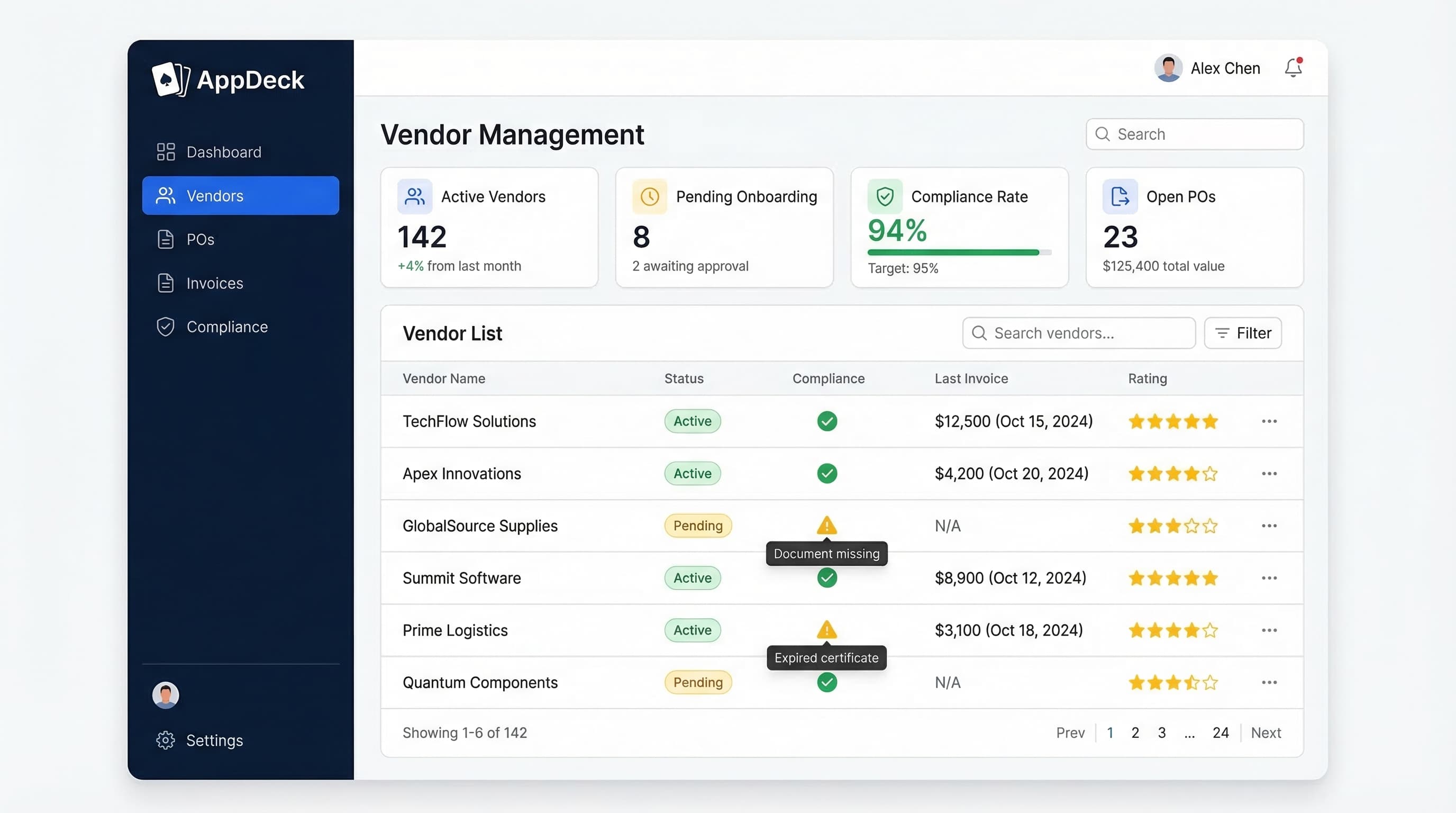
TL;DR: Comprehensive comparison of the best vendor portal software for 2026. Compare SAP Ariba, Coupa, Jaggaer, AppDeck, and 6 others. Features, pricing, and real user reviews. For the evaluation framework, RFP template, and feature criteria to apply BEFORE picking from this list, see our Vendor Portal Software Buyer's Guide.
Introduction
Choosing vendor portal software is one of the most impactful decisions a procurement leader will make. The right platform streamlines vendor onboarding, eliminates compliance gaps, and gives your finance team real-time spend visibility. The wrong one? Wasted budget, frustrated vendors who refuse to use it, and a procurement team still drowning in spreadsheets.
After advising 60+ organizations through vendor portal selection and implementation over 15 years, I've seen what works—and what doesn't. In this comprehensive comparison, I'll break down the top 10 vendor portal platforms with honest assessments of features, pricing, and real-world performance.
What is Vendor Portal Software?
Vendor portal software is a secure digital platform that centralizes all vendor-related activities and provides a self-service hub for your suppliers:
Core capabilities:
- Vendor onboarding and registration workflows
- Document management (W-9s, insurance certificates, contracts)
- Compliance tracking and certification management
- Purchase order management and approvals
- Invoice submission and payment tracking
- Vendor performance management and scorecards
- Communication and collaboration tools
- Spend analytics and reporting dashboards
Who needs this:
- Mid-market and enterprise companies managing 50+ vendors
- Procurement teams overseeing complex supply chains
- Organizations with strict vendor compliance requirements
- Companies wanting to reduce procurement cycle times
- Finance teams needing better spend visibility and AP automation
Why Vendor Portal Software Matters
The Email and Spreadsheet Problem
Before vendor portals, most organizations struggle with:
- ❌ Vendor onboarding taking 3-6 weeks with manual back-and-forth emails
- ❌ Insurance certificates and compliance documents scattered across inboxes
- ❌ No visibility into which vendors are out of compliance
- ❌ Purchase orders tracked in spreadsheets with no approval audit trail
- ❌ Invoices lost in email, leading to late payments and strained relationships
- ❌ Zero real-time spend analytics (quarterly reports are already outdated)
- ❌ Vendors calling AP constantly asking "where's my payment?"
The Portal Solution
Modern vendor portals solve these problems:
- ✅ Self-service vendor onboarding completed in days, not weeks
- ✅ Centralized document repository with automatic expiration alerts
- ✅ Proactive compliance tracking with real-time dashboards
- ✅ Digital PO workflows with full approval audit trails
- ✅ Vendor self-service invoice submission and payment status
- ✅ Real-time spend analytics and vendor performance scorecards
- ✅ Reduced AP inquiries—vendors check their own payment status
Result: 50% reduction in vendor onboarding time, 30% fewer compliance gaps, and 25% faster invoice processing.
Key Features to Compare
Before diving into specific platforms, here's what matters when evaluating vendor portal software:
1. Vendor Onboarding & Registration
Essential onboarding features:
- Self-service registration portal for new vendors
- Customizable onboarding forms and questionnaires
- Automated document collection (W-9, insurance, certifications)
- Approval workflows for vendor qualification
- Bulk vendor import capabilities
- Vendor profile management and updates
Why it matters: Manual onboarding is the single biggest bottleneck in procurement. If it takes weeks to onboard a vendor, your business units will find workarounds—and those workarounds create compliance risks.
2. Document Management & Compliance
Critical compliance features:
- Centralized document repository for all vendor files
- Automatic expiration tracking and renewal reminders
- Insurance certificate verification
- Diversity and sustainability certifications
- Regulatory compliance tracking (SOX, GDPR, industry-specific)
- Audit-ready reporting
Why it matters: One expired insurance certificate can expose your company to millions in liability. Manual tracking in spreadsheets guarantees gaps.
3. Purchase Order Workflows
Essential PO features:
- Digital PO creation and submission
- Multi-level approval workflows
- Budget checking and spend controls
- PO change order management
- Three-way matching (PO, receipt, invoice)
- Integration with ERP systems
4. Invoice Management
Must-have invoicing features:
- Vendor self-service invoice submission
- Automated invoice matching and validation
- Approval routing and exception handling
- Payment status visibility for vendors
- Early payment discount management
- Integration with AP systems
5. Performance Management
Key performance features:
- Vendor scorecards with customizable KPIs
- Delivery performance tracking
- Quality metrics and defect rates
- Responsiveness and communication scoring
- Contract compliance monitoring
- Performance trend analysis over time
6. Security & Access Controls
Essential security features:
- SOC 2 Type II compliance
- Two-factor authentication (2FA)
- Encryption at rest and in transit (AES-256, TLS 1.3)
- Role-based access controls
- Complete audit logs
- Data residency controls
Why it matters: Vendor portals contain sensitive financial data, contracts, and proprietary pricing. A security breach can expose your entire supply chain strategy.
7. Integration Capabilities
Critical integrations:
- ERP systems (SAP, Oracle, NetSuite, Microsoft Dynamics)
- Accounting software (QuickBooks, Xero)
- Payment platforms (Stripe, ACH, wire transfers)
- Contract management tools
- Business intelligence platforms
- Single sign-on (SSO) providers
8. Reporting & Analytics
Must-have analytics:
- Real-time spend dashboards
- Vendor performance analytics
- Compliance status reporting
- Procurement cycle time metrics
- Category spend analysis
- Custom report builder
The 10 Best Vendor Portal Software Platforms for 2026
1. AppDeck Vendor Portal
Best for: Mid-market companies wanting modern UX, real-time dashboards, and affordable pricing
Pricing: $299/month (unlimited vendors)
Key features:
- ✅ Self-service vendor onboarding with customizable registration forms
- ✅ Compliance tracking with automatic expiration reminders
- ✅ Purchase order management and approval workflows
- ✅ Vendor invoice portal with payment status visibility
- ✅ Real-time spend dashboards (connects to QuickBooks, NetSuite, Stripe)
- ✅ Vendor performance scorecards with customizable KPIs
- ✅ AES-256 encryption, RBAC, and audit logging (designing for SOC 2 Type II audit readiness)
- ✅ White-label branding (your logo, your colors, your domain)
- ✅ 30-minute setup (not 6 months)
Pros:
- Modern design that vendors actually enjoy using (high adoption rates)
- Real-time spend dashboards vs. static spreadsheet reports
- Flat pricing with no per-vendor fees (scales beautifully as you add vendors)
- Fast implementation (hours, not months)
- Excellent customer support with dedicated onboarding specialist
- Includes executive dashboard capabilities beyond vendor management
- Affordable at $299/mo vs. $50K-200K/year for enterprise platforms
- Flexible — use for vendors, clients, and internal teams on one platform
Cons:
- Newer platform (less brand recognition than SAP Ariba)
- Fewer advanced procurement features than full source-to-pay suites
- No built-in sourcing or auction capabilities yet (roadmap H2 2026)
- Smaller customer base (though growing rapidly)
Best fit:
- Mid-market companies (50-500 vendors)
- Growing businesses tired of spreadsheet-based vendor management
- Companies that want vendors to actually use the portal (UX matters)
- Organizations needing real-time spend visibility
- Procurement teams with budgets under $15K/year
- Companies wanting fast time-to-value
User review:
"We evaluated SAP Ariba and Coupa, but the implementation timelines and costs were staggering. AppDeck was live in an afternoon. Our vendors love the self-service portal—AP inquiries dropped 60% in the first month. The real-time spend dashboards changed how our CFO thinks about procurement. At $299/mo with unlimited vendors, the ROI was immediate." — VP of Procurement, Mid-Market Manufacturing Company ($85M Revenue)
Try it: AppDeck Vendor Portal
2. SAP Ariba
Best for: Large enterprises with complex global supply chains
Pricing: Custom ($50,000-$200,000+/year)
Key features:
- ✅ Comprehensive source-to-pay procurement suite
- ✅ Ariba Network (millions of connected suppliers globally)
- ✅ Strategic sourcing and auction capabilities
- ✅ Contract lifecycle management
- ✅ Invoice automation and payment processing
- ✅ Supply chain risk management
- ✅ Spend analytics and category management
- ✅ Supplier qualification and performance management
Pros:
- Largest supplier network in the world (millions of suppliers on Ariba Network)
- Comprehensive features covering every procurement function
- Strong for global procurement (multi-currency, multi-language, multi-entity)
- Deep SAP ERP integration (seamless if you're already on SAP)
- Proven at scale (used by Fortune 500 companies)
- Robust compliance and regulatory capabilities
- AI-powered insights and recommendations (improving in 2026)
- Extensive partner ecosystem
Cons:
- Very expensive ($50K-200K+ per year, plus implementation)
- 6-12 month implementation timeline (often longer)
- Complex user interface that vendors struggle with
- Requires dedicated admin team (1-3 FTEs)
- Massive overkill for mid-market companies
- Rigid workflows difficult to customize without consultants
- Vendor adoption challenges (suppliers often hate the complexity)
- Annual price increases of 5-8% are common
Best fit:
- Fortune 500 / Global 2000 companies
- Organizations with 5,000+ vendors globally
- Companies already running SAP ERP
- Enterprises needing full source-to-pay capabilities
- Budgets above $100K/year for procurement technology
- Highly regulated industries with complex compliance needs
User review:
"SAP Ariba is the gold standard for enterprise procurement—if you have the budget and patience. Implementation took 14 months and cost $350K. The feature set is unmatched, but our smaller vendors despise the interface. We spend significant time helping suppliers navigate the portal. For large enterprises, it's worth it. For anyone else, it's overkill." — Chief Procurement Officer, Fortune 500 Manufacturer
3. Coupa
Best for: Enterprise companies focused on spend management and AP automation
Pricing: Custom ($30,000-$150,000+/year)
Key features:
- ✅ Business Spend Management (BSM) platform
- ✅ Supplier portal with self-service capabilities
- ✅ Procurement and purchasing workflows
- ✅ Invoice processing and AP automation
- ✅ Expense management integration
- ✅ Treasury and payments
- ✅ Community intelligence (benchmarking data)
- ✅ AI-powered spend classification
Pros:
- Strong spend analytics and visibility across the organization
- Better UI than SAP Ariba (modern web interface)
- AI-powered insights using community intelligence data
- Good supplier portal experience (better than most enterprise platforms)
- Unified platform covering procurement, invoicing, expenses, and payments
- Growing rapidly with strong market position
- Coupa Pay simplifies payment processing
- Good mobile experience for approvals
Cons:
- Expensive ($30K-150K+ per year)
- 4-8 month implementation for full deployment
- Per-module pricing adds up quickly (procurement + invoicing + expenses + analytics)
- Complex configuration requires certified consultants
- Annual contracts with auto-renewal (watch the fine print)
- Supplier onboarding still requires effort
- Customization limitations on certain workflows
- Support quality varies by region and tier
Best fit:
- Enterprise companies ($500M+ revenue)
- Organizations wanting unified spend management
- Companies with 500-5,000 vendors
- Finance teams focused on AP automation and spend analytics
- Budgets of $50K-150K/year for procurement tech
User review:
"Coupa gave us visibility into spend we never had before. The AI-powered insights are genuinely useful—we identified $2M in savings in the first year. Implementation took 6 months and cost about $80K on top of the license. The supplier portal is decent but not great. Our vendors tolerate it, which is better than what we hear from Ariba users." — VP of Finance, Enterprise Technology Company
4. Jaggaer (formerly SciQuest)
Best for: Large enterprises with complex sourcing and manufacturing procurement needs
Pricing: Custom ($40,000-$100,000+/year)
Key features:
- ✅ Full source-to-pay suite
- ✅ Advanced supplier management and qualification
- ✅ Contract lifecycle management
- ✅ eProcurement and catalog management
- ✅ Sourcing and reverse auctions
- ✅ Invoice management and AP automation
- ✅ Supplier risk management
- ✅ Direct and indirect procurement support
Pros:
- Strong sourcing capabilities (best-in-class for strategic sourcing)
- Excellent for manufacturing procurement (direct materials)
- Comprehensive supplier management with risk monitoring
- Good for complex supply chains requiring multi-tier visibility
- Flexible deployment (cloud and on-premise options)
- Strong in healthcare and education verticals
- Deep catalog management capabilities
Cons:
- Dated user interface (being modernized but still behind)
- Expensive ($40K-100K+ per year)
- Long implementation (6-12 months typical)
- Steep learning curve for both procurement teams and suppliers
- Brand confusion (multiple name changes over the years)
- Smaller market share than SAP Ariba or Coupa
- Integration complexity with non-standard ERPs
- Customer support can be inconsistent
Best fit:
- Large manufacturers with complex direct procurement
- Healthcare systems and higher education institutions
- Organizations needing advanced sourcing and auction tools
- Companies with $40K+ annual procurement tech budgets
- Enterprises with 1,000+ vendors
User review:
"Jaggaer is incredibly powerful for sourcing—the auction capabilities saved us millions on raw materials contracts. But the UI feels like it was designed in 2012. Our procurement team took months to get comfortable, and our suppliers regularly complain about the portal. If sourcing is your priority, it's hard to beat. For vendor portal specifically, there are better options." — Director of Procurement, Industrial Manufacturing Company
5. GEP SMART
Best for: Enterprise procurement teams wanting AI-powered insights and unified procurement
Pricing: Custom ($25,000-$100,000+/year)
Key features:
- ✅ Unified procurement platform (source-to-pay)
- ✅ AI and machine learning capabilities throughout
- ✅ Supplier management and onboarding
- ✅ Sourcing and contract management
- ✅ Procurement and invoice automation
- ✅ Spend analytics with predictive insights
- ✅ Risk management and compliance
- ✅ Sustainability tracking
Pros:
- AI-powered throughout (not bolted on—native AI capabilities)
- Unified platform eliminates point solution sprawl
- Good analytics with predictive spend insights
- Modern interface (more current than Jaggaer or SAP Ariba)
- Strong consulting arm (GEP also provides procurement consulting)
- Growing innovation pace with regular feature releases
- Sustainability and ESG tracking built in
- Good for complex multi-entity organizations
Cons:
- Enterprise pricing ($25K-100K+ per year)
- Complex setup (3-6 months for full deployment)
- Better suited for large organizations (features overkill for mid-market)
- Requires dedicated resources to manage effectively
- Supplier portal is functional but not exceptional
- Smaller customer base than SAP Ariba or Coupa
- Consulting-driven model can increase costs
- Limited self-service configuration options
Best fit:
- Enterprise companies wanting AI-native procurement
- Organizations with 500-5,000+ vendors
- Companies valuing unified platform over best-of-breed
- Procurement teams wanting predictive analytics
- Budgets of $50K+ for procurement technology
User review:
"GEP SMART's AI capabilities are genuinely impressive—the spend classification and savings recommendations are better than anything we've seen. But it's an enterprise platform through and through. Implementation took 5 months with GEP's consulting team. Great for a $1B company, but not something I'd recommend for a mid-market org." — Senior Director of Procurement, Global Consumer Goods Company
6. Ivalua
Best for: Large organizations with complex, highly customizable procurement needs
Pricing: Custom ($30,000-$120,000+/year)
Key features:
- ✅ End-to-end spend management platform
- ✅ Supplier management and collaboration
- ✅ Sourcing and contract management
- ✅ Procurement and invoicing
- ✅ Highly configurable workflows
- ✅ Supplier quality management
- ✅ ESG and sustainability tracking
- ✅ Subcontractor management
Pros:
- Highly configurable (more customizable than most competitors)
- Strong for complex supply chains requiring unique workflows
- Good supplier quality management capabilities
- Growing market presence (recognized by Gartner and Forrester)
- Unified platform with real depth in each module
- Strong in European markets (French company with global reach)
- Flexible data model adapts to unique business requirements
Cons:
- Complex implementation (6-12 months typical)
- Requires dedicated resources to configure and maintain
- Expensive ($30K-120K+ per year)
- Steeper learning curve than modern platforms
- Customization can backfire (over-configured systems become brittle)
- Less intuitive UI than newer platforms
- Smaller ecosystem of implementation partners
- Supplier portal UX could be improved
Best fit:
- Large enterprises with unique procurement workflows
- Organizations needing deep customization
- Companies with 1,000+ vendors and complex supply chains
- European enterprises (strong regional presence)
- Budgets of $50K+ for procurement technology
User review:
"Ivalua's strength is its configurability—we were able to build procurement workflows that perfectly match our business processes. But that flexibility comes at a cost: implementation took 10 months and we need a dedicated admin. The vendor portal works but our suppliers say it's not the most intuitive. If you need customization, Ivalua delivers. If you want simplicity, look elsewhere." — VP of Strategic Sourcing, Large Energy Company
7. Precoro
Best for: Small to mid-market companies wanting simple, affordable procurement
Pricing: $35-$499/month (based on users and features)
Key features:
- ✅ Purchase order creation and approvals
- ✅ Supplier management and directory
- ✅ Budget tracking and spend controls
- ✅ Invoice management
- ✅ Receiving and three-way matching
- ✅ Approval workflows
- ✅ Basic reporting and analytics
- ✅ Integration with accounting software
Pros:
- Very affordable ($35-499/month, depending on plan)
- Easy to use with minimal training required
- Quick setup (live in days, not months)
- Good for small procurement teams (1-10 people)
- Clean, modern interface
- No long-term contracts required
- Solid PO management for the price
- Good accounting integrations (QuickBooks, Xero, NetSuite)
Cons:
- Limited vendor portal features (suppliers can't self-serve easily)
- Basic compliance tracking (no automated expiration alerts)
- Fewer integrations than enterprise platforms
- Limited spend analytics (basic reports only)
- No vendor performance scorecards
- Per-user pricing can add up for larger teams
- Not designed for complex supply chains
- Limited customization options
Best fit:
- Small businesses (under 50 vendors)
- Startups and growing companies
- Teams of 1-10 procurement staff
- Companies wanting simple PO management
- Budgets under $6K/year
- Organizations upgrading from spreadsheets
User review:
"Precoro was exactly what we needed to get off spreadsheets. Setup took a day, and our team picked it up immediately. The PO workflow is clean and simple. We outgrew it when we hit 100+ vendors and needed real compliance tracking and a proper vendor portal—that's when we switched to AppDeck. But for small teams, Precoro is a solid starting point." — Operations Manager, Growing E-Commerce Company
8. Kissflow Procurement Cloud
Best for: Companies wanting customizable procurement workflows on a no-code platform
Pricing: Starting at $1,500/month
Key features:
- ✅ Vendor management and onboarding
- ✅ Purchase order automation
- ✅ Invoice processing and approvals
- ✅ Customizable workflow builder (no-code)
- ✅ Budget management
- ✅ Catalog management
- ✅ Vendor self-service portal
- ✅ Analytics dashboards
Pros:
- Highly flexible no-code workflow builder
- Good user interface (modern design)
- Reasonable pricing for mid-market
- Customizable without developer resources
- Quick deployment (2-4 weeks)
- Vendor portal with self-service capabilities
- Good for unique workflows that don't fit standard tools
- Part of Kissflow platform (can extend to other business processes)
Cons:
- Not a dedicated vendor portal (procurement module within broader platform)
- Limited compliance features compared to purpose-built solutions
- Smaller ecosystem of procurement-specific integrations
- Vendor portal is basic compared to dedicated platforms
- Customization requires effort (flexible doesn't mean ready out of the box)
- Less procurement domain expertise than pure-play vendors
- Reporting could be more robust
- Support knowledge varies on procurement-specific questions
Best fit:
- Companies wanting customizable workflows
- Organizations already using or considering Kissflow
- Mid-market companies with unique procurement processes
- Teams with $18K-30K annual budget
- Companies that value flexibility over depth
User review:
"Kissflow let us build procurement workflows that match our business exactly—no other tool could accommodate our approval matrix. The vendor portal works but it's basic compared to dedicated solutions. If workflow customization is your priority, Kissflow is great. If vendor management depth is what you need, look at a purpose-built platform." — Procurement Manager, Professional Services Firm
9. Tipalti
Best for: Companies focused on vendor payments, AP automation, and global payables
Pricing: Starting at $129/month + per-transaction fees
Key features:
- ✅ Vendor onboarding with tax form collection (W-9, W-8)
- ✅ Global payment automation (190+ countries, 120+ currencies)
- ✅ Tax compliance and 1099 filing
- ✅ Invoice processing and AP automation
- ✅ Payment reconciliation
- ✅ Fraud detection and sanctions screening
- ✅ Self-service vendor payment portal
- ✅ Multi-entity support
Pros:
- Excellent payment automation (best-in-class for paying vendors globally)
- Strong tax compliance (automated W-9 collection, 1099 filing)
- Global payment capabilities (ACH, wire, PayPal, check in 190+ countries)
- Easy vendor onboarding for payment setup
- Good fraud detection and sanctions screening
- Self-service portal for payment status and tax forms
- Fast implementation (2-4 weeks for core payment features)
- Reduces AP workload significantly
Cons:
- Payment-focused (not a full vendor management platform)
- Per-transaction fees add up with high volume
- Limited procurement features (no PO management, no sourcing)
- Basic vendor management beyond payments and tax compliance
- No vendor performance scorecards
- No compliance tracking beyond tax documents
- Not a substitute for a full vendor portal (complementary tool)
- Pricing complexity (base fee + per-transaction + per-payee)
Best fit:
- Companies paying many vendors globally
- Organizations needing AP automation and tax compliance
- Businesses with contractor-heavy workforces
- Companies wanting to automate 1099 filing
- Often used alongside a vendor portal (AppDeck + Tipalti is common)
User review:
"Tipalti is phenomenal for paying vendors—we went from spending 40 hours a month on AP to about 5. Tax compliance is basically automated now. But it's not a vendor portal in the traditional sense. We use Tipalti for payments and AppDeck for the actual vendor management, compliance tracking, and PO workflows. Together they cover everything." — Controller, SaaS Company with 300+ Vendors
10. Custom-Built Solutions (SharePoint, Google Sheets, Email)
Best for: Companies with unique needs and strong IT teams (not recommended)
Pricing: Variable (internal time + tools)
What people try:
- SharePoint sites with custom lists and document libraries
- Google Sheets for vendor tracking and compliance
- Email folders for vendor documents
- Custom web applications built by internal IT
- Combination of Slack, Drive, and spreadsheets
Pros:
- Complete customization to your exact workflow
- Use tools your team already knows
- Potentially lower monthly software cost
Cons:
- ❌ No audit trails for compliance and regulatory requirements
- ❌ Security gaps (not designed for sensitive vendor data)
- ❌ No vendor self-service (everything routes through your team)
- ❌ Manual compliance tracking guarantees gaps
- ❌ No automated reminders when certifications expire
- ❌ Ongoing maintenance burden on IT team
- ❌ No vendor performance analytics
- ❌ Vendors despise the inconsistent experience
- ❌ Scales terribly (works at 20 vendors, breaks at 200)
- ❌ Liability risk when compliance documentation is incomplete
Our strong recommendation: Don't do this. Vendor compliance is too critical and the efficiency gains from purpose-built software are too significant. A proper vendor portal pays for itself within months through faster onboarding, reduced compliance risk, and fewer AP inquiries. At $299/month, there's no reason to duct-tape spreadsheets together.
Feature Comparison Table
| Feature | AppDeck | SAP Ariba | Coupa | Jaggaer | Precoro | Tipalti |
|---|---|---|---|---|---|---|
| Pricing | $299/mo | $50K-200K+/yr | $30K-150K+/yr | $40K-100K+/yr | $35-499/mo | $129/mo + fees |
| Setup Time | 30 minutes | 6-12 months | 4-8 months | 6-12 months | 1-3 days | 2-4 weeks |
| Vendor Onboarding | ✅ Self-service | ✅ Comprehensive | ✅ Good | ✅ Advanced | ⚠️ Basic | ✅ Payment-focused |
| Real-time Dashboards | ✅ Excellent | ✅ Advanced | ✅ Good | ⚠️ Basic | ❌ No | ⚠️ Payments only |
| Compliance Tracking | ✅ Auto-reminders | ✅ Comprehensive | ✅ Good | ✅ Good | ⚠️ Basic | ⚠️ Tax only |
| Mobile Access | ✅ Native apps | ✅ Native apps | ✅ Native apps | ⚠️ Web only | ✅ Web app | ⚠️ Web only |
| PO Management | ✅ Full workflow | ✅ Advanced | ✅ Advanced | ✅ Advanced | ✅ Good | ❌ No |
| Invoice Portal | ✅ Self-service | ✅ Advanced | ✅ Advanced | ✅ Good | ✅ Basic | ✅ Excellent |
| Performance Scorecards | ✅ Customizable | ✅ Advanced | ✅ Good | ✅ Good | ❌ No | ❌ No |
| Best For | Modern UX + value | Global enterprise | Spend management | Sourcing-heavy | Small teams | Payments & AP |
How to Choose the Right Vendor Portal Software
Step 1: Assess Your Requirements
By company size and vendor count:
- Under 50 vendors → Precoro or AppDeck
- 50-500 vendors → AppDeck
- 500-5,000 vendors → AppDeck, Coupa, or GEP SMART
- 5,000+ vendors globally → SAP Ariba or Coupa
By primary need:
- Real-time spend visibility → AppDeck
- Full source-to-pay suite → SAP Ariba or Coupa
- Vendor performance management → AppDeck or GEP SMART
- Advanced sourcing and auctions → Jaggaer or SAP Ariba
- Payment automation → Tipalti
- Simple PO management → Precoro
- Custom workflows → Kissflow
- Maximum configurability → Ivalua
Budget reality check:
- Under $5K/year → Precoro or AppDeck
- $5K-15K/year → AppDeck
- $15K-50K/year → AppDeck, GEP SMART
- $50K-150K/year → Coupa, Jaggaer, Ivalua
- $150K+/year → SAP Ariba
Step 2: Get Stakeholder Buy-In
Before selecting, talk to:
Chief Procurement Officer / VP of Procurement: "What are our biggest pain points in vendor management today? Where are we losing time and money?"
Finance / AP Team: "How many hours per week do you spend on vendor-related inquiries? What would reduce your workload?"
IT / Security: "What security certifications do we require? What ERP and accounting integrations are non-negotiable?"
Your vendors (yes, really): "What frustrates you about working with our procurement process? What would make it easier to do business with us?"
Step 3: Request Demos (But Be Strategic)
What to test during demos:
1. Onboard a real vendor (not their sample data)
- How long does the registration take?
- Can the vendor complete it without calling you?
- What documents are collected automatically?
2. Test the vendor experience (not just the admin view)
- Log in as a vendor yourself
- Submit a test invoice
- Check a payment status
- Upload a compliance document
- Does it feel intuitive or frustrating?
3. Review compliance capabilities
- Set up an expiring insurance certificate
- Does the system send automatic reminders?
- Can you see compliance status across all vendors at a glance?
- What does the audit trail look like?
4. Understand total cost
- What's included in base price?
- Per-vendor or per-user fees?
- Implementation and consulting costs?
- Training included or extra?
- Annual price increases?
- Contract length and termination fees?
Step 4: Run a Pilot
Pilot approach:
- Select 2-3 finalist platforms
- Onboard 10-20 real vendors on each
- Process actual POs and invoices through the system
- Survey vendors on their experience (this is critical)
- Measure time savings for your procurement team
- Evaluate compliance tracking effectiveness
- Make final decision based on data, not demos
Red flags during pilot:
- Vendors refusing to use the portal
- Takes MORE admin time than before
- Compliance documents still tracked manually outside the system
- Integration issues with your ERP or accounting software
- Vendor support is slow or unhelpful
- Hidden fees appear that weren't discussed
Step 5: Plan Your Rollout
Successful implementation requires:
1. Executive sponsorship (CPO or CFO must champion this)
- They must communicate the "why" to the organization
- Announcement: "This vendor portal is now our standard process for all vendor interactions"
2. Vendor communication plan (this is where most implementations fail)
- Send clear instructions to all vendors 2 weeks before go-live
- Provide step-by-step registration guide
- Offer phone/email support during transition
- Set a deadline: "All invoices must be submitted through the portal by [date]"
3. Phased rollout
- Phase 1: Top 20 vendors (highest spend) — first 2 weeks
- Phase 2: Next 50 vendors — weeks 3-4
- Phase 3: Remaining vendors — weeks 5-8
- Don't try to onboard 500 vendors in one week
4. Measure and iterate
- Track vendor adoption rates weekly
- Monitor AP inquiry volume (should decrease)
- Measure onboarding time (before vs. after)
- Gather vendor feedback after first month
- Adjust process based on real-world usage
Common Vendor Portal Mistakes to Avoid
Mistake #1: Over-Buying (Enterprise Platform When Mid-Market Will Do)
Problem: "SAP Ariba is the market leader, so we should use them."
Reality: A $100M company doesn't need a platform designed for Fortune 500 global supply chains. You'll pay $100K+ for features you'll never use, spend 12 months implementing, and frustrate your vendors with unnecessary complexity.
Solution: Match platform capabilities to your actual vendor count, complexity, and budget. A mid-market company with 200 vendors needs AppDeck, not SAP Ariba.
Mistake #2: Ignoring the Vendor Experience
Problem: Choosing a platform based only on what your procurement team sees, not what vendors experience.
Reality: If vendors hate the portal, adoption fails. They'll keep emailing invoices, calling about payment status, and sending documents via whatever channel they prefer. Your "vendor portal" becomes a glorified internal tool.
Solution: During evaluation, log in as a vendor. Submit an invoice. Upload a document. If it takes more than 5 minutes or requires a training manual, your vendors won't use it.
Mistake #3: Overlooking Total Cost of Ownership
Problem: Comparing only monthly subscription prices.
Reality:
- Platform A: $5,000/month + $80K implementation + 6 months setup = $140K first year
- Platform B: $299/month + $0 implementation + 30 minutes setup = $3.6K first year
Solution: Calculate 3-year total cost including implementation, consulting, per-vendor fees, internal IT time, and training.
Mistake #4: Not Involving Vendors in the Decision
Problem: Procurement picks tool, vendors refuse to use it, everyone keeps emailing.
Result: Wasted money and a portal nobody uses.
Solution: Ask 5-10 of your top vendors what they'd want in a portal. Include 2-3 vendors in the pilot. Their feedback is more valuable than any analyst report.
Mistake #5: No Change Management Plan
Problem: Launch portal, send login credentials, expect adoption.
Result: Vendors ignore the portal. Your team processes invoices through email and the portal simultaneously, doubling their work.
Solution:
- Communicate the "why" to vendors (faster payments, better visibility)
- Provide simple registration instructions (1-page guide)
- Set hard deadlines for portal-only submission
- Offer support during transition (phone line, email)
- Follow up with non-adopting vendors personally
Mistake #6: Treating the Portal Like a Document Dump
Problem: Moving from email attachments to portal uploads without rethinking the process.
Reality: Uploading 500 PDFs to a portal isn't transformation—it's digitizing a broken process.
Solution: Use the portal's automation capabilities. Set up compliance auto-reminders. Build approval workflows. Create vendor performance scorecards. Use real-time dashboards for spend visibility. The portal should make procurement smarter, not just digital.
Recommendations by Company Size
Small Business (Under 50 Vendors)
Recommended: Precoro ($35-499/mo) or AppDeck ($299/mo)
Why:
- Limited procurement complexity
- Small team (1-3 people managing vendors)
- Need to move fast and stay lean
- Budget-conscious
- Precoro for pure PO management, AppDeck if you need a real vendor portal
Skip: SAP Ariba, Coupa, Jaggaer, GEP SMART, Ivalua (massive overkill)
Mid-Market (50-500 Vendors)
Recommended: AppDeck
Why:
- Growing vendor base needs structure and automation
- Compliance tracking becomes critical at this scale
- Real-time spend dashboards provide CFO-level visibility
- Flat pricing means no surprises as vendor count grows
- Fast implementation means immediate ROI
- Modern UX drives vendor adoption
Consider: Coupa if you have enterprise budget and need full source-to-pay
Enterprise (500-5,000 Vendors)
Recommended: AppDeck, Coupa, or GEP SMART
Why:
- Complex approval workflows and multi-entity needs
- Advanced analytics and AI-powered insights valuable at scale
- Vendor performance management becomes critical
- AppDeck for modern UX and value, Coupa for spend management depth, GEP SMART for AI capabilities
Large Enterprise (5,000+ Vendors)
Recommended: SAP Ariba or Coupa
Why:
- Global supply chain complexity
- Multi-currency, multi-language, multi-entity requirements
- Deep ERP integration essential
- Full source-to-pay capabilities needed
- Budget supports enterprise pricing
- Dedicated admin team available
Pricing Deep Dive: What You Actually Pay
AppDeck Vendor Portal
- Base price: $299/month ($3,588/year)
- Implementation: $0 (DIY setup in 30 minutes)
- Training: Included
- Per-vendor fees: $0 (unlimited vendors)
- Support: Included (dedicated onboarding specialist)
- Real-time dashboards: Included
- First year total: $3,588
- Scales well: Same price for 50 or 500 vendors
SAP Ariba
- Base price: $50,000-$200,000+/year (custom quote)
- Implementation: $100,000-$350,000 (consulting required)
- Training: $10,000-$25,000
- Per-supplier fees: Often included, but network fees apply
- Support: Tiered (premium support costs extra)
- First year total: $160,000-$575,000
- Annual increases: Typically 5-8%
Coupa
- Base price: $30,000-$150,000/year (varies by modules)
- Implementation: $30,000-$100,000
- Training: $5,000-$15,000
- Per-module add-ons: Can increase cost significantly
- Support: Tiered
- First year total: $65,000-$265,000
- Annual increases: Typically 3-5%
Precoro
- Base price: $35-$499/month ($420-$5,988/year)
- Implementation: $0 (DIY setup)
- Training: Self-service (help docs and videos)
- Per-user pricing: Included in plan tiers
- Support: Email and chat
- First year total: $420-$5,988
My Personal Recommendation (After 15 Years)
After advising 60+ organizations through vendor portal selection, here's what I recommend for most companies:
For mid-market companies (80% of my clients): AppDeck
Why:
- Real-time spend dashboards give procurement and finance teams visibility they've never had
- Modern UX that vendors actually enjoy using (this is the #1 driver of successful adoption)
- 30-minute setup vs. months of implementation (immediate time-to-value)
- Flat $299/mo pricing with unlimited vendors (no surprises as you scale)
- Compliance auto-reminders eliminate the spreadsheet tracking burden
- Vendor self-service dramatically reduces AP inquiries
- Performance scorecards bring accountability to vendor relationships
When I'd choose alternatives:
- Global enterprise with complex sourcing: SAP Ariba (you need the full source-to-pay suite and global supplier network)
- Enterprise focused on spend management: Coupa (if you have $50K+ budget and want unified BSM)
- Small team with simple PO needs: Precoro (best value for basic procurement automation)
- Payment automation focus: Tipalti (best-in-class for AP automation, pairs well with AppDeck)
- Manufacturing with heavy sourcing: Jaggaer (unmatched auction and direct procurement capabilities)
The Bottom Line
The best vendor portal is the one your vendors actually use. If vendors refuse to adopt the portal, you've wasted your money. Modern UX, self-service capabilities, and a friction-free experience drive adoption. Legacy enterprise platforms have features you'll never use but complexity that will frustrate your suppliers.
For most companies, that means AppDeck.
Frequently Asked Questions
What is vendor portal software?
Vendor portal software is a self-service web platform where third-party suppliers interact with your organization — submitting onboarding documents, viewing purchase orders, sending invoices, tracking payment status, updating compliance certifications, and communicating with procurement. It replaces the email-and-spreadsheet chaos of traditional vendor management with a centralized, audit-friendly system that both sides can access 24/7. Modern portals also handle electronic invoicing (e-invoicing), three-way matching with POs, contract storage, and performance scorecards. The best portals are vendor-experience first — if suppliers hate the interface, they won't adopt it and you'll lose the ROI.
How is vendor portal software different from a procurement or ERP system?
A procurement system (Coupa, Ariba, SAP) is the broader workflow engine for sourcing, contracts, requisitions, POs, and spend analytics. An ERP (SAP, Oracle, NetSuite) is the financial system of record holding GL, AP, and vendor master data. A vendor portal is the supplier-facing surface that lets vendors interact with both systems without your team copying data back and forth. Standalone portals work well when you need a clean supplier experience on top of an existing ERP. Enterprise procurement platforms usually include a portal as one module — but those modules are often the weakest part of the platform because they were designed for buyers, not suppliers.
How much does vendor portal software cost?
Standalone vendor portals start at $200-1,500/month for small portfolios (50-200 vendors) and scale to $30K-150K/year for mid-market deployments. Enterprise procurement suites with vendor portal modules (Coupa, Ariba, Ivalua, Jaggaer) cost $100K-1M+/year including implementation. Pricing models vary: per active vendor, per buyer seat, per transaction, or flat tier. Hidden costs include implementation consulting (often 1-3x first-year subscription for enterprise platforms), ERP integration, and vendor enablement (training and supporting your suppliers through adoption). Always model 3-year total cost including implementation, not just subscription.
Who should use vendor portal software?
Any organization with more than 50 active vendors, recurring invoicing, or formal compliance requirements benefits from a vendor portal. The clearest use cases are mid-market companies (200-2,000 vendors) where spreadsheets break but enterprise procurement suites are overkill, regulated industries (healthcare, financial services, government contractors) that require auditable compliance, and any company with a procurement team spending 30%+ of time on manual vendor administration. Small companies under 25 vendors can usually get by with shared drives and email — the portal cost exceeds the benefit until you cross the 50-100 vendor threshold.
When should we replace our current vendor portal?
Replace when one of these signals appears: (1) vendor adoption is below 60% — suppliers actively refuse to use the portal and revert to email, (2) your procurement team builds workarounds in spreadsheets because the portal can't do what they need, or (3) the platform can't integrate with your ERP or AP automation tool causing manual data entry. Don't replace for cosmetic reasons or because a competitor announced a feature you don't actually need. Migrations are painful — budget 6-12 months for enterprise replacements — so the cost of staying must clearly exceed the cost of moving. Most vendor portal problems are configuration issues, not platform problems.
Conclusion
Vendor portal software is essential for modern procurement, but choosing the wrong platform wastes money and creates more work than it eliminates.
Key takeaways:
- Match to your vendor count and complexity: Don't buy a Fortune 500 platform when you have 200 vendors
- Prioritize vendor experience: If vendors hate the portal, adoption fails and you're back to email
- Calculate total cost: Implementation and consulting fees often exceed the first year of subscription
- Get vendor buy-in: Include top vendors in evaluation—their experience determines success
- Real-time data wins: Modern procurement teams want dashboards, not quarterly spreadsheet reports
- Security is non-negotiable: SOC 2 Type II minimum for sensitive vendor and financial data
- Plan for adoption: Vendor communication and phased rollout determine whether the portal succeeds
Next steps:
- Audit your current vendor management process (count your vendors, identify pain points)
- Calculate how much time your team spends on manual vendor tasks each week
- Shortlist 2-3 platforms from this comparison based on your size and budget
- Request demos and test both the admin AND vendor experience
- Run a pilot with 10-20 real vendors before committing
- Get CFO/CPO sponsorship before purchase
- Plan a phased rollout with clear vendor communication
Your vendor portal impacts every procurement transaction and every vendor relationship. Choose wisely.
Related reading:
- The Complete Guide to Vendor Management
- Vendor Management Best Practices — 15 best practices with vendor onboarding checklist
- Customer Portal Software Comparison 2026 — If you also need a customer-facing portal
- Client Portal vs Customer Portal — Understand the differences between portal types

Founder & CEO, AppDeck
Serial entrepreneur with 20+ years building B2B software companies. Former executive managing 2,800+ employees across three continents. Vik reviews all AppDeck content for accuracy and practical relevance.
Share this article
Explore Related Solutions
Related Articles
Vendor Management Best Practices: Complete Guide for 2026
15 vendor management best practices for procurement teams. Covers onboarding, compliance, performance tracking, risk management, and technology.
Vendor Portal Software: Buyer's Guide to Features, Evaluation & Implementation (2026)
How to evaluate vendor portal software: core features, must-have capabilities, evaluation framework, and implementation pitfalls. For procurement leaders selecting their first or replacement platform.
What Is a Vendor Portal? The Complete Guide to Vendor Management Portals
Everything you need to know about vendor portals: what they are, key features, benefits, how to set one up, and software comparison. The definitive guide for procurement and operations teams.