
Vendor Portal Software: Buyer's Guide to Features, Evaluation & Implementation (2026)
How to evaluate vendor portal software: core features, must-have capabilities, evaluation framework, and implementation pitfalls. For procurement leaders selecting their first or replacement platform.
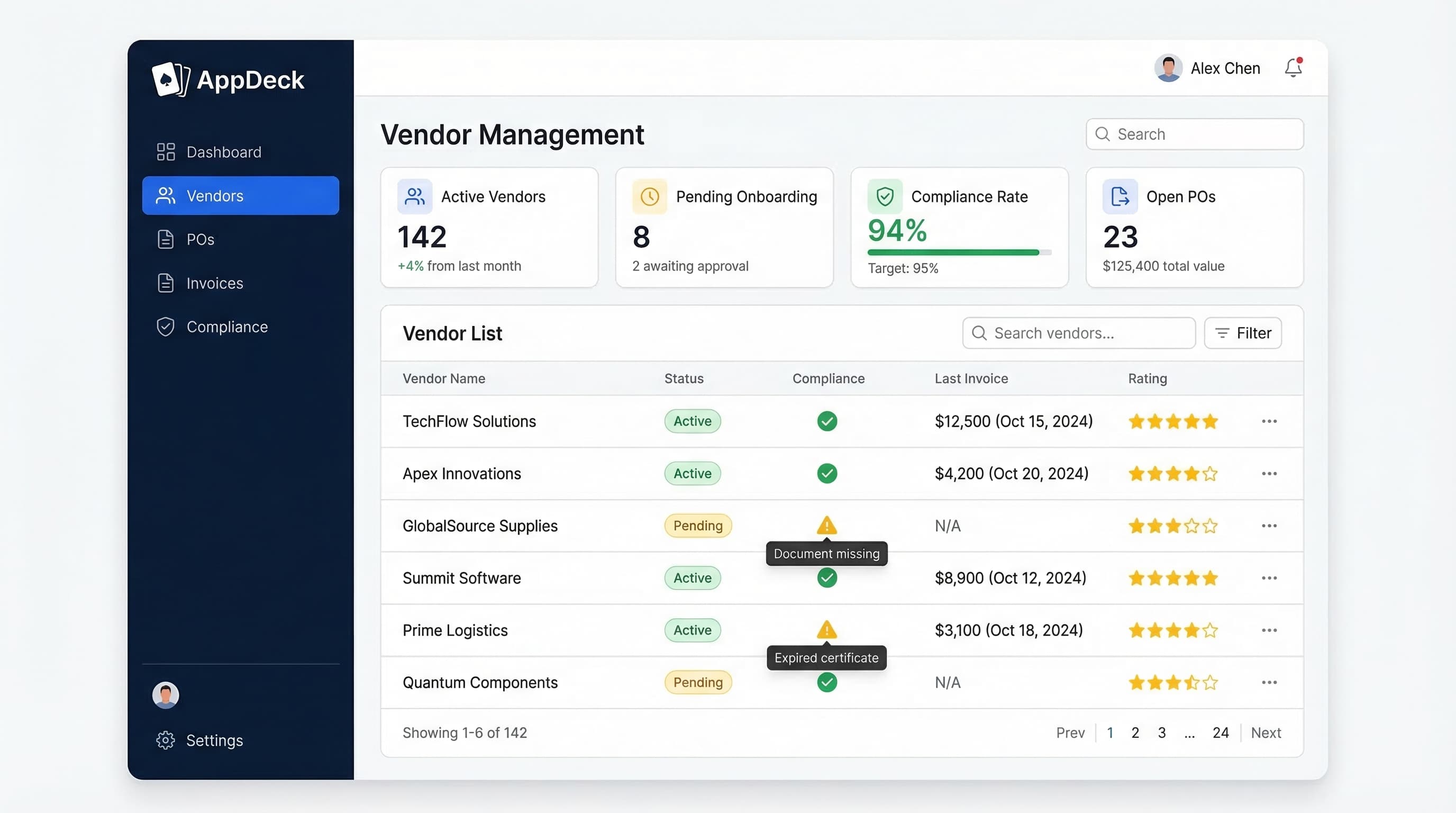
TL;DR: Use this buyer's guide to evaluate vendor portal software — core features, must-have capabilities, evaluation framework, and implementation pitfalls. For a side-by-side platform comparison, see our Vendor Portal Software Comparison 2026.
If you manage more than a dozen vendors, you already know the pain. Compliance documents scattered across email threads. Invoices stuck in approval limbo. Onboarding a new supplier takes weeks because nobody can find the right form.
I have spent 20 years building B2B software and managing vendor relationships across three continents. The pattern is always the same: companies start with spreadsheets, graduate to shared drives, bolt on an ERP module they half-configure, and then wonder why vendor management still feels like chaos.
Dedicated vendor portal software solves this by giving your suppliers a single, self-service hub for onboarding, compliance, invoicing, and communication. No more chasing documents. No more "did you get my email?" back-and-forth.
In this guide, I will compare the 8 best vendor portal software platforms for 2026 — from enterprise procurement suites to mid-market tools you can deploy in a day. I will cover features, pricing, honest pros and cons, and help you figure out which category actually fits your team.
Why Dedicated Vendor Portal Software Matters
Before we get into the platforms, let me address the two alternatives teams usually try first:
Spreadsheets and Shared Drives
This works when you have 5-10 vendors. Beyond that:
- ❌ No audit trail for compliance documents
- ❌ Version control nightmares (which W-9 is current?)
- ❌ Manual follow-up for every expiring certificate
- ❌ Zero visibility into approval bottlenecks
- ❌ No self-service — every vendor question hits your inbox
ERP Vendor Modules
SAP, Oracle, and NetSuite all have vendor management modules. They are better than spreadsheets, but:
- ❌ Designed for internal users, not vendor self-service
- ❌ Clunky supplier-facing interfaces that vendors hate using
- ❌ Configuration requires expensive consultants
- ❌ Locked into one ecosystem
- ❌ Overkill if you just need vendor onboarding and compliance
A purpose-built vendor portal platform sits in between. It gives vendors a clean, self-service experience while giving your procurement and operations teams the compliance tracking, document management, and reporting they actually need.
If you are still exploring whether a vendor portal is even the right move, start with our what is a vendor portal guide for the fundamentals.
What to Look for in Vendor Portal Software
After evaluating dozens of platforms and talking to hundreds of procurement teams, here are the 8 criteria that matter most:
1. Vendor Onboarding Workflows
How easy is it to bring a new vendor into the system? Look for customizable onboarding checklists, automated document collection, and approval routing. The best platforms let you create different onboarding workflows for different vendor categories — a janitorial service does not need the same onboarding as a cloud infrastructure provider.
For a deeper dive on structuring this process, see our vendor onboarding process guide.
2. Compliance and Risk Tracking
This is the number one reason teams invest in vendor portal software. You need automated expiration tracking for insurance certificates, business licenses, SOC 2 reports, and whatever else your compliance team requires. The platform should send reminders to vendors automatically — not create more work for your team.
Our vendor compliance checklist covers the documents you should be collecting.
3. Document Management
Every vendor relationship generates paper: contracts, NDAs, certificates of insurance, W-9s, MSAs. Your portal needs version control, search, and the ability to restrict who sees what. Bonus points for e-signature integration.
4. PO and Invoice Management
Some vendor portals handle the full purchase order and invoice cycle. Others just handle onboarding and compliance, leaving PO/invoicing to your accounting system. Neither approach is wrong — it depends on where your current bottlenecks are.
5. Integrations
At minimum, your vendor portal should connect to your accounting system (QuickBooks, NetSuite, Xero) and your ERP if you have one. API access matters too — your team will want to pull vendor data into internal dashboards and workflows.
6. Reporting and Analytics
You should be able to answer basic questions without exporting to Excel: How many vendors are non-compliant? What is the average onboarding time? Which vendors have expiring documents this month? The best platforms give you real-time dashboards for these metrics.
7. Security
Your vendor portal holds sensitive business data — contracts, financial information, tax documents. Look for SOC 2 certification, SSO support, role-based access controls, and encryption at rest and in transit. Our vendor risk assessment template can help you evaluate the security posture of any platform you are considering.
8. Pricing Model
Enterprise platforms charge custom pricing that typically starts north of $50K/year. Mid-market tools range from $35/user/month to flat-rate plans around $300-1,500/month. Per-user pricing can get expensive fast if you need to give portal access to hundreds of vendors.
The 8 Best Vendor Portal Software Platforms for 2026
I have organized these from most accessible to most enterprise-focused. Each review is based on product demos, published documentation, customer interviews, and my own team's evaluation process.
1. AppDeck
Best for: Mid-market companies wanting fast setup and white-label branding
AppDeck's vendor portal is the platform my team built, so I will be upfront about that. I will also be honest about where we are strong and where we are still growing.
We designed AppDeck specifically for operations and procurement teams that need a professional vendor portal without a six-month implementation. The platform covers vendor onboarding, compliance tracking, document management, and real-time reporting dashboards — all configurable through a no-code builder.
Key features:
- ✅ 30-minute setup with guided onboarding wizard
- ✅ Customizable vendor onboarding workflows
- ✅ Automated compliance document tracking with expiration alerts
- ✅ White-label portal with your branding and custom domain
- ✅ Real-time dashboards for vendor compliance and performance
- ✅ SOC 2 certified with SSO and role-based access
- ✅ Integrations with QuickBooks, NetSuite, Xero, and Zapier
- ✅ API access for custom integrations
Pricing: $299/month (flat rate, unlimited vendors)
Pros:
- Genuinely fast to set up — most teams are live within a day
- White-label branding means vendors see your company, not ours
- Flat-rate pricing means no surprises as your vendor count grows
- Modern UI that vendors actually enjoy using
- Works for vendor management as well as customer portals on the same platform
Cons:
- Newer platform — we launched in 2024, so we have a smaller user community than established players
- No built-in purchase order or invoice management (we integrate with accounting tools instead)
- Advanced procurement features like sourcing and auctions are not available
Bottom line: If you need a vendor portal that is up and running this week — not this quarter — AppDeck is the fastest path. The flat-rate pricing is a major advantage for companies managing 50+ vendors. For a full walkthrough of what the platform can do, visit our vendor portal product page.
2. Coupa
Best for: Enterprise procurement teams needing a full procure-to-pay suite
Coupa is one of the giants in procurement software. Their Business Spend Management platform covers everything from sourcing and procurement to invoicing and payments. The vendor portal is part of a much larger ecosystem.
Key features:
- ✅ Full procure-to-pay workflow
- ✅ Supplier risk management with third-party data enrichment
- ✅ Spend analytics and budget tracking
- ✅ Invoice automation with three-way matching
- ✅ Supplier diversity tracking
- ✅ Community.ai for benchmarking data
Pricing: Enterprise (custom pricing, typically $100K+/year)
Pros:
- Deep procurement capabilities — if P2P is your primary need, Coupa delivers
- Strong spend analytics and community benchmarking
- Large customer base with extensive partner ecosystem
- Good mobile experience for approvals
Cons:
- Implementation takes 3-6 months minimum
- Enterprise pricing puts it out of reach for mid-market companies
- The vendor portal experience is secondary to the buyer experience
- Can be overwhelming — most teams only use 30-40% of the features they pay for
Bottom line: Coupa makes sense if procurement is a strategic function at your company and you need source-to-pay automation. If you just need a vendor portal for onboarding and compliance, it is more than you need.
3. SAP Ariba
Best for: Large enterprises already invested in the SAP ecosystem
SAP Ariba claims the largest B2B commerce network in the world, connecting millions of buyers and suppliers. If you are running SAP for ERP, Ariba is the natural choice for vendor management and procurement.
Key features:
- ✅ Ariba Network with millions of registered suppliers
- ✅ Supplier lifecycle management
- ✅ Procurement automation and catalog management
- ✅ Deep integration with SAP S/4HANA and SAP ECC
- ✅ Supplier risk monitoring
- ✅ Contract management
Pricing: Enterprise (custom pricing, typically $150K+/year plus network fees)
Pros:
- Massive supplier network — many of your vendors may already be on Ariba
- Seamless integration with SAP ERP systems
- Comprehensive procurement feature set
- Strong in regulated industries (pharma, manufacturing, government)
Cons:
- Steep learning curve for both buyers and suppliers
- UI feels dated compared to modern platforms
- Expensive implementation, often requiring SAP consultants
- Suppliers frequently complain about the portal experience
- Overkill if you are not on SAP
Bottom line: If your company runs on SAP and your procurement team needs deep ERP integration, Ariba is the standard. For everyone else, the complexity and cost are hard to justify.
4. Jaggaer
Best for: Organizations with complex, multi-category procurement workflows
Jaggaer (formerly SciQuest and BravoSolution) offers a modular source-to-pay platform that handles direct materials, indirect spend, and services procurement. They are particularly strong in manufacturing and higher education.
Key features:
- ✅ Source-to-pay platform with modular deployment
- ✅ Supplier management and performance scoring
- ✅ Advanced sourcing with optimization tools
- ✅ Contract lifecycle management
- ✅ Catalog management for direct and indirect materials
- ✅ Configurable approval workflows
Pricing: Enterprise (custom pricing, typically $75K+/year)
Pros:
- Flexible modular architecture — buy only what you need
- Strong in complex procurement categories (direct materials, services)
- Good analytics and reporting capabilities
- Handles multi-entity, multi-currency environments well
Cons:
- Implementation is complex and time-intensive (4-8 months typical)
- The user interface has improved but still feels enterprise-grade (read: not intuitive)
- Documentation could be better
- Smaller market presence than Coupa or SAP Ariba means fewer integration partners
Bottom line: Jaggaer works well for organizations that need flexible procurement workflows across multiple categories. The modular approach means you can start with vendor management and add sourcing later. But plan for a serious implementation effort.
5. GEP SMART
Best for: Procurement teams wanting AI-powered automation
GEP SMART is a unified procurement platform that has invested heavily in AI capabilities. Their platform covers sourcing, procurement, supplier management, and spend analytics — with machine learning baked into recommendations and automation.
Key features:
- ✅ Unified source-to-pay platform
- ✅ AI-powered spend classification and insights
- ✅ Supplier risk monitoring with predictive analytics
- ✅ Smart invoice processing with ML-based matching
- ✅ Category management tools
- ✅ Modern, cloud-native interface
Pricing: Enterprise (custom pricing, typically $80K+/year)
Pros:
- AI capabilities are genuinely useful — spend classification is particularly strong
- Modern UI that is easier to learn than legacy platforms
- Good supplier collaboration features
- Strong consulting arm can help with procurement strategy
Cons:
- Enterprise-only — no self-serve or mid-market pricing
- AI features require clean data to be effective (garbage in, garbage out)
- Smaller customer base than Coupa or SAP Ariba
- Some features feel like they are still maturing
Bottom line: If your procurement team cares about AI-powered automation and you have the budget for an enterprise platform, GEP SMART is worth evaluating. The UI is noticeably more modern than SAP Ariba or Jaggaer.
6. Ivalua
Best for: Companies that need highly configurable procurement workflows
Ivalua positions itself as the most configurable procurement platform on the market. Their claim is that you can tailor every workflow, form, and process without custom code — and from what I have seen, that is mostly true.
Key features:
- ✅ Highly configurable workflows without custom development
- ✅ Supplier collaboration portal with good UX
- ✅ Full source-to-pay coverage
- ✅ Supplier risk and performance management
- ✅ Environmental and sustainability tracking
- ✅ Single-platform architecture (no bolt-on acquisitions)
Pricing: Enterprise (custom pricing, typically $100K+/year)
Pros:
- Genuinely configurable — most changes can be made by admin users, not developers
- Supplier-facing portal is better than most enterprise platforms
- Single-platform architecture means everything works together natively
- Growing quickly with strong customer satisfaction scores
Cons:
- Configuration flexibility means you need clear requirements — otherwise you spend months tweaking
- Smaller partner and integration ecosystem than Coupa or SAP
- Implementation still takes 3-6 months for full deployment
- North American market presence is growing but not yet on par with European presence
Bottom line: Ivalua is the best choice among enterprise platforms if configurability is your top priority. The supplier-facing portal is genuinely good, which matters for vendor adoption. Just make sure you have clear requirements before you start configuration.
7. Precoro
Best for: SMBs wanting affordable purchase order management with a vendor portal
Precoro is a procurement tool focused on purchase orders, approvals, and budget tracking. The vendor portal is more of an add-on than the core product — but for small teams that primarily need PO management with some vendor self-service, it gets the job done.
Key features:
- ✅ Purchase order creation and approval workflows
- ✅ Budget tracking by department or project
- ✅ Vendor portal for PO and invoice self-service
- ✅ Receipt matching and three-way matching
- ✅ Integrations with QuickBooks, Xero, and NetSuite
- ✅ Document storage for contracts and agreements
Pricing: From $35/user/month (vendor portal requires additional configuration)
Pros:
- Affordable entry point for small teams
- Simple, clean interface that does not require training
- Good PO and approval workflow capabilities
- Quick setup compared to enterprise platforms
Cons:
- Vendor portal features are limited — mostly PO and invoice visibility
- No compliance tracking or automated document collection
- Per-user pricing gets expensive if you need many internal users
- Limited vendor onboarding workflows
- Not ideal if vendor management (rather than PO management) is your primary need
Bottom line: Precoro is a solid PO management tool. If your main pain is purchase order chaos and you want vendors to be able to view POs and submit invoices, it works. If you need comprehensive vendor management, look elsewhere.
8. Kissflow Procurement Cloud
Best for: Teams that want to build custom procurement workflows without coding
Kissflow is a low-code platform with a procurement-specific product. It is designed for teams that want to automate procurement processes — including vendor management — without relying on IT or developers.
Key features:
- ✅ Low-code workflow builder for procurement processes
- ✅ Vendor onboarding and management workflows
- ✅ Purchase requisition and PO automation
- ✅ Invoice management
- ✅ Customizable forms and approval chains
- ✅ Basic reporting and analytics
Pricing: From $1,500/month
Pros:
- Easy to customize workflows without technical skills
- Good for non-technical procurement teams
- Flexible enough to handle unique business processes
- Vendor portal can be tailored to your specific requirements
Cons:
- Not procurement-specialized — it is a low-code tool adapted for procurement
- Compliance tracking and risk management features are basic
- Reporting is limited compared to dedicated procurement platforms
- The "build it yourself" approach means more upfront configuration time
- Limited pre-built integrations with accounting and ERP systems
Bottom line: Kissflow makes sense if your procurement workflows are unique and you need the flexibility to build custom processes. If you want something that works out of the box for standard vendor management, a purpose-built tool will get you there faster.
Vendor Portal Software Comparison Table
Here is how all 8 platforms stack up across the criteria that matter most:
| Feature | AppDeck | Coupa | SAP Ariba | Jaggaer | GEP SMART | Ivalua | Precoro | Kissflow |
|---|---|---|---|---|---|---|---|---|
| Vendor Onboarding | ✅ | ✅ | ✅ | ✅ | ✅ | ✅ | Limited | ✅ (custom) |
| Compliance Tracking | ✅ | ✅ | ✅ | ✅ | ✅ | ✅ | ❌ | Basic |
| Document Management | ✅ | ✅ | ✅ | ✅ | ✅ | ✅ | Basic | ✅ (custom) |
| PO/Invoice Management | Via integration | ✅ | ✅ | ✅ | ✅ | ✅ | ✅ | ✅ |
| Reporting Dashboards | ✅ | ✅ | ✅ | ✅ | ✅ | ✅ | Basic | Basic |
| White-Label Branding | ✅ | ❌ | ❌ | ❌ | ❌ | ❌ | ❌ | ❌ |
| SOC 2 Certified | ✅ | ✅ | ✅ | ✅ | ✅ | ✅ | ✅ | ✅ |
| SSO Support | ✅ | ✅ | ✅ | ✅ | ✅ | ✅ | ✅ | ✅ |
| API Access | ✅ | ✅ | ✅ | ✅ | ✅ | ✅ | ✅ | ✅ |
| Setup Time | 1 day | 3-6 months | 4-8 months | 4-8 months | 3-6 months | 3-6 months | 1-2 weeks | 2-4 weeks |
| Best For | Mid-market | Enterprise | SAP shops | Complex procurement | AI-powered | Configurable | SMB PO mgmt | Custom workflows |
| Starting Price | $299/mo | Custom ($100K+/yr) | Custom ($150K+/yr) | Custom ($75K+/yr) | Custom ($80K+/yr) | Custom ($100K+/yr) | $35/user/mo | $1,500/mo |
Enterprise vs. Mid-Market: Which Category Do You Need?
This is the most important question to answer before you start evaluating platforms. Here is a simple framework:
You need an enterprise platform (Coupa, SAP Ariba, Jaggaer, GEP SMART, Ivalua) if:
- ✅ You manage 500+ vendors across multiple categories
- ✅ Procurement is a strategic function with a dedicated team of 10+
- ✅ You need source-to-pay automation (sourcing, contracts, POs, invoicing, payments)
- ✅ You are already on SAP, Oracle, or a major ERP
- ✅ You have budget for $75K-200K+/year in software plus implementation
- ✅ You can wait 3-8 months for full deployment
You need a mid-market platform (AppDeck, Precoro, Kissflow) if:
- ✅ You manage 20-500 vendors
- ✅ Your primary pain is vendor onboarding, compliance tracking, or communication
- ✅ You have a lean procurement/operations team (1-10 people)
- ✅ You use QuickBooks, Xero, or NetSuite for accounting
- ✅ You need to be live within days or weeks, not months
- ✅ Your budget is under $25K/year
Most companies I talk to fall into the mid-market category but start by evaluating enterprise tools because those are what Gartner and Forrester recommend. That is like test-driving a semi truck when you need a pickup. The enterprise tools are powerful, but the implementation cost, timeline, and ongoing complexity are significant.
If your primary need is giving vendors a self-service portal for onboarding, compliance documents, and communication, a mid-market vendor portal platform like AppDeck will get you there faster and at a fraction of the cost.
Implementation Tips: How to Roll Out Vendor Portal Software
Regardless of which platform you choose, these tips will improve your chances of a successful rollout:
Phase 1: Start with Your Top 20 Vendors
Do not try to onboard all vendors at once. Pick your 20 most active vendors — the ones your team communicates with weekly. Get them set up, collect feedback, and refine your workflows before expanding.
Phase 2: Nail the Vendor Experience
The biggest risk with any vendor portal is adoption. If vendors hate using the portal, they will find workarounds (email, phone calls, fax — yes, fax still happens). Test the vendor-facing experience yourself:
- ❌ Is the registration process confusing?
- ❌ Are there too many required fields?
- ❌ Is it clear what documents are needed?
- ✅ Can a vendor complete onboarding in under 15 minutes?
- ✅ Are automated reminders clear and helpful?
- ✅ Does the portal work well on mobile?
Phase 3: Automate Compliance Monitoring
Once your top vendors are onboarded, set up automated alerts for expiring documents. This is where vendor portal software delivers the most immediate ROI — your team stops manually tracking insurance certificates and license renewals.
Phase 4: Expand to All Vendors
Roll out to remaining vendors in batches of 20-50. Send a clear email explaining why you are moving to a portal, what vendors need to do, and how long it will take. Provide a phone number or chat option for vendors who need help.
Phase 5: Connect to Your Financial Systems
Once the vendor portal is running smoothly, integrate it with your accounting or ERP system. This eliminates duplicate data entry and ensures vendor master data stays in sync.
For more on structuring your vendor program, our vendor management best practices guide covers the full framework.
Frequently Asked Questions
What is vendor portal software?
Vendor portal software provides a secure, self-service web application where your suppliers can manage their relationship with your company. This typically includes onboarding, submitting compliance documents, viewing purchase orders, submitting invoices, and communicating with your procurement team. For a complete overview, read our what is a vendor portal guide.
How much does vendor portal software cost?
Costs range widely. SMB-focused tools like Precoro start at $35/user/month. Mid-market platforms like AppDeck offer flat-rate pricing around $299/month. Enterprise platforms (Coupa, SAP Ariba, Jaggaer, GEP SMART, Ivalua) typically start at $75K-200K+/year with additional implementation costs.
How long does implementation take?
Mid-market tools can be set up in a day to a few weeks. Enterprise platforms typically require 3-8 months for full deployment, including configuration, data migration, integration, testing, and change management.
Can vendor portal software integrate with my ERP?
Yes. Most platforms offer integrations with major ERP and accounting systems. Enterprise platforms have the deepest ERP integrations (especially SAP Ariba with SAP). Mid-market tools typically connect via pre-built integrations or API/Zapier for QuickBooks, NetSuite, and Xero.
What is the difference between a vendor portal and a customer portal?
A vendor portal is designed for your suppliers — the companies you buy from. It handles onboarding, compliance, invoicing, and procurement workflows. A customer portal is designed for your clients — the companies or people who buy from you. It handles project updates, support tickets, reporting, and file sharing. Some platforms, like AppDeck, support both on the same infrastructure.
How do I get vendors to actually use the portal?
Vendor adoption is the number one challenge. Three things help: (1) make the portal genuinely easy to use — test it yourself, (2) clearly communicate the benefit to vendors (faster payments, less back-and-forth), and (3) make it required for doing business with your company. If vendors can still email documents and get the same result, they will.
Do I need vendor portal software if I already have an ERP?
It depends on your ERP's vendor-facing capabilities. Most ERPs have vendor master data management, but the supplier-facing experience is an afterthought. If your vendors complain about your current system or avoid using it, a dedicated vendor portal will improve adoption and reduce manual work for your team.
What security features should a vendor portal have?
At minimum: SOC 2 certification (or equivalent), SSO/SAML support, role-based access controls, encryption in transit and at rest, audit logging, and two-factor authentication. For a comprehensive security evaluation framework, see our vendor risk assessment template.
Choosing the Right Vendor Portal Software
The best vendor portal software is the one your vendors will actually use. That might sound obvious, but I have watched companies spend six figures on enterprise procurement platforms only to find that 60% of their vendors refuse to log in because the interface is too complicated.
Start with your actual requirements. If you need a full procure-to-pay suite with sourcing, contracts, and spend analytics, the enterprise platforms (Coupa, SAP Ariba, Jaggaer, GEP SMART, Ivalua) are built for that. If your primary need is vendor onboarding, compliance tracking, and giving suppliers a professional self-service experience, a mid-market platform will deliver faster results at a fraction of the cost.
If you want to see how AppDeck handles vendor management specifically, explore our vendor portal product page or check out our complete vendor management guide for the broader strategy.
Related reading:

Founder & CEO, AppDeck
Serial entrepreneur with 20+ years building B2B software companies. Former executive managing 2,800+ employees across three continents. Vik reviews all AppDeck content for accuracy and practical relevance.
Share this article
Explore Related Solutions
Related Articles
Vendor Management Best Practices: Complete Guide for 2026
15 vendor management best practices for procurement teams. Covers onboarding, compliance, performance tracking, risk management, and technology.
Vendor Portal Software Comparison 2026: 10 Best Platforms Reviewed
Comprehensive comparison of the best vendor portal software for 2026. Compare SAP Ariba, Coupa, Jaggaer, AppDeck, and 6 others. Features, pricing, and real user reviews.
What Is a Vendor Portal? The Complete Guide to Vendor Management Portals
Everything you need to know about vendor portals: what they are, key features, benefits, how to set one up, and software comparison. The definitive guide for procurement and operations teams.