
Customer Portal Software Comparison 2026: 10 Best Platforms Reviewed
Compare the best customer portal software for 2026. Zendesk, Salesforce, Freshdesk, AppDeck, and 6 others reviewed. Features, pricing, and ratings.
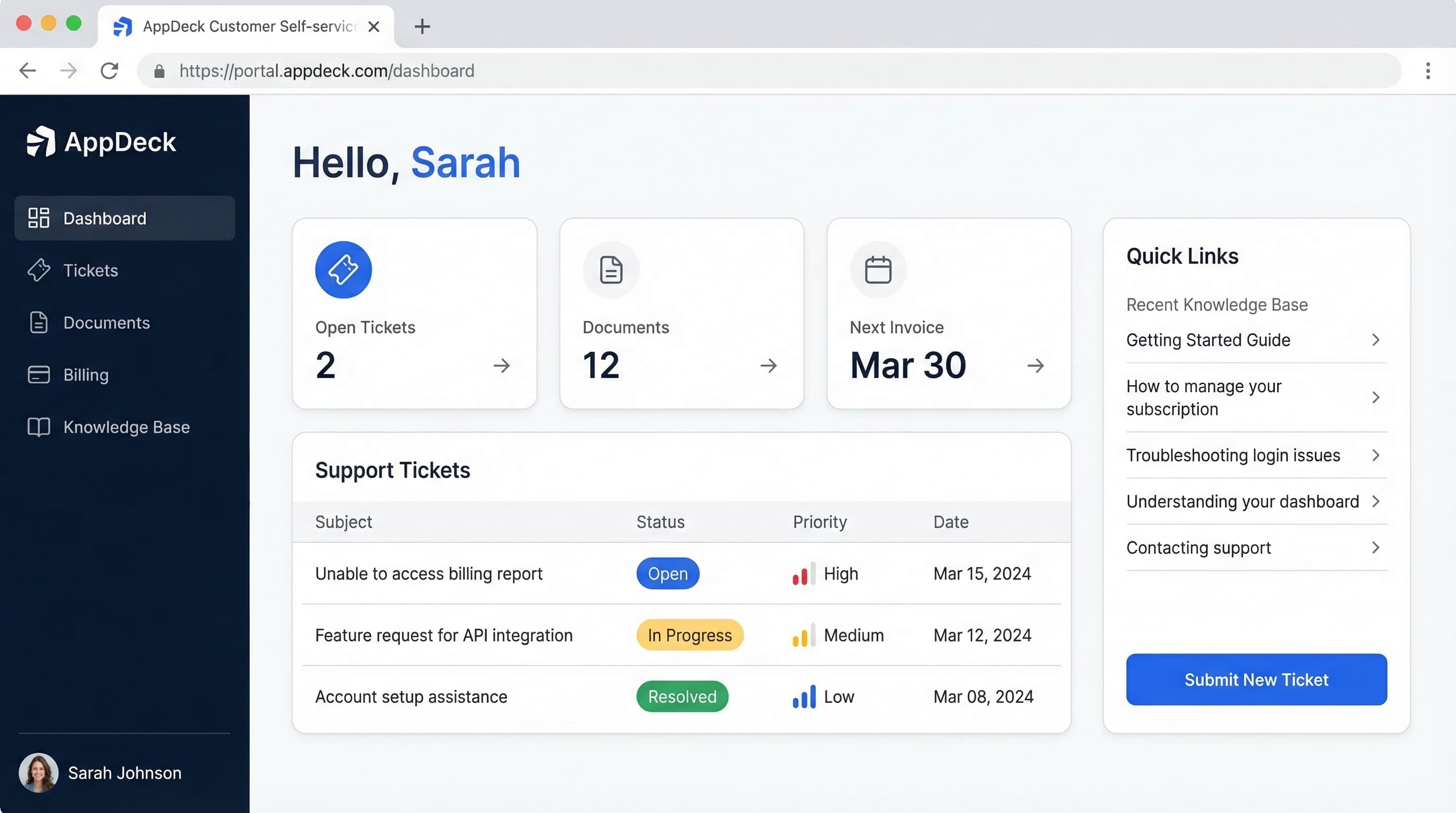
TL;DR: Compare the best customer portal software for 2026. Zendesk, Salesforce, Freshdesk, AppDeck, and 6 others reviewed. Features, pricing, and ratings.
Introduction
Choosing the right customer portal software is one of the most impactful decisions a customer success or operations leader will make. The right platform empowers your customers to self-serve, reduces support costs, and transforms your customer experience from reactive to proactive. The wrong one? A ghost town nobody logs into, wasted budget, and customers still flooding your inbox.
After helping 50+ companies select and implement customer portals over 12 years, I've seen what separates the platforms that drive adoption from the ones that collect dust. In this comprehensive comparison, I'll break down the top 10 customer portal platforms with honest assessments of features, pricing, and real-world performance.
What is Customer Portal Software?
Customer portal software is a secure, branded digital platform where your customers can independently manage their relationship with your business:
Core capabilities:
- Self-service account management (profile, preferences, settings)
- Support ticketing and case tracking
- Knowledge base and help documentation
- Secure document sharing and file exchange
- Billing, invoices, and payment management
- Custom dashboards with real-time data
- Notifications and communication center
- Analytics and reporting on customer activity
Who needs this:
- SaaS companies with complex products and ongoing support needs
- Professional services firms managing client engagements
- B2B companies with ongoing customer relationships and recurring revenue
- Any business wanting to reduce support costs while improving satisfaction
- Agencies managing multiple client accounts and deliverables
Why Customer Portal Software Matters
The Email/Phone Problem
Before customer portals, most businesses struggle with:
- ❌ Customers emailing or calling for basic account information
- ❌ Support teams buried under repetitive "where's my invoice?" tickets
- ❌ No self-service options (every request needs a human)
- ❌ Documents scattered across email threads and shared drives
- ❌ Customers waiting hours or days for simple answers
- ❌ Zero visibility into customer engagement or health
- ❌ Support costs scaling linearly with customer count
The Portal Solution
Modern customer portals solve these problems:
- ✅ 24/7 self-service for account info, documents, and billing
- ✅ Automated ticket routing and status tracking
- ✅ Searchable knowledge base deflects common questions
- ✅ Secure document sharing with audit trails
- ✅ Real-time dashboards showing project status, metrics, and KPIs
- ✅ Proactive notifications keep customers informed
- ✅ Analytics reveal customer engagement and health signals
Result: 40% reduction in support ticket volume, 60% improvement in customer satisfaction scores, and 30% lower support costs within the first year.
Key Features to Compare
Before diving into specific platforms, here's what matters when evaluating customer portal software:
1. Self-Service Capabilities
Essential self-service features:
- Account management (profile, preferences, team members)
- Order history and status tracking
- Service request submission and tracking
- Automated workflows for common tasks
- Personalized dashboards per customer
- Single sign-on (SSO) for seamless access
Why it matters: Every question a customer can answer themselves is a ticket your team doesn't have to handle. The best portals make self-service so easy that customers prefer it over contacting support.
2. Support & Ticketing
Critical support features:
- Ticket creation with categorization and priority
- Real-time status tracking for open cases
- Conversation history and thread management
- SLA tracking and escalation rules
- Multichannel support (email, chat, portal)
- Internal notes and collaboration for agents
Why it matters: When customers do need help, the portal should make it effortless to submit, track, and resolve issues. Poor ticketing drives customers back to email and phone.
3. Knowledge Base
Must-have knowledge base features:
- Searchable articles with rich media support
- Category and tag organization
- Version control for documentation
- Analytics on article performance (views, helpfulness)
- Suggested articles based on context
- Public and restricted content options
Why it matters: A well-built knowledge base can deflect 30-50% of support tickets. It's the single highest-ROI feature in any customer portal.
4. Document Management
Essential document features:
- Organized folder structure per customer
- Version control and history
- Secure sharing with permission controls
- Upload/download with drag-and-drop
- Support for all common file types
- Storage limits that make sense (not 500MB)
Why it matters: B2B relationships generate mountains of documents—contracts, reports, deliverables, invoices. A portal that can't handle document management forces customers back to email attachments.
5. Billing & Payments
Key billing features:
- Invoice history and download
- Online payment processing
- Subscription management
- Usage tracking and reporting
- Payment method management
- Automated payment reminders
Why it matters: "Can you resend my invoice?" is one of the most common support requests. Billing self-service alone can eliminate 15-20% of support tickets.
6. Branding & Customization
Customization requirements:
- White-label with custom domain
- Brand colors, logos, and typography
- Custom layouts and page structure
- Configurable navigation and menus
- Custom CSS/HTML for advanced needs
- Email template customization
Why it matters: Your portal is an extension of your brand. A generic-looking portal erodes trust. A branded portal reinforces professionalism and ownership.
7. Security
Essential security features:
- SOC 2 Type II compliance
- Two-factor authentication (2FA)
- Encryption at rest and in transit (AES-256, TLS 1.3)
- Role-based access controls (RBAC)
- Single sign-on (SSO) with SAML/OAuth
- Complete audit logs
- Data residency controls
- IP allowlisting
Why it matters: Customer portals contain sensitive business data—financials, contracts, support history. A security breach destroys trust and can trigger compliance violations.
8. Analytics & Reporting
Key analytics features:
- Customer login and engagement tracking
- Support ticket analytics (volume, resolution time, CSAT)
- Knowledge base performance metrics
- Customer health scoring
- Usage trends and adoption reports
- Exportable reports and dashboards
Why it matters: You can't improve what you can't measure. Portal analytics reveal which customers are engaged, which are at risk, and where your self-service experience is falling short.
The 10 Best Customer Portal Software for 2026
1. AppDeck Customer Portal
Best for: B2B companies wanting modern UX, real-time dashboards, and affordable flat pricing
Pricing: $199/month (unlimited customers)
Key features:
- ✅ Real-time customer dashboards (connects to your data sources)
- ✅ Modern, intuitive interface customers actually enjoy using
- ✅ Branded portal with custom domain and white-label
- ✅ Secure document sharing with version control
- ✅ Billing and invoice management
- ✅ Knowledge base and help center
- ✅ Support ticketing with SLA tracking
- ✅ Mobile-responsive design
- ✅ AES-256 encryption, RBAC, and audit logging (designing for SOC 2 Type II audit readiness)
- ✅ 30-minute setup (not 3 months)
Pros:
- Modern design that customers actually want to log into
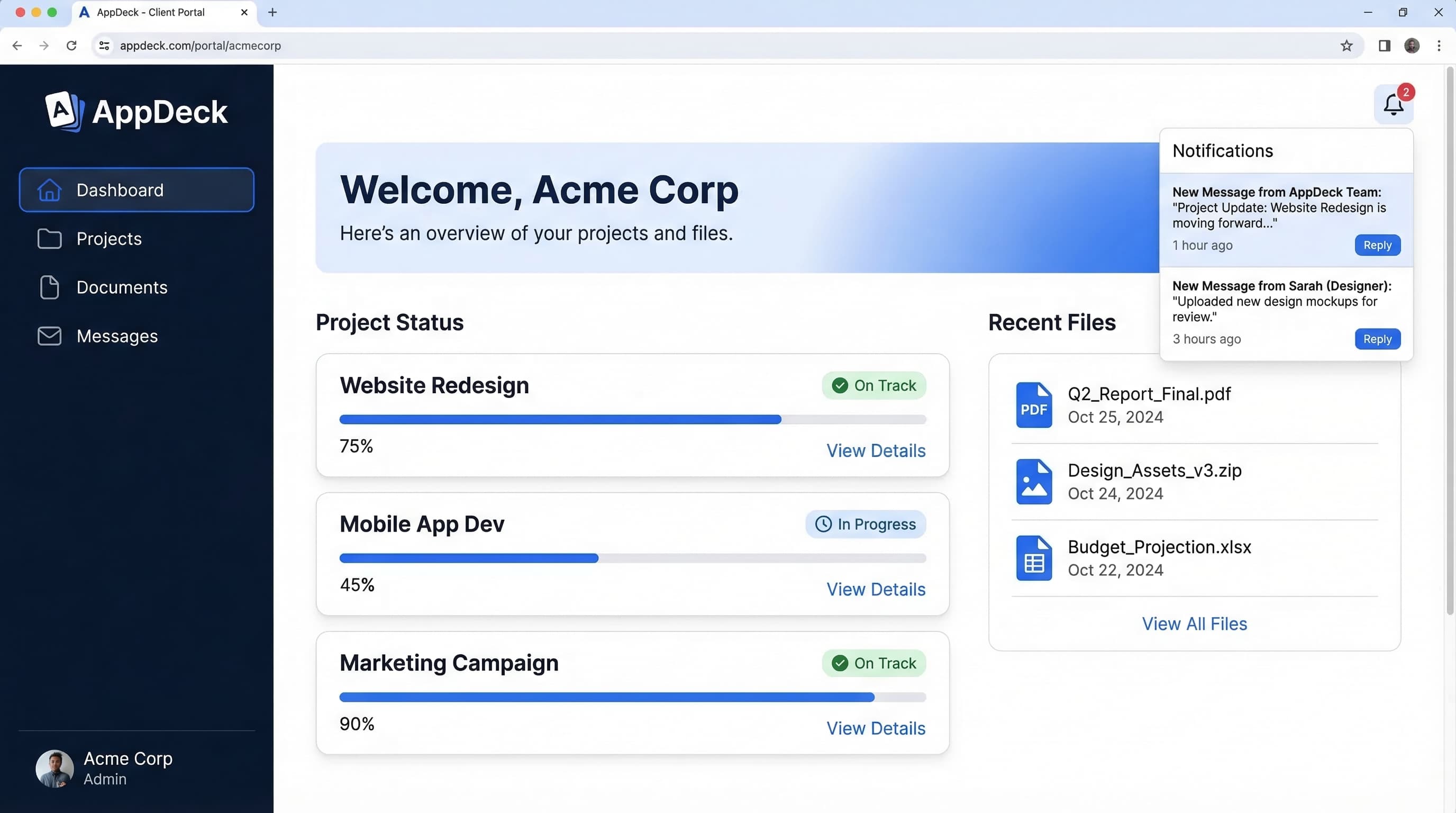
- Real-time dashboards showing live metrics, KPIs, and project status (not static PDFs)
- Flat pricing with no per-customer fees (scales beautifully as you grow)
- Fast implementation (hours, not months)
- Excellent customer support with dedicated onboarding
- White-label ready so it looks like your product, not a third-party tool
- Affordable at $199/mo vs. $25K-100K/year for enterprise platforms
- Flexible - use for customer portal, client portal, or partner portal
Cons:
- Newer platform (less brand recognition than Zendesk or Salesforce)
- Fewer native integrations than established ecosystems
- No built-in live chat yet (integrates with existing chat tools)
- Smaller customer base (though growing rapidly)
Best fit:
- SaaS companies (seed stage through enterprise)
- Professional services and agencies
- B2B companies with recurring customer relationships
- Organizations tired of cobbling together multiple tools
- Companies wanting real-time customer dashboards
- Budgets under $5K/year
User review:
"We replaced a Salesforce Experience Cloud portal that cost us $45K/year and took 4 months to implement. AppDeck was live in under an hour, our customers actually use it, and we're saving $40K annually. The real-time dashboards are what sealed it—our clients can see their project status and metrics without emailing us." — VP of Customer Success, Series B SaaS Company ($25M ARR)
Try it: AppDeck Customer Portal
2. Zendesk Guide + Support
Best for: Companies already in the Zendesk ecosystem needing a support-focused portal
Pricing: $55-$115/agent/month (Suite plans)
Key features:
- ✅ Help center and knowledge base
- ✅ Ticket submission and tracking
- ✅ Community forums
- ✅ AI-powered article suggestions
- ✅ Multichannel support (email, chat, phone, social)
- ✅ Customer satisfaction surveys
- ✅ Advanced reporting and analytics
- ✅ Extensive marketplace of integrations
Pros:
- Industry-leading ticketing system (best-in-class for support workflows)
- Massive integration ecosystem (1,500+ apps in marketplace)
- Strong knowledge base with AI-powered search and suggestions
- Community forums for peer-to-peer support
- Excellent analytics and reporting
- Reliable uptime and global infrastructure
- Large community of users and developers
- AI features for ticket deflection and agent assistance
Cons:
- Per-agent pricing adds up fast with growing teams ($55-115/agent/month)
- Support-centric only (no document management, billing, or dashboards)
- Generic portal design that's hard to make look like your brand
- Complex setup for anything beyond basic help center
- No real-time dashboards for customer data or metrics
- Limited document sharing (not designed for B2B file exchange)
- Feature fragmentation (Guide, Support, Chat are separate products)
- Price increases have been aggressive in recent years
Best fit:
- Companies already using Zendesk for support
- B2C companies with high-volume support needs
- Organizations prioritizing ticket deflection
- Teams wanting community forums
- Companies with 5-50 support agents
User review:
"Zendesk is excellent for support ticketing and knowledge base. But when our B2B clients asked for a real portal—document sharing, project dashboards, billing—we hit a wall. It's a help desk, not a customer portal. We ended up running Zendesk for tickets alongside AppDeck for the portal experience." — Director of Support, Mid-Market SaaS
3. Salesforce Experience Cloud
Best for: Large enterprises with complex CRM needs and existing Salesforce investment
Pricing: $25-$300/user/month (custom for portals, typically $25K-$100K+/year total)
Key features:
- ✅ Deep CRM integration (native Salesforce data)
- ✅ Custom portal builder with drag-and-drop
- ✅ Knowledge management
- ✅ Case management and support
- ✅ Community forums and groups
- ✅ AppExchange integrations
- ✅ Advanced analytics (Tableau)
- ✅ Workflow automation (Flow)
Pros:
- Deepest CRM integration of any portal (it IS your CRM data)
- Highly customizable with Lightning components and custom development
- Enterprise-grade security, compliance, and scalability
- Massive ecosystem of partners, consultants, and integrations
- Advanced automation with Salesforce Flow
- AI capabilities with Einstein for predictions and recommendations
- Comprehensive reporting with Tableau integration
Cons:
- Extremely expensive ($25K-100K+/year for portal implementations)
- Requires Salesforce expertise (you'll need a Salesforce admin or consultant)
- Long implementation (3-6 months minimum, often 6-12 months)
- Overwhelming complexity for straightforward portal needs
- Per-user pricing that punishes customer growth
- Consultant dependency for any significant customization
- Performance issues with heavily customized portals
- Steep learning curve for both admins and end users
Best fit:
- Fortune 500 companies with existing Salesforce investment
- Organizations with dedicated Salesforce admin teams
- Companies needing deep CRM-portal integration
- Enterprises with $50K+ annual portal budget
- Highly regulated industries needing Salesforce compliance features
User review:
"We spent $80K and 8 months building our Salesforce Experience Cloud portal. It's powerful, but our customers find it confusing. The interface feels like Salesforce, not like our brand. And every change requires our Salesforce consultant at $200/hour. For what we're paying, I expected something customers would love—not just tolerate." — CTO, Enterprise B2B Software Company
4. Freshdesk Customer Portal
Best for: Small to mid-size businesses wanting an affordable support portal
Pricing: $15-$79/agent/month
Key features:
- ✅ Self-service portal with ticket tracking
- ✅ Knowledge base with SEO optimization
- ✅ Community forums
- ✅ Multichannel support (email, phone, chat, social)
- ✅ AI-powered chatbot (Freddy AI)
- ✅ SLA management
- ✅ Canned responses and automation
- ✅ Customer satisfaction surveys
Pros:
- Very affordable compared to Zendesk ($15-79 vs. $55-115/agent)
- Easy to set up (live in days, not months)
- Solid knowledge base with good search and organization
- Free tier available for small teams (up to 2 agents)
- Good automation for ticket routing and workflows
- AI chatbot included on higher tiers
- Clean interface that's intuitive for agents and customers
- Freshworks ecosystem (CRM, marketing, ITSM)
Cons:
- Support-focused only (no document management or billing portal)
- Limited customization for portal branding
- No real-time dashboards or customer data visualization
- Per-agent pricing still adds up at scale
- Basic portal compared to purpose-built solutions
- Limited B2B features (no project tracking, document sharing)
- Community forums are basic compared to Zendesk
- Reporting lacks depth on higher-end needs
Best fit:
- Small businesses (1-50 employees) needing basic support portal
- Startups wanting affordable help desk with self-service
- B2C companies with straightforward support needs
- Teams evaluating Zendesk alternatives on a budget
- Companies already using Freshworks products
User review:
"Freshdesk is a great value for basic support and knowledge base. We launched our portal in two days and our customers can submit and track tickets. But it's really a help desk portal, not a client portal. We can't share documents, show project dashboards, or manage billing through it." — Customer Support Manager, Growing SaaS Startup
5. HubSpot Customer Portal
Best for: Companies already using HubSpot CRM for sales and marketing
Pricing: $45-$1,200/month (Service Hub)
Key features:
- ✅ Customer portal with ticket tracking
- ✅ Knowledge base
- ✅ Live chat and chatbot
- ✅ Shared inbox for team collaboration
- ✅ Customer feedback surveys (NPS, CSAT, CES)
- ✅ Reporting dashboards
- ✅ Playbooks for support processes
- ✅ Native CRM integration
Pros:
- Seamless HubSpot integration (sales, marketing, service in one platform)
- Clean, modern UI that's easy for customers to navigate
- Strong CRM foundation with unified customer view
- Free CRM with paid Service Hub tiers
- Good feedback tools (NPS, CSAT, CES surveys built in)
- Knowledge base is solid and easy to build
- Growing ecosystem of integrations and apps
- Excellent onboarding and educational resources (HubSpot Academy)
Cons:
- Portal only on Professional+ ($450+/month minimum for portal access)
- Limited portal customization compared to dedicated solutions
- No real-time data dashboards for customers
- Basic document sharing (not designed for B2B file exchange)
- Pricing jumps between tiers are steep
- Per-seat pricing on higher tiers adds up
- Portal feels like an add-on rather than a core product
- Limited white-label options (HubSpot branding persists)
Best fit:
- Companies already invested in HubSpot ecosystem
- Teams wanting sales + marketing + service in one platform
- Organizations with $500+/month Service Hub budget
- B2B companies with moderate portal needs
- Teams prioritizing CRM integration over portal depth
User review:
"We love HubSpot for sales and marketing, so adding the customer portal made sense. It works for basic ticket tracking and knowledge base. But it's clearly an afterthought—the portal is not as polished as the CRM. And at $1,200/month for Service Hub Enterprise, it's not cheap." — Head of Customer Success, Mid-Market B2B
6. Zoho Desk
Best for: Budget-conscious small businesses wanting a functional support portal
Pricing: $14-$40/agent/month
Key features:
- ✅ Self-service portal
- ✅ Knowledge base with article management
- ✅ Community forums
- ✅ Multichannel ticketing
- ✅ AI assistant (Zia)
- ✅ Workflow automation
- ✅ SLA management
- ✅ Customer happiness ratings
Pros:
- Most affordable option in this comparison ($14-40/agent)
- Solid feature set for the price point
- Zoho ecosystem integration (CRM, Projects, Books, etc.)
- AI assistant (Zia) available on higher tiers
- Customizable portal with basic branding options
- Multi-brand help centers on higher plans
- Good automation for small team efficiency
- Free tier for up to 3 agents
Cons:
- Interface feels dated compared to modern alternatives
- Support portal is basic (functional but not impressive)
- Limited B2B portal features (no document sharing, billing, dashboards)
- Per-agent pricing model
- Customer-facing UX isn't modern enough for brand-conscious companies
- Limited integrations outside Zoho ecosystem
- Setup complexity increases with customization needs
- Support quality varies (long response times reported)
Best fit:
- Small businesses with tight budgets
- Companies already using Zoho ecosystem
- Teams with 3-15 support agents
- Organizations prioritizing cost over UX polish
- B2C businesses with basic self-service needs
User review:
"Zoho Desk is solid for what you pay. The self-service portal works, and at $14/agent it's hard to beat on price. But the portal design feels a few years behind, and we can't customize it enough to match our brand. For a polished B2B client experience, we'd need something else." — Support Lead, Small B2B Company
7. Copilot
Best for: Professional services firms and agencies wanting a modern client portal
Pricing: $29-$69/user/month
Key features:
- ✅ Modern client portal with branded experience
- ✅ Messaging and communication hub
- ✅ File sharing and document management
- ✅ Billing and invoicing
- ✅ Forms and intake workflows
- ✅ Helpdesk and knowledge base
- ✅ Client onboarding workflows
- ✅ Custom apps and integrations
Pros:
- Beautiful, modern design that clients love
- All-in-one for client management (messaging, billing, files, forms)
- Great for service businesses (agencies, consultants, accountants)
- Quick setup (launch in days)
- Branded portal with custom domain
- Client onboarding workflows built in
- Invoicing and payments included
- Growing integration library
Cons:
- Per-user pricing gets expensive with internal team growth
- Designed for services (less suitable for SaaS or product companies)
- No real-time data dashboards (can't connect to external data sources)
- Limited analytics compared to enterprise solutions
- Smaller company with less infrastructure than major vendors
- Knowledge base is basic compared to Zendesk or Freshdesk
- No advanced ticketing or SLA management
- Limited scalability for high-volume customer bases
Best fit:
- Agencies and consultancies (marketing, design, accounting, legal)
- Professional services firms with 10-200 clients
- Freelancers and solopreneurs wanting a polished client experience
- Companies prioritizing messaging and file sharing over ticketing
- Service businesses wanting billing + portal in one tool
User review:
"Copilot is gorgeous and our clients love the experience. Messaging, file sharing, and billing all in one portal. But it's really built for service businesses. When we needed real-time dashboards showing client KPIs and metrics, we had to look elsewhere. We use Copilot for small client engagements and AppDeck for larger accounts." — Operations Director, Digital Agency
8. SuiteDash
Best for: Small businesses wanting an all-in-one business management suite
Pricing: $19-$99/month
Key features:
- ✅ Client portal with branded login
- ✅ Project management
- ✅ CRM and pipeline management
- ✅ Invoicing and payments
- ✅ File sharing
- ✅ Appointment scheduling
- ✅ Email marketing
- ✅ Learning management system (LMS)
Pros:
- Incredible value (CRM + portal + PM + billing for $19-99/mo)
- All-in-one platform replacing 5-6 separate tools
- White-label portal with custom domain
- No per-user fees on most features
- Lifetime deal options occasionally available
- Good for solopreneurs and very small teams
- Client onboarding automation
- Active development and feature additions
Cons:
- Jack of all trades, master of none (each feature is basic)
- Dated UI design that feels 2018-era
- Limited scalability for growing businesses
- Basic support ticketing (not a real help desk)
- No real-time dashboards or data visualization
- Learning curve due to feature sprawl
- Small development team (slower bug fixes)
- Limited integrations with third-party tools
- Performance issues reported with larger datasets
Best fit:
- Solopreneurs and freelancers wanting one tool for everything
- Very small businesses (1-5 employees)
- Budget-conscious startups needing CRM + portal + billing
- Companies willing to trade UX polish for value
- Service businesses with under 50 clients
User review:
"SuiteDash does a lot for $49/month—CRM, client portal, invoicing, project management. The value is insane. But each feature is a 6/10 instead of a 9/10. Our clients have commented that the portal feels dated. If you need something polished for bigger clients, look elsewhere." — Founder, Small Marketing Agency
9. Clinked
Best for: Financial services, legal firms, and professional organizations needing secure collaboration
Pricing: $119-$599/month
Key features:
- ✅ Branded client portal
- ✅ Secure file sharing with audit trails
- ✅ Group collaboration and discussions
- ✅ Task management
- ✅ Activity streams and notifications
- ✅ Mobile apps (iOS & Android)
- ✅ White-label options
- ✅ Virtual data room capabilities
Pros:
- Strong security focus (designed for regulated industries)
- Good document management with version control and audit trails
- White-label portal with custom branding
- Virtual data room features for deal management
- Group collaboration for team and client interaction
- Mobile apps for on-the-go access
- Compliance-friendly for financial and legal industries
- Reasonable mid-tier pricing
Cons:
- Dated interface compared to modern alternatives
- No support ticketing or help desk functionality
- Limited knowledge base features
- No billing or payments integration
- No real-time dashboards or data visualization
- Setup complexity for advanced configurations
- Limited integrations with common business tools
- Pricing jumps between tiers are significant
Best fit:
- Financial advisory firms and wealth management
- Law firms and legal departments
- Accounting firms managing client documents
- Companies needing virtual data room capabilities
- Organizations in regulated industries prioritizing compliance
User review:
"Clinked works well for sharing documents securely with our financial advisory clients. The audit trail is solid. But it's really a collaboration and file sharing tool, not a full customer portal. We had to add separate tools for support ticketing, knowledge base, and billing." — Managing Director, Financial Advisory Firm
10. Custom-Built Solutions (SharePoint, Notion, Google Sites)
Best for: Companies with unique needs and strong engineering teams (not recommended)
Pricing: Variable (internal engineering time + tools)
What people try:
- SharePoint sites with customer access
- Notion workspaces shared with clients
- Google Sites with embedded apps
- Custom web applications built in-house
- Retool or internal tool builders
Pros:
- Complete customization to your exact workflow
- Use tools your team already knows
- Potentially lower monthly subscription cost
- Full control over features and roadmap
Cons:
- ❌ No proper security for customer-facing portals
- ❌ Maintenance burden falls entirely on your team
- ❌ Poor customer experience (tools not designed for external users)
- ❌ No mobile optimization (clunky on phones and tablets)
- ❌ No support ticketing or knowledge base built in
- ❌ No billing integration or payment processing
- ❌ Engineering time is your most expensive resource
- ❌ Security liability if customer data is exposed
- ❌ Doesn't scale as customer count grows
Our strong recommendation: Don't build your own customer portal. The total cost of engineering time, maintenance, and security compliance will exceed any purpose-built platform within 6 months. Your engineers should be building your core product, not reinventing customer portal infrastructure.
Feature Comparison Table
| Feature | AppDeck | Zendesk | Salesforce | Freshdesk | HubSpot | Zoho Desk |
|---|---|---|---|---|---|---|
| Pricing | $199/mo | $55-115/agent | $25K-100K+/yr | $15-79/agent | $450-1,200/mo | $14-40/agent |
| Setup Time | 30 minutes | 1-2 weeks | 3-12 months | 1-3 days | 1-2 weeks | 1-3 days |
| Self-Service Portal | ✅ Full | ✅ Support-focused | ✅ Full (complex) | ✅ Basic | ✅ Basic | ✅ Basic |
| Knowledge Base | ✅ Included | ✅ Excellent | ✅ Advanced | ✅ Good | ✅ Good | ✅ Basic |
| Real-time Dashboards | ✅ Excellent | ❌ No | ⚠️ Custom build | ❌ No | ❌ No | ❌ No |
| White-Label | ✅ Full | ⚠️ Limited | ✅ Full | ⚠️ Limited | ⚠️ Limited | ⚠️ Limited |
| Billing Portal | ✅ Built-in | ❌ No | ⚠️ Custom build | ❌ No | ❌ No | ❌ No |
| Mobile Access | ✅ Responsive | ✅ Native apps | ✅ Responsive | ✅ Native apps | ✅ Responsive | ✅ Native apps |
| Security (SOC 2) | ⚠️ In development | ✅ Type II | ✅ Type II | ✅ Type II | ✅ Type II | ⚠️ Type I |
| Best For | B2B with real-time data | Support-heavy orgs | Large enterprises | SMBs on budget | HubSpot users | Budget-conscious |
How to Choose the Right Customer Portal Software
Step 1: Define Your Portal Goals
What are you trying to solve?
- Reduce support ticket volume → Zendesk, Freshdesk, or AppDeck
- Provide a branded client experience → AppDeck or Copilot
- Share documents securely → Clinked or AppDeck
- Billing and invoice self-service → AppDeck, Copilot, or SuiteDash
- Real-time dashboards and metrics → AppDeck
- All of the above → AppDeck
Budget reality check:
- Under $500/year → Zoho Desk (free tier) or Freshdesk (free tier)
- $500-3K/year → Freshdesk, Zoho Desk, or SuiteDash
- $3K-10K/year → AppDeck, Copilot, or Clinked
- $10K-50K/year → Zendesk, HubSpot, or AppDeck
- $50K+/year → Salesforce Experience Cloud
Step 2: Get Stakeholder Buy-In
Before selecting, talk to:
Customer Success team: "What are the top 10 questions customers ask repeatedly? What would reduce your ticket volume by 30%?"
Customers (3-5 key accounts): "What information do you wish you could access without contacting us? What would make working with us easier?"
Finance team: "What billing-related requests consume support time? Can customers access their invoices independently?"
Engineering/IT: "What security requirements do we need? What integrations are non-negotiable? How much engineering bandwidth do we have?"
Step 3: Request Demos (But Be Strategic)
What to test during demos:
1. Create a realistic customer experience (not their sample data)
- Set up a real customer account with your branding
- Upload actual documents and create sample tickets
- Navigate as if you were your customer
2. Test on actual devices (not just the presenter's screen)
- Open the portal on your phone
- Try submitting a ticket on a tablet
- Check load times on a slower connection
- Test the search functionality
3. Review security documentation
- Request their SOC 2 report
- Understand data encryption standards
- Review access control granularity
- Check SSO and authentication options
4. Understand total cost
- What's included in base price?
- Per-user or per-agent fees?
- Implementation costs?
- Training included or extra?
- Annual price increases?
- Contract length and termination fees?
Step 4: Run a Pilot
Pilot approach:
- Select 2-3 finalists
- Set up a portal for 5-10 real customers
- Measure self-service adoption over 30 days
- Survey pilot customers on experience
- Track ticket deflection rates
- Evaluate admin effort to maintain
- Make final decision based on data
Red flags during pilot:
- Customers still emailing instead of using portal
- Setup took much longer than promised
- Branding options are more limited than demo showed
- Performance issues with real data volumes
- Vendor support is slow or unhelpful
- Hidden fees appear during configuration
Step 5: Plan Your Rollout
Successful implementation requires:
1. Executive sponsorship (CX leader or COO)
- Portal launch should be announced as a company initiative
- Customer-facing teams must use it consistently (not bypass it for email)
2. Customer onboarding (don't just send a login link)
- Personalized email introducing the portal with clear value proposition
- 5-minute video walkthrough embedded in welcome email
- Dedicated support during first 2 weeks of launch
- Follow-up check: "Were you able to find everything you needed?"
3. Clear transition plan
- Set go-live date and communicate 2 weeks early
- Migrate critical documents and historical data
- Train internal teams on portal workflows
- Make portal THE primary channel (stop sending documents via email)
4. Measure and iterate
- Track login rates and active users weekly
- Monitor ticket deflection (before vs. after portal)
- Survey customers at 30 and 90 days
- Iterate on content, structure, and features based on feedback
Common Customer Portal Mistakes to Avoid
Mistake #1: Choosing a Help Desk and Calling It a Portal
Problem: "We already have Zendesk, so our help center is our customer portal."
Reality: A help desk knowledge base is not a customer portal. Real portals include document sharing, billing, dashboards, and account management—not just support articles.
Solution: Evaluate whether you need a support portal or a comprehensive customer portal. They're different products solving different problems.
Mistake #2: Overbuilding with Salesforce
Problem: "We use Salesforce for CRM, so we'll build our portal on Experience Cloud."
Reality: You'll spend $50K-100K and 6+ months building something that looks like Salesforce, not like your brand. Your customers won't love it.
Solution: Use Salesforce for CRM and a purpose-built portal for the customer experience. They can integrate via APIs.
Mistake #3: Ignoring Customer Experience During Evaluation
Problem: Evaluating portals based on admin features and pricing, ignoring the customer-facing UX.
Reality: The most feature-rich portal is worthless if customers won't log in. Adoption is everything.
Solution: Have 3-5 customers test each finalist during your pilot. Their feedback matters more than your feature checklist.
Mistake #4: Underestimating the Cost of "Free"
Problem: Choosing the cheapest option or free tier to save money.
Reality:
- Platform A: Free tier + 100 hours of workarounds + poor CX = costly
- Platform B: $199/month + 2 hours setup + delighted customers = valuable
Solution: Calculate total cost including internal time, lost productivity, and customer experience impact—not just subscription price.
Mistake #5: Launching Without Content
Problem: Launching a portal with empty knowledge base and no documents.
Result: Customers log in once, find nothing useful, never return.
Solution: Before launch, populate at minimum: 20+ knowledge base articles covering top FAQs, all relevant customer documents, billing history, and at least one dashboard or report they'll find valuable.
Mistake #6: No Adoption Strategy
Problem: Send login credentials, hope customers figure it out.
Result: 10% adoption rate and wasted investment.
Solution:
- Announce portal with clear value proposition ("access everything 24/7")
- Onboard customers with a 5-minute walkthrough
- Make portal the primary channel (stop sending documents via email)
- Follow up personally with key accounts
- Track and celebrate adoption milestones internally
Recommendations by Company Size
Startups and Small Businesses (1-50 employees)
Recommended: AppDeck ($199/mo) or Freshdesk (free-$79/agent)
Why:
- Limited budget and engineering resources
- Need to look professional to punch above your weight
- Self-service reduces the need for large support teams
- Fast setup is critical (can't spend months on implementation)
- Flat pricing (AppDeck) scales without surprises
Skip: Salesforce, HubSpot Enterprise (massive overkill and too expensive)
Mid-Market Companies (50-500 employees)
Recommended: AppDeck or Zendesk
Why:
- Growing customer base needs scalable self-service
- Support team efficiency becomes critical
- Branded experience differentiates from competitors
- Real-time dashboards impress and retain customers
- Budget allows for professional tools but not enterprise bloat
Consider: HubSpot if already deeply invested in the ecosystem
Enterprise (500+ employees)
Recommended: Salesforce Experience Cloud or AppDeck
Why:
- Complex requirements and multiple stakeholder groups
- Need deep CRM integration and workflow automation
- Compliance and security are non-negotiable
- Budget available for premium platforms
- Multiple departments may need portal access
Why AppDeck still works: Many enterprise companies choose AppDeck for speed and UX, then integrate it with their CRM via APIs. The 30-minute setup and modern design are attractive even at enterprise scale.
Agencies and Professional Services
Recommended: AppDeck or Copilot
Why:
- Client experience is your brand differentiator
- Need document sharing, messaging, and billing in one place
- White-label is essential (clients should see your brand)
- Per-client pricing models matter (flat pricing wins)
- Multiple client portals from one account
Skip: Zendesk, Freshdesk (built for support, not client management)
Pricing Deep Dive: What You Actually Pay
AppDeck Customer Portal
- Base price: $199/month ($2,388/year)
- Implementation: $0 (DIY setup in 30 minutes)
- Training: Included
- Per-customer fees: $0
- Support: Included
- Real-time dashboards: Included
- White-label: Included
- First year total: $2,388
- Scales well: Same price for 50 or 5,000 customers
Zendesk Suite (Professional)
- Base price: $115/agent/month
- Typical team (5 agents): $6,900/year
- Implementation: $2,000-$5,000 (partner recommended)
- Training: Self-service (HQ courses)
- Add-ons: Advanced AI ($50/agent), Workforce Management ($25/agent)
- First year total: $9,000-$15,000 (5 agents with setup)
- Scales: Cost increases with every new agent
Salesforce Experience Cloud
- Base price: $25-$300/user/month (custom quote for portals)
- Typical portal: $25,000-$100,000/year
- Implementation: $15,000-$50,000+ (consultant required)
- Training: $3,000-$10,000 (admin certification recommended)
- Ongoing consultant: $5,000-$20,000/year for changes
- First year total: $50,000-$175,000
- Annual increases: Typically 5-8%
Freshdesk (Pro)
- Base price: $49/agent/month
- Typical team (5 agents): $2,940/year
- Implementation: $0-$1,000 (mostly DIY)
- Training: Self-service
- Per-customer fees: $0
- First year total: $2,940-$4,000 (5 agents)
- Scales: Cost increases with every new agent
My Personal Recommendation (After 12 Years)
After helping 50+ companies select and implement customer portals, here's what I recommend for most B2B companies:
For B2B companies (85% of my clients): AppDeck
Why:
- Real-time dashboards are the differentiator (customers see live data without emailing you)
- Modern UX that customers actually want to use (high adoption rates)
- 30-minute setup vs. months (fastest time to value I've seen)
- Flat $199/mo pricing with unlimited customers (no per-seat surprises)
- White-label so it looks like your product, not a third-party tool
- Combines document sharing, billing, dashboards, and support in one portal
- Excellent support (responsive team that actually helps)
When I'd choose alternatives:
- High-volume support (B2C): Zendesk (best ticketing system and knowledge base for ticket deflection)
- Deep Salesforce integration: Salesforce Experience Cloud (if you have the budget and Salesforce expertise)
- Budget under $100/month: Freshdesk or Zoho Desk (best free/low-cost support portals)
- Agency/consulting firm: Copilot (beautiful messaging + billing for service businesses)
- Regulated industry document sharing: Clinked (virtual data room capabilities)
The Bottom Line
The best customer portal is the one your customers actually log into every week. Modern UX and real-time data drive adoption. Help desks masquerading as portals create frustration. Over-engineered enterprise solutions create complexity nobody needs.
For most B2B companies, that means AppDeck.
Frequently Asked Questions
What is the best customer portal software in 2026?
There is no single "best" — the right choice depends on your use case, scale, and existing tech stack. For high-volume B2C support, Zendesk leads on ticket deflection and knowledge base depth. For B2B companies that want real-time dashboards and a branded experience, platforms like AppDeck score higher on customer adoption. For organizations standardized on Salesforce, Experience Cloud offers deep CRM integration but at significantly higher cost and complexity. The platforms that consistently underperform are the ones bolted onto help desk software as an afterthought — they handle tickets but lack the dashboards, document sharing, and account self-service modern customers expect.
Is Zendesk or Salesforce better for a customer portal?
Zendesk is faster to deploy, cheaper, and best when your portal's job is ticket deflection and a knowledge base. Salesforce Experience Cloud is more powerful when you need deep customization, complex permissions across multiple customer segments, and tight integration with Sales Cloud or Service Cloud. The cost gap is significant: Zendesk Suite Professional runs around $115 per agent per month with minimal implementation cost, while a Salesforce Experience Cloud rollout typically lands between $50,000 and $175,000 in the first year including consultants. Pick Zendesk if you can describe your portal in a paragraph; pick Salesforce if you can't describe it without flow diagrams.
How much should a customer portal cost in 2026?
Expect $99-$300/month for flat-rate platforms covering unlimited customers (AppDeck, Copilot), $49-$115 per agent per month for help desk-based portals (Freshdesk, Zendesk), and $25,000-$175,000 per year all-in for enterprise solutions (Salesforce, ServiceNow). Hidden costs that catch teams off guard include implementation consulting (often 1-2x the first-year subscription on enterprise tools), integration development for CRM and billing, content creation for the knowledge base, and ongoing admin time. Budget at least 20% of your annual portal spend for content production — the platform is the easy part.
Who needs a customer portal versus a help center or community?
A customer portal makes sense when customers need to see account-specific data — their orders, invoices, contracts, ticket history, usage metrics. A public help center is enough if your support content is the same for every customer. A community forum is the right pick when peer-to-peer answers are more valuable than account data, common in developer tools and large prosumer software. Most B2B SaaS companies eventually need all three: portal for account self-service, help center for documentation, community for peer support. Start with whichever solves your top support ticket category first.
When should we delay buying customer portal software?
Skip or delay if you have fewer than 100 active customers, your support volume is under 20 tickets per week, your customer success motion depends on named human contact, or your roadmap involves a major product or business model change in the next six months. Implementing a portal during a pricing or packaging overhaul forces you to redesign it once the dust settles, doubling the work. Also delay if you haven't yet categorized your support tickets — without ticket data, you'll pick the wrong features. Spend three months instrumenting support first, then choose the platform.
Conclusion
Customer portal software is essential for modern customer success, but choosing the wrong platform wastes money and leaves customers frustrated.
Key takeaways:
- Help desk ≠ customer portal: Zendesk and Freshdesk are great for support but don't replace a full customer portal
- Calculate total cost: Salesforce implementation fees often 2-3x the first-year subscription
- Prioritize customer UX: The most feature-rich portal is worthless if customers won't use it
- Real-time data wins: Modern customers want dashboards and live metrics, not static documents
- Flat pricing scales: Per-agent and per-user models punish growth—look for flat-rate options
- Security is non-negotiable: SOC 2 Type II minimum for any portal handling customer data
- Plan for adoption: Content, onboarding, and follow-up determine whether your portal thrives or dies
Next steps:
- Define your top 3 portal goals (support deflection, document sharing, billing, dashboards?)
- Calculate your budget including implementation and internal time
- Shortlist 2-3 platforms from this comparison
- Request demos and test the customer-facing experience yourself
- Pilot with 5-10 real customers for 30 days
- Measure adoption and ticket deflection during pilot
- Roll out with proper onboarding and content strategy
Your customer portal shapes how customers experience your business every day. Choose wisely.
Related reading:
- The Complete Guide to Customer Portals
- Customer Portal vs Client Portal — Understand the key differences and which you need
- Client Portal Software for Agencies — Best client portals for agency workflows
- White-Label Portal Software Guide — How to brand your portal for a professional experience

Founder & CEO, AppDeck
Serial entrepreneur with 20+ years building B2B software companies. Former executive managing 2,800+ employees across three continents. Vik reviews all AppDeck content for accuracy and practical relevance.
Share this article
Explore Related Solutions
Related Articles
Customer Portal Examples: 15 Real-World Designs That Drive Adoption
15 customer portal examples from SaaS, e-commerce, healthcare, finance, and professional services. See what works, key features, and design patterns that boost self-service adoption.
Customer Portal vs Client Portal: What's the Difference?
Customer portal vs client portal - understand the key differences, use cases, and which type of portal your business needs. Complete comparison guide for 2026.
How to Reduce Support Tickets by 40% with a Customer Portal
Proven strategies to reduce support ticket volume using self-service customer portals. Knowledge bases, account management, billing portals, and automation tactics.