
How to Reduce Support Tickets by 40% with a Customer Portal
Proven strategies to reduce support ticket volume using self-service customer portals. Knowledge bases, account management, billing portals, and automation tactics.
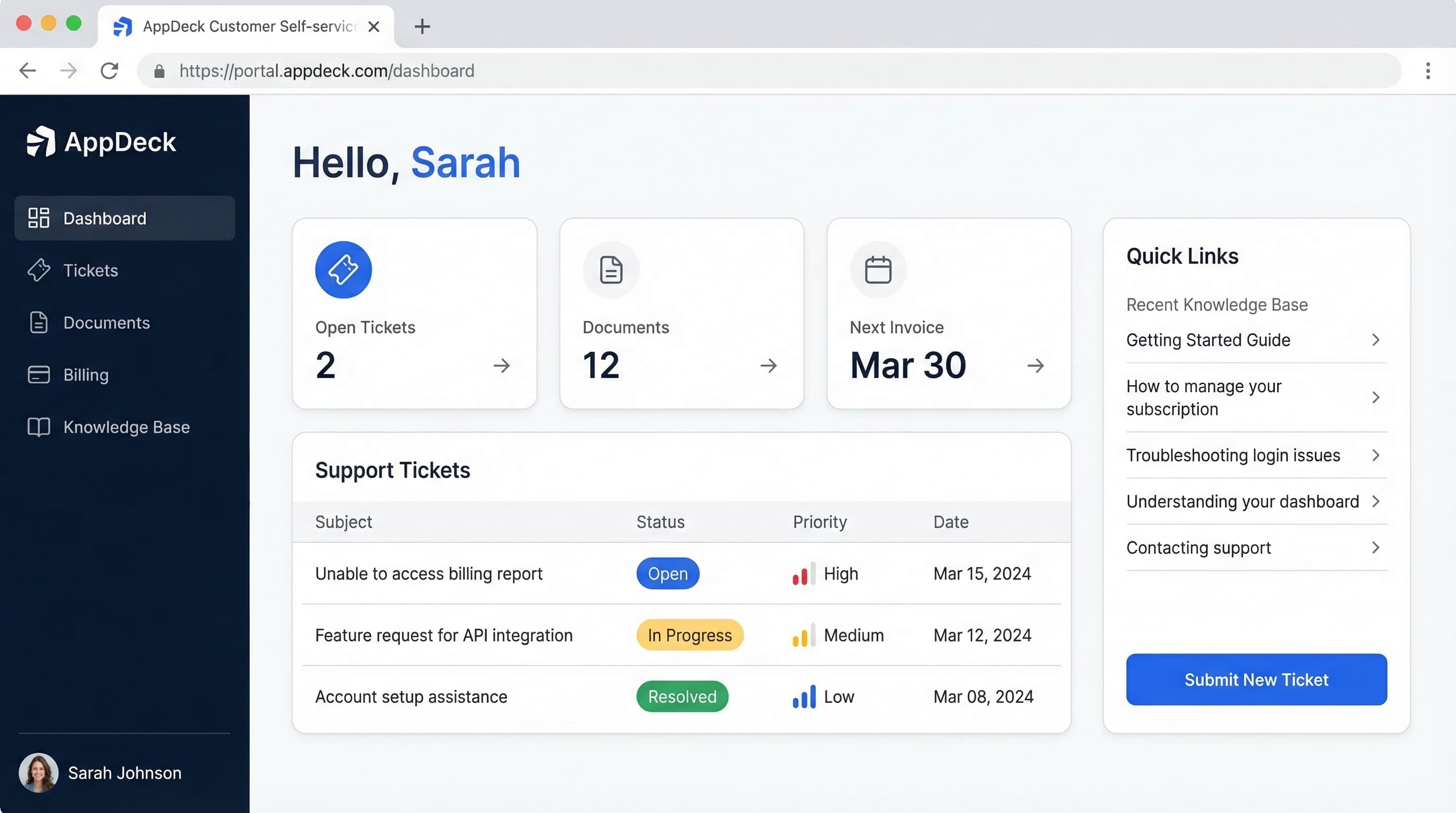
TL;DR: Proven strategies to reduce support ticket volume using self-service customer portals. Knowledge bases, account management, billing portals, and automation tactics.
Introduction
Every support ticket costs you money. Not a little money. Real money: $15-25 per ticket when you account for agent time, tools, overhead, and management. If your team handles 2,000 tickets a month, that's $30,000-50,000 in monthly support costs. And most of those tickets are questions your customers could answer themselves if you gave them the right tools.
"Where's my invoice?" "How do I add a team member?" "What's the status of my project?" These aren't complex problems. They're information retrieval tasks that consume your agents' time and test your customers' patience.
Over the past 12 years, I've watched companies deploy customer portals with varying degrees of success. The ones who approach it strategically, targeting the right ticket categories with the right self-service features, consistently achieve a 40% reduction in support ticket volume within six months. The ones who bolt on a knowledge base and call it a day see single-digit improvements and wonder why self-service "doesn't work."
This article walks through eight specific strategies to reduce your support tickets using a customer portal. Each one targets a different category of ticket, and together they compound into significant savings.
The True Cost of Support Tickets
Before diving into strategies, let's establish what support tickets actually cost your business. Most companies underestimate this number because they only count agent salary.
Direct Cost Per Ticket: $15-25
The fully loaded cost of a human-handled support ticket includes:
- Agent time: 15-30 minutes per ticket at $25-40/hour (salary + benefits)
- Tool costs: Help desk software, phone systems, screen sharing tools
- Management overhead: Team leads, QA reviews, training time
- Infrastructure: Office space, equipment, IT support for the support team
When you add it all up, industry benchmarks consistently land between $15 and $25 per ticket. Simple tickets (password resets, invoice requests) cost less. Complex tickets (technical troubleshooting, escalations) cost more. The blended average falls in that range.
The Hidden Costs
Direct ticket costs are only part of the picture:
- Customer wait time: Every hour a customer waits for an answer is an hour they're frustrated with your company. 53% of customers say they'll switch to a competitor after a poor support experience
- Agent burnout: Repetitive tickets demoralize your best agents. Answering "where's my invoice?" for the 50th time this week isn't why anyone got into customer support
- Scaling problems: Without self-service, support costs grow linearly with your customer base. Double your customers, double your support spend
- Opportunity cost: Every minute an agent spends on a password reset is a minute they're not spending on a complex issue that actually needs human expertise
The Self-Service Alternative
A self-service interaction through a customer portal costs less than $0.10. That's a 99% cost reduction per interaction. Even if only 40% of your tickets shift to self-service, the savings are substantial.
Quick math: 2,000 tickets/month x $20 average cost = $40,000/month. At 40% deflection: 800 fewer tickets = $16,000/month saved = $192,000/year.
That $192,000 isn't theoretical. It's the budget you free up for product development, sales, marketing, or higher-quality support for the tickets that genuinely need human attention.
8 Strategies to Reduce Support Tickets
Strategy 1: Build a Searchable Knowledge Base
Target ticket reduction: 15-20%
The knowledge base is the single highest-impact self-service feature. It addresses the largest category of support tickets: "how do I do X?" questions.
But a knowledge base only works if customers can find what they need. A library with no catalog is just a room full of books. The search experience makes or breaks everything.
What makes a knowledge base effective:
- Natural language search that understands "how do I change my billing address" instead of requiring exact keyword matches
- Typo tolerance and synonym matching so a search for "cancellation" finds articles about "subscription termination"
- Auto-suggestions that surface relevant articles as the customer types
- Contextual recommendations that suggest articles based on where the customer is in the portal
- "Was this helpful?" feedback on every article to identify content that needs improvement
Content strategy for maximum deflection:
- Export your last 6 months of support tickets
- Categorize by topic and rank by volume
- Write articles for your top 20 ticket topics first
- Format for scanning: headers, bullet points, numbered steps, screenshots
- Include troubleshooting sections in every how-to article
- Track "zero-result searches" and create content to fill those gaps monthly
Common mistake: Writing knowledge base articles like internal documentation. Customers don't have the context your team does. Write at a reading level your least technical customer can understand. Define acronyms. Include screenshots for every step. Have someone outside your team review content before publishing.
A well-maintained knowledge base with 50-100 articles covering your most common topics will deflect 15-20% of total ticket volume. Start with 20-30 articles at launch and grow from there.
Strategy 2: Enable Account Self-Service
Target ticket reduction: 10-15%
"How do I add a team member?" "Can you update my email address?" "I need to reset my password." These account management requests are among the top 10 most common support tickets for B2B companies. Every single one is avoidable with proper self-service.
Account self-service features that eliminate tickets:
- Profile management: Name, email, phone, timezone, language preferences. Let customers update these without emailing your team
- Team management: Add, remove, and change permissions for team members. This alone eliminates a surprising volume of tickets
- Password and security: Self-service password resets, two-factor authentication setup, active session management
- Notification preferences: Let customers control what emails they receive instead of emailing you to unsubscribe
- API key management: Generation, rotation, and usage tracking for technical customers
- Data export: Let customers download their own data without filing a request
Implementation priority: Start with password resets and profile updates. These are the highest-volume, lowest-complexity items. Add team management and security settings in your second phase.
Why this matters beyond ticket reduction: Account self-service also improves security. When customers can manage their own credentials and access controls in real time, your attack surface shrinks. A customer who can immediately revoke a departing employee's access is better protected than one who has to email your team and wait.
Strategy 3: Create a Billing Portal
Target ticket reduction: 5-10%
Billing questions account for 15-20% of support tickets at most B2B companies. A billing portal doesn't eliminate all of them, but it handles the majority: invoice requests, payment confirmations, receipt downloads, and plan details.
Essential billing self-service features:
- Invoice history with search, filter, and one-click PDF download
- Payment receipts generated automatically for every transaction
- Subscription details showing current plan, renewal date, and usage
- Payment method management so customers can update their credit card without calling you
- Usage tracking with visual indicators showing consumption against plan limits
- Tax documents (annual statements, W-9s, tax receipts) available on demand
The revenue impact beyond ticket reduction: Companies that add billing self-service consistently report faster payment collection. When it's easy for a customer to view their invoice, check the amount, and pay with a click, they pay 5-7 days faster on average. Fewer overdue invoices, less time chasing payments, better cash flow.
What to watch out for: Billing self-service needs to be accurate and real-time. If a customer pays their invoice through the portal but it still shows as "unpaid" for 24 hours, they'll submit a ticket. Make sure your billing integration updates status immediately.
Strategy 4: Automate Status Updates
Target ticket reduction: 5-10%
"Any update on my ticket?" "What's the status of my project?" "Has my request been processed?" Status inquiry tickets are pure waste. The customer isn't asking for help. They're asking for information you already have but haven't shared.
How automated status updates reduce tickets:
- Real-time ticket status visible in the portal. Customers check status instead of emailing your team
- Automated email notifications when ticket status changes (received, in progress, waiting for input, resolved)
- Project dashboards showing milestones, progress percentages, and timelines
- Order/request tracking with step-by-step progress indicators
- SLA visibility so customers know when to expect a response without asking
The compounding effect: Status update tickets have a multiplication problem. A customer submits a ticket. Two days later, they email asking for an update. That's now two tickets for one issue. With automated status updates, the original ticket still exists, but the follow-up never happens.
Best practice: Don't just notify customers when their ticket is resolved. Notify them at every meaningful stage: when it's assigned to an agent, when it moves to a specialist, when the agent is waiting for information, and when it's resolved. Proactive communication eliminates the anxiety that drives "any update?" emails.
Strategy 5: Build an FAQ Section
Target ticket reduction: 3-5%
An FAQ section serves a different purpose than a knowledge base. While the knowledge base handles detailed, multi-step how-to content, the FAQ addresses simple questions that need quick, direct answers.
Why you need both:
- FAQs answer questions in 1-3 sentences. Knowledge base articles provide step-by-step guides with screenshots and troubleshooting
- FAQs are scanned. Knowledge base articles are read
- FAQs catch customers who want a fast answer before they bother searching the knowledge base
- FAQs serve as a gateway: quick answer first, with links to deeper content for customers who need it
Effective FAQ implementation:
- Expandable/collapsible format for easy scanning. Nobody wants to scroll through 50 fully expanded answers
- Categorized sections: Getting Started, Billing, Security, Integrations, Account Management
- Dynamic content that adapts based on the customer's plan or product
- Regular audits (quarterly at minimum) to remove outdated questions and add trending ones
- Search integration so FAQ results appear alongside knowledge base results
High-impact FAQ categories:
| Category | Example Questions |
|---|---|
| Getting Started | How do I log in? How do I invite my team? |
| Billing | When am I billed? How do I update my payment method? |
| Security | Is my data encrypted? Do you support SSO? |
| Integrations | Which tools do you integrate with? How do I connect Slack? |
| Account | How do I change my email? How do I cancel my account? |
Maintenance tip: Review your recent support tickets monthly. If the same question keeps appearing that could be answered in 1-3 sentences, it belongs in the FAQ.
Strategy 6: Launch Community Forums
Target ticket reduction: 3-5%
Community forums shift a portion of support from your team to your customers. Power users answer questions for newer users. Customers share workarounds, tips, and creative solutions your team might never think of. And the content generated by the community becomes a permanent, searchable resource.
Why community forums work:
- Peer answers are trusted. A customer sharing their experience carries more weight than an official support article for some users
- Coverage expands organically. Your community covers edge cases and use-case-specific scenarios that your knowledge base doesn't address
- Questions get answered outside business hours by community members in different time zones
- Product feedback surfaces naturally through discussion threads
Community forum best practices:
- Moderate actively. Unmoderated forums devolve quickly. Assign a community manager or rotate moderation among support agents
- Recognize top contributors. Badges, leaderboards, or early access to features motivate participation
- Staff participation is mandatory. If customers ask questions and only other customers respond, the forum feels abandoned. Your team should participate regularly
- Integrate with your knowledge base. When a community thread produces a great answer, turn it into a knowledge base article
- Mark accepted answers so future visitors can quickly find the solution
When forums work best: Companies with a large, engaged customer base (500+ active customers) and a product with enough depth that customers develop expertise. If your product is simple and your customer base is small, a forum will feel empty. In that case, focus on the other seven strategies first.
Strategy 7: Send Proactive Notifications
Target ticket reduction: 3-5%
Many support tickets are caused by surprises. A customer's payment fails and they don't know until their service is disrupted. A scheduled maintenance window catches them off guard. Their usage approaches a plan limit and they suddenly hit a wall. Proactive notifications prevent the surprise and the ticket that follows.
High-impact notification types:
- Usage alerts: "You've used 80% of your storage allocation" prevents the angry ticket when they hit 100%
- Payment reminders: "Your invoice is due in 7 days" and "Your payment method is expiring next month" prevent failed payments
- Maintenance notifications: "Scheduled maintenance on Saturday 2-4 AM EST" prevents "is the system down?" tickets
- Feature announcements: "We've added bulk export to your portal" prevents "can you add this feature?" requests for features that already exist
- Renewal reminders: "Your annual subscription renews in 30 days" prevents billing surprise tickets
- Security alerts: "A new device logged into your account" addresses security concerns before they become tickets
Notification delivery best practices:
- Multiple channels: Email for important updates, in-app for informational ones, SMS for urgent alerts
- Customer control: Let customers set their notification preferences. Some want everything. Others want only critical alerts
- Timing matters: Send payment reminders at 14 days, 7 days, and 1 day before due date. Maintenance notifications at 7 days and 24 hours before
- Actionable content: Every notification should include a clear next step. "Your payment method is expiring" should link directly to the payment update page
The math: If proactive notifications prevent even 50 tickets per month at $20 each, that's $1,000/month saved from notifications alone. The cost of sending those notifications is negligible.
Strategy 8: Integrate a Chatbot
Target ticket reduction: 5-8%
A well-implemented chatbot serves as the first line of defense. It handles simple, repetitive questions instantly and routes complex issues to human agents with full context. The key word is "well-implemented." A bad chatbot creates more frustration than it solves.
What chatbots do well:
- Instant answers to common questions: business hours, pricing, feature availability
- Guided troubleshooting that walks customers through diagnostic steps before they submit a ticket
- Account lookups like order status, billing balance, and subscription details
- Ticket routing that collects context (issue type, urgency, affected feature) and sends the customer to the right agent
- After-hours support for basic questions when human agents aren't available
What chatbots do poorly:
- Complex, multi-step troubleshooting that requires back-and-forth
- Emotionally charged situations where the customer is angry or frustrated
- Novel problems the chatbot hasn't been trained on
- Anything that requires judgment, discretion, or exceptions to policy
Implementation principles:
- Always offer a human option. "Talk to a person" should be available at every point in the conversation. Forcing customers through a chatbot maze destroys trust
- Connect to your knowledge base. The chatbot should pull answers from your existing content, not maintain a separate database
- Escalate gracefully. When the chatbot can't help, it should hand off to a human agent with the full conversation history so the customer doesn't repeat themselves
- Measure deflection, not conversations. A chatbot that handles 1,000 conversations but deflects only 50 tickets isn't helping much. Track how many conversations end without a ticket submission
- Train continuously. Review chatbot transcripts monthly to identify failed conversations and improve responses
AI chatbots in 2026: Modern AI-powered chatbots understand natural language significantly better than the rule-based bots of a few years ago. They can interpret context, handle follow-up questions, and learn from interactions. If you tried chatbots before and gave up, it's worth revisiting with current technology.
Combining Strategies: The Compound Effect
These eight strategies don't work in isolation. They compound. A customer who gets a proactive notification about an upcoming payment, clicks through to the billing portal, finds the answer to a billing question in the FAQ, and pays their invoice has just avoided three potential tickets in a single session.
Here's how the strategies layer together:
| Strategy | Individual Impact | Cumulative Impact |
|---|---|---|
| Knowledge base | 15-20% | 15-20% |
| Account self-service | 10-15% | 25-30% |
| Billing portal | 5-10% | 30-35% |
| Automated status updates | 5-10% | 33-40% |
| FAQ section | 3-5% | 35-42% |
| Community forums | 3-5% | 37-44% |
| Proactive notifications | 3-5% | 38-46% |
| Chatbot integration | 5-8% | 40-48% |
Note that cumulative impact doesn't equal the sum of individual impacts. There's overlap between categories. A billing question might be answered by the knowledge base, the FAQ, or the billing portal. That's fine. Redundancy means coverage. The goal is to ensure that wherever the customer looks, they find an answer.
Realistic expectation: Most companies that implement all eight strategies achieve 40-50% ticket reduction within six months. If you implement only the top three (knowledge base, account self-service, billing portal), expect 25-35%.
Measuring Results: The Metrics That Matter
Implementing these strategies without measurement is guessing. Here are the metrics to track and the targets to aim for.
Primary Metrics
| Metric | How to Measure | Target |
|---|---|---|
| Ticket deflection rate | (Tickets before - Tickets after) / Tickets before | 40%+ at 6 months |
| Self-service resolution rate | Portal sessions that don't result in a ticket | 70%+ |
| Knowledge base search success | Searches that result in an article click | 80%+ |
| Portal adoption rate | Monthly active portal users / Total customers | 70%+ at 12 months |
| Customer satisfaction (CSAT) | Post-interaction survey scores | 4.0+/5.0 |
Secondary Metrics
| Metric | How to Measure | Why It Matters |
|---|---|---|
| Zero-result search rate | Searches with no results / Total searches | Identifies content gaps (target: under 10%) |
| Article helpfulness | "Was this helpful?" positive rate | Identifies content quality issues (target: 80%+) |
| Time to self-service resolution | Average session time for self-service interactions | Confirms self-service is faster (target: under 5 min) |
| First-contact resolution | Tickets resolved without follow-up | Measures agent effectiveness on remaining tickets |
| Chatbot deflection rate | Bot conversations without ticket creation | Measures chatbot effectiveness (target: 40%+) |
Measurement Cadence
- Weekly: Monitor ticket volume trends and portal login counts
- Monthly: Review zero-result searches, article helpfulness ratings, and chatbot transcripts. Create content to fill gaps
- Quarterly: Calculate deflection rates, update ROI projections, and present results to stakeholders
- Annually: Comprehensive review of portal strategy, feature roadmap, and content overhaul
ROI Framework: Building the Business Case
Whether you're pitching a customer portal to leadership or justifying continued investment, you need a clear ROI framework.
Step 1: Calculate Your Baseline
Gather these numbers:
- Monthly ticket volume: Total tickets submitted per month
- Average cost per ticket: Agent time x hourly rate + overhead (typically $15-25)
- Monthly support cost: Volume x cost per ticket
- Ticket growth rate: How fast is volume increasing quarter over quarter?
Example baseline: 2,000 tickets/month x $20/ticket = $40,000/month = $480,000/year
Step 2: Project Savings
Apply conservative deflection estimates based on which strategies you're implementing:
| Implementation Scope | Expected Deflection | Monthly Savings | Annual Savings |
|---|---|---|---|
| Knowledge base only | 15-20% | $6,000-8,000 | $72,000-96,000 |
| KB + account + billing self-service | 25-35% | $10,000-14,000 | $120,000-168,000 |
| Full 8-strategy implementation | 40-50% | $16,000-20,000 | $192,000-240,000 |
Step 3: Account for Portal Costs
A purpose-built portal platform typically costs $500-2,000/month depending on features and customer volume. Add content creation time (40-80 hours initially, 10-20 hours/month ongoing) and integration work (20-40 hours for initial setup).
Total first-year investment example:
- Platform: $12,000-24,000/year
- Content creation: $5,000-10,000 (initial) + $6,000-12,000 (ongoing)
- Integration and setup: $3,000-6,000
- Total: $26,000-52,000
Step 4: Calculate Net ROI
Using the full 8-strategy implementation against a baseline of $480,000/year:
- Annual savings: $192,000-240,000
- Annual cost: $26,000-52,000
- Net annual benefit: $140,000-214,000
- ROI: 369-723%
- Payback period: 2-4 months
Even conservative estimates show strong ROI. And these numbers don't account for indirect benefits: improved customer satisfaction, reduced agent burnout, better scalability, and faster payment collection.
Step 5: Project Multi-Year Impact
Self-service ROI improves over time because:
- Content compounds. Every article you write deflects tickets forever
- Adoption grows. More customers use the portal as they discover its value
- Costs decrease. Platform and maintenance costs stay flat while savings grow with customer count
- Ticket growth slows. Without self-service, tickets grow linearly with customers. With self-service, the growth curve flattens
By year two, most companies see 50%+ deflection rates and even stronger ROI as initial setup costs are absorbed and adoption matures.
Implementation Roadmap
You don't need to implement all eight strategies at once. Here's a phased approach that delivers quick wins while building toward full coverage.
Phase 1: Foundation (Weeks 1-6)
Focus: Knowledge base + account self-service + ticket tracking
- Audit your last 6 months of support tickets and categorize by topic
- Choose a portal platform (for most companies, a purpose-built solution like AppDeck gets you to launch fastest)
- Write 20-30 knowledge base articles covering your top ticket topics
- Configure account self-service (profile, password reset, team management)
- Set up ticket submission with real-time status tracking
- Launch to a pilot group of 10-20 customers
Expected result: 15-25% ticket deflection by end of Phase 1.
Phase 2: Expansion (Weeks 7-12)
Focus: Billing portal + FAQ + automated notifications
- Build billing self-service (invoices, payments, subscription management)
- Create FAQ section covering simple, high-volume questions
- Implement automated status update notifications for tickets and projects
- Set up proactive notifications (payment reminders, usage alerts)
- Roll out the portal to all customers with an adoption campaign
Expected result: 30-40% ticket deflection by end of Phase 2.
Phase 3: Optimization (Months 4-6)
Focus: Chatbot + community forum + continuous improvement
- Deploy a chatbot integrated with your knowledge base
- Launch community forums if your customer base supports it (500+ active customers)
- Analyze zero-result searches and fill content gaps
- Optimize article content based on helpfulness ratings
- Fine-tune chatbot responses based on transcript analysis
Expected result: 40-50% ticket deflection by end of Phase 3.
Common Pitfalls to Avoid
Launching Without Enough Content
A portal with 5 articles feels empty. Customers search, find nothing, and never come back. Invest the time to create 20-30 solid articles before launch. That's your minimum viable knowledge base.
Hiding the Human Option
Self-service should be the easy path, not the only path. If customers feel trapped in a self-service loop with no way to reach a human, they'll resent the portal and resent your company. Every page should include a "Contact Support" option.
Ignoring Search Analytics
Your search bar is telling you exactly what customers need. Zero-result searches reveal content gaps. High-volume searches reveal your most important topics. Search-to-ticket conversions reveal content that isn't helpful enough. Review this data monthly.
Building It and Forgetting It
A portal isn't a project with an end date. It's an ongoing program. Budget 10-20 hours per month for content creation, article updates, analytics review, and feature optimization. Without it, content becomes outdated and the portal loses its effectiveness.
Not Training Your Support Team
Your agents are the biggest driver of portal adoption. If they don't reference the portal in their responses, customers won't use it. Train agents to include knowledge base links in every ticket response and suggest the portal for follow-up questions.
Frequently Asked Questions
How much can a customer portal actually reduce support ticket volume?
Most companies see a 30-50% reduction in inbound tickets within 6-9 months of launching a well-designed portal, with mature implementations hitting 60%+. The biggest gains come from the top 20 questions — billing, account changes, status checks, password resets — which typically account for 60-80% of ticket volume. Knowledge base self-service alone can deflect 25-40% of tickets. Add account self-service (update payment, change plan, download invoices) and you eliminate another 15-25%. The remaining tickets shift toward higher-value issues that genuinely need human help.
Is a customer portal better than expanding your support team?
For repetitive, low-complexity tickets, a portal beats hiring every time. A $100K/year support hire handles roughly 12,000-15,000 tickets annually. A portal that deflects 30% of a 50,000-ticket year prevents 15,000 tickets at a fraction of the ongoing cost. Hiring makes sense for issues that require judgment, empathy, or complex troubleshooting. The right answer for most growing companies is both: portals for the repetitive 60%, agents for the high-value 40%.
How long does it take to launch a customer portal that actually reduces tickets?
Plan on 8-16 weeks to a meaningful launch. Weeks 1-4: audit tickets, choose a platform, set up authentication and account data. Weeks 5-8: write the first 20-30 knowledge base articles covering your top ticket topics. Weeks 9-12: pilot with 50-200 customers, fix gaps, train agents to reference the portal. Weeks 13-16: roll out broadly with email campaigns and in-product nudges. You won't see the 40% reduction in the first month — meaningful deflection compounds over 6-9 months as articles, automation, and adoption catch up to ticket volume.
Which companies see the biggest support savings from a portal?
B2B SaaS, financial services, and any product with recurring billing or account management see the highest ROI because they have predictable, repetitive ticket categories. Companies with under 500 tickets a month often struggle to justify a portal — the math doesn't work yet. Companies with 2,000+ monthly tickets, an average cost per ticket above $15, and a top-20 ticket distribution that covers more than half of volume are the strongest fit. Consumer products with one-time purchases and low repeat contact see smaller returns.
When does a customer portal stop being the right answer?
A portal stops paying off when ticket volume is too low to justify the maintenance cost, when your product changes faster than your KB can keep up, or when your customers are non-technical and won't self-serve regardless of UX quality. The signal to pivot: knowledge base usage is high but ticket volume isn't dropping, meaning customers read articles and still contact you. That usually means the underlying product is the problem, not support. Fix the friction in the product before adding more portal features.
Getting Started
The math is straightforward. Support tickets cost $15-25 each. A customer portal reduces ticket volume by 40% or more. The ROI is measurable and significant, often paying for itself within the first quarter.
But the bigger opportunity isn't cost reduction. It's the customer experience transformation. When customers can find answers instantly, manage their accounts independently, and track their requests in real time, they feel in control. They trust your company more. They stay longer. They expand their relationship with you.
Your next steps:
-
Audit your tickets. Export 6 months of data, categorize by topic, and calculate your cost per ticket. This gives you the baseline for your ROI projection.
-
Choose a platform. A purpose-built portal platform like AppDeck gets you to launch in weeks, not months. For a detailed comparison of options, see our 2026 customer portal software comparison.
-
Write your first 20 articles. Cover your top ticket topics. Each article is a future ticket avoided.
-
Launch to a pilot group. Test with 10-20 customers, fix what's broken, then roll out to everyone.
The companies that see the biggest results don't wait for perfection. They launch, measure, and improve. Start with the foundation, prove the ROI, and build from there.
Related Reading
- Customer Portal Guide — comprehensive overview of portal solutions for every use case
- Customer Self-Service Portal: Complete Guide for 2026 — how to build a self-service portal from the ground up
- Customer Portal Software Comparison 2026 — detailed platform comparison to help you choose the right tool

Founder & CEO, AppDeck
Serial entrepreneur with 20+ years building B2B software companies. Former executive managing 2,800+ employees across three continents. Vik reviews all AppDeck content for accuracy and practical relevance.
Share this article
Explore Related Solutions
Related Articles
Customer Self-Service Portal: Complete Guide for 2026
How to build a self-service portal that reduces support tickets by 40%. Covers knowledge bases, account management, ticketing, billing, and implementation best practices.
Customer Portal Examples: 15 Real-World Designs That Drive Adoption
15 customer portal examples from SaaS, e-commerce, healthcare, finance, and professional services. See what works, key features, and design patterns that boost self-service adoption.
Customer Portal Software Comparison 2026: 10 Best Platforms Reviewed
Compare the best customer portal software for 2026. Zendesk, Salesforce, Freshdesk, AppDeck, and 6 others reviewed. Features, pricing, and ratings.