
Customer Self-Service Portal: Complete Guide for 2026
How to build a self-service portal that reduces support tickets by 40%. Covers knowledge bases, account management, ticketing, billing, and implementation best practices.
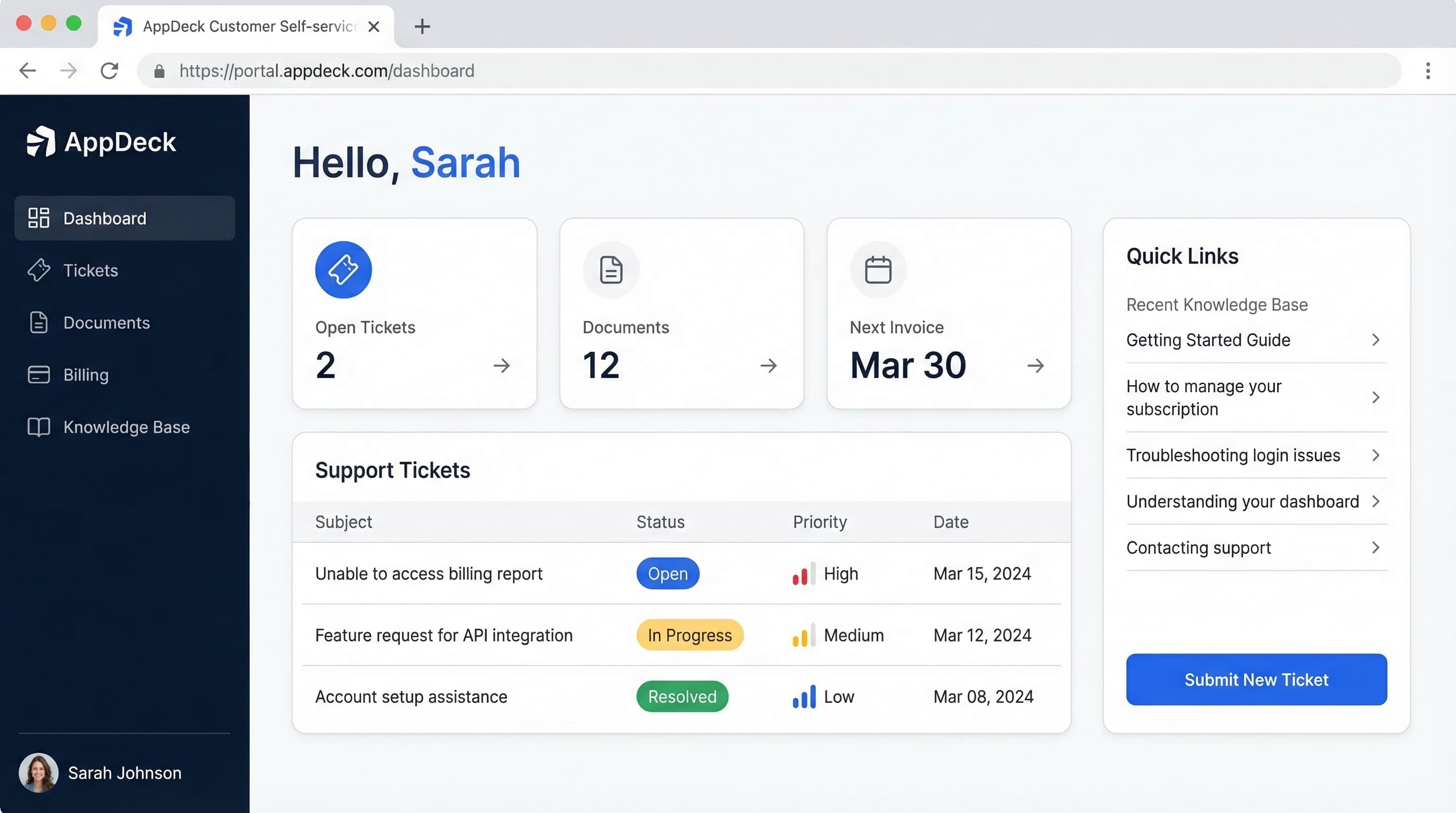
TL;DR: How to build a self-service portal that reduces support tickets by 40%. Covers knowledge bases, account management, ticketing, billing, and implementation best practices.
Introduction
Your support team is drowning. Ticket volume climbs every quarter. Customers wait hours for answers they could find in 30 seconds. And you keep hiring agents just to keep response times from getting worse.
This is the reality for most B2B companies that haven't invested in self-service. And it's expensive: the average cost of a human-handled support ticket is $15-25, while a self-service interaction costs less than $0.10.
Over the past 12 years, I've helped dozens of companies plan, build, and launch self-service portals. The ones that get it right typically see a 40% reduction in support ticket volume within the first six months, along with measurably higher customer satisfaction. The ones that get it wrong end up with an expensive login page nobody visits.
This guide covers everything you need to know to build a self-service portal that customers actually use: what to include, how to implement it, and the mistakes that sink most projects before they launch.
See also: Reduce Support Tickets by 40% with a Customer Portal — the specific knowledge-base and automation tactics that move the ticket number.
What is a Customer Self-Service Portal?
A customer self-service portal is a secure, branded web application where your customers can independently find answers, manage their accounts, track requests, and handle routine tasks without contacting your support team.
Think of it as the digital equivalent of a well-organized front desk that never closes. Instead of calling your office, emailing your team, or waiting on hold, customers log in and help themselves.
A self-service portal typically includes:
- A searchable knowledge base with articles, guides, and FAQs
- Account management (profile, preferences, team members, settings)
- Support ticket submission and status tracking
- Billing and invoice history with online payment
- Document sharing and file management
- Real-time dashboards showing project status or key metrics
- Notification center for updates and alerts
What it is not:
- A static FAQ page on your website (that's a starting point, not a portal)
- A simple contact form (that creates tickets, not self-service)
- An internal tool repurposed for customers (those always feel clunky)
The distinction matters. A true self-service portal is purpose-built to let customers accomplish tasks independently. It's proactive, not reactive.
Why Self-Service Portals Matter in 2026
The Numbers Tell the Story
The business case for self-service has never been stronger:
- 40% average reduction in support ticket volume after portal launch
- 67% of customers prefer self-service over speaking with a company representative (Zendesk Customer Experience Trends Report)
- $15-25 per ticket for human-handled support vs. $0.10 or less for self-service
- 91% of customers say they would use a knowledge base if it met their needs (Salesforce State of the Connected Customer)
- 24/7 availability eliminates time zone barriers for global customer bases
- 35% improvement in customer satisfaction scores for companies with effective self-service
The Cost of Not Having Self-Service
Let's do the math. If your support team handles 2,000 tickets per month at an average cost of $20 per ticket, that's $40,000 in monthly support costs. A 40% reduction saves $16,000 per month, or $192,000 per year.
But the cost goes beyond direct support expenses:
- Agent burnout: Repetitive tickets like "where's my invoice?" and "how do I reset my password?" demoralize experienced support staff
- Scaling problems: Without self-service, support costs scale linearly with customer count. Double your customers, double your support spend
- Customer frustration: 53% of customers say they'll switch to a competitor after a poor support experience. Making them wait for answers you could automate is a poor experience
- Lost insights: Without a portal, you have no data on what customers are searching for, what problems they're trying to solve, or where they're getting stuck
What's Changed in 2026
Self-service expectations have evolved significantly:
- AI-powered search understands natural language queries, not just keyword matching
- Personalized content surfaces relevant articles based on the customer's product and history
- Embedded automation lets customers complete multi-step tasks without human intervention
- Mobile-first design is mandatory as over 40% of portal sessions happen on mobile
- Real-time data through connected dashboards replaces static reports and PDFs
The Benefits of a Self-Service Portal
1. Reduce Support Ticket Volume by 40%
This is the headline benefit, and it's achievable. Here's how it breaks down:
Knowledge base deflection (15-25% reduction):
- Customers search and find answers before submitting a ticket
- Contextual article suggestions appear when customers start typing a support request
- Common questions answered once, consumed thousands of times
Account self-service (10-15% reduction):
- Password resets, profile updates, team member management
- Preference changes, notification settings, timezone adjustments
- API key management, integration configurations
Billing self-service (5-10% reduction):
- Invoice downloads, payment history, receipt generation
- Payment method updates, plan changes, usage tracking
- Tax document access, credit applications
Status tracking (5-10% reduction):
- Customers check ticket status instead of emailing "any update?"
- Project dashboards show progress without status meetings
- Automated notifications reduce proactive inquiry tickets
2. 24/7 Availability Without 24/7 Staffing
Self-service never sleeps. A customer in Tokyo can download their invoice at 2 AM Eastern. A team in London can check project status without waiting for New York to open. Companies with international customers report that 35-45% of portal usage occurs outside business hours.
3. Lower Support Costs While Improving Quality
Self-service doesn't just reduce costs, it improves the quality of remaining support interactions. Agents handle fewer tickets so they spend more time on complex issues. Repetitive tickets disappear, reducing burnout. Agents have context from the portal (what the customer searched for, which articles they read) before conversations start. First-contact resolution improves because agents aren't rushing through a backlog.
4. Better Customer Experience
Counter-intuitively, giving customers a "do it yourself" option improves how they feel about your company. Self-service answers are instant, customers feel in control managing their own accounts, knowledge base articles deliver consistent answers every time, and real-time dashboards build trust through transparency.
5. Actionable Customer Intelligence
A well-instrumented portal generates valuable data. Search queries reveal what customers are looking for. Article performance shows which content helps and which falls flat. Usage patterns identify at-risk customers and power users. Feature requests surface organically through ticket themes. This intelligence feeds product, marketing, and customer success decisions you can't get from email-based support.
Essential Features of a Self-Service Portal
1. Knowledge Base
The knowledge base is the backbone of self-service. If customers can't find answers, they'll submit tickets instead.
Must-have capabilities:
- Powerful search with natural language processing, typo tolerance, and synonym matching
- Organized categories that match how customers think, not how your team is structured
- Rich content support for screenshots, videos, GIFs, code snippets, and step-by-step guides
- Article versioning so content stays accurate as your product evolves
- Feedback mechanisms ("Was this helpful?") to identify content gaps
- Analytics showing views, searches, deflection rates, and helpfulness scores
- Contextual suggestions that recommend articles based on where the customer is in the portal
- Access controls for public vs. customer-only vs. plan-specific content
Content strategy tips:
- Start with your top 20 support ticket topics for highest deflection impact
- Write for scanning: headers, bullet points, numbered steps, and screenshots
- Include troubleshooting steps, not just feature descriptions
- Update articles quarterly at minimum
- Track "zero-result searches" and create content to fill those gaps
2. Support Ticketing
When self-service isn't enough, the portal should make it effortless to get human help.
Essential ticketing features:
- Smart ticket forms that collect the right information upfront (category, priority, affected feature)
- Article suggestions before submission ("Did any of these articles help?" reduces ticket volume by 10-15%)
- Real-time status tracking so customers don't email asking "any update?"
- Conversation threading with full history visible to both customer and agent
- File attachments for screenshots, logs, and documents
- SLA visibility so customers know when to expect a response
- Satisfaction surveys after resolution to measure support quality
- Escalation paths for urgent issues that need immediate attention
Best practices:
- Show estimated response times based on current queue and priority
- Send automatic updates when ticket status changes
- Let customers reopen resolved tickets if the issue recurs
- Surface related knowledge base articles on the ticket submission page
3. Account Management
Account self-service eliminates a surprising volume of support requests.
Core account features:
- Profile management: Name, email, phone, timezone, language preferences
- Team management: Add, remove, and manage team member access and roles
- Security settings: Password changes, two-factor authentication setup, active sessions
- Notification preferences: Email, in-app, SMS, and digest frequency settings
- API access: Key generation, rotation, usage tracking, and documentation
- Integration management: Connect and configure third-party tools
- Data export: Let customers download their data without filing a request
Why this matters: "How do I add a team member?" and "Can you reset my password?" are among the top 10 most common support tickets for B2B SaaS companies. Every one of these that's self-service is a ticket avoided.
4. Billing and Invoice Management
Billing questions account for 15-20% of support tickets at most B2B companies. A billing portal eliminates the majority of these.
Essential billing features:
- Invoice history with search, filter, and one-click PDF download
- Online payment with support for credit cards, ACH, and wire transfer
- Subscription management: Plan details, upgrade/downgrade options, add-ons
- Usage tracking: Current usage vs. plan limits with visual progress indicators
- Payment method management: Add, update, or remove payment methods
- Receipt generation: Automatic receipts for all transactions
- Tax documents: Annual statements, W-9s, and tax receipts on demand
- Billing contact management: Separate billing contacts from primary account contacts
Revenue impact: Companies that add billing self-service report faster payment collection (average 5-7 days faster) and fewer overdue invoices. When it's easy to pay, customers pay on time.
5. FAQ and Quick Answers
While the knowledge base handles detailed content, FAQs serve a different purpose: rapid answers to simple questions.
Effective FAQ implementation:
- Expandable/collapsible format for easy scanning
- Categorized sections (Getting Started, Billing, Security, Integrations, etc.)
- Search integration so FAQ results appear alongside knowledge base results
- Dynamic content that updates based on the customer's plan or product
- Links to deeper content when the quick answer isn't enough
- Regular audits to remove outdated questions and add trending ones
FAQ vs. Knowledge Base:
- FAQs answer questions in 1-3 sentences
- Knowledge base articles provide step-by-step guides, context, and troubleshooting
- Both are necessary. FAQs catch the simple questions, knowledge base handles the rest
6. Real-Time Dashboards
Modern self-service portals go beyond reactive support. They proactively give customers the information they need.
Dashboard capabilities:
- Project status with milestones, progress, and timeline
- Key metrics and KPIs pulled from your systems in real time
- Usage analytics showing the customer's activity and consumption
- Health indicators for services, integrations, and systems
- Custom widgets tailored to each customer's needs
- Data export for offline analysis and reporting
Why dashboards matter for self-service: Every time a customer logs into the portal and sees the information they need on a dashboard, that's a status update email they didn't send, a meeting they didn't schedule, and a report they didn't request from your team.
7. Document Sharing and File Management
B2B relationships generate extensive documentation. The portal should be the single source of truth.
Document management features:
- Organized folder structure per customer or project
- Version control with history and rollback
- Permission controls for who can view, edit, and download
- Drag-and-drop upload with progress indicators
- Notifications when new documents are shared or updated
- Audit trail tracking who accessed what and when
8. Notifications and Communication
A self-service portal should proactively communicate with customers, not just wait for them to log in.
Notification features:
- Email notifications for ticket updates, new documents, and important changes
- In-app notifications visible when the customer logs in
- Digest options (daily, weekly) for customers who prefer batched updates
- Customizable preferences so customers control what they receive
How to Implement a Self-Service Portal: Step by Step
Step 1: Audit Your Current Support Volume (Week 1-2)
Before building anything, understand what you're solving for.
Actions:
- Export your last 6 months of support tickets
- Categorize every ticket by type (billing, how-to, bug report, feature request, account management, status inquiry)
- Calculate the percentage breakdown for each category
- Identify the top 20 most common ticket topics
- Estimate the cost per ticket (agent time x hourly rate + overhead)
What you'll learn: Which categories are self-serviceable (usually 50-70% of total volume) and which require human intervention. This data drives your feature prioritization and ROI projections.
Step 2: Define Your Self-Service Strategy (Week 2-3)
Not everything needs to be self-service on day one. Prioritize based on impact.
Priority framework:
| Priority | Criteria | Examples |
|---|---|---|
| P1 (Launch) | High volume, easy to self-serve | Password resets, invoice downloads, FAQ searches |
| P2 (Month 2-3) | Medium volume, moderate complexity | Ticket submission, account management, knowledge base |
| P3 (Month 4-6) | Lower volume, high value | Billing management, dashboards, document sharing |
| P4 (Future) | Complex, requires integration | Custom reporting, automated workflows, API access |
Key decisions:
- Which platform will you use? (Build vs. buy vs. configure)
- Will the portal be branded with a custom domain?
- What authentication method? (Email/password, SSO, social login)
- What existing systems need to integrate? (CRM, billing, help desk, project management)
Step 3: Choose Your Portal Platform (Week 3-4)
You have three main options:
Option A: Purpose-built portal platform (Recommended for most companies)
- Platforms like AppDeck offer pre-built self-service features you can configure and brand
- Fastest time to launch (days to weeks, not months)
- Lowest ongoing maintenance
- Trade-off: Less customization than building from scratch
Option B: Help desk with portal features
- Zendesk, Freshdesk, and Salesforce offer portal add-ons
- Good if you're already invested in one of these ecosystems
- Trade-off: Portal features are secondary to the help desk, so UX can suffer
Option C: Custom build
- Maximum flexibility and control
- Best for unique requirements that no platform supports
- Trade-off: 3-6 months to build, ongoing engineering maintenance, and significant cost
For a detailed comparison of platforms, see our customer portal software comparison.
Step 4: Build Your Knowledge Base Content (Week 4-8)
Content is what makes or breaks a self-service portal. Start here.
Content creation process:
- Take your top 20 ticket topics from Step 1 and write an article for each
- Interview your support team. They know the questions customers actually ask
- Write in customer language, not internal jargon. If customers say "billing" don't label it "financial administration"
- Include screenshots and videos for any multi-step process
- Add troubleshooting sections to how-to articles ("If this doesn't work, try...")
- Review with support agents before publishing
Content quantity targets:
- Launch: 20-30 articles covering your most common ticket topics
- Month 3: 50-75 articles with expanded coverage
- Month 6: 100+ articles with video content and advanced troubleshooting
Step 5: Configure and Brand Your Portal (Week 6-8)
Your portal should feel like a natural extension of your product and brand.
Branding checklist:
- Custom domain (portal.yourcompany.com or support.yourcompany.com)
- Company logo, colors, and typography
- Customized navigation matching your terminology
- Branded email templates for notifications
- Welcome message and onboarding flow for new portal users
Information architecture:
- Home/dashboard with key actions and status
- Knowledge base/help center section
- Support/tickets section
- Account/settings section
- Billing section (if applicable)
Keep the navigation simple. Five to seven top-level items maximum.
Step 6: Integrate with Your Existing Systems (Week 7-9)
A self-service portal is most powerful when it connects to your other tools.
Common integrations: CRM (Salesforce, HubSpot), help desk (Zendesk, Freshdesk, Intercom), billing (Stripe, QuickBooks, Xero), project management (Asana, Monday, Jira), communication (Slack, Teams), and SSO (Okta, Azure AD, Google).
Integration priorities:
- SSO should be available at launch for enterprise customers
- Help desk integration is critical if you have an existing ticket system
- Billing integration delivers immediate self-service value
Step 7: Test with a Pilot Group (Week 9-10)
Don't launch to all customers at once.
Pilot strategy:
- Select 10-20 customers across different segments (size, industry, support volume)
- Include both tech-savvy and less technical users
- Give them access with a brief orientation (5-minute video or guided tour)
- Track portal usage, ticket submission behavior, and content gaps
- Fix critical issues before broader rollout
What to measure: Portal login rate, knowledge base search success rate, ticket deflection, time on portal, and recurring feedback themes.
Step 8: Launch and Drive Adoption (Week 10-12)
A portal nobody uses delivers zero value. Adoption requires deliberate effort.
Launch communication:
- Email announcement to all customers explaining the portal and its benefits
- In-app notifications or banners directing users to the portal
- Support team scripts: "You can also find this in your portal at [link]"
- Onboarding flow for first-time portal users (guided tour, welcome email)
- Quick-start guide or video walkthrough
Adoption tactics that work:
- Make the portal the default. Route support requests through the portal, not email
- Train your support team to reference the portal in every interaction
- Send weekly tips highlighting portal features customers might not know about
- Gamify usage for internal teams (track which agents drive the most portal referrals)
- Remove friction: SSO, mobile-responsive design, fast load times
Adoption benchmarks:
- Month 1: 30-40% of customers have logged in
- Month 3: 50-60% monthly active portal users
- Month 6: 70%+ monthly active portal users
- Month 12: Self-service handles 40%+ of total support volume
Step 9: Measure, Optimize, and Iterate (Ongoing)
Launch is the beginning, not the end.
Key metrics to track:
| Metric | Target | Why It Matters |
|---|---|---|
| Ticket deflection rate | 40%+ | Core measure of self-service effectiveness |
| Knowledge base search success | 80%+ | Are customers finding relevant content? |
| Portal adoption rate | 70%+ | Are customers using the portal? |
| Self-service satisfaction (CSAT) | 4.0+/5.0 | Is the portal experience good? |
| Time to resolution (self-service) | Under 5 min | Is self-service actually faster? |
| Zero-result search rate | Under 10% | Are there content gaps? |
| Article helpfulness rating | 80%+ helpful | Is the content accurate and useful? |
Monthly optimization tasks:
- Review zero-result searches and create missing content
- Update articles with low helpfulness ratings
- Analyze ticket themes for new self-service opportunities
- Test navigation and search improvements
Self-Service Portal Best Practices
1. Design for the Customer, Not Your Org Chart
The most common mistake in portal design is organizing content around your internal team structure: "Engineering," "Finance," "Operations." Customers don't know or care about your departments. They think in terms of their tasks: "Pay my invoice," "Check my project status," "Reset my password."
Do this: Organize navigation and content around customer tasks and goals.
Not this: Mirror your internal department structure.
2. Make Search the Primary Navigation
Most portal visitors use search first, browse second. If your search is mediocre, your portal is mediocre.
Invest in:
- Natural language search ("how do I change my billing address" should work)
- Typo tolerance and synonym matching
- Search result ranking based on relevance and popularity
- Auto-suggestions as the customer types
- Search analytics to continuously improve results
3. Measure Deflection, Not Just Pageviews
Pageviews tell you people visited your knowledge base. Deflection tells you it actually helped. Track whether customers who search and read articles still submit tickets. That's the metric that matters.
How to measure deflection:
- Track the ratio of knowledge base sessions to ticket submissions
- Monitor "contact support" clicks from article pages (lower is better)
- Compare ticket volume before and after content publication
- Survey ticket submitters: "Did you search the help center before contacting us?"
4. Keep Content Fresh
Outdated content is worse than no content. A customer who follows inaccurate instructions wastes their time and loses trust in your portal. They won't come back.
Content maintenance schedule:
- Monthly: Review articles for top 10 ticket topics
- Quarterly: Audit entire knowledge base for accuracy
- With every product release: Update affected articles before the release goes live
- Triggered by feedback: Immediately update articles flagged as unhelpful or inaccurate
5. Provide Escape Hatches
Self-service should be the easy path, not the only path. Customers should always be able to reach a human when they need to.
Best practices:
- Include "Contact Support" on every page
- Show a "Still need help?" option at the bottom of every article
- Don't hide your support email or phone number
- Offer live chat as an alternative for customers who prefer it
- Make ticket submission a one-click action from any knowledge base article
Forcing customers through a self-service maze to reach a human creates frustration and resentment. That's the opposite of what you're building.
6. Personalize the Experience
A generic portal treats a new customer and a 5-year enterprise client the same way. That's a missed opportunity.
Personalization opportunities:
- Show relevant articles based on the customer's product or plan
- Display account-specific data on the dashboard
- Surface recently viewed articles and bookmarks
- Recommend content based on similar customers' behavior
7. Optimize for Mobile
Over 40% of portal sessions happen on mobile devices. If your portal isn't mobile-responsive, you're excluding a huge portion of your users.
Mobile essentials:
- Responsive design that works on all screen sizes
- Touch-friendly navigation and buttons
- Fast load times (under 3 seconds on mobile networks)
- Simplified forms optimized for mobile keyboards
8. Invest in Onboarding
The first experience determines whether a customer becomes a regular portal user or never logs in again.
Onboarding elements:
- Welcome email with login link and quick-start guide
- Guided tour highlighting key features (3-5 steps maximum)
- A pre-populated dashboard showing real data, not empty states
- A "Getting Started" section with essential articles
Common Mistakes to Avoid
Mistake 1: Building It and Forgetting It
Launching a portal is not a one-time project. It requires ongoing content creation, feature updates, and optimization. Budget for 10-20 hours per month of portal maintenance after launch. Without it, content becomes outdated, customers stop trusting the portal, and it becomes a liability instead of an asset.
Mistake 2: Making Content Too Technical
Your support team writes great internal documentation, but internal docs assume context customers don't have. Write at a reading level your least technical customer can understand, define acronyms on first use, include screenshots for every step, and have someone outside your team review content before publishing.
Mistake 3: Ignoring Search Analytics
Your search bar is telling you exactly what customers need, and most companies never look at the data.
What to monitor:
- Zero-result searches: Customers are looking for something you haven't created
- High-volume searches: Your most important content topics
- Search-to-ticket conversion: Searches that end in a ticket mean content isn't helpful enough
Mistake 4: Launching Without Enough Content
A portal with 5 articles feels empty and unhelpful. Customers won't form a habit of checking it. Aim for at least 20-30 articles at launch covering your top support ticket topics: 10 how-to articles for common workflows, 5 troubleshooting guides, 5 FAQ-style articles on billing and security, and 3-5 getting started guides.
Mistake 5: Not Training Your Support Team
Your support agents are the biggest driver of portal adoption. If they don't reference the portal in their interactions, customers won't use it. Train agents to link knowledge base articles in ticket responses, suggest the portal for follow-up questions, flag content gaps based on ticket themes, and use the portal themselves so they can guide customers effectively.
Mistake 6: Over-Engineering the Launch
Trying to launch with every feature at once delays the project by months. Start with the minimum viable portal: knowledge base with 20-30 articles, ticket submission and tracking, account profile management, and branded design with custom domain. Everything else (billing, dashboards, document sharing, automation) can come in subsequent phases.
Mistake 7: Neglecting Security
Customer portals contain sensitive data: billing information, contracts, support history, and account credentials. A security breach doesn't just affect your portal. It affects your entire customer relationship.
Security requirements: SOC 2 Type II compliance, two-factor authentication, encryption at rest and in transit, role-based access controls, regular security audits, and complete audit logs.
Self-Service Portal vs. Customer Portal: What's the Difference?
These terms are often used interchangeably, but there's a nuance. A self-service portal emphasizes independent task completion: finding answers, managing accounts, resolving issues without human help. A customer portal is a broader concept that includes self-service but also encompasses collaboration, communication, and relationship management.
In practice, the best customer portals are built with self-service at their core. For a deeper exploration of terminology and use cases, see our guide on client portal vs. customer portal.
Bottom line: Whether you call it a self-service portal, customer portal, or support portal, the goal is the same: empower customers to help themselves while giving your team the tools to help when needed.
Choosing the Right Platform
The platform you choose determines your time to launch, ongoing maintenance burden, and the quality of the customer experience. Here's what to prioritize:
Non-negotiable features:
- Knowledge base with powerful search
- Support ticketing with status tracking
- Account management and self-service settings
- Branding and custom domain support
- Mobile-responsive design
- Security (SOC 2, 2FA, encryption, RBAC)
High-value additions:
- Real-time dashboards with live data
- Billing and invoice management
- Document sharing with version control
- SSO integration
- Analytics and reporting
- API access for custom integrations
Evaluation criteria: Time to launch (weeks vs. months), ongoing maintenance burden, pricing model (flat pricing scales better than per-customer), UX quality, and integration ecosystem.
For a platform that covers all of these requirements with flat pricing and fast implementation, take a look at AppDeck's customer portal. For a broader market overview, see our 2026 customer portal software comparison.
Measuring Self-Service Portal ROI
Direct Cost Savings
Calculate your baseline: monthly ticket volume multiplied by average cost per ticket (agent time x hourly rate + overhead). Then project savings at 40% deflection.
Example: 2,000 tickets/month x $20/ticket = $40,000/month. At 40% deflection: 800 fewer tickets = $16,000/month saved = $192,000/year.
Indirect Benefits
Beyond direct cost savings, self-service portals deliver faster customer onboarding, higher retention rates from improved experience, better agent productivity on complex issues, and reduced training costs for new support agents.
Time to ROI
Most companies see positive ROI within 3-6 months of portal launch:
- Month 1: 10-15% ticket deflection as early adopters use the portal
- Month 3: 25-30% deflection as content grows and adoption increases
- Month 6: 40%+ deflection as the portal becomes the primary support channel
Frequently Asked Questions
What is a customer self-service portal?
A customer self-service portal is a secure, authenticated web destination where customers can resolve their own issues — finding answers in a knowledge base, updating account details, paying invoices, tracking orders or tickets, and managing subscriptions — without contacting a support agent. Unlike a public help center, a self-service portal is personalized to the logged-in customer, exposing their data and account context. Modern portals combine knowledge base search, account management, ticket tracking, community forums, and increasingly AI-assisted answers in a single experience.
Is a self-service portal the same as a knowledge base?
No — a knowledge base is one component of a self-service portal. A knowledge base is content (articles, FAQs, videos). A self-service portal is an authenticated experience that combines content with account data, transactions, ticket history, and personalization. You can have a knowledge base without a portal (most public help centers), but you can't have a real self-service portal without a knowledge base. The portal turns reading into doing — customers don't just learn how to update their plan, they actually update it.
How long does it take to build a self-service portal?
Using a purpose-built platform, plan 8-16 weeks from kickoff to broad launch. Custom development on top of Zendesk or Salesforce typically runs 4-8 months. Fully custom-built portals can stretch to 9-12 months. The actual buildout is fast; the slow parts are knowledge base authoring (20-30 articles takes 4-6 weeks of writer time), authentication integration, and change management with your support team. Companies that try to launch in under 8 weeks usually skimp on content and see weak deflection numbers.
Which businesses get the most value from a self-service portal?
B2B SaaS, subscription services, financial services, telecom, utilities, and any business with recurring relationships and predictable ticket categories. The pattern: high ticket volume (1,500+ per month), repeatable questions (top 20 topics drive 60%+ of volume), and customers comfortable with web self-service. One-time consumer purchases with low repeat contact see weaker returns. Highly relational enterprise services where every interaction is custom also see less benefit — though even there, customers want to track their own data and history.
When should you replace your self-service portal instead of improving it?
Replace when adoption is stuck below 20% after a year of effort, when your platform can't integrate with the core systems you've added (billing, CRM, product), or when knowledge base search consistently fails to surface relevant content. Performance — sub-2-second loads, mobile-first UX — is also a common replacement trigger because Gen Z and millennial customers abandon slow portals fast. If your current platform requires a developer to publish every article, you'll never scale content fast enough; that alone is a replacement signal.
Getting Started
Building a self-service portal doesn't have to be a massive, multi-quarter project. With the right platform and approach, you can launch in weeks and start seeing results immediately.
Your first three steps:
-
Audit your tickets. Export your last 6 months of support data and categorize by topic. This tells you exactly what content to create and what features to prioritize.
-
Choose a platform. For most companies, a purpose-built portal platform like AppDeck gets you to launch fastest. See our customer portal comparison for options.
-
Write your first 20 articles. Start with your top ticket topics. Each article you publish is a future ticket avoided.
The companies that win at self-service don't wait for perfection. They launch with a solid foundation and improve every month based on data. Start now, measure everything, and let your customers tell you what to build next.
For a comprehensive overview of portal solutions across different use cases, visit our customer portal guide.

Founder & CEO, AppDeck
Serial entrepreneur with 20+ years building B2B software companies. Former executive managing 2,800+ employees across three continents. Vik reviews all AppDeck content for accuracy and practical relevance.
Share this article
Explore Related Solutions
Related Articles
How to Reduce Support Tickets by 40% with a Customer Portal
Proven strategies to reduce support ticket volume using self-service customer portals. Knowledge bases, account management, billing portals, and automation tactics.
Customer Portal Examples: 15 Real-World Designs That Drive Adoption
15 customer portal examples from SaaS, e-commerce, healthcare, finance, and professional services. See what works, key features, and design patterns that boost self-service adoption.
Customer Portal Software Comparison 2026: 10 Best Platforms Reviewed
Compare the best customer portal software for 2026. Zendesk, Salesforce, Freshdesk, AppDeck, and 6 others reviewed. Features, pricing, and ratings.