
How to Build a Membership Portal: Complete Guide for 2026
Step-by-step guide to building a membership portal for your association, club, or organization. Learn features, best practices, and platform options.
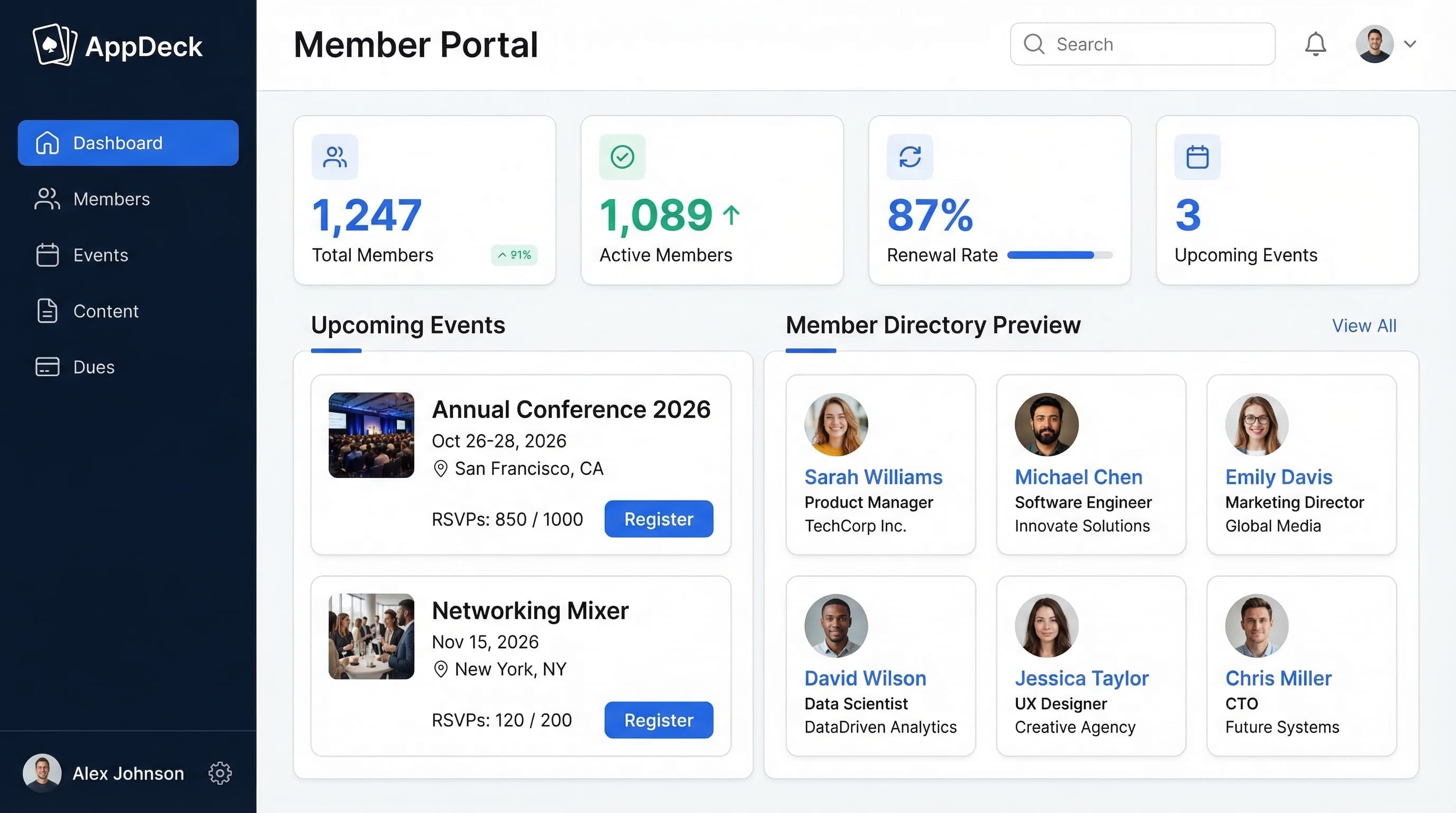
TL;DR: Step-by-step guide to building a membership portal for your association, club, or organization. Learn features, best practices, and platform options.
Introduction
Every association, club, and membership organization reaches the same inflection point: the moment when spreadsheets, email blasts, and shared drives can no longer keep up with your growing membership. Maybe renewal reminders are slipping through the cracks. Maybe members are calling to ask questions you've already answered in an email nobody read. Maybe your board is asking for engagement metrics you simply can't produce.
If any of that sounds familiar, you need a membership portal.
In 2026, member expectations are higher than ever. They want self-service access to their accounts, seamless payment processing, and a professional digital experience that reflects the value of their membership. Organizations still relying on manual processes are losing members to competitors who've already modernized.
After helping 60+ associations and membership organizations build and launch portals over the past decade, I've developed a proven step-by-step process that works whether you have 50 members or 50,000. This guide covers everything: what a membership portal is, why you need one, the essential features, how to choose a platform, and exactly how to build and launch yours.
Let's get started.
See also: Membership Website Software — 8 platforms compared with pricing for membership site builders.
What is a Membership Portal?
A membership portal is a secure, online platform where your members can log in to access resources, manage their accounts, connect with other members, and engage with your organization—all in one place.
Core capabilities of a membership portal:
- Member self-service (profile updates, payment management, preferences)
- Dues collection and automated renewal processing
- Member directory and networking tools
- Event management and registration
- Gated content and resource libraries
- Communication tools (announcements, newsletters, messaging)
- Analytics and reporting on membership health
- Branding and customization
Who uses membership portals:
- Professional associations and trade organizations
- Clubs (fitness, social, hobby, sports)
- Alumni associations and university groups
- Chambers of commerce and business networks
- Churches and religious organizations
- Unions and labor organizations
- Nonprofit membership programs
- Coworking spaces and community organizations
- HOAs and property management groups
Think of your membership portal as your organization's digital headquarters—the single place members go for everything related to their membership.
Why Your Organization Needs a Membership Portal
The Spreadsheet Problem
If you're managing membership with spreadsheets, email, and manual processes, you're likely experiencing these pain points:
- ❌ Renewal dates tracked in a spreadsheet that's always out of date
- ❌ Member information scattered across email threads, documents, and someone's memory
- ❌ No visibility into which members are engaged and which are at risk of churning
- ❌ Hours spent each month on manual invoicing and payment follow-ups
- ❌ New members receive a confusing onboarding experience (or none at all)
- ❌ No way to gate content or resources by membership tier
- ❌ Event registration handled through separate tools with no connection to member records
- ❌ Communication limited to mass emails that get ignored
- ❌ Your organization looks unprofessional compared to competitors with modern portals
The real cost: Beyond administrative headaches, manual membership management costs you members. When renewal reminders get lost, when members can't easily find resources, and when the experience feels outdated—they leave.
The Portal Solution
A modern membership portal eliminates these problems:
- ✅ Automated renewal reminders and payment processing (no more chasing invoices)
- ✅ Single source of truth for all member data and activity history
- ✅ Engagement analytics showing who's active, who's at risk, and what content performs
- ✅ Self-service profiles so members update their own information
- ✅ Professional, branded experience that reflects your organization's value
- ✅ Tiered content access matching membership levels
- ✅ Integrated event management with automatic attendance tracking
- ✅ Targeted communications based on member segments and behavior
- ✅ Mobile access so members engage from anywhere
The numbers speak for themselves: Organizations that implement membership portals see an average 35% increase in renewal rates and 50% reduction in administrative time spent on membership management. That's not marginal improvement—it's transformational.
Essential Features for a Membership Portal
Not all portals are created equal. Here are the 10 features that separate great membership portals from mediocre ones:
1. Member Directory
What it does: A searchable, filterable directory where members can find and connect with each other.
Why it matters: Networking is one of the top reasons people join membership organizations. A robust directory turns your portal from a billing tool into a community platform.
Must-have capabilities:
- Searchable by name, company, location, expertise, and custom fields
- Member profile pages with photos and bios
- Privacy controls (members choose what to share)
- Contact information with click-to-email and click-to-call
- Filter by membership tier, committee, or interest group
- Export capabilities for administrators
2. Dues & Payment Processing
What it does: Handles all aspects of membership billing—from initial signup to recurring renewals.
Why it matters: Payment friction is the #1 reason members don't renew. Every manual step in the payment process increases churn.
Must-have capabilities:
- Automated recurring billing (monthly, quarterly, annual)
- Multiple payment methods (credit card, ACH, bank transfer)
- Automated renewal reminders (30, 15, 7 days before expiration)
- Grace period management for lapsed members
- Proration for mid-cycle upgrades and downgrades
- Receipt generation and payment history
- Integration with accounting software (QuickBooks, Xero)
- Support for multiple membership tiers and pricing
3. Event Management
What it does: Create, promote, and manage events directly within your portal.
Why it matters: Events drive member engagement more than any other feature. Integrating events with your portal connects attendance data to member records.
Must-have capabilities:
- Event creation with descriptions, dates, locations, and capacity limits
- Online registration and RSVP tracking
- Calendar view (syncs with Google Calendar, Outlook)
- Attendance tracking and check-in tools
- Ticketing with member vs. non-member pricing
- Event reminders and follow-up communications
- Post-event surveys and feedback collection
- Waitlist management for popular events
4. Content & Resource Library
What it does: A centralized hub for documents, videos, articles, and resources—gated by membership tier.
Why it matters: Exclusive content justifies membership fees. When members consistently find valuable resources, they renew.
Must-have capabilities:
- Organized by category, topic, or resource type
- Access controls by membership tier (free members see X, premium members see Y)
- Document sharing (PDFs, presentations, spreadsheets)
- Video hosting or embedding
- Search across all resources
- Download tracking (know what's popular)
- Regular content updates (stale libraries kill engagement)
5. Communication Tools
What it does: Enables targeted, multi-channel communication between your organization and members.
Why it matters: Members who feel informed and connected renew at significantly higher rates than those who feel forgotten.
Must-have capabilities:
- Announcement feeds visible on portal dashboard
- Email newsletter integration
- Segmented messaging (by tier, interest, engagement level)
- Direct messaging between members (optional)
- Push notifications for mobile users
- Discussion forums or community boards
- Automated communications (welcome sequences, milestone emails)
6. Member Self-Service
What it does: Lets members manage their own accounts without contacting your staff.
Why it matters: Self-service reduces your administrative burden by 40-60% while giving members the instant access they expect in 2026.
Must-have capabilities:
- Profile editing (contact info, photo, bio, preferences)
- Payment method management
- Membership tier upgrades/downgrades
- Event registration and cancellation
- Communication preferences and email opt-in/opt-out
- Document downloads and resource access
- Renewal management
- Password reset and account recovery
7. Analytics & Reporting
What it does: Provides dashboards and reports on membership health, engagement, and revenue.
Why it matters: You can't improve what you can't measure. Analytics reveal which programs work, which members are at risk, and where to invest resources.
Must-have capabilities:
- Membership growth trends (new, renewed, lapsed, total)
- Engagement scoring (logins, event attendance, content views)
- Revenue tracking and forecasting
- Renewal rate monitoring with early warning indicators
- Event attendance and satisfaction metrics
- Content performance analytics
- Exportable reports for board presentations
- Custom dashboards for different stakeholders
8. Security & Privacy
What it does: Protects member data and ensures compliance with privacy regulations.
Why it matters: You're storing personal information, payment data, and potentially sensitive professional details. A data breach destroys member trust permanently.
Must-have capabilities:
- SSL/TLS encryption for all data in transit
- Encryption at rest for stored data (AES-256)
- Two-factor authentication (2FA)
- Role-based access controls
- GDPR and privacy regulation compliance
- Regular security audits and penetration testing
- Data backup and disaster recovery
- Secure payment processing (PCI DSS compliance)
9. Mobile Access
What it does: Ensures members can access the portal from any device, anywhere.
Why it matters: Over 65% of membership portal logins happen on mobile devices. If your portal doesn't work on phones, it doesn't work.
Must-have capabilities:
- Fully responsive design (works on all screen sizes)
- Native mobile apps (iOS and Android) or progressive web app
- Fast load times on mobile networks
- Touch-friendly interface and navigation
- Push notifications for events and announcements
- Offline access for downloaded content
- Mobile-optimized event check-in
10. Branding & Customization
What it does: Makes the portal look and feel like an extension of your organization—not a generic software product.
Why it matters: A branded portal reinforces your organization's identity and professionalism. Members should feel like they're logging into YOUR platform.
Must-have capabilities:
- Custom domain (members.yourorganization.org)
- Logo, colors, and typography matching your brand
- White-label options (remove vendor branding)
- Customizable navigation and layout
- Branded email templates and communications
- Custom registration and signup forms
- Landing page customization
Step-by-Step: How to Build Your Membership Portal
Step 1: Define Your Requirements
Before touching any technology, document exactly what your organization needs. This prevents the most common mistake: choosing a platform based on a flashy demo instead of actual requirements.
Answer these questions:
What type of organization are you?
- Professional association or trade group
- Social club or hobby organization
- Alumni association
- Chamber of commerce
- Nonprofit membership program
- Religious organization
- Union or labor organization
- Other
How many members do you have (and expect)?
- Under 50 members → Simple solution with room to grow
- 50-500 members → Mid-range features and automation
- 500-5,000 members → Robust automation, segmentation, and analytics
- 5,000-50,000+ members → Enterprise capabilities, advanced integrations
What features are must-haves vs. nice-to-haves?
Create two lists:
Must-haves (launch requirements):
- Member directory
- Dues collection and automated renewals
- Content library
- Basic analytics
Nice-to-haves (phase 2):
- Event management
- Discussion forums
- Advanced reporting
- Mobile apps
What's your budget?
- Software subscription: $100-$500/month is typical for most organizations
- Implementation: $0 (DIY) to $10,000+ (custom setup)
- Ongoing content and management: Staff time allocation
What integrations do you need?
- Payment processor (Stripe, PayPal, Square)
- Email marketing (Mailchimp, Constant Contact)
- CRM (Salesforce, HubSpot)
- Accounting (QuickBooks, Xero)
- Calendar (Google Calendar, Outlook)
- Social media
- Website (WordPress, Squarespace)
Pro tip: Talk to 10 members before finalizing requirements. Ask them: "What would make your membership more valuable?" Their answers will surprise you—and they're almost always more practical than what staff assumes.
Step 2: Choose Your Platform
This is the most consequential decision you'll make. There are three main approaches:
Option A: Purpose-Built Portal Software (Recommended)
Platforms: AppDeck, Wild Apricot, MemberClicks, Glue Up
What you get: A ready-made platform with membership features built in. Configure it for your organization, add your branding, and launch.
Pros:
- ✅ Fast setup (hours to days, not months)
- ✅ Built-in membership features (directory, payments, events, content)
- ✅ Ongoing updates and new features from the vendor
- ✅ Professional support when you need help
- ✅ Security and compliance handled for you
- ✅ Mobile-ready out of the box
- ✅ No technical team required
Cons:
- ❌ Monthly subscription cost
- ❌ Some customization limits (you're working within the platform's framework)
- ❌ Vendor dependency
Best for: 95% of membership organizations. Unless you have truly unique requirements and a large budget, purpose-built software is the way to go.
Option B: CMS + Plugins (WordPress + Membership Plugins)
Platforms: WordPress with MemberPress, Paid Memberships Pro, or Restrict Content Pro
What you get: A WordPress website with membership functionality added through plugins. You manage the site, hosting, updates, and security.
Pros:
- ✅ Highly flexible and customizable
- ✅ Large plugin ecosystem for additional features
- ✅ Full control over design and functionality
- ✅ Lower software costs (plugin license fees only)
- ✅ Large community for support and tutorials
Cons:
- ❌ Requires technical knowledge (or a developer)
- ❌ You're responsible for security, backups, and updates
- ❌ Plugin conflicts and compatibility issues
- ❌ Slower to set up and configure properly
- ❌ No dedicated membership support team
- ❌ Ongoing maintenance burden
- ❌ Multiple plugins needed to match purpose-built features
Best for: Tech-savvy organizations with a developer on staff (or budget) who want maximum control over the member experience.
Option C: Custom Development
What you get: A fully custom portal built from scratch by a development team, tailored to your exact specifications.
When it makes sense: Large organizations (10,000+ members) with truly unique requirements that no existing platform can meet—and a budget to match.
Pros:
- ✅ Total control over every feature and design element
- ✅ Built exactly to your specifications
- ✅ No vendor dependency
- ✅ Unlimited customization
Cons:
- ❌ Expensive: $50,000-$200,000+ for initial build
- ❌ Slow: 6-12 months to launch
- ❌ Ongoing maintenance costs ($5K-$20K/month for developers)
- ❌ You manage security, hosting, and updates
- ❌ No support team—your developers ARE the support
- ❌ Feature parity with commercial platforms takes years
Best for: Very large organizations with unique workflows, significant budgets, and in-house technical teams.
Our Recommendation
For 95% of organizations, purpose-built portal software like AppDeck is the best choice. You get professional features in 30 minutes, not months. You don't need a developer. And you can focus your time and budget on what matters most: serving your members.
The organizations I've seen struggle the most are those that chose Option B or C when Option A would have been perfect. Over-engineering your portal before you even know what your members want is a recipe for wasted time and budget.
Step 3: Set Up Your Portal Structure
Once you've chosen your platform, it's time to configure it. Here's the setup checklist:
Configure membership tiers:
- Define your tier names and pricing (e.g., Free, Basic at $99/year, Premium at $299/year)
- Set what each tier includes (content access, events, directory listing, etc.)
- Configure upgrade and downgrade paths
- Set up trial periods if applicable
Set up payment processing:
- Connect your payment processor (Stripe, PayPal, etc.)
- Configure automatic recurring billing
- Set renewal reminder schedule (30, 15, 7, and 3 days before expiration)
- Create grace period rules for lapsed members
- Test the complete payment flow end-to-end
Design your member directory:
- Choose which fields to display (name, title, company, location, etc.)
- Set default privacy settings
- Configure search and filter options
- Create categories or groups for filtering
Create content categories:
- Organize resources by type (documents, videos, templates, etc.)
- Set access permissions by tier
- Upload initial content library
- Plan a content calendar for ongoing updates
Configure automated emails:
- Welcome email for new members
- Renewal reminder sequence (30, 15, 7, 3 days)
- Lapsed member re-engagement emails
- Event confirmation and reminder emails
- Monthly or weekly digest/newsletter
Pro tip: Don't try to configure everything perfectly on day one. Set up the essentials (tiers, payments, directory, welcome email) and iterate from there. You'll learn more about what your members need in the first 30 days than in 30 hours of planning.
Step 4: Migrate Existing Member Data
If you're moving from another system (or spreadsheets), data migration is critical. Do it carefully.
Step-by-step migration process:
1. Export from your current system
- Download all member records from your existing tool, spreadsheet, or database
- Include: names, emails, phone numbers, addresses, membership tier, join date, renewal date, payment history
- Export in CSV format for maximum compatibility
2. Clean and deduplicate your data
- Remove duplicate records (same email, same person with different names)
- Standardize formatting (phone numbers, addresses, capitalization)
- Flag inactive or bounced email addresses
- Verify membership tier assignments
- Update outdated information where possible
3. Import into your new portal
- Use your platform's import tool to upload the cleaned CSV
- Map fields correctly (first name → first name, email → email, etc.)
- Run a test import with 10-20 records first
- Verify the test records look correct before importing all
4. Verify member records
- Spot-check 20-30 records across different tiers
- Confirm payment information transferred correctly
- Verify tier assignments match your records
- Check that dates (join date, renewal date) are accurate
5. Tips for a smooth migration:
- ✅ Always keep a backup of your original data
- ✅ Communicate the migration timeline to members in advance
- ✅ Expect 2-5% of records to need manual cleanup
- ✅ Don't try to migrate everything at once—start with active members
- ✅ Have a rollback plan if something goes wrong
- ❌ Don't delete your old system until you've verified 100% of the migration
Step 5: Design Your Member Experience
Your portal's look and feel directly impacts engagement. First impressions matter.
Choose your branding:
- Upload your organization's logo (high resolution)
- Set primary and secondary brand colors
- Choose typography that matches your brand
- Configure your custom domain (e.g., members.yourorganization.org)
Create your welcome page:
- Clear, personalized greeting ("Welcome back, Sarah!")
- Quick links to the most-used features (directory, events, resources)
- Upcoming events or announcements
- Engagement prompt (complete your profile, register for next event)
- New content highlights
Set up the onboarding flow for new members:
- Welcome email with login credentials and quick-start guide
- First login → guided tour of key features
- Prompt to complete profile (photo, bio, contact details)
- Invitation to join interest groups or committees
- Highlight of upcoming events to register for
- Introduction to the member directory and networking
- Follow-up email at day 3 and day 7 checking in
Configure navigation and content organization:
- Keep main navigation simple (5-7 items maximum)
- Most common actions should be 1-2 clicks from the dashboard
- Organize content logically by topic, not by internal structure
- Use clear, plain-language labels (not jargon or acronyms)
Create a member handbook/guide:
- One-page PDF with screenshots showing how to log in, update profile, find resources, and register for events
- Short video walkthrough (2-3 minutes)
- FAQ section covering the 10 most common questions
Step 6: Launch and Communicate
A great portal with a poor launch will fail. A good portal with an excellent launch will succeed. Communication is everything.
Phase 1: Soft launch with leadership (Week 1)
- Invite board members, committee chairs, and staff to test the portal
- Ask them to complete specific tasks (log in, update profile, view a resource)
- Gather detailed feedback on their experience
- Fix any issues or confusion points before the full launch
Phase 2: Gather feedback and iterate (Week 2)
- Address all issues identified during soft launch
- Refine onboarding flow based on where people got stuck
- Update content and navigation based on feedback
- Prepare launch communications
Phase 3: Announce to full membership (Week 3)
- Send a launch email with clear value proposition ("Your new member portal is live!")
- Include login instructions and a link to the quick-start guide
- Highlight the top 3 features they'll love (directory, events, resources)
- Set a deadline for profile completion (with an incentive if possible)
- Follow up 3 days later for members who haven't logged in
Phase 4: Provide training and support (Weeks 3-6)
- Host a live webinar walkthrough (record it for those who can't attend)
- Create a PDF quick-start guide with screenshots
- Set up a dedicated support email or help desk for portal questions
- Have staff available to help members during the transition period
- Share tips and feature highlights in your regular communications
Phase 5: Reinforce the habit (Months 1-3)
- Make the portal THE place for all membership communications
- Stop sending important updates via other channels
- Regularly add fresh content to give members a reason to log in
- Celebrate milestones (100 profiles completed, 500 event registrations)
- Share engagement stats with leadership
Step 7: Optimize and Grow
Launching your portal is just the beginning. The organizations that see the best results are the ones that continuously optimize.
Monitor engagement metrics weekly:
- Login frequency (how often are members visiting?)
- Feature usage (what are they doing when they visit?)
- Content views (what resources are most popular?)
- Event registrations (are members signing up for events?)
- Directory searches (are members networking?)
Track renewal rates monthly:
- Overall renewal rate (target: 85%+ for healthy organizations)
- Renewal rate by tier
- Renewal rate by engagement level (engaged vs. inactive members)
- Average time from first reminder to renewal
- Lapsed member recovery rate
Gather member feedback quarterly:
- Short surveys (3-5 questions) about portal experience
- Net Promoter Score (NPS) for your membership overall
- Feature requests and improvement suggestions
- Satisfaction with specific features (events, content, directory)
Add new content and features regularly:
- Fresh resources at least monthly (documents, videos, templates)
- New events and programs
- Feature updates based on member feedback
- Seasonal or themed content campaigns
Use analytics to improve:
- If logins are low → improve welcome emails and onboarding
- If renewals are dropping → check engagement and content quality
- If events have low attendance → survey members about preferred topics and times
- If directory usage is low → add networking features or member spotlights
- If content views are declining → refresh your resource library
Membership Portal Best Practices
After helping dozens of organizations build and optimize their portals, these are the 10 practices that separate thriving portals from abandoned ones:
1. Keep It Simple
Don't overwhelm members with every feature on day one. Launch with the essentials (directory, payments, content, events) and add features based on actual demand. The organizations that try to launch with 50 features end up with a portal nobody understands.
2. Mobile-First Design
Over 65% of portal logins happen on mobile devices. If you're only designing for desktop, you're designing for the minority. Test every feature on a phone before launching.
3. Automate Renewals
This is non-negotiable. Manual renewal reminders are unreliable, time-consuming, and result in unnecessary churn. Set up automated billing and a reminder sequence (30, 15, 7, 3 days) and let the system do the work.
4. Fresh Content Drives Engagement
A portal with the same content from launch day becomes a portal members forget exists. Commit to adding at least one new resource per month—more if possible. Regular updates give members a reason to log in.
5. Make It Social
Member directories and networking tools transform your portal from a billing system into a community platform. The organizations with the highest engagement are the ones that facilitate connections between members, not just between the organization and members.
6. Segment by Tier
Different membership levels should see different content and have different access. This creates clear upgrade incentives and makes premium members feel valued. A member paying $299/year should have a meaningfully different experience than a free member.
7. Track Engagement Relentlessly
Know which members are active and which are at risk of churning. Engagement scoring lets you proactively reach out to disengaged members before they lapse—not after.
8. Get Executive Buy-In
Your board or leadership team must champion the portal. If they're not using it, nobody will. The most successful launches happen when the president or executive director sends the announcement and personally encourages participation.
9. Offer Full Self-Service
Every task a member can complete themselves is a task your staff doesn't have to handle. Profile updates, payment changes, event registration, content downloads—all of these should be self-service. Members prefer it, and your team gets hours back.
10. Collect Feedback Constantly
Run quarterly satisfaction surveys. Monitor feature requests. Watch usage analytics. The organizations that improve fastest are the ones that listen to members and iterate. Your portal should evolve with your membership's needs.
Membership Portal Platform Comparison
Here's a quick comparison of the leading platforms to help you narrow your options:
| Platform | Best For | Pricing | Setup Time |
|---|---|---|---|
| AppDeck | Modern associations wanting real-time dashboards | $199/mo flat | 30 minutes |
| Wild Apricot | Small nonprofits and clubs | $60-$420/mo | Days |
| MemberClicks | Mid-size associations | Custom ($5K-$15K/yr) | Weeks |
| Glue Up | Event-heavy organizations | $125-$500/mo | Weeks |
| WordPress + MemberPress | Tech-savvy orgs wanting full control | $179-$399/yr + hosting | Days-Weeks |
Why AppDeck stands out:
- ✅ Flat pricing with no per-member fees (critical as you grow)
- ✅ Real-time dashboards for membership health and engagement
- ✅ 30-minute setup—not days or weeks
- ✅ Modern, intuitive interface members actually enjoy using
- ✅ White-label branding with custom domain
- ✅ Built-in analytics and reporting
- ✅ Automated renewals and payment processing
- ✅ Mobile-ready out of the box
- ✅ Dedicated onboarding support
For most associations and membership organizations, AppDeck's Membership Portal delivers the best combination of features, ease of use, and value.
Common Mistakes to Avoid
After a decade of helping organizations build portals, I see the same mistakes repeated. Here's how to avoid them:
Mistake #1: Over-Building Before Launch
The problem: Spending 6 months perfecting every feature before any member sees the portal.
Why it fails: You're building based on assumptions, not member behavior. Half of what you build won't be used, and features members actually want aren't included.
The fix: Launch with core features in 30 days. Iterate based on real usage data and feedback. Perfect is the enemy of live.
Mistake #2: Ignoring Mobile Experience
The problem: Designing and testing only on desktop, assuming members will do the same.
The reality: 65%+ of portal logins are on mobile devices. If event registration doesn't work on a phone, you'll get fewer registrations—not phone calls asking for help.
The fix: Test every feature on a phone before launch. Choose a platform with native mobile apps or a fully responsive design.
Mistake #3: Not Automating Renewals
The problem: Relying on staff to send manual renewal reminders and follow up on lapsed members.
Why it fails: People miss emails. Staff get busy. Members forget. Manual processes consistently produce 15-25% lower renewal rates than automated ones.
The fix: Set up automated billing with a multi-touch reminder sequence. Let the system do the work—your staff should only get involved for at-risk members who need personal outreach.
Mistake #4: Treating the Portal Like a File Dump
The problem: Uploading hundreds of documents with no organization, categorization, or curation.
Why it fails: Members can't find what they need. They stop looking. They stop logging in. They stop renewing.
The fix: Curate, don't dump. Organize content by topic and relevance. Feature new and popular resources on the dashboard. Remove outdated content regularly.
Mistake #5: No Onboarding Process for Members
The problem: Sending login credentials and expecting members to figure it out.
Why it fails: Members who don't engage in the first two weeks rarely come back. Without guidance, they log in once, feel overwhelmed, and never return.
The fix: Create a structured onboarding flow—welcome email, guided tour, profile completion prompt, event invitation, and follow-up check-ins at day 3 and day 7.
Mistake #6: Not Tracking Engagement Metrics
The problem: Having no visibility into how members are using (or not using) the portal.
Why it fails: You can't improve what you can't measure. Without engagement data, you're guessing about member satisfaction and churn risk.
The fix: Choose a platform with built-in analytics. Review engagement dashboards weekly. Set up alerts for members showing signs of disengagement (no login in 30+ days).
Frequently Asked Questions
What is a membership portal and which organizations need one?
A membership portal is a secure online platform where members log in to manage their account, pay dues, access gated resources, register for events, and connect with other members. Professional associations, trade organizations, social and hobby clubs, alumni associations, chambers of commerce, churches, unions, nonprofit membership programs, coworking spaces, and HOAs are the most common users. If you manage more than 50 members, send recurring renewal invoices, or run regular events, a portal eliminates the spreadsheets and email chases that come with manual management.
How is a membership portal different from a CRM or an email marketing tool?
A CRM tracks contacts and sales pipelines for staff use; a membership portal is member-facing and built around the recurring-dues lifecycle. Email marketing tools send broadcasts but don't authenticate users or gate content. Membership portals combine authentication, recurring billing, tiered content access, event registration, member directory, and engagement analytics in one system. You can integrate a CRM (Salesforce, HubSpot) and email tool (Mailchimp) with your portal, but the portal is the system of record for membership status, renewal dates, and engagement data.
How much does it cost to build and run a membership portal?
Purpose-built platforms cost $60 to $500 per month for most organizations (Wild Apricot, MemberClicks, Glue Up, AppDeck), with flat or per-member pricing. WordPress with membership plugins (MemberPress, Paid Memberships Pro) costs $179 to $399 per year plus hosting, but requires technical maintenance. Custom builds start at $50,000 and rarely pay back unless you have 10,000+ members and truly unique workflows. Implementation costs range from zero (DIY on a SaaS platform) to $10,000+ for custom setup. Factor in 5 to 15 hours per week of staff time to maintain content, events, and member communications.
Who on staff should own the membership portal?
The membership director or operations lead owns day-to-day management: content updates, event setup, member onboarding, and engagement monitoring. Finance owns dues billing, renewal reporting, and reconciliation. Marketing or communications owns announcements, newsletters, and member acquisition campaigns. Leadership reviews engagement and renewal metrics monthly. Avoid having IT or a developer own the portal—it should be operated by member-facing staff, not engineering. A single full-time membership ops person can manage portals for organizations up to 5,000 members; larger associations need 2 to 4 dedicated staff.
When should you replace your existing membership portal?
Replace your portal when renewal rates drop below 75 percent (a sign members aren't finding value), when member-facing staff spend more than 30 percent of their time on manual data entry the portal should handle, when per-member fees from your current vendor exceed $5 per member annually as you grow, or when the platform doesn't support mobile properly and members complain. The biggest red flag is when members ask you to email them resources instead of logging in—it means the portal experience is worse than email, and that's a clear migration signal.
Conclusion
Building a membership portal doesn't have to be complicated, expensive, or time-consuming. With the right platform and a clear plan, you can launch a professional portal in days—not months.
Key takeaways:
- Define requirements first: Know your organization type, member count, must-have features, and budget before evaluating platforms
- Choose purpose-built software: For 95% of organizations, platforms like AppDeck are faster, easier, and more cost-effective than DIY solutions
- Start simple and iterate: Launch with core features, then add based on actual member feedback and usage data
- Automate everything possible: Renewals, reminders, onboarding emails—automation drives retention and saves staff time
- Prioritize mobile: Over 65% of members access portals on mobile devices—design for them first
- Track engagement metrics: Know who's active, who's at risk, and what content drives value
- Communicate the launch: A great portal with a poor launch fails; invest in training and change management
Your membership portal is the digital face of your organization. It shapes how members perceive your value, how they engage with your community, and whether they renew. Get it right, and you'll see higher retention, deeper engagement, and less administrative overhead.
Ready to build your membership portal?
Try AppDeck free — set up your portal in 30 minutes with no technical skills required. Automated renewals, member directory, event management, and real-time analytics included.
Related reading:
- The Complete Guide to Membership Portals
- Customer Portal vs Client Portal — Understand the differences between portal types
- Customer Portal Software Comparison 2026 — If you also need a customer-facing self-service portal
- White-Label Portal Software Guide — Brand your portal for a professional member experience

Founder & CEO, AppDeck
Serial entrepreneur with 20+ years building B2B software companies. Former executive managing 2,800+ employees across three continents. Vik reviews all AppDeck content for accuracy and practical relevance.
Share this article
Explore Related Solutions
Related Articles
Association Management Best Practices: 12 Strategies for Modern Associations
12 association management best practices for 2026. Covers member portals, dues automation, event management, board governance, communication, and technology modernization.
Member Engagement Strategies: 12 Proven Tactics to Boost Retention
12 member engagement strategies for associations, clubs, and organizations. Covers onboarding, events, content, communication, recognition, and portal technology to boost retention rates.
Membership Portal Software Comparison 2026: 10 Best Platforms Reviewed
Comprehensive comparison of the best membership portal software for 2026. Compare Wild Apricot, MemberClicks, Glue Up, AppDeck, and 6 others. Features, pricing, and real user reviews.