
Membership Portal Software Comparison 2026: 10 Best Platforms Reviewed
Comprehensive comparison of the best membership portal software for 2026. Compare Wild Apricot, MemberClicks, Glue Up, AppDeck, and 6 others. Features, pricing, and real user reviews.
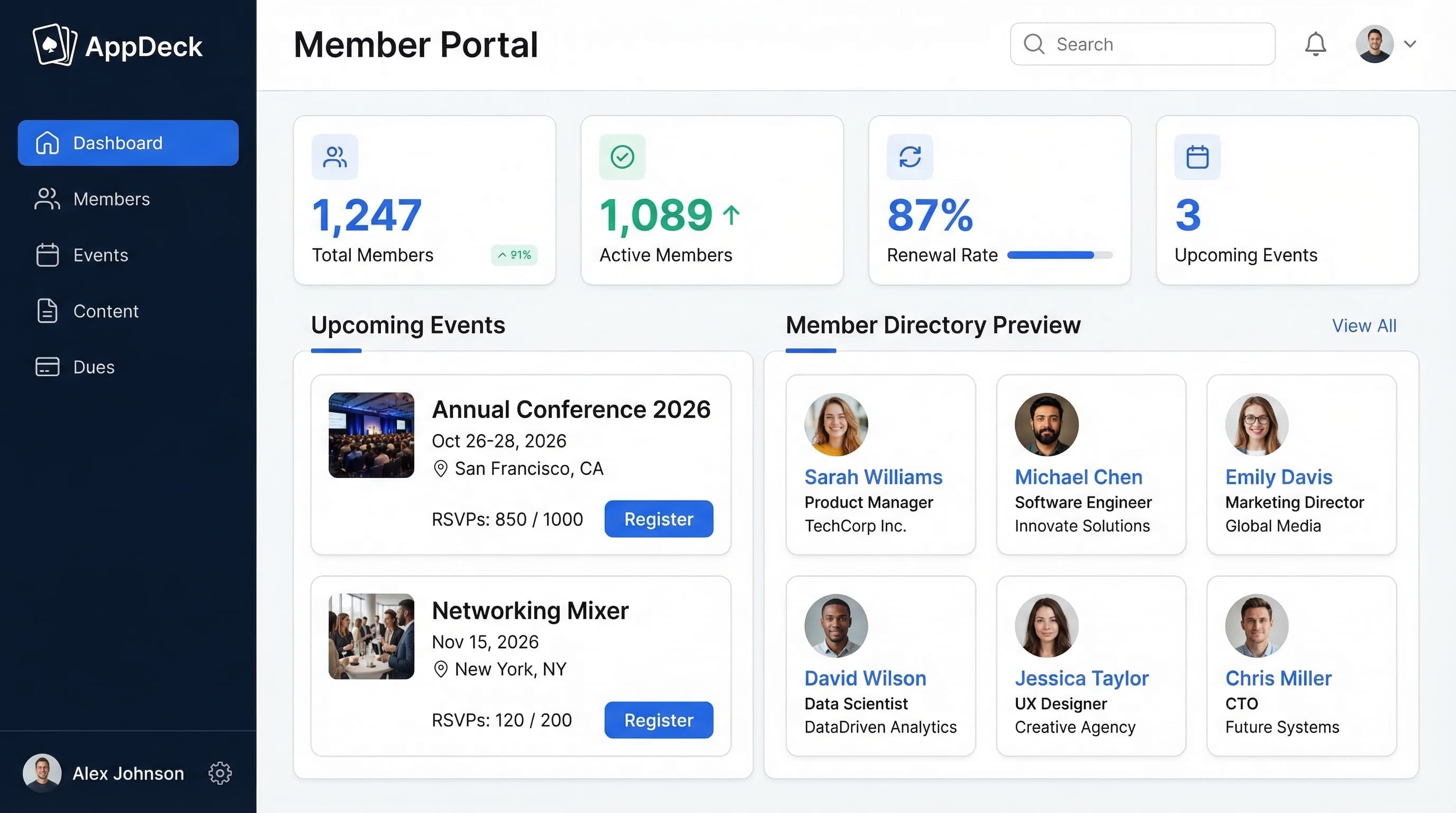
TL;DR: Comprehensive comparison of the best membership portal software for 2026. Compare Wild Apricot, MemberClicks, Glue Up, AppDeck, and 6 others. Features, pricing, and real user reviews.
Introduction
Choosing membership portal software is one of the most consequential decisions an association executive or membership director will make. The right platform drives renewals, increases engagement, and transforms member experience from transactional to transformational. The wrong one? Plummeting retention, frustrated staff, and a failed implementation that members never log into.
After advising 60+ organizations through membership portal selection and implementation over 10+ years, I've seen what works—and what doesn't. In this comprehensive comparison, I'll break down the top 10 membership portal platforms with honest assessments of features, pricing, and real-world performance.
What is Membership Portal Software?
Membership portal software is a secure digital platform that centralizes all member-facing activities and internal membership management:
Core capabilities:
- Member directories with searchable profiles
- Dues collection and payment processing (recurring billing, invoicing)
- Event management and registration
- Content library and resource access (gated by membership tier)
- Communication tools (email, announcements, newsletters)
- Self-service member profiles and account management
- Analytics and reporting (retention, engagement, revenue)
- Mobile access for members on the go
Who needs this:
- Professional associations and trade groups
- Clubs and social organizations
- Chambers of commerce
- Churches and religious organizations
- Alumni groups and university networks
- Unions and labor organizations
- HOAs and community associations
- Gyms and fitness studios
- Nonprofit membership organizations
Why Membership Portal Software Matters
The Spreadsheet & Email Problem
Before membership portals, most organizations struggle with:
- ❌ Member records scattered across Excel spreadsheets and email chains
- ❌ Manual dues collection with checks and phone calls
- ❌ Event registration via email replies and paper sign-ups
- ❌ No visibility into who's engaged and who's about to lapse
- ❌ Members calling the office for basic account questions
- ❌ Zero self-service options (staff handles everything)
- ❌ Renewal reminders sent manually (or forgotten entirely)
The Portal Solution
Modern membership portals solve these problems:
- ✅ Single source of truth for all member data
- ✅ Automated dues billing and payment processing
- ✅ Self-service profiles where members update their own information
- ✅ Event management with online registration and payment
- ✅ Gated content libraries organized by membership tier
- ✅ Automated renewal reminders and engagement campaigns
- ✅ Real-time dashboards showing retention, revenue, and engagement
Result: 35% higher renewal rates, 50% reduction in administrative time, and 65% of member interactions happening via mobile.
Key Features to Compare
Before diving into specific platforms, here's what matters when evaluating membership portal software:
1. Member Directory & Profiles
Essential directory features:
- Searchable member directory (public or members-only)
- Custom profile fields (industry, certifications, interests)
- Photo uploads and biographical information
- Privacy controls (members choose what's visible)
- Bulk import/export from CSV
- Duplicate detection and merge tools
- Membership tier badges and status indicators
Why it matters: Your directory is the backbone of your community. Members join associations to connect with peers. A poor directory means members can't find each other—and they'll question why they're paying dues.
2. Dues & Payment Processing
Critical payment capabilities:
- Recurring billing (monthly, quarterly, annual)
- Multiple payment methods (credit card, ACH, invoice)
- Tiered pricing (individual, corporate, student, retired)
- Proration for mid-year joins and grace periods for late renewals
- Automatic renewal reminders and failed payment retry logic
- PCI-compliant payment processing
Why it matters: Dues are your lifeblood. Manual billing costs staff time and leaks revenue. Organizations that automate billing see 20-30% higher renewal rates simply because they remove friction.
3. Event Management
Essential event features:
- Event creation with online registration and member/non-member pricing
- Waitlists, capacity limits, and calendar view
- Check-in tools (QR codes, mobile check-in)
- Virtual and hybrid event support
- Post-event surveys and feedback
Why it matters: Events are how members experience your value. If registration is painful, attendance drops—and so does renewal intent.
4. Content & Resource Library
Must-have content features:
- Gated content by membership tier
- Document library with categories, tags, and search
- Video hosting and webinar archives
- Download tracking and drip content for onboarding
Why it matters: Members increasingly expect on-demand access to resources. A strong content library justifies dues between events and keeps members engaged year-round.
5. Communication Tools
Essential communication capabilities:
- Email campaigns, newsletters, and automated workflows (welcome series, renewal reminders)
- Segmentation by tier, interest, and engagement level
- Announcement banners and push notifications
- Discussion forums or community feeds
Why it matters: Communication drives engagement, and engagement drives renewals. Organizations that send targeted, automated communications see significantly higher retention.
6. Self-Service Features
Key self-service capabilities:
- Profile editing and photo uploads
- Dues payment and invoice history
- Event registration and ticket management
- Digital membership card and credential downloads
- Directory visibility and opt-in/opt-out controls
Why it matters: Every phone call to your office about "How do I update my address?" costs staff time. Self-service frees your team to focus on strategy instead of administration.
7. Analytics & Reporting
Essential analytics:
- Membership growth and retention dashboards
- Revenue reports (dues, events, donations)
- Engagement scoring (who's active vs. at risk)
- Lapsed member reports and custom report builder
- Export to Excel/CSV
Why it matters: You can't improve what you don't measure. Boards and executive committees expect data-driven insights on membership health—not anecdotes.
8. Branding & Customization
Customization capabilities:
- Custom domain (members.yourorg.com)
- Logo, colors, and branding throughout portal and emails
- White-label options (no vendor branding)
- Custom membership application forms and branded member cards
Why it matters: Your portal IS your member experience. If it looks generic or carries another company's branding, it undermines your organization's credibility.
The 10 Best Membership Portal Software Platforms for 2026
1. AppDeck Membership Portal
Best for: Modern associations wanting real-time dashboards, polished UX, and affordable flat pricing. AppDeck also offers Board Portals, Client Portals, and Executive Dashboards, making it ideal for organizations that need multiple portal types under one platform.
Pricing: $199/month (unlimited members)
Key features:
- ✅ Real-time membership dashboards (retention, revenue, engagement metrics)
- ✅ Modern, intuitive interface members actually enjoy using
- ✅ Automated dues billing with recurring payment support
- ✅ Event management with online registration
- ✅ Gated content library organized by membership tier
- ✅ Searchable member directory with custom profiles
- ✅ Mobile apps (iOS & Android) with offline access
- ✅ White-label branding (your domain, your logo, no AppDeck branding)
- ✅ 30-minute setup (not 3 months)
Pros:
- Modern design that members embrace immediately
- Real-time dashboards showing retention, revenue, and engagement at a glance
- Flat pricing with no per-member fees (saves massively as membership grows)
- Fast implementation (hours, not months)
- Excellent customer support with dedicated onboarding
- Multi-portal capability (add board portal, client portal from same platform)
- Affordable at $199/mo vs. $5K-25K/year for legacy AMS platforms
- Flexible - works for 50-member clubs and 10,000-member associations alike
Cons:
- Newer platform (less brand recognition than Wild Apricot)
- Fewer legacy AMS features than enterprise platforms (no committee management yet)
- Integration library still growing
- Smaller customer base (though growing quickly)
Best fit:
- Professional associations (100-5,000 members)
- Chambers of commerce wanting modern member experience
- Clubs and organizations tired of spreadsheet chaos
- Alumni groups needing self-service member profiles
- Organizations wanting real-time membership health dashboards
- Budgets under $5K/year
User review:
"We switched from Wild Apricot after 4 years and the difference is night and day. Our members actually log in now—the interface is that much better. The real-time retention dashboard changed how our board talks about membership. At $199/mo with unlimited members, we're saving $3,000/year compared to our old plan." — Executive Director, State Professional Association (1,200 members)
Try it: AppDeck Membership Portal
2. Wild Apricot
Best for: Small nonprofits and clubs on tight budgets wanting an all-in-one solution
Pricing: $60-$420/month (member-based tiers: 100 contacts free, then scales up)
Key features:
- ✅ Member database and directory
- ✅ Website builder with templates
- ✅ Event management and registration
- ✅ Online payment processing
- ✅ Email campaigns
- ✅ Mobile admin app
- ✅ Donation management
- ✅ Online store for merchandise
Pros:
- Very well-known in the small nonprofit space (20+ years, 60K+ orgs)
- Built-in website builder (no separate CMS needed)
- Free tier for up to 50 contacts
- Good for beginners who need everything in one place
- Donation tracking included
- Large community of users sharing tips and templates
- Reasonable pricing for small organizations
- Mobile admin app for managing on the go
Cons:
- Dated interface (feels like 2015)
- Per-member pricing gets expensive as you grow (2,000+ members = $420/mo)
- Limited customization (templates are rigid)
- Basic reporting (no real-time dashboards)
- Slow performance (pages load slowly with large databases)
- Email deliverability issues reported by many users
- No native mobile app for members (web only)
- Support quality has declined since Personify acquisition
Best fit:
- Small nonprofits (under 500 members)
- Volunteer-run clubs and organizations
- Organizations that need website + membership in one tool
- Groups with minimal budget and basic needs
- Churches and religious organizations
User review:
"Wild Apricot was great when we had 200 members. Now at 1,500 members, we're paying $360/month and the site is painfully slow. The interface looks dated and our younger members complain. We're actively looking for alternatives." — Membership Director, Regional Trade Association
3. MemberClicks
Best for: Mid-size professional associations wanting a full AMS with portal capabilities
Pricing: Custom ($5,000-$15,000/year depending on modules)
Key features:
- ✅ Full association management system (AMS)
- ✅ Member portal with directory
- ✅ Event management with CE credit tracking
- ✅ Website CMS integration
- ✅ Email marketing tools
- ✅ Committee and chapter management
- ✅ Job board functionality
- ✅ Reporting and analytics
Pros:
- Purpose-built for associations (understands the space deeply)
- CE/CPE credit tracking (critical for professional associations)
- Committee management tools built in
- Job board module drives member value
- Good implementation support with dedicated project manager
- Chapter management for multi-chapter organizations
- Solid reporting for board presentations
Cons:
- Expensive for smaller organizations ($5K-15K/year)
- Long implementation (2-4 months typical)
- Interface feels dated compared to modern platforms
- Per-module pricing means costs add up quickly
- Limited mobile experience (responsive web, not native apps)
- Steep learning curve for administrators
- Annual contracts required (no month-to-month)
- Customization requires vendor involvement (not DIY)
Best fit:
- Professional associations (500-5,000 members)
- Organizations requiring CE/CPE credit tracking
- Multi-chapter associations
- Groups with $10K+ annual software budget
- Associations wanting a traditional full-featured AMS
User review:
"MemberClicks handles our CE tracking perfectly and the committee management features are solid. But the interface looks like it was designed in 2012. Our staff spent 3 months implementing it. The per-module pricing means we're paying $12K/year for everything we need." — Association Manager, Healthcare Professional Society (2,800 members)
4. Glue Up (formerly EventBank)
Best for: Event-heavy organizations like chambers of commerce and networking groups
Pricing: $125-$500/month (based on features and member count)
Key features:
- ✅ Event management (strongest feature)
- ✅ CRM and member database
- ✅ Email campaigns and automation
- ✅ Community engagement tools
- ✅ Mobile app for members
- ✅ Payment processing
- ✅ Survey and feedback tools
- ✅ Sponsorship management
Pros:
- Best-in-class event management (their core strength)
- Member mobile app available (unlike many competitors)
- Modern interface that looks professional
- Community features including social feed
- Good for chambers and business networking organizations
- Sponsorship management tools built in
- Global presence with multi-currency support
- All-in-one approach reduces tool sprawl
Cons:
- Event-first, membership-second (membership features feel bolted on)
- Per-member pricing at higher tiers
- Limited dues management compared to purpose-built AMS
- Reporting is basic (no real-time dashboards)
- Customer support inconsistent (varies by region)
- Limited content library features
- No offline access on mobile app
- Customization limitations on portal layout
Best fit:
- Chambers of commerce
- Business networking organizations
- Event-heavy associations (10+ events/year)
- Organizations where events drive membership value
- International organizations needing multi-currency
User review:
"Glue Up is fantastic for events—registration, check-in, follow-up are all seamless. But for day-to-day membership management, it's lacking. Dues automation is clunky and reporting is basic. We use it for events and wish we had something better for the membership side." — Chamber Director, Metropolitan Chamber of Commerce (800 members)
5. YourMembership (by Community Brands)
Best for: Large associations with complex needs and big budgets
Pricing: Custom ($8,000-$25,000/year)
Key features:
- ✅ Full AMS with member portal and website CMS
- ✅ Learning management system (LMS)
- ✅ Career center and job board
- ✅ Online community, forums, event management
- ✅ Committee and chapter management
- ✅ Advanced reporting and analytics
Pros:
- Enterprise-grade AMS with deep feature set
- LMS built in for education-focused associations
- Career center that drives member value
- Chapter and committee management
- Large installed base (trusted by major associations)
Cons:
- Very expensive ($8K-25K/year plus implementation)
- Lengthy implementation (3-6 months typical)
- Dated user interface (not modern or intuitive)
- Vendor lock-in (data migration is painful)
- Overkill for organizations under 2,000 members
Best fit:
- Large professional associations (2,000-50,000 members)
- Organizations needing integrated LMS or career center
- Multi-chapter national organizations
User review:
"YourMembership does everything but nothing brilliantly. The LMS and career center are solid for our members. But the interface is clunky, implementation took 5 months, and we're paying $18K/year. For what we get, there are more modern options out there now." — IT Director, National Professional Association (8,500 members)
6. MemberSpace
Best for: Content creators and online communities monetizing membership content
Pricing: $29-$199/month
Key features:
- ✅ Content gating by membership tier
- ✅ Integrates with any existing website
- ✅ Recurring payment processing (Stripe)
- ✅ Member directory
- ✅ Free trial and coupon management
- ✅ Drip content scheduling
- ✅ Custom signup forms
- ✅ Zapier integrations
Pros:
- Works with any website (WordPress, Squarespace, Wix, custom)
- Excellent content gating (their core strength)
- Simple pricing and easy to understand
- Quick setup (under an hour)
- Good for digital content monetization
- Free trial capability for prospective members
- Drip content for onboarding sequences
- No migration needed (adds to existing site)
Cons:
- Not a full membership platform (no event management)
- No member directory beyond basic list
- No email marketing built in (need separate tool)
- Limited reporting and analytics
- No dues invoicing (credit card only via Stripe)
- No mobile app for members
- Basic branding options
- Not designed for traditional associations
Best fit:
- Content creators with paid membership tiers
- Online education communities
- Media organizations with subscriber content
- Organizations where content IS the primary member benefit
- Tech-savvy teams comfortable with multiple tools
User review:
"MemberSpace is perfect for what we need—gating our premium content behind a membership paywall. It took 45 minutes to set up on our WordPress site. But it's not a full membership platform. We still need separate tools for events, email, and reporting." — Program Director, Online Professional Development Community (450 members)
7. Mighty Networks
Best for: Community-focused organizations wanting social features and engagement
Pricing: $41-$360/month
Key features:
- ✅ Community feed, spaces, and social features
- ✅ Courses and content hosting
- ✅ Events (virtual and in-person)
- ✅ Branded mobile app (higher tiers)
- ✅ Live streaming, polls, and Q&A
Pros:
- Best community features in the market (social feed, spaces, discussions)
- Branded mobile app available on higher plans
- Course hosting built in (great for education)
- Modern, engaging interface members enjoy using
- AI features for content recommendations
Cons:
- Not a traditional AMS (limited membership management)
- No real dues management (basic subscription billing only)
- No member directory in the traditional association sense
- Branded app costs extra ($360/mo plan)
- Not ideal for organizations where events and dues are core
Best fit:
- Online communities and creator organizations
- Education-focused groups with courses
- Coaching and mastermind programs
User review:
"Mighty Networks is incredible for community engagement—our members are posting, commenting, and interacting daily. The mobile app looks like it's ours. But it's not built for traditional association management. We can't do tiered dues, invoicing, or proper member directories." — Community Manager, Tech Industry Networking Group (650 members)
8. Raklet
Best for: Budget-conscious small organizations wanting a modern, affordable portal
Pricing: Free-$99/month (free for up to 50 members)
Key features:
- ✅ Member portal with directory
- ✅ Event management
- ✅ Payment collection and donations
- ✅ Email and SMS communication
- ✅ Content management
- ✅ Custom forms and surveys
- ✅ Mobile-responsive design
- ✅ Integrations via Zapier
Pros:
- Very affordable (free tier available, paid plans start at $49/mo)
- Modern interface that looks professional
- Good feature breadth for the price
- Quick setup (DIY in under an hour)
- Mobile-responsive portal
- Donation management included
- Custom forms for applications and surveys
- No long-term contracts
Cons:
- Limited advanced features (no CE tracking, no LMS)
- Basic reporting (no real-time dashboards)
- Small company (limited support resources)
- Per-member pricing on paid tiers
- No native mobile app (web only)
- Limited event management compared to Glue Up
- Email deliverability not as strong as dedicated tools
- Fewer integrations than established platforms
Best fit:
- Small organizations (under 500 members)
- Clubs and hobby groups
- Student organizations
- Startups and new associations just getting started
- Organizations with minimal budget
User review:
"Raklet is surprisingly capable for the price. We're on the $49/month plan for 300 members and it covers 80% of what we need. The interface is clean and modern. For a small club, it's hard to beat. We'll likely outgrow it eventually, but it's perfect for now." — President, Regional Professional Club (300 members)
9. WordPress + MemberPress
Best for: Tech-savvy organizations wanting full customization and control
Pricing: $179-$399/year (MemberPress license) + hosting ($10-$50/month)
Key features:
- ✅ Content gating by membership level
- ✅ Recurring payment processing and coupon management
- ✅ Full WordPress ecosystem (thousands of plugins)
- ✅ Complete design control and course builder (add-on)
Pros:
- Complete customization (WordPress is infinitely flexible)
- Low annual cost ($179-$399/year + hosting)
- Own your data (no vendor lock-in)
- Massive plugin ecosystem and SEO advantages
- One-time annual fee (not per-member pricing)
Cons:
- Requires technical skills (WordPress admin, plugin management)
- Security responsibility is yours (updates, patches, backups)
- No built-in event management or email marketing (need separate plugins)
- Plugin conflicts can break functionality
- Maintenance overhead (5-10 hours/month typical)
- No mobile app unless you build one
Best fit:
- Tech-savvy organizations with WordPress experience
- Content-focused memberships wanting full ownership
- Budgets under $2K/year who can handle maintenance
User review:
"MemberPress on WordPress gives us total control and the cost is unbeatable. But it took our developer 3 weeks to set up properly and we spend 5-10 hours/month on maintenance. If you don't have technical resources, don't go this route." — Operations Manager, Writers' Association (700 members)
10. Custom-Built Solutions (Spreadsheets, Google Workspace, Notion)
Best for: Organizations with unique needs and strong technical teams (not recommended)
Pricing: Variable (internal time + tools)
What people try:
- Google Sheets for member tracking
- Google Forms for event registration
- Notion databases for member directory
- Stripe standalone for payment collection
- Mailchimp standalone for communications
- A patchwork of 5-10 disconnected tools
Pros:
- Complete customization to your exact workflow
- Use tools team already knows
- Potentially lower monthly subscription cost
Cons:
- ❌ No single source of truth (data scattered everywhere)
- ❌ Manual processes that don't scale
- ❌ No self-service for members (they email you for everything)
- ❌ Security gaps (member data in shared spreadsheets)
- ❌ No automated billing (manual invoicing and follow-up)
- ❌ No engagement analytics (you're flying blind on retention)
- ❌ Ongoing maintenance burden on staff
- ❌ No mobile experience for members
- ❌ Staff turnover risk (knowledge lives in one person's head)
Our strong recommendation: Don't do this. Membership management is too complex and member experience too important to cobble together from disconnected tools. Purpose-built membership portal software pays for itself through higher retention and lower admin costs.
Feature Comparison Table
| Feature | AppDeck | Wild Apricot | MemberClicks | Glue Up | MemberSpace | Raklet |
|---|---|---|---|---|---|---|
| Pricing | $199/mo | $60-420/mo | $5K-15K/yr | $125-500/mo | $29-199/mo | Free-$99/mo |
| Setup Time | 30 minutes | 1-2 hours | 2-4 months | 2-4 weeks | 45 minutes | 1 hour |
| Real-time Dashboards | ✅ Excellent | ❌ No | ⚠️ Basic | ❌ No | ❌ No | ❌ No |
| Mobile Apps | ✅ Native | ⚠️ Admin only | ⚠️ Web only | ✅ Native | ❌ No | ⚠️ Web only |
| Dues Automation | ✅ Full | ✅ Full | ✅ Full | ⚠️ Basic | ⚠️ Stripe only | ✅ Yes |
| Event Management | ✅ Yes | ✅ Yes | ✅ Advanced | ✅ Excellent | ❌ No | ✅ Basic |
| Content Gating | ✅ By tier | ⚠️ Basic | ⚠️ Basic | ⚠️ Limited | ✅ Excellent | ✅ Yes |
| White-Label Branding | ✅ Full | ⚠️ Limited | ⚠️ Limited | ⚠️ Partial | ❌ No | ⚠️ Partial |
| Member Directory | ✅ Searchable | ✅ Searchable | ✅ Advanced | ✅ Yes | ⚠️ Basic | ✅ Yes |
| Email Marketing | ✅ Built-in | ✅ Built-in | ✅ Built-in | ✅ Built-in | ❌ No | ✅ Built-in |
| Best For | Modern associations | Small nonprofits | Mid-size associations | Event-heavy orgs | Content creators | Budget-conscious |
How to Choose the Right Membership Portal Software
Step 1: Assess Your Requirements
Organization type and size:
- Under 100 members → Raklet or Wild Apricot (free tiers)
- 100-500 members → AppDeck, Wild Apricot, or Raklet
- 500-2,000 members → AppDeck, MemberClicks, or Glue Up
- 2,000-10,000 members → AppDeck, MemberClicks, or YourMembership
- 10,000+ members → YourMembership or MemberClicks (enterprise)
Primary needs:
- Real-time membership dashboards → AppDeck
- All-in-one with website builder → Wild Apricot
- Full AMS with CE tracking → MemberClicks
- Event-heavy organization → Glue Up
- Content gating focus → MemberSpace
- Community and social features → Mighty Networks
- Minimal budget → Raklet
- Full customization → WordPress + MemberPress
Step 2: Get Stakeholder Buy-In
Before selecting, talk to:
Board/Executive Committee: "What membership metrics do you want visibility into? What does member engagement look like to you?"
Membership staff: "What takes the most time in your day? What questions do members ask repeatedly that self-service could solve?"
Members (survey a sample): "Would you use a member portal? What features would make you log in regularly? How do you prefer to pay dues?"
Step 3: Request Demos (But Be Strategic)
What to test during demos:
1. Import your actual member data (not their sample data)
- How clean is the import process?
- Can members see their own profiles?
2. Test the member experience (not just the admin side)
- Log in as a member—is it intuitive?
- Try updating a profile, registering for an event, paying dues
- Check on a mobile device
3. Understand total cost
- Per-member fees? Implementation costs? Training included?
- Annual price increases? Transaction fees on payments?
- Contract length and termination fees?
Step 4: Run a Pilot
Pilot approach:
- Select 2-3 finalists
- Import a subset of your member data (50-100 members)
- Invite a pilot group to test for 30 days
- Survey pilot members on experience
- Test payment workflows with real transactions
- Make final decision
Red flags during pilot:
- Members can't figure out how to log in
- Staff spending more time than before on admin
- Poor mobile experience or payment processing issues
- Vendor support is slow or unhelpful
Step 5: Plan Your Rollout
Successful implementation requires:
1. Executive sponsorship (executive director or board president must visibly champion the platform)
2. Member communication (send preview emails 2 weeks before launch, create a 2-minute walkthrough video, offer a live Q&A during launch week)
3. Data migration plan (clean data before migrating, test with a small batch, keep old system read-only for 90 days)
4. Measure and iterate (track login rates at 30/60/90 days, monitor self-service adoption, gather feedback after first month)
Common Membership Portal Mistakes to Avoid
Mistake #1: Choosing Based on Feature Count Alone
Problem: "This platform has 150 features, so it must be the best."
Reality: Feature count ≠ usability. A platform with 50 well-designed features will outperform one with 150 clunky ones. Members don't use features they can't find.
Solution: Focus on the 10-15 features you'll actually use daily. Prioritize member experience over admin feature lists.
Mistake #2: Ignoring the Member Experience
Problem: Only evaluating from the admin perspective during demos.
Reality: Your staff will tolerate a clunky admin interface. Your members won't tolerate a confusing portal. If members don't log in, the whole investment is wasted.
Solution: Always test as a member during evaluation. Log in, update a profile, register for an event, pay dues. If it's confusing for you, it's worse for your members.
Mistake #3: Overlooking Per-Member Pricing
Problem: "It's only $60/month!" ...for 100 members. At 2,000 members, it's $420/month.
Reality: Per-member pricing punishes growth. The more successful your organization, the more you pay. Flat-rate pricing (like AppDeck's $199/mo unlimited) scales far better.
Solution: Calculate 3-year total cost at your current size AND your projected size. Factor in growth.
Mistake #4: Skipping the Member Survey
Problem: Admin picks platform based on internal needs. Members never log in.
Result: Wasted money and a portal nobody uses.
Solution: Survey 50-100 members before purchasing. Ask what features they'd actually use. Involve 5-10 members in pilot testing.
Mistake #5: Treating the Portal as a Dumping Ground
Problem: Uploading every document and newsletter from the last 10 years into the new portal.
Solution: Curate content strategically. Start with current-year materials. Add historical content gradually based on demand.
Mistake #6: No Onboarding Plan for Members
Problem: Send login credentials, expect adoption. Result: 80% of members never log in.
Solution: Send a personalized welcome email, create a 2-minute video walkthrough, highlight ONE compelling reason to log in, and follow up with non-adopters at 7 and 30 days.
Recommendations by Organization Size
Small Organizations (Under 200 Members)
Recommended: AppDeck ($199/mo) or Raklet (Free-$49/mo)
Why:
- Limited budget and staff
- Need simple, fast setup
- Members expect modern, easy-to-use interface
- Self-service capabilities reduce admin burden immediately
- Real-time dashboards help small teams make data-driven decisions
Skip: MemberClicks, YourMembership (massive overkill and too expensive)
Mid-Size Organizations (200-2,000 Members)
Recommended: AppDeck or MemberClicks
Why:
- Growing complexity (multiple tiers, events, committees)
- Need automated billing to scale
- Board and leadership expect reporting and metrics
- Member experience becomes competitive differentiator
- Balance between features and usability matters
Consider: MemberClicks if you need CE/CPE credit tracking. Glue Up if events are your primary value proposition.
Large Organizations (2,000-10,000+ Members)
Recommended: MemberClicks or YourMembership
Why: Complex membership structures, need for LMS or CE tracking, dedicated IT staff, enterprise budget available.
Why AppDeck still works: Many associations in this range use AppDeck successfully. The key is whether you need legacy AMS features like committee management, CE tracking, or chapter hierarchies.
Content-Focused Organizations
Recommended: MemberSpace or Mighty Networks (content gating is primary requirement, simpler membership structure)
Budget-Constrained Organizations
Budget under $600/year: Raklet (free tier or $49/mo) Budget $600-$2,500/year: AppDeck ($199/mo) Budget $2,500-$10,000/year: AppDeck, Wild Apricot, or Glue Up Budget $10,000+/year: MemberClicks or YourMembership
Pricing Deep Dive: What You Actually Pay
AppDeck Membership Portal
- Base price: $199/month ($2,388/year)
- Implementation: $0 (DIY setup in 30 minutes)
- Training: Included
- Per-member fees: $0 (unlimited members)
- Support: Included
- Real-time dashboards: Included
- Transaction fees: Standard Stripe rates
- First year total: $2,388
- Scales well: Same price for 50 or 5,000 members
Wild Apricot
- Base price: $60-$420/month (based on contact count)
- 100 contacts: $60/mo ($720/year)
- 500 contacts: $120/mo ($1,440/year)
- 2,000 contacts: $360/mo ($4,320/year)
- 5,000 contacts: $420/mo ($5,040/year)
- Implementation: $0 (DIY)
- Transaction fees: 2.9% + $0.30 per transaction (additional to Stripe)
- First year total (500 members): ~$1,440 + transaction fees
MemberClicks
- Base price: $5,000-$15,000/year (custom quote based on modules)
- Implementation: $2,000-$5,000
- Training: $500-$2,000
- Annual increases: Typically 3-5%
- First year total: $7,500-$22,000
- Ongoing annual cost: $5,000-$15,000+
Glue Up
- Base price: $125-$500/month ($1,500-$6,000/year)
- Implementation: $500-$2,000
- Training: Included on higher tiers
- Transaction fees: Vary by plan
- First year total: $2,000-$8,000
My Personal Recommendation (After 10+ Years)
After advising 60+ organizations through membership portal selection, here's what I recommend for most organizations:
For most associations and membership organizations: AppDeck
Why:
- Real-time membership dashboards are a game-changer (board sees retention and revenue metrics without waiting for quarterly reports)
- Modern UX that members actually enjoy (high adoption rates from day one)
- 30-minute setup vs. months (faster time to value)
- Flat $199/mo pricing with unlimited members (transparent and scales beautifully)
- White-label branding that looks like YOUR portal, not a vendor's
- Excellent support (responsive and genuinely helpful)
When I'd choose alternatives:
- Small nonprofit on minimal budget: Wild Apricot or Raklet (free tiers get you started)
- Professional association needing CE tracking: MemberClicks (purpose-built for that use case)
- Event-heavy chamber of commerce: Glue Up (best event management in the space)
- Content/course-focused community: MemberSpace or Mighty Networks
- Enterprise association with 10,000+ members and complex chapters: YourMembership
The Bottom Line
The best membership portal is the one your members actually log into regularly. Modern UX and self-service features drive adoption. Legacy AMS platforms have features you'll configure once and forget about. Start with what solves your immediate pain—automated billing, self-service profiles, and engagement visibility—not what might be needed in 5 years.
For most organizations, that means AppDeck.
Frequently Asked Questions
What is membership portal software?
Membership portal software is a self-service web platform where members of an association, club, or nonprofit can manage their profile, pay dues, register for events, access exclusive content, and interact with other members. It typically combines an association management system (AMS) with a member-facing portal, handling dues billing, renewals, event registration, member directory, content library, and engagement analytics. Modern platforms are cloud-based, mobile-friendly, and prioritize the member experience over staff-facing administration — older AMS systems often invert that priority and suffer poor member adoption as a result.
How is membership portal software different from a general AMS or CRM?
An AMS (association management system) is the system of record for membership data, dues, and events but historically focuses on staff workflows. A CRM tracks relationships and pipeline but isn't built for dues-based recurring billing or member self-service. Membership portal software sits on top of (or replaces) the AMS by giving members a modern interface to do everything themselves — update payment methods, renew, register, network, download content. The trend in 2026 is portal-first platforms that bundle AMS, CRM, and member portal into one product rather than three integrated systems.
How much does membership portal software cost?
Pricing ranges from $0-50/month for small clubs (Wild Apricot starter tiers, MemberPress for WordPress) to $500-2,000/month for mid-sized associations (Glue Up, Tendenci, ClubExpress) to $20,000-100,000+/year for enterprise AMS platforms (iMIS, YourMembership, Personify, Fonteva). Most platforms price per active member, which punishes growth — a 500-member association paying $2/member/month becomes a 2,000-member association paying $4,000/month for the same software. Always model 3-year total cost at projected member count, not current count, and prefer flat-rate or tiered pricing when available.
Who should use membership portal software vs. a simple website with a payment form?
You need dedicated membership software once you cross roughly 100 members, run recurring annual dues, host more than 4 events per year, or want a member directory. Below that threshold, a simple WordPress site with Stripe and Mailchimp may be enough. Above it, the cost of manual dues tracking, spreadsheet directories, and email-based event registration exceeds the software cost. Professional associations, chambers of commerce, alumni groups, trade associations, nonprofits with dues, and large clubs are the core audience. Mission-driven nonprofits without dues should look at donor CRMs (Bloomerang, Neon) instead.
When should we migrate off our current membership platform?
Migrate when one of these three signals appears: (1) member adoption is below 40% — most members never log in because the UX is broken, (2) staff spends more than 10 hours per week on manual workarounds the software should handle, or (3) the platform can't support a strategic initiative (new revenue stream, new chapter structure, new member type). Migration is painful — budget 3-6 months and expect data cleanup costs equal to one year of subscription fees — so don't migrate for minor irritations. But staying on a broken platform costs more in lost members than migration costs in cash.
Conclusion
Membership portal software is essential for modern associations, but choosing the wrong platform wastes money and frustrates both staff and members.
Key takeaways:
- Match to your size and needs: Don't buy enterprise AMS when you have 200 members
- Prioritize member experience: If members won't log in, nothing else matters
- Calculate total cost: Per-member pricing punishes growth—compare at current AND projected size
- Test as a member: Demo from the member perspective, not just admin
- Automate billing: Manual dues collection is the #1 source of lost revenue and wasted time
- Real-time data wins: Boards want dashboards, not quarterly spreadsheets
- Plan for adoption: Member onboarding and communication determine success
Next steps:
- Assess your organization's size, budget, and primary needs
- Shortlist 2-3 platforms from this comparison
- Request demos and test as both admin AND member
- Survey your members on what features they'd value
- Run a 30-day pilot with a subset of members
- Get board buy-in before final purchase
- Plan proper rollout with member onboarding
Your membership portal impacts every member interaction and the long-term health of your organization. Choose wisely.
Related reading:
- The Complete Guide to Membership Portals
- How to Build a Membership Portal — Step-by-step guide for creating an engaging member experience
- Customer Portal vs Client Portal — Understanding the differences and choosing the right approach
Disclosure: This comparison is based on extensive research, client experiences, and publicly available information. Pricing and features may change. Always verify details with vendors directly. The author has consulted for organizations using various platforms mentioned in this comparison.

Founder & CEO, AppDeck
Serial entrepreneur with 20+ years building B2B software companies. Former executive managing 2,800+ employees across three continents. Vik reviews all AppDeck content for accuracy and practical relevance.
Share this article
Explore Related Solutions
Related Articles
Association Management Best Practices: 12 Strategies for Modern Associations
12 association management best practices for 2026. Covers member portals, dues automation, event management, board governance, communication, and technology modernization.
How to Build a Membership Portal: Complete Guide for 2026
Step-by-step guide to building a membership portal for your association, club, or organization. Learn features, best practices, and platform options.
Member Engagement Strategies: 12 Proven Tactics to Boost Retention
12 member engagement strategies for associations, clubs, and organizations. Covers onboarding, events, content, communication, recognition, and portal technology to boost retention rates.