
Best Board Portal Software for Nonprofits: 2026 Comparison & Buyer's Guide
Compare the best board management software for nonprofits in 2026. Features, pricing, and honest reviews of 9 platforms designed for volunteer boards, compliance, and limited budgets.
TL;DR: Compare the best board management software for nonprofits in 2026. Features, pricing, and honest reviews of 9 platforms designed for volunteer boards, compliance, and limited budgets.
Introduction
Nonprofit boards are fundamentally different from corporate boards — and they deserve software built for how they actually work. Volunteer directors juggling full-time careers, tight budgets stretching every dollar toward the mission, compliance requirements that rival publicly traded companies, and turnover rates that would make a corporate governance officer's head spin.
After helping 40+ nonprofit organizations select and implement board management software over the past 19 years, I've watched the same pattern unfold repeatedly: a well-meaning executive director purchases enterprise board portal software designed for Fortune 500 companies, the volunteer board members can't figure out how to log in, adoption craters within two meetings, and the organization is back to emailing 47-page PDF board packets.
The nonprofit board portal market has matured significantly in 2026. There are now platforms specifically designed for the unique challenges nonprofits face — from volunteer board onboarding to affordable pricing that doesn't require a capital campaign. In this guide, I'll walk through the 9 best board management software platforms for nonprofits, with honest assessments of features, pricing, and real-world fit.
What you'll learn:
- Why nonprofit boards need different software than corporate boards
- The 7 features that matter most for volunteer directors
- Detailed reviews of 9 platforms (including a free option)
- A decision framework based on your budget and board size
- Implementation tips to get buy-in from volunteer directors
What Makes Nonprofit Boards Different?
Before comparing platforms, you need to understand why generic board portal software often fails at nonprofits. The dynamics are fundamentally different from corporate governance.
1. Volunteer Directors with Limited Time
Corporate board members are typically compensated — sometimes $50,000-$300,000+ per year — and dedicate significant time to governance. Nonprofit board members? They're volunteers squeezing board work between full-time jobs, family commitments, and the three other boards they sit on.
What this means for software:
- ❌ Complex interfaces with steep learning curves don't work
- ❌ Multi-step login processes frustrate busy volunteers
- ❌ Features that require training sessions are rarely used
- ✅ Intuitive design that works on the first try is essential
- ✅ Mobile access for reviewing materials during commutes
- ✅ Quick login (single sign-on or magic links)
2. Significantly Smaller Budgets
The median nonprofit operating budget is $765,000. After program costs, staffing, and fundraising expenses, the governance software budget is typically $0-$500 per month. Enterprise board portals charging $15,000-$30,000 per year are simply not realistic.
Budget reality check:
- Small nonprofits (under $1M budget): $0-$150/month for board software
- Mid-size nonprofits ($1M-$10M): $100-$400/month
- Large nonprofits ($10M+): $200-$800/month
- Very few nonprofits can justify $1,000+/month for board software alone
3. Complex Compliance Requirements
Nonprofits face regulatory requirements that many corporate boards don't:
Form 990 obligations:
- Board meeting documentation and attendance records
- Conflict of interest policy tracking
- Executive compensation disclosure
- Related party transaction records
- Document retention compliance
State-level requirements:
- Annual filings with the state attorney general
- Charitable solicitation registration
- Board meeting minutes as public records (in some states)
- Whistleblower policy documentation
Accreditation standards (sector-specific):
- Healthcare: Joint Commission governance requirements
- Education: Regional accreditor board standards
- Social services: COA accreditation governance criteria
4. Higher Board Turnover
Nonprofit board terms are typically 2-3 years with term limits. Combined with natural attrition, many nonprofits replace 25-40% of their board annually. Compare that to corporate boards where directors serve for 8+ years on average.
What this means for software:
- Onboarding new directors needs to be fast and frictionless
- Historical documents must be easily accessible for incoming members
- Institutional knowledge can't live in one person's head
- Training costs multiply when you're constantly onboarding
5. Varying Technical Comfort Levels
A corporate board is typically 8-12 executives who live on their laptops. A nonprofit board might include a 72-year-old retired teacher, a 35-year-old tech entrepreneur, a local business owner who still uses a flip phone, and a college student. The technology comfort range is enormous.
The implication: If your board portal software can't be used by every member of your board — not just the tech-savvy ones — it's the wrong tool.
7 Key Features Nonprofits Need in Board Portal Software
Not every feature matters equally. Based on dozens of nonprofit implementations, here are the 7 capabilities that actually drive adoption and governance improvement at nonprofits.
1. Dead-Simple Document Management
This is the single most important feature. Your board portal replaces the email chaos of distributing board packets, financial statements, and committee reports.
What to look for:
- Drag-and-drop file upload
- Automatic organization by meeting date
- Version control (no more "BoardPacket_FINAL_v3_REVISED.pdf")
- Full-text search across all documents
- Download for offline reading
- Support for large files (50+ MB board packets)
2. Voting and Resolution Tracking
Nonprofit boards vote on everything — budgets, policies, grant applications, strategic plans. Between-meeting voting (consent agendas, written resolutions) saves enormous time.
Essential capabilities:
- Online voting between meetings
- Quorum tracking and validation
- Voting history and audit trail
- Resolution tracking with status
- Conflict of interest declarations
- Anonymous voting option for sensitive decisions
3. Meeting Management
The core workflow: scheduling meetings, distributing materials, taking attendance, recording minutes, and tracking follow-up actions.
Must-have meeting features:
- Calendar integration (Google Calendar, Outlook, iCal)
- Automated meeting reminders
- Agenda builder with templates
- Attendance tracking and quorum monitoring
- Minutes drafting and approval workflow
- Action item assignment and follow-up
4. Compliance and Audit Trail
Nonprofits operate under public trust. Your board portal should make compliance effortless, not optional. Refer to our board portal security checklist for a deep dive on what to look for.
Compliance features that matter:
- Complete audit log (who accessed what, when)
- Document retention policies
- Conflict of interest tracking and disclosure
- Committee charter management
- Policy acknowledgment tracking
- Term tracking and director rotation schedules
- Form 990 preparation support
5. New Director Onboarding
With 25-40% annual turnover, your onboarding process runs several times per year. It should be systematized, not ad hoc.
Onboarding capabilities to look for:
- Welcome portal with orientation materials
- Bylaws, policies, and governing documents in one place
- Historical meeting minutes and board packet archive
- Director handbook or orientation guide hosting
- Board roster with contact information and committee assignments
- Training acknowledgment tracking
6. Affordable, Transparent Pricing
Nonprofits can't absorb hidden costs. The board portal that quotes $200/month but charges extra for storage, users, training, and support will blow your budget.
Pricing transparency checklist:
- ✅ Flat monthly or annual pricing (no per-director fees)
- ✅ Unlimited board members included
- ✅ Training and onboarding included
- ✅ All core features in one plan (not tiered)
- ✅ No long-term contract required
- ✅ Nonprofit discount available
- ❌ Avoid per-seat pricing (board size fluctuates)
- ❌ Avoid multi-year lock-in contracts
- ❌ Avoid platforms with "call for pricing" (usually means expensive)
7. Mobile Access That Actually Works
Board members review materials everywhere — at kids' soccer games, on commutes, in waiting rooms. Mobile isn't a nice-to-have. It's how 65%+ of volunteer directors will interact with your portal.
Mobile essentials:
- Native iOS and Android apps (not just responsive web)
- Offline access for areas without connectivity
- PDF annotation and highlighting
- Push notifications for new documents and upcoming meetings
- Quick login without remembering complex passwords
The 9 Best Board Portal Platforms for Nonprofits (2026)
1. AppDeck Board Portal
Best for: Nonprofits wanting modern UX, real-time dashboards, and affordable flat pricing without sacrificing security
Pricing: $299/month (unlimited board members) — nonprofit discount available
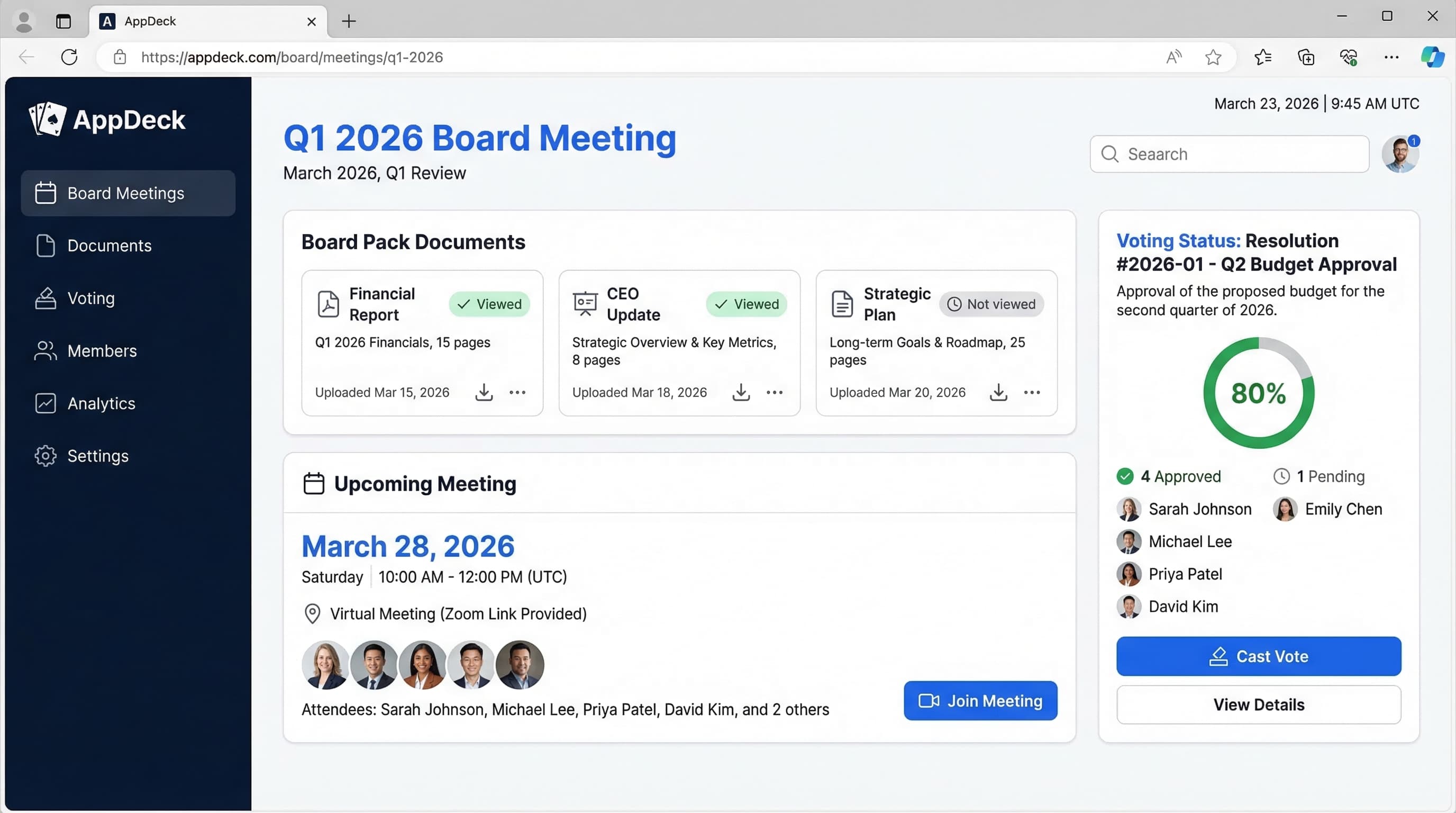
AppDeck's board portal was built with the understanding that not every board is a Fortune 500 boardroom. The interface is clean and modern, which matters enormously when you're asking 15 volunteer directors to adopt new technology.
Key features:
- ✅ Real-time dashboards (connect financial data from QuickBooks, Stripe, etc.)
- ✅ Board packet distribution with version control
- ✅ Meeting management with agenda builder and calendar integration
- ✅ Voting and resolution tracking
- ✅ Action item tracking with notifications
- ✅ Mobile apps (iOS & Android) with offline access
- ✅ SOC 2 Type II compliant
- ✅ White-label branding (use your nonprofit's logo and colors)
- ✅ 30-minute setup (not 3 months)
- ✅ Unlimited board members (no per-seat fees)
Pros:
- Modern design that volunteer directors adopt without training
- Real-time financial dashboards — show donors' impact metrics, program KPIs, and budget vs. actuals live in board meetings instead of static PDFs
- Flat pricing — no per-director fees means your cost doesn't increase as your board grows
- Fast implementation — set up in 30 minutes, not 3 months
- Excellent support — dedicated onboarding included at no extra cost
- Multi-portal flexibility — need a donor portal or membership portal too? Same platform
- SOC 2 security — enterprise-grade protection at nonprofit-friendly pricing
Cons:
- Newer platform (less brand recognition than legacy vendors like Diligent)
- Fewer advanced governance features than $30K/year enterprise platforms
- Smaller customer base (though growing rapidly)
Best fit:
- Nonprofits with $1M-$50M+ budgets wanting professional governance tools
- Organizations that want real-time financial visibility for board members
- Boards tired of static PDF board packets
- Executive directors who also need dashboard capabilities for staff
Pair your board portal with an executive dashboard for real-time nonprofit program metrics, fundraising dashboards, and operational KPIs that go beyond board meetings.
User review:
"We switched from emailing board packets to AppDeck and the difference is night and day. Our volunteer directors — including our 68-year-old board chair — were using it within 10 minutes. The real-time financial dashboard means our finance committee actually reviews numbers between meetings now." — Executive Director, Regional Healthcare Nonprofit ($12M budget)
Try it: AppDeck Board Portal
2. Boardable
Best for: Small nonprofits on tight budgets upgrading from email
Pricing: $79-$329/month
Boardable was purpose-built for the nonprofit sector, and it shows. The interface is approachable, the pricing is reasonable, and the features are focused on what nonprofit boards actually do. It's one of the most popular nonprofit board management software platforms in the market.
Key features:
- ✅ Document library and file sharing
- ✅ Meeting scheduling and agendas
- ✅ Task management
- ✅ Simple voting
- ✅ Member directory
- ✅ Email integration
- ✅ Mobile-responsive web app
Pros:
- Very affordable ($79/mo starting price)
- Easy setup (DIY in under an hour)
- Built for nonprofits — features match the sector's needs
- Unlimited users on higher-tier plans
- No long-term contracts (month-to-month available)
- Good customer support for the price point
Cons:
- No native mobile apps (responsive web only)
- Limited reporting and analytics capabilities
- Basic security (no SOC 2 compliance)
- No real-time dashboards or financial integrations
- Basic document management (limited version control)
- No e-signature integration
- Limited audit trail for compliance-heavy organizations
Best fit:
- Small nonprofits (under $1M budget)
- Community organizations and volunteer boards
- HOAs, churches, and local associations
- Organizations upgrading from email for the first time
User review:
"Boardable is perfect for what we need. We're a small environmental nonprofit with 9 board members. At $129/month, it's affordable and our volunteers figured it out quickly. It's not enterprise software, but we don't need enterprise software." — Board Secretary, Environmental Nonprofit
3. OnBoard
Best for: Larger nonprofits wanting polished UX with traditional governance features
Pricing: Custom (typically $6,000-$15,000/year)
OnBoard offers one of the better user interfaces in the board portal market. It's a solid mid-market option, though pricing may stretch smaller nonprofit budgets.
Key features:
- ✅ Modern, intuitive interface
- ✅ Board packet builder with templates
- ✅ Mobile apps (iOS & Android)
- ✅ Voting and approvals
- ✅ Action item tracking
- ✅ Meeting minutes and resolutions
- ✅ E-signature integration (DocuSign)
- ✅ Committee management
Pros:
- Clean user interface that directors appreciate
- Strong mobile experience with native apps
- Good customer support with training included
- E-signature built in
- Meeting builder with agenda templates
- Annotation tools for document markup
Cons:
- Per-director pricing adds up (especially with 15+ member nonprofit boards)
- Expensive for most nonprofits ($6K-15K/year)
- Annual contracts required
- No real-time dashboards (static PDF distribution)
- Implementation takes weeks (not hours)
- No nonprofit-specific features (compliance tracking, Form 990 support)
Best fit:
- Large nonprofits ($10M+ budget) with governance budgets to match
- Organizations that prioritize UX above all else
- Boards with 8-15 members (per-seat pricing gets costly above that)
User review:
"OnBoard's interface is the best we've seen. Our directors love the iPad experience. But at $10K/year with per-seat pricing for our 14-member board, it's a significant line item. We looked at AppDeck as a more affordable alternative." — CFO, National Education Nonprofit
4. BoardEffect (by Diligent)
Best for: Large nonprofits and healthcare organizations with complex compliance needs
Pricing: Custom (typically $6,000-$15,000+/year)
BoardEffect was specifically designed for the nonprofit sector before being acquired by Diligent. It retains strong nonprofit governance features — conflict of interest tracking, committee management, and compliance workflows — but now carries Diligent's enterprise pricing.
Key features:
- ✅ Committee workspaces
- ✅ Conflict of interest tracking
- ✅ Board assessments and evaluations
- ✅ Task management
- ✅ Secure messaging
- ✅ Document management
- ✅ Mobile apps
- ✅ Surveys and polls
Pros:
- Purpose-built for nonprofits — understands the sector's needs
- Strong compliance features (conflict of interest, policy tracking)
- Board evaluation tools for governance assessments
- Committee management with separate workspaces
- Backed by Diligent (enterprise-grade security)
- Good training resources and onboarding support
Cons:
- Expensive after Diligent acquisition (pricing increased significantly)
- Dated interface — feels like software from 2015
- Slow innovation since acquisition (fewer feature updates)
- Complex setup requiring dedicated implementation project
- Per-user pricing makes large boards expensive
- No real-time dashboards or financial integrations
- Long contracts (typically annual or multi-year)
- Support quality has declined post-acquisition (per user reports)
Best fit:
- Large nonprofits ($10M+) with dedicated governance staff
- Healthcare nonprofits needing Joint Commission compliance support
- Organizations already in the Diligent ecosystem
- Boards prioritizing compliance features over user experience
User review:
"BoardEffect has the nonprofit features we need, but the interface feels dated. Since Diligent acquired them, pricing went up 40% and we're not seeing new features. Exploring alternatives for our next renewal." — Governance Director, Regional Hospital System (Nonprofit)
5. Govenda (formerly Aprio)
Best for: Governance-focused nonprofits wanting Roberts Rules and parliamentary procedure support
Pricing: Custom (typically $4,000-$10,000/year)
Govenda carved a niche in governance-centric board management. If your nonprofit board follows strict parliamentary procedure and needs software that understands Robert's Rules of Order, Govenda is worth evaluating.
Key features:
- ✅ Parliamentary procedure support (Robert's Rules)
- ✅ Meeting management with structured agendas
- ✅ Voting with quorum validation
- ✅ Minutes generation
- ✅ Document management
- ✅ Board book builder
- ✅ Action tracking
- ✅ Mobile access
Pros:
- Governance-first approach — built around proper parliamentary procedure
- Strong meeting management with structured workflows
- Good voting capabilities with quorum tracking
- Minutes generation tools save administrative time
- Reasonable pricing for the feature set
Cons:
- Narrow focus — governance features are strong, but other areas are limited
- Smaller company with fewer resources for support and development
- Limited integrations with other tools
- No financial dashboards or real-time data
- Mobile experience is adequate but not exceptional
- Less intuitive for directors who don't know parliamentary procedure
- Limited onboarding automation for new directors
Best fit:
- Nonprofits with formal governance structures (large foundations, hospital boards)
- Boards that strictly follow Robert's Rules of Order
- Organizations where meeting procedure matters as much as content
User review:
"Govenda understands governance in a way other platforms don't. Our foundation board follows strict Robert's Rules and this platform maps to that workflow perfectly. The trade-off is it's not as modern or flexible as some alternatives." — Board Secretary, Private Foundation
6. BoardPro
Best for: Small to mid-size nonprofits wanting good value from a growing platform
Pricing: $50-$400/month (nonprofit discounts available)
BoardPro, based in New Zealand, has been steadily expanding into the North American nonprofit market. The pricing is competitive, the interface is clean, and the feature set covers the essentials. It's less well-known than US-based competitors but deserves consideration.
Key features:
- ✅ Meeting management and agendas
- ✅ Board pack builder
- ✅ Action tracking
- ✅ Document library
- ✅ Voting
- ✅ Minutes and reporting
- ✅ Director profiles and governance records
- ✅ Mobile-responsive design
Pros:
- Affordable pricing with nonprofit discounts
- Clean interface that's easy to navigate
- Good meeting management workflow
- Growing feature set with regular updates
- Responsive customer support despite smaller team
- Free trial available (no credit card required)
Cons:
- New Zealand-based — support hours may not align with US time zones
- Limited integrations with North American tools
- No native mobile apps (responsive web only)
- Smaller customer base in North America
- Basic security certifications (no SOC 2)
- Limited compliance features for US regulatory requirements
- Data residency may be a concern (servers outside US)
Best fit:
- Small nonprofits ($500K-$5M budget) looking for value
- Organizations comfortable with a growing platform
- Boards that primarily need meeting management and document distribution
- International nonprofits (strong in Australia, NZ, UK markets)
User review:
"BoardPro punches above its weight. We're a small arts nonprofit and the platform handles our needs well at a price we can afford. Customer support is excellent — you actually talk to people who know the product." — Executive Director, Community Arts Organization
7. Boardsi
Best for: Organizations that also need help recruiting board members
Pricing: Custom (varies by service; portal is part of broader offering)
Boardsi is unique on this list — it's primarily a board member recruitment and matchmaking platform that includes portal capabilities. If your nonprofit struggles to find qualified directors (a common problem), Boardsi addresses both the people and the technology side.
Key features:
- ✅ Board member recruitment and matching
- ✅ Document sharing
- ✅ Meeting management
- ✅ Communication tools
- ✅ Board member profiles and skills tracking
- ✅ Succession planning support
Pros:
- Unique value proposition combining recruitment + management
- Board member matching helps find qualified directors
- Skills gap analysis for board composition planning
- Good for organizations struggling to fill board seats
- Diversity and inclusion focus in recruitment
Cons:
- Portal features are secondary to recruitment platform
- Limited governance features compared to dedicated board portals
- Custom pricing makes comparison difficult
- Less mature as a standalone board management tool
- No financial dashboards or compliance tracking
- Document management is basic
- Not designed for complex meeting management
Best fit:
- Nonprofits that need to recruit board members AND manage them
- Organizations with upcoming board transitions or expansions
- Startups building their first advisory or governing board
- Nonprofits focused on board diversity
User review:
"We used Boardsi primarily to recruit three new board members, and the portal features are a nice bonus. But as standalone board management software, it's not competitive with dedicated platforms." — CEO, Youth Development Nonprofit
8. Azeus Convene
Best for: Large nonprofits and international NGOs needing enterprise-grade features
Pricing: Custom (typically $8,000-$20,000+/year)
Azeus Convene is an enterprise board management platform with a global presence. It's comprehensive, secure, and feature-rich — but the pricing and complexity put it beyond reach for most nonprofit organizations.
Key features:
- ✅ Enterprise-grade security (ISO 27001, SOC 2)
- ✅ Comprehensive meeting management
- ✅ Document management with annotation
- ✅ Voting and resolution tracking
- ✅ Committee workspaces
- ✅ Native mobile apps (iOS & Android)
- ✅ Multi-language support
- ✅ E-signature integration
- ✅ Video conferencing integration
Pros:
- Enterprise security certifications (ISO 27001, SOC 2)
- Global multi-language support (20+ languages)
- Comprehensive feature set covering all governance needs
- Strong mobile apps with offline access
- Video conferencing integration for hybrid meetings
- Good for international organizations with global boards
Cons:
- Very expensive for most nonprofits
- Complex implementation (weeks to months)
- Overkill for boards under 20 members
- Enterprise-focused — not designed for volunteer boards
- Steep learning curve for less tech-savvy directors
- Long sales cycle with custom proposals
Best fit:
- Large international NGOs ($50M+ budget)
- Nonprofits with global boards needing multi-language support
- Healthcare systems and large university foundations
- Organizations with security requirements matching enterprise standards
User review:
"Convene checks every box feature-wise. The challenge is cost and complexity. Our international board appreciates the multi-language support, but our smaller committee chairs find it overwhelming." — Governance Manager, International Relief Organization
9. Google Workspace (Free Option)
Best for: Very small nonprofits with no budget who need "something better than email"
Pricing: Free for nonprofits (via Google for Nonprofits)
Google Workspace isn't board portal software. But through Google for Nonprofits, organizations get free access to Google Drive, Docs, Sheets, Calendar, and Meet — which many small nonprofits cobble together as a makeshift board management solution.
What you'd use:
- Google Drive — shared folders for board documents
- Google Docs — collaborative minutes and agendas
- Google Calendar — meeting scheduling
- Google Meet — video conferencing
- Google Forms — simple voting and surveys
- Google Sites — basic internal portal page
Pros:
- Completely free through Google for Nonprofits
- Familiar interface (most people already use Google)
- No onboarding needed — directors likely already have Google accounts
- Unlimited storage for nonprofit accounts
- Real-time collaboration on documents
- Works on any device with a web browser
Cons:
- ❌ No governance features — no voting, no resolutions, no compliance tracking
- ❌ No audit trail for document access (who read the board packet?)
- ❌ No meeting management beyond calendar invites
- ❌ Security gaps — Google Drive isn't designed for confidential board materials
- ❌ No board packet builder or distribution workflow
- ❌ Version chaos — which folder has the current version?
- ❌ No action item tracking or accountability
- ❌ No director onboarding workflow
- ❌ Messy over time — folder structures break down as documents accumulate
- ❌ Compliance risk — insufficient audit trail for Form 990 governance requirements
Best fit:
- Very small nonprofits (under $250K budget)
- Organizations with no governance software budget at all
- Boards with fewer than 7 members
- As a temporary solution while evaluating proper board portals
- Startups in their first year with informal advisory boards
The honest truth: Google Workspace is better than email attachments, but it's not board management software. If your organization has any compliance obligations, handles confidential financial data, or has more than a handful of board members, you'll outgrow this approach quickly. Consider it a stepping stone toward a purpose-built solution like AppDeck or Boardable.
Comparison Table: Board Portal Software for Nonprofits
| Feature | AppDeck | Boardable | OnBoard | BoardEffect | Govenda | BoardPro | Boardsi | Azeus Convene | Google Workspace |
|---|---|---|---|---|---|---|---|---|---|
| Starting Price | $299/mo | $79/mo | ~$500/mo | ~$500/mo | ~$333/mo | $50/mo | Custom | ~$667/mo | Free |
| Nonprofit Discount | Yes | Yes | Case-by-case | Case-by-case | Case-by-case | Yes | N/A | Case-by-case | Free tier |
| Unlimited Users | Yes | Higher plans | No | No | No | Higher plans | N/A | No | Yes |
| Native Mobile Apps | Yes | No | Yes | Yes | No | No | No | Yes | Yes |
| Real-Time Dashboards | Yes | No | No | No | No | No | No | No | No |
| Voting/Resolutions | Yes | Basic | Yes | Yes | Yes | Yes | No | Yes | No |
| Document Management | Advanced | Basic | Advanced | Advanced | Good | Good | Basic | Advanced | Basic |
| Meeting Management | Yes | Yes | Yes | Yes | Yes | Yes | Basic | Yes | No |
| SOC 2 Compliance | Yes | No | Yes | Yes | No | No | No | Yes | Yes |
| Audit Trail | Full | Limited | Full | Full | Good | Limited | No | Full | No |
| Onboarding Portal | Yes | Limited | Yes | Yes | No | Limited | Yes | Yes | No |
| E-Signatures | Yes | No | Yes | No | No | No | No | Yes | No |
| White Labeling | Yes | No | No | No | No | No | No | Yes | No |
| Setup Time | 30 min | 30 min | 4-6 weeks | 4-8 weeks | 2-4 weeks | 1-2 hours | Varies | 4-8 weeks | 1 hour |
| Contract Required | No | No | Annual | Annual | Annual | No | Varies | Annual | No |
How to Choose: A Decision Framework for Nonprofits
Choosing board management software for nonprofits doesn't need to be complicated. Use this framework based on your three most important variables: budget, board size, and technical comfort level.
Budget Tier 1: $0-$100/month
Your best options: Google Workspace (free) or BoardPro (starting at $50/mo)
Who you are: Small nonprofit, under $500K annual budget, volunteer-run, minimal compliance requirements, fewer than 10 board members.
Recommendation: Start with Google Workspace if you're truly at zero budget. Move to BoardPro or Boardable's entry tier when you can afford $50-$100/month. The jump from email to any organized system will transform your board operations.
Budget Tier 2: $100-$300/month
Your best options: Boardable ($129-$329/mo) or BoardPro (mid-tier)
Who you are: Growing nonprofit, $500K-$5M budget, starting to formalize governance, 8-15 board members, some compliance needs.
Recommendation: Boardable is the safe choice here — built for nonprofits, reasonable pricing, adequate features. If you want more robust capabilities and can stretch to $299/mo, AppDeck offers significantly more (real-time dashboards, security-first architecture, native mobile apps) for the same price range.
Budget Tier 3: $300-$600/month
Your best options: AppDeck ($299/mo) or Govenda (~$333/mo)
Who you are: Established nonprofit, $5M-$25M budget, professional governance program, 10-20 board members, real compliance obligations, multiple committees.
Recommendation: This is the sweet spot for AppDeck. You get a security-first architecture (designed for SOC 2 Type II audit readiness), real-time dashboards, unlimited users, native mobile apps, and 30-minute setup — all at flat pricing that doesn't increase as your board grows. If parliamentary procedure is your primary concern, evaluate Govenda.
Budget Tier 4: $600+/month
Your best options: OnBoard, BoardEffect, or Azeus Convene
Who you are: Large nonprofit ($25M+), dedicated governance staff, complex compliance requirements, 15+ board members with multiple committees, need enterprise features.
Recommendation: Before defaulting to an expensive legacy platform, honestly evaluate whether you need enterprise features or just enterprise security. Many large nonprofits are choosing AppDeck over BoardEffect because they get a security-first architecture and better UX at 60-70% lower cost. Only choose BoardEffect, OnBoard, or Convene if you genuinely need specific governance features they offer that AppDeck doesn't.
Decision Quick-Check
Ask yourself these 5 questions:
1. What's your real budget (not aspirational)? Be honest. Include the cost of training, implementation, and annual renewal — not just the sticker price.
2. How tech-savvy is your least technical board member? If the answer is "not at all," user experience matters more than feature count. Choose AppDeck, Boardable, or BoardPro.
3. What compliance requirements do you actually have? Most nonprofits need basic governance documentation (minutes, voting records, conflict of interest). You don't need a $15K/year platform for that.
4. How many board members and committees do you have? Per-seat pricing gets expensive fast with large boards. Flat pricing (AppDeck, Boardable's higher tiers) protects your budget.
5. What are you replacing? If you're replacing email, almost anything will be a massive improvement. If you're replacing an existing board portal, focus on what specifically isn't working today.
Implementation Tips for Nonprofit Boards
Selecting software is only half the battle. Getting volunteer directors to actually use it is the other half. Here's what works based on dozens of nonprofit board portal rollouts. For a more comprehensive guide, see our board portal buyer's guide.
Getting Buy-In from Volunteer Directors
Before the technology conversation:
- Identify your champion — Find one board member (ideally the board chair or governance committee chair) who will advocate for the change. Without a board-level champion, adoption fails.
- Frame the problem, not the solution — Don't say "We're implementing board portal software." Say "We're solving the problem of directors not having current materials before meetings."
- Quantify the pain — "Last year, we spent 340 staff hours compiling and distributing board packets. That's $12,000 in staff time for something software handles in minutes."
Training Volunteer Directors
The 80/20 rule of board portal training:
- 80% of directors will use 20% of features (document access, meeting calendar, basic voting)
- Train on those 20% features first. Advanced features can come later.
- Don't overwhelm volunteers with a comprehensive training session
What works:
- ✅ 15-minute live demo at a board meeting (not a 90-minute webinar)
- ✅ One-page quick-start guide (PDF or printed) with screenshots
- ✅ Individual follow-up with directors who struggle
- ✅ A "tech buddy" system pairing less tech-savvy directors with more comfortable ones
- ✅ Pre-loaded sample board packet so directors can explore immediately
What doesn't work:
- ❌ Hour-long recorded training videos nobody watches
- ❌ Sending a login email and expecting self-service adoption
- ❌ Mandatory training sessions that feel like another obligation
- ❌ Rolling out all features at once
Phased Rollout Strategy
Phase 1 (Month 1): Documents and calendar only
- Upload the next board packet to the portal
- Send meeting invitations through the platform
- Keep sending email notifications as backup
- Goal: Get every director to log in at least once
Phase 2 (Month 2-3): Meeting management
- Use the portal for agendas and meeting materials
- Start tracking attendance through the platform
- Introduce action item tracking
- Stop sending PDF board packets via email (portal only)
Phase 3 (Month 4-6): Full governance
- Enable voting and resolution tracking
- Migrate historical documents to the portal
- Set up compliance tracking (conflicts of interest, policies)
- Use analytics to identify disengaged directors
Phase 4 (Ongoing): Optimization
- Review adoption metrics quarterly
- Solicit director feedback and adjust workflows
- Add committee workspaces as needed
- Explore advanced features (dashboards, integrations)
Common Implementation Mistakes
- Trying to migrate everything at once — Start fresh with the next meeting. Migrate historical documents gradually.
- Choosing software the executive director likes but the board won't use — The board's comfort matters more than the admin's preferences.
- Skipping the board chair — If the board chair doesn't use the portal, nobody will.
- Over-configuring before launch — Get the basics right. Refine later.
- No executive director on the board who owns it — Someone on staff must be responsible for keeping the portal current and answering director questions.
Frequently Asked Questions
Is there free board management software for nonprofits?
There's no full-featured free board management software for nonprofits, but there are budget-friendly options. Google Workspace is free through Google for Nonprofits and can serve as a basic document-sharing and calendar solution, though it lacks governance features. Boardable starts at $79/month, and BoardPro at $50/month — both offer nonprofit discounts. For organizations with compliance needs or more than 10 board members, investing in proper board portal software like AppDeck ($299/mo with nonprofit discount) pays for itself in reduced admin time and improved governance.
What's the difference between board portal software and board management software?
The terms are used interchangeably in practice. Historically, "board portal" referred to the secure document repository where directors access board materials, while "board management software" implied a broader feature set including meeting management, voting, action tracking, and compliance tools. In 2026, most platforms marketed as either term include the full suite of governance capabilities. Don't get hung up on terminology — focus on whether the platform has the specific features your nonprofit needs.
How long does it take to implement board portal software?
It varies dramatically by platform. AppDeck can be set up in 30 minutes with board packets distributed the same day. Boardable and BoardPro take 1-2 hours for basic setup. Enterprise platforms like OnBoard, BoardEffect, and Azeus Convene typically require 4-8 weeks for implementation, including configuration, data migration, training, and testing. For nonprofits, faster implementation is better — you're working with volunteer directors who won't tolerate a months-long rollout.
Do we need SOC 2 compliance for our nonprofit board portal?
It depends on what your board handles. If your board discusses executive compensation, strategic partnerships, donor information, or financial data, SOC 2 compliance provides meaningful security assurance. For small community boards discussing event planning and volunteer schedules, it's less critical. However, as cybersecurity threats increase and donor trust becomes more important, SOC 2 compliance is becoming a best practice even for mid-size nonprofits. OnBoard and BoardEffect are SOC 2 certified; AppDeck is designing for SOC 2 Type II audit readiness.
Can we use the same portal for our board and staff?
Some platforms support this; most don't. AppDeck is designed as a multi-purpose portal platform, so you can run a board portal for governance and a separate staff dashboard for operations — all under one account. Dedicated board portals like BoardEffect and OnBoard are designed exclusively for board governance and don't extend to staff use cases. If you need both, consider a platform that supports multiple portal types to avoid paying for two separate tools. Visit our nonprofit solutions page to see how organizations use AppDeck across board, donor, and operational portals.
How do we handle the transition from email to a board portal?
The golden rule: don't go cold turkey. Run both systems in parallel for one full board meeting cycle. Send the board packet through the portal AND via email for the first meeting. For the second meeting, send materials only through the portal but email a reminder with the login link. By the third meeting, directors should be comfortable accessing everything through the portal. Budget 2-3 months for full transition, and expect 1-2 directors to need individual support.
What should we include in our board portal besides meeting materials?
A well-organized nonprofit board portal should include: governing documents (bylaws, articles of incorporation, conflict of interest policy), board meeting minutes archive, financial statements and board reports, strategic plan and annual goals, committee charters and reports, director contact information and term dates, onboarding materials for new directors, insurance certificates (D&O), and key organizational policies. Having everything in one searchable location saves enormous time — especially during audits, accreditation reviews, or when onboarding new directors who need to get up to speed quickly.
How do we get reluctant board members to adopt the portal?
Start with empathy — many volunteer directors are busy professionals who see new software as another burden. Three strategies that work: (1) Have the board chair or a respected director champion the change publicly. If the most senior person uses it, others follow. (2) Make the portal the only way to access materials. When email stops being an option, adoption happens. (3) Celebrate small wins — "Our meeting prep time dropped from 3 hours to 45 minutes" resonates with volunteers who value their time. Read our complete guide on running effective board meetings for more strategies on improving board engagement and preparation.
Final Verdict: Which Nonprofit Board Portal Should You Choose?
After evaluating all 9 options, here's the simplified recommendation:
If you have no budget: Start with Google Workspace. It's free and better than email chaos. Plan to upgrade within 12 months as your governance matures.
If you have $79-$150/month: Boardable is the pragmatic choice. Built for nonprofits, affordable, and adequate for basic governance needs.
If you have $299/month: AppDeck is the best value in the market. You get a security-first architecture (designed for SOC 2 Type II audit readiness), real-time dashboards, unlimited users, native mobile apps, and 30-minute setup. It's the only platform in this price range that doesn't make you choose between affordability and capability.
If you have $500+/month and complex requirements: Evaluate OnBoard for UX-focused governance, BoardEffect for nonprofit-specific compliance features, or Azeus Convene for international multi-language needs. But honestly evaluate whether you're paying for features you'll actually use or just brand recognition.
The best board management software for nonprofits is the one your volunteer directors will actually use. A $299/month platform with 100% adoption delivers infinitely more value than a $15,000/year platform that nobody logs into.
Related Reading
- Complete Board Portal Guide — Everything you need to know about board portal software, from evaluation to implementation
- Board Portal Software Comparison 2026 — Our comprehensive comparison of 11 platforms (including enterprise options)
- Board Portal Security Checklist — Essential security features to evaluate before selecting any board portal
- Board Meeting Best Practices — How to run more effective board meetings (pairs well with good software)
- How to Create a Professional Board Portal — Step-by-step implementation guide
Ready to modernize your nonprofit's board governance? Try AppDeck Board Portal — set up in 30 minutes, loved by volunteer directors, and priced for nonprofit budgets.

Founder & CEO, AppDeck
Serial entrepreneur with 20+ years building B2B software companies. Former executive managing 2,800+ employees across three continents. Vik reviews all AppDeck content for accuracy and practical relevance.
Share this article
Explore Related Solutions
Related Articles
7 Free Board Management Software Options (And When to Upgrade)
Compare 7 free board management software options for 2026. Features, limitations, and honest advice on when free tools work — and when they'll cost you more than paid software.
Best Board Portal Software 2026: 12 Platforms Compared (Real Pricing, Pros & Cons)
12 board portals compared side-by-side with the real 2026 pricing vendors hide, from $79/mo to $30K+/yr. Diligent, OnBoard, Boardable, BoardPro, Aprio, Ansarada, AppDeck & more, with honest pros, cons, and reviews.
How to Choose Board Portal Software: Complete Buyer's Guide 2026
Step-by-step guide to selecting the right board portal software. Evaluation criteria, must-have features, vendor assessment questions, RFP template, and red flags to avoid.