
Best Board Management Software 2026: 12 Board Portals Compared (Pricing + Reviews)
We compared 12 board management & governance software platforms side-by-side — Diligent, OnBoard, Boardable, Ansarada, Aprio, AppDeck & more. Real pricing, features, pros/cons, and reviews for 2026.
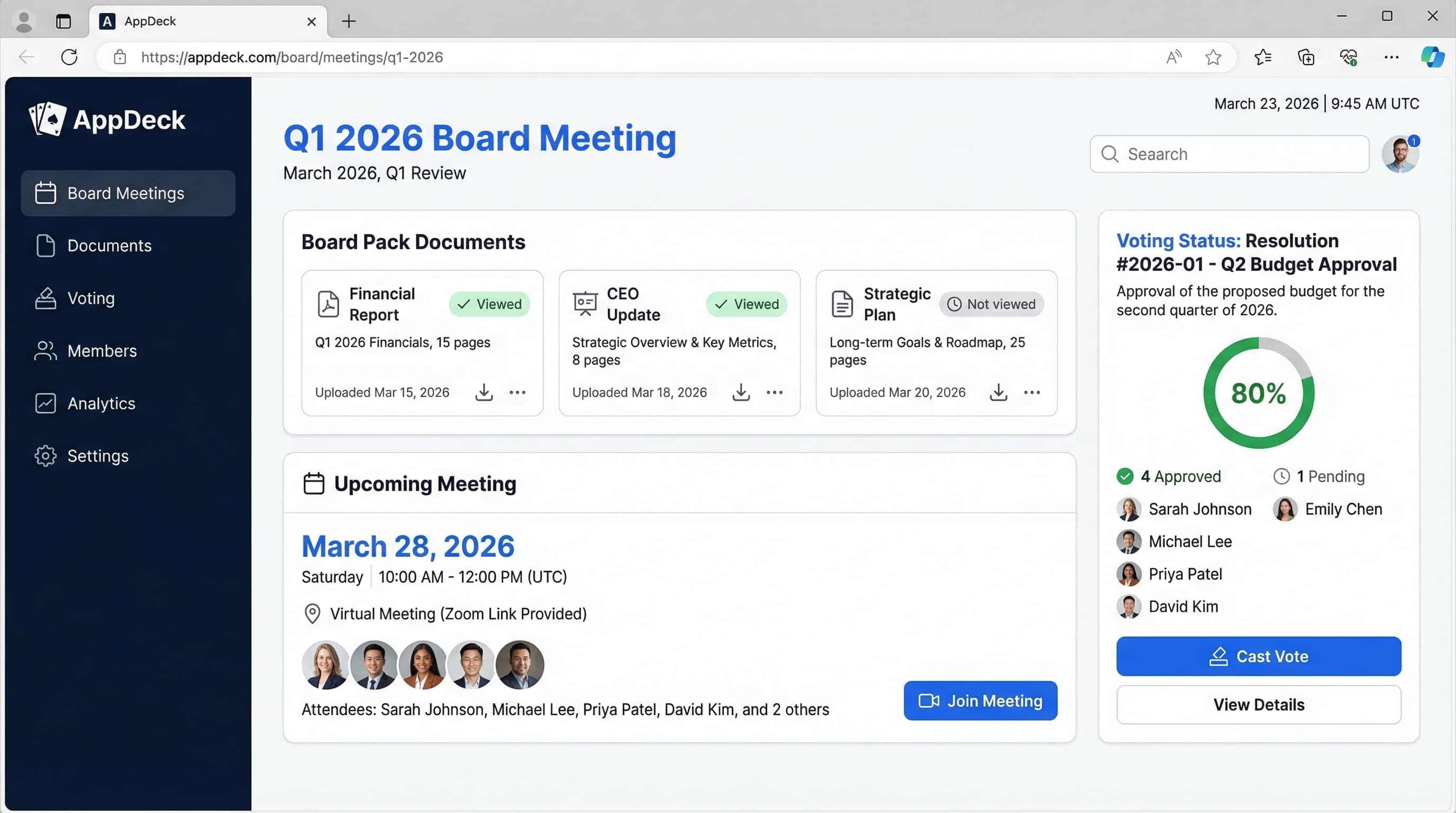
TL;DR: Updated June 2026. The best board management software (also called a board portal or board governance platform) for 2026 depends on your organization size and budget. AppDeck ($299/mo flat) offers the best value for private companies with modern UX and real-time dashboards. Diligent ($15K–30K+/yr) remains the enterprise standard for large public companies. Boardable ($79–329/mo) is the most affordable option for small nonprofits. Below, we compare all 11 platforms with real pricing, features, and user reviews. New to evaluating board portals? Start with our How to Choose Board Portal Software buyer's framework.
Introduction
Choosing board portal software is one of the most consequential decisions a board secretary or corporate governance professional will make. The right platform streamlines governance, increases engagement, and transforms board meetings from administrative burdens into strategic sessions. The wrong one? Wasted budget, frustrated directors, and a failed implementation gathering dust.
After advising 80+ organizations through board portal selection and implementation over 19+ years, I've seen what works—and what doesn't. In this comprehensive board management software comparison and review, I'll break down the top 12 board portal and governance platforms with honest assessments of features, pricing, and real-world performance.
Board Portal Reviews at a Glance
Here's a quick summary of every board portal reviewed in this comparison. Scroll down for detailed reviews with pros, cons, pricing, and real user feedback.
| Platform | Best For | Pricing | Our Verdict |
|---|---|---|---|
| AppDeck | Modern UX + real-time dashboards | $299/mo (flat) | Best value for private companies |
| Diligent | Large public companies | $15K–30K+/yr | Enterprise standard, dated UX |
| OnBoard | Mid-market modern UX | $6K–15K/yr | Strong UX, per-director pricing adds up |
| Boardable | Small nonprofits | $79–329/mo | Budget-friendly, limited governance |
| Convene | International boards | $8K–18K/yr | Best multilingual support |
| BoardPro | Small businesses | $199–399/mo | Simple and affordable |
| Boardvantage | Nasdaq-backed enterprises | $20K–40K+/yr | Enterprise-grade, very expensive |
| BoardEffect | Nonprofits (Diligent-owned) | $5K–12K/yr | Merged with OnBoard |
| Passageways | Budget-conscious orgs | $3K+/yr | Basic but affordable |
| Ansarada Board | Boards that also need a data room | Custom quote | Strong security, deal-room DNA |
| Aprio Board Portal | Nonprofits, credit unions & co-ops | Custom quote | Simple, volunteer-friendly |
What is Board Portal Software?
Board portal software (also called board management software) is a secure digital platform that centralizes all board-related activities:
Core capabilities:
- Secure distribution of board materials and meeting packets
- Document management with version control
- Meeting scheduling and calendar management
- Voting and resolution tracking
- Action item management and follow-up
- Director communication and collaboration
- Compliance and audit trail reporting
Who needs this:
- Public companies with regulatory requirements
- Private companies with active boards
- Nonprofits managing volunteer boards
- Advisory boards seeking efficiency
- Executive committees and C-suites
Why Does Board Portal Software Matter?
The Email Problem
Before board portals, most organizations struggle with:
- ❌ Board packets emailed as 15+ PDF attachments
- ❌ Directors searching through hundreds of emails for one document
- ❌ No version control (is this the final version?)
- ❌ Security risks with confidential materials in personal inboxes
- ❌ Zero visibility into who's read what
- ❌ Manual meeting minutes compilation
- ❌ Lost action items and follow-up tasks
The Portal Solution
Modern board portals solve these problems:
- ✅ Single secure location for all board materials
- ✅ Real-time updates when documents change
- ✅ Complete version history and audit trails
- ✅ Enterprise-grade encryption and security
- ✅ Engagement analytics (who's prepared for meetings)
- ✅ Automated meeting workflows
- ✅ Action item tracking with accountability
Result: Organizations that adopt board portals consistently report higher director engagement, significant reduction in administrative overhead, and improved governance outcomes. Board preparation time typically drops from days to hours (per vendor case studies from BoardPro and Diligent).
What Features Should You Compare in Board Portal Software?
Before diving into specific platforms, here's what matters when evaluating board portal software:
1. Security & Compliance
Essential security features:
- SOC 2 Type II compliance
- Two-factor authentication (2FA)
- Encryption at rest and in transit (AES-256, TLS 1.3)
- Granular permission controls
- Complete audit logs
- Remote wipe for lost devices
- Watermarking and download restrictions
- Data residency controls
Why it matters: Board materials contain highly confidential strategic plans, financial data, and M&A discussions. A security breach can result in leaked information reaching competitors, regulatory penalties, and director liability.
2. Mobile Experience
Critical mobile capabilities:
- Native iOS and Android apps (not just web browsers)
- Offline access for planes and poor connections
- Annotation and highlighting tools
- Intuitive navigation on tablets
- Fast PDF rendering
- Search across all documents
Why it matters: The majority of board members now access materials on tablets and mobile devices (Diligent). If your mobile experience is poor, adoption will fail.
3. Meeting Management
Essential meeting features:
- Meeting scheduling with calendar integration
- Automated board packet compilation
- Agenda builder with time allocations
- Voting and resolution management
- Minutes generation and approval workflow
- Attendance tracking
- Post-meeting action items
4. Document Management
Must-have document features:
- Organized folder structure
- Version control and history
- Advanced search across all documents
- Annotations and comments
- Secure sharing with expiration
- Support for multiple file types
- Large file handling (100+ MB)
5. Ease of Use
For administrators:
- How long to create a board packet?
- Can you reuse templates?
- Bulk upload capabilities?
- Integration with existing tools?
For directors:
- Intuitive navigation?
- Quick login (not 10 steps)?
- Can they find what they need fast?
- Support available when needed?
6. Pricing Structure
Common pricing models:
- Per-director annual: $200-$600/director/year
- Flat subscription: $299-$999/month
- Enterprise custom: $15,000-$50,000+/year
Hidden costs to watch:
- Implementation and onboarding fees
- Training costs
- Per-meeting fees
- Storage limits
- Support tiers
- Contract termination fees
Detailed Board Management Software Reviews: 12 Platforms for 2026
1. AppDeck Board Portal
Best for: Companies wanting real-time dashboards, modern UX, and affordable pricing. AppDeck also offers Vendor Portals, Customer Portals, and Membership Portals, making it an ideal choice for organizations that need multiple portal types under one platform.
Pricing: $299/month (unlimited board members)
Key features:
- ✅ Real-time financial dashboards (connects to QuickBooks, Stripe, NetSuite)
- ✅ Modern, intuitive interface directors actually like
- ✅ Board packet distribution with version control
- ✅ Meeting management and calendar
- ✅ Action item tracking with notifications
- ✅ Mobile apps (iOS & Android) with offline access
- ✅ AES-256 encryption, RBAC, and audit logging (designing for SOC 2 Type II audit readiness)
- ✅ White-label branding options
- ✅ 30-minute setup (not 3 months)
Pros:
- Modern design that directors embrace immediately
- Real-time data vs. static PDFs (financial metrics, KPIs)
- Flat pricing with no per-director fees (saves money as board grows)
- Fast implementation (hours, not months)
- Excellent customer support with dedicated onboarding
- Includes executive dashboard capabilities beyond board meetings
- Affordable at $299/mo vs. $15K-30K/year for legacy platforms
- Flexible - use for board, executive team, advisory board
Cons:
- Newer platform (less brand recognition than Diligent)
- Fewer advanced governance features than enterprise platforms
- E-signature integration available
- Smaller customer base (though growing quickly)
Best fit:
- Private companies (seed stage through late-stage)
- Public companies comfortable with modern platforms
- Boards that want real-time financial visibility
- Organizations tired of static PDF board packets
- CFOs who want live dashboards in board meetings
- Budgets under $10K/year
User review:
"We switched from Diligent after 5 years and haven't looked back. Our directors love the real-time financial dashboards—they can check key metrics between meetings. Setup took 30 minutes vs. the 4 months we spent on Diligent. At $299/mo, it's a no-brainer." — Corporate Secretary, Series C SaaS Company ($40M ARR)
Try it: AppDeck Board Portal
2. Diligent Boards (formerly Diligent Boardbooks)
Best for: Large public companies with complex compliance requirements
Pricing: Custom (typically $15,000-$30,000+/year)
Key features:
- ✅ Enterprise-grade security and compliance
- ✅ Comprehensive governance suite
- ✅ Board meeting management
- ✅ Committee workspaces
- ✅ Entity management
- ✅ D&O questionnaire management
- ✅ Board evaluations
- ✅ Minutes builder
Pros:
- Industry leader with strong brand reputation (20+ years)
- Comprehensive governance features (everything you could need)
- Excellent security and compliance (GDPR, SOX, ISO 27001)
- Global support team available 24/7
- Extensive audit capabilities
- Board intelligence and insights
- Large customer base (over 700,000+ users)
- Integration with Diligent ecosystem
Cons:
- Very expensive ($15K-30K+ per year)
- Long implementation (3-6 months typical)
- Dated user interface (feels like 2010)
- Per-director pricing that increases costs
- Overkill for most private companies
- Limited financial dashboard capabilities (static reports only)
- Complex setup requires IT involvement
- Slow innovation compared to modern platforms
Best fit:
- Public companies (Fortune 1000)
- Large enterprises with global boards
- Organizations with extensive compliance requirements
- Companies with budgets >$25K/year for board software
- Highly regulated industries (banking, healthcare)
User review:
"Diligent is comprehensive but feels outdated. The mobile app works but isn't intuitive. Our directors constantly ask 'where is the document I need?' Implementation took 5 months. We're paying $28K/year. For our Series D stage, it's overkill." — Board Secretary, Late-Stage Startup
3. OnBoard
Best for: Mid-market companies wanting modern UX with traditional board portal features
Pricing: Custom (typically $6,000-$15,000/year)
Key features:
- ✅ Modern, intuitive interface
- ✅ Board packet builder with templates
- ✅ Mobile apps (iOS & Android)
- ✅ Voting and approvals
- ✅ Action item tracking
- ✅ Meeting minutes and resolutions
- ✅ E-signature integration
- ✅ Committee management
Pros:
- Best-in-class user interface (cleanest design after AppDeck)
- Strong mobile experience that directors love
- Reasonable pricing (for enterprise software)
- Good customer support with training included
- Faster implementation than Diligent (4-6 weeks)
- E-signature built-in (DocuSign integration)
- Meeting builder with agenda templates
- Annotation tools for document markup
Cons:
- Per-director pricing adds up quickly
- Still expensive for early-stage companies ($6K-15K/year)
- Limited financial reporting compared to AppDeck
- Annual contracts required (can't test monthly)
- Implementation still takes weeks, not hours
- Static PDFs (no real-time data dashboards)
- Add-on costs for some features
Best fit:
- Growth-stage companies (Series B-D)
- Mid-market companies ($10M-100M revenue)
- Organizations prioritizing user experience
- Boards with 5-15 members
- Companies with $500-1,000/month budget
User review:
"OnBoard has the best UX of the traditional board portals. Our directors adopted it much faster than our old platform. The mobile app is excellent. We're paying $8K/year for 8 directors. Wish they had real-time financial dashboards like AppDeck." — Corporate Secretary, Series B Healthcare Company
4. Boardable
Best for: Small nonprofits and community boards on tight budgets
Pricing: $79-$329/month
Key features:
- ✅ Document library and file sharing
- ✅ Meeting scheduling and agendas
- ✅ Task management
- ✅ Simple voting
- ✅ Member directory
- ✅ Email integration
- ✅ Mobile-responsive web app
Pros:
- Very affordable ($79-$329/mo)
- Easy to set up (DIY in 30 minutes)
- Good for volunteer boards with varying tech skills
- Nonprofit-friendly pricing and features
- Unlimited users on higher plans
- No long-term contracts (month-to-month)
- Decent support for the price point
Cons:
- Limited features for corporate governance
- No financial dashboards or real-time data
- Basic security (no SOC 2 compliance)
- Not suitable for confidential corporate data
- Mobile experience is just responsive web (no native apps)
- No advanced voting or resolution tracking
- Limited audit trail capabilities
- Basic document management (no version control)
Best fit:
- Small nonprofits (under $1M budget)
- Community boards and associations
- HOAs and volunteer organizations
- Churches and religious organizations
- Boards with under 15 members
- Organizations upgrading from email
User review:
"Perfect for our small nonprofit. We were using email before and this is a huge improvement. At $129/month it fits our budget. Wouldn't work for a corporate board, but for us it's great." — Board Chair, Local Nonprofit
5. Convene (formerly Azeus Convene)
Best for: International organizations with boards in multiple countries
Pricing: Custom (typically $8,000-$18,000/year)
Key features:
- ✅ Multi-language support (20+ languages)
- ✅ Board meeting management
- ✅ Document annotation
- ✅ Voting and approvals
- ✅ Meeting minutes
- ✅ Mobile apps
- ✅ Data residency options
Pros:
- Strong international presence (used in 100+ countries)
- Multi-language interface and support
- Data residency options for GDPR compliance
- Good security features
- Solid mobile apps for iOS and Android
- Committee management capabilities
- Reasonable pricing for mid-market
Cons:
- Less well-known in North America
- Implementation takes 6-8 weeks
- User interface feels dated
- Limited integrations with US-based tools
- Customer support can be slow (time zone issues)
- No real-time dashboards (static documents only)
Best fit:
- International companies with global boards
- Organizations with GDPR requirements
- Companies operating in Asia-Pacific region
- Boards needing multi-language support
6. BoardPro
Best for: Small to medium businesses wanting affordable simplicity
Pricing: $199-$399/month
Key features:
- ✅ Meeting management
- ✅ Document storage
- ✅ Action tracking
- ✅ Voting
- ✅ Meeting minutes
- ✅ Mobile access
Pros:
- Affordable for small companies
- Simple interface easy to learn
- Good for smaller boards (under 10 members)
- No long implementation required
- Decent mobile experience
Cons:
- Limited features compared to enterprise platforms
- Basic security (not suitable for highly confidential data)
- No real-time data capabilities
- Small company with limited support
- Fewer integrations
Best fit:
- Small businesses with simple boards
- Companies with under $10M revenue
- Boards wanting basic features only
7. Boardvantage
Best for: Public companies and large enterprises (Nasdaq owned)
Pricing: Custom (typically $20,000-$40,000+/year)
Key features:
- ✅ Enterprise governance suite
- ✅ Advanced security and compliance
- ✅ Board evaluation tools
- ✅ Committee management
- ✅ Integration with Nasdaq ecosystem
Pros:
- Enterprise-grade security and features
- Nasdaq backing provides credibility
- Comprehensive governance capabilities
- Good for public companies
Cons:
- Very expensive ($20K-40K+/year)
- Complex implementation (3-6 months)
- Dated interface (similar to Diligent)
- Overkill for private companies
Best fit:
- Public companies with large budgets
- Organizations already using Nasdaq services
8. BoardEffect (now part of Diligent)
Best for: Nonprofits and mid-market companies (note: acquired by Diligent)
Pricing: Custom (typically $5,000-$12,000/year)
Key features:
- Similar to OnBoard (same product after merger)
- Nonprofit-specific features
- Grant management integration
Note: BoardEffect was acquired by Diligent and merged with OnBoard. The BoardEffect brand still exists for nonprofits, but the platform is essentially OnBoard with nonprofit pricing.
Best fit:
- Nonprofits with budgets for professional software
- Mid-market organizations
9. Passageways
Best for: Budget-conscious organizations needing basic board portal
Pricing: Starting at $3,000/year
Key features:
- ✅ Document distribution
- ✅ Meeting management
- ✅ Basic voting
- ✅ Mobile access
- ✅ Audit trails
Pros:
- More affordable than premium options
- Covers basic board portal needs
- Reasonable mobile experience
- Faster setup than enterprise solutions
Cons:
- Limited features compared to competitors
- Basic dashboarding only
- User interface feels dated
- Less robust security features
- Customer support can be slow
- Smaller company with limited resources
Best fit:
- Smaller companies with tight budgets
- Boards with basic needs
- Organizations upgrading from email
- Companies wanting to spend under $5K/year
10. Ansarada Board
Best for: Boards that also manage data rooms, M&A, or capital raises
Pricing: Custom (contact for quote)
Key features:
- ✅ Board portal built on a virtual data room foundation
- ✅ AI-assisted document organization and search
- ✅ Deal, audit, and transaction workspaces
- ✅ Granular permissions and activity tracking
- ✅ Voting, resolutions, and minutes
- ✅ ISO 27001 / SOC 2-grade security posture
Pros:
- Best-in-class security pedigree inherited from its data-room business
- One platform for board materials and deal/data-room workflows
- Strong audit trail and document-level access controls
- AI features for summarizing and finding information fast
Cons:
- Deal-room DNA means board-specific governance (evaluations, committee workflows) is shallower than pure-play portals
- Opaque pricing (no public rates, custom quote only)
- Overkill if you only need a board portal and never touch data rooms
- Less brand recognition among North American corporate secretaries
Best fit:
- Companies running frequent M&A, fundraising, or audits
- Boards that want governance and a data room in one tool
- Organizations that prioritize security certifications
11. Aprio Board Portal
Best for: Nonprofits, credit unions, co-ops, and public-sector boards wanting simplicity
Name note: This is Aprio the board portal (aprio.net), not Aprio LLP the accounting firm — two unrelated companies that share a name.
Pricing: Custom (contact for quote; positioned as mid-market affordable)
Key features:
- ✅ Clean, simple interface built for non-technical volunteer directors
- ✅ Board packet building and distribution
- ✅ Meeting management, agendas, and minutes
- ✅ Voting and approvals
- ✅ Mobile access
- ✅ Strong onboarding and support reputation
Pros:
- Very easy to learn — ideal for volunteer and rotating boards
- Popular with nonprofits, credit unions, and co-ops
- Responsive support with hands-on onboarding
- Reasonable pricing for mission-driven organizations
Cons:
- Fewer advanced features than enterprise governance suites
- No real-time financial dashboards
- Primarily North American customer base and ecosystem
- Custom pricing (no public, self-service tier)
Best fit:
- Small to mid-sized nonprofits and associations
- Credit unions and cooperatives
- Boards that prioritize ease of use over feature depth
12. Custom-Built Solutions (SharePoint, Notion, Google Workspace)
Best for: Companies with unique needs and strong IT teams (not recommended)
Pricing: Variable (internal time + tools)
What people try:
- SharePoint document libraries
- Notion databases
- Google Workspace with Drive folders
- Custom web applications
Pros:
- Complete customization to your workflow
- Use tools team already knows
- Potentially lower monthly cost
Cons:
- ❌ No audit trails for compliance
- ❌ Security gaps (not designed for board-level confidentiality)
- ❌ Poor mobile experience (not optimized for tablets)
- ❌ No governance features (voting, resolutions, etc.)
- ❌ Ongoing maintenance burden on IT team
- ❌ No support when things break
- ❌ Directors hate the inconsistent UX
- ❌ Liability risk if security breach occurs
Our strong recommendation: Don't do this. Board governance is too important and security too critical to DIY. Purpose-built board portal software is worth the investment.
Feature Comparison Table
| Feature | AppDeck | Diligent | OnBoard | Boardable | Convene | BoardPro | Passageways |
|---|---|---|---|---|---|---|---|
| Pricing | $299/mo | $15K-30K/yr | $6K-15K/yr | $79-329/mo | $8K-18K/yr | $199-399/mo | $3K+/yr |
| Setup Time | 30 minutes | 3-6 months | 4-6 weeks | 30 minutes | 6-8 weeks | 1 week | 2-3 weeks |
| Real-time Dashboards | ✅ Excellent | ❌ No | ❌ No | ❌ No | ❌ No | ❌ No | ❌ No |
| Mobile Apps | ✅ Native | ✅ Native | ✅ Native | ⚠️ Web only | ✅ Native | ⚠️ Web only | ⚠️ Basic |
| Security (SOC 2) | ⚠️ In development | ✅ Type II | ✅ Type II | ❌ No | ✅ Type I | ⚠️ Basic | ⚠️ Basic |
| Voting | ✅ Yes | ✅ Advanced | ✅ Yes | ✅ Basic | ✅ Yes | ✅ Yes | ✅ Basic |
| E-Signature | 🔗 Integration | ✅ Built-in | ✅ Built-in | ❌ No | ✅ Built-in | ❌ No | ❌ No |
| Audit Logs | ✅ Complete | ✅ Complete | ✅ Complete | ⚠️ Basic | ✅ Complete | ⚠️ Basic | ✅ Complete |
| Minutes Builder | ✅ Yes | ✅ Advanced | ✅ Yes | ⚠️ Basic | ✅ Yes | ✅ Yes | ⚠️ Basic |
| Best For | Real-time data + modern UX | Public companies | Modern mid-market | Nonprofits | International | Small businesses | Budget-conscious |
How Do You Choose the Right Board Portal Software?
Step 1: Assess Your Requirements
Company stage and type:
- Pre-seed to Series A → AppDeck or Boardable
- Series B-C → AppDeck or OnBoard
- Late-stage/Pre-IPO → OnBoard or Diligent
- Public company → Diligent or Boardvantage
- Small nonprofit → Boardable
- Established nonprofit → BoardEffect/OnBoard
Primary needs:
- Real-time financial visibility → AppDeck
- Maximum governance features → Diligent
- Best user experience → AppDeck or OnBoard
- International boards → Convene
- Tight budget → Boardable or Passageways
Budget reality check:
- Under $2K/year → Boardable
- $2K-5K/year → Passageways, BoardPro, AppDeck
- $5K-15K/year → AppDeck, OnBoard
- $15K+/year → Diligent, Boardvantage
Step 2: Get Stakeholder Buy-In
Before selecting, talk to:
Board chair: "What frustrates you about current board communications? What would make board meetings more effective?"
Directors: "How do you prefer to access board materials? What features matter most to you?"
CFO: "What financial metrics should the board see in real-time? What data should be in every board packet?"
IT/Security: "What security certifications do we need? Any integration requirements?"
Step 3: Request Demos (But Be Strategic)
What to test during demos:
1. Upload a real board packet (not their sample data)
- How long does it take?
- How's the organization and navigation?
- Can directors find what they need quickly?
2. Test on actual devices (not just presenter's screen)
- Download the mobile app yourself
- Try navigating a board packet on an iPad
- Test offline mode
- Check annotation tools
3. Review security documentation
- Request their SOC 2 report
- Understand encryption standards
- Review audit logging capabilities
- Check data residency options
4. Understand total cost
- What's included in base price?
- Per-director fees?
- Implementation costs?
- Training included or extra?
- Annual price increases?
- Contract length and termination fees?
Step 4: Run a Pilot
Pilot approach:
- Select 2-3 finalists
- Use each for one full board meeting cycle
- Keep old process as backup initially
- Survey directors on experience (anonymous feedback)
- Measure administrative time savings
- Check engagement analytics
- Make final decision
Red flags during pilot:
- Directors still asking for email copies
- Takes MORE time than old process
- Security concerns raised by IT
- Poor mobile experience
- Vendor support is slow or unhelpful
- Hidden fees appear
Step 5: Plan Your Rollout
Successful implementation requires:
1. Executive sponsorship (board chair or lead director)
- They must visibly use and champion the platform
- First meeting announcement: "This new portal is excellent, and I expect all directors to use it before our next meeting"
2. Proper training (don't skip this)
- 15-minute onboarding call with each director
- Quick reference guide (1-page PDF)
- Test login before first meeting
- Have support contact readily available
3. Clear transition plan
- Set go-live date (start of new quarter ideal)
- Upload historical materials (last 4 quarters minimum)
- Send welcome email with login instructions 2 weeks early
- Make portal THE ONLY source for board materials (no email backup)
4. Measure and iterate
- Track login rates before meetings
- Monitor engagement analytics
- Gather feedback after first 2 meetings
- Adjust structure and process based on input
What Are the Most Common Board Portal Mistakes?
Mistake #1: Choosing Based on Brand Name Only
Problem: "Diligent is the market leader, so we should use them."
Reality: Market leader ≠ best fit for your needs. A $500M public company has very different requirements than a Series B startup.
Solution: Match features and pricing to your actual stage and needs, not perceived prestige.
Mistake #2: Ignoring Mobile Experience
Problem: Only testing on desktop during demos.
Reality: Most directors now access materials on tablets and smartphones. If the mobile experience is poor, adoption fails.
Solution: Test mobile apps yourself during evaluation. Navigate a full board packet on an iPad before committing.
Mistake #3: Overlooking Total Cost of Ownership
Problem: Focusing only on monthly subscription price.
Reality:
- Platform A: $500/month + $15K implementation + 40 hours setup = $21K first year
- Platform B: $299/month + $0 implementation + 1 hour setup = $3.6K first year
Solution: Calculate 3-year total cost including implementation, training, per-user fees, and your internal time.
Mistake #4: Not Involving Directors in Decision
Problem: Admin picks tool, directors hate it, everyone still uses email.
Result: Wasted money and failed implementation.
Solution: Demo to 2-3 directors before purchasing. Get their input and buy-in upfront.
Mistake #5: Treating Portal Like a File Dump
Problem: Moving from email attachments to portal uploads with no process change.
Reality: That's not transformation—it's digitizing a broken process.
Solution: Rethink your entire board workflow. Use real-time dashboards, not just static PDFs. Organize materials logically. Add context and analysis.
Mistake #6: No Change Management Plan
Problem: Launch portal, send login, expect adoption.
Result: Directors keep emailing you for materials.
Solution:
- Train each director individually (15 min)
- Get board chair to champion the change
- Make portal the ONLY source for materials
- Provide excellent support during transition
- Follow up: "Were you able to find what you needed?"
CFO & Corporate Secretary Recommendations by Company Stage
Pre-Seed to Series A ($0-$5M raised)
Recommended: AppDeck ($299/mo) or Boardable ($79-329/mo)
Why:
- Limited budget
- Small board (3-5 people)
- Need to move fast
- Board members likely tech-savvy
- Real-time financial dashboards valuable for fundraising
Skip: Diligent, Boardvantage (massive overkill and too expensive)
Series B-C ($10M-$75M raised)
Recommended: AppDeck or OnBoard
Why:
- Growing board (5-8 people)
- Need professional appearance for investors
- Real-time financial metrics increasingly important
- Balance cost vs. features
- Multiple committees forming
Consider: OnBoard if you need advanced e-signature workflows
Late-Stage/Pre-IPO ($75M+ raised)
Recommended: OnBoard or Diligent
Why:
- Larger board (7-12 people)
- Increased governance and compliance requirements
- Multiple active committees
- Audit and SEC preparation
- Budget available for premium platform
Why AppDeck still works: Many pre-IPO companies successfully use AppDeck. The key is whether you need advanced governance features like board evaluations and D&O management.
Public Company
Recommended: Diligent or Boardvantage
Why:
- Regulatory compliance critical (SOX, SEC)
- Complex governance structure
- Multiple committees with specific needs
- Budget available for best-in-class
- Comprehensive audit trails required
- Entity management needs
Nonprofits
Budget under $50K/year: Boardable Budget $50K-$500K/year: BoardEffect or AppDeck Budget $500K+: OnBoard or BoardEffect
Deep dive: For a nonprofit-specific breakdown including BoardSpot, Aprio, OnBoard's nonprofit tier, and BoardEffect, see our dedicated Best Board Portal Software for Nonprofits guide. It covers volunteer board workflows, 501(c)(3) compliance considerations, and grant-funded budget constraints in detail.
How Much Does Board Portal Software Actually Cost?
AppDeck Board Portal
- Base price: $299/month ($3,588/year)
- Implementation: $0 (DIY setup in 30 minutes)
- Training: Included
- Per-director fees: $0
- Support: Included
- Real-time dashboards: Included
- First year total: $3,588
- Scales well: Same price for 3 or 15 directors
Diligent Boards
- Base price: $15,000-$30,000/year (custom quote)
- Implementation: $5,000-$15,000
- Training: $2,000-$5,000
- Per-director pricing: Often baked into annual fee
- Support: Included (but tiered)
- First year total: $22,000-$50,000
- Annual increases: Typically 3-5%
OnBoard
- Base price: $6,000-$15,000/year (varies by board size)
- Implementation: $1,000-$3,000
- Training: Included
- Per-director add-ons: Can increase cost
- Support: Included
- First year total: $7,000-$18,000
Boardable
- Base price: $79-$329/month ($948-$3,948/year)
- Implementation: $0 (DIY)
- Training: Self-service
- Per-director fees: $0
- Support: Email only (phone support on higher tiers)
- First year total: $948-$3,948
My Personal Recommendation (After 19+ Years)
After advising 80+ organizations through board portal selection, here's what I recommend for most companies:
For private companies (90% of my clients): AppDeck
Why:
- Real-time financial dashboards are a game-changer (board members can check metrics between meetings)
- Modern UX that directors actually like (high adoption rates)
- 30-minute setup vs. months (faster time to value)
- Flat $299/mo pricing (transparent and affordable)
- Includes executive dashboard capabilities (use beyond just board)
- Excellent support (responsive and helpful)
When I'd choose alternatives:
- Public company or complex compliance: Diligent (you need the full governance suite)
- Mid-market with big budget: OnBoard (if you love their UX and have $10K+ budget)
- Small nonprofit: Boardable (best value for volunteer boards)
- International with multiple languages: Convene (multilingual support)
The Bottom Line
The best board portal is the one your directors actually use every meeting. Modern UX and real-time data drive adoption. Legacy platforms have features you'll never use. Start with what solves your immediate needs, not what might be needed in 5 years.
For most companies, that means AppDeck.
Frequently Asked Questions
What is board portal software?
Board portal software is a secure platform that boards of directors use to distribute meeting materials, collaborate between meetings, vote on resolutions, and maintain governance records. It replaces the email-and-PDF workflow with role-based access, encrypted document storage, annotation tools, e-signature for resolutions, and audit trails. Modern board portals also include real-time financial dashboards, mobile apps for tablet-friendly reading, and integrations with calendar, e-signature, and document management systems. The category exists because emailing sensitive board materials is both a security risk and a version-control disaster.
Is Diligent worth 4-8x the cost of modern alternatives?
For public companies and heavily regulated financial institutions, yes -- Diligent's entity management, regulatory archival, and full governance suite are genuinely necessary. For private companies, nonprofits, and mid-market boards, almost never. Diligent's $22K-$50K first-year cost is hard to justify when modern platforms in the $3K-$6K range cover document distribution, voting, annotations, dashboards, and SOC 2 security. The 4-8x premium pays for features 90% of boards never touch. Test-drive a modern alternative before committing to enterprise pricing.
How long does board portal implementation take?
Modern self-service platforms set up in 30 minutes to 1 day. Enterprise platforms like Diligent or BoardEffect typically take 4-8 weeks because they include consultant-led configuration, custom branding, integration work, and director training. The trade-off is real: faster setup means less hand-holding, while enterprise implementations come with dedicated customer success teams. For boards under 15 directors with standard governance needs, self-service is usually the better path -- you can be live before an enterprise vendor finishes scoping the project.
Which directors care most about board portal UX?
Independent directors who sit on multiple boards. They are using 3-5 different portals across their director seats and notice immediately when one is harder to navigate than the others. Founder-CEOs and inside directors will tolerate clunky UX because they are forced to use it; independents will quietly disengage from boards with painful platforms. If your board includes outside directors with public-company experience, prioritize mobile UX and modern design over feature checklists -- they have already seen what good looks like.
When should a startup graduate from email-based board management to a portal?
Once your board has 5+ directors, you are sharing more than 30 pages of materials per meeting, or you have raised institutional capital (Series A or later). Pre-seed and seed-stage boards with 3 directors and a few investors can usually run on Google Drive and shared calendar invites. The trigger to formalize is often the first institutional VC joining the board -- they expect a portal because that is how every other portfolio company operates. Switching after Series B is also common, when committee structures emerge and email simply cannot scale.
What is the best affordable board portal software for tight budgets in 2026?
For boards on tight budgets, Boardable ($79–329/mo) is the most affordable serious option, followed by BoardPro ($199–399/mo) and AppDeck ($299/mo flat with no per-director fees). Below $100/month you are mostly looking at general-purpose tools like Google Workspace or Notion, which lack voting, audit trails, and director-specific access controls. Avoid Diligent ($15K–30K+/yr) and Boardvantage ($20K–40K+/yr) entirely if budget is the constraint — their pricing reflects features 90% of small boards never use.
What is the best board portal software for nonprofits in 2026?
Boardable is the most popular pick for small nonprofits because of its $79/mo entry tier, volunteer-friendly UX, and committee features built for community boards. Mid-sized nonprofits ($50K–$500K budgets) often choose BoardEffect (now Diligent-owned, nonprofit-specific pricing) or AppDeck for nonprofit boards for the dashboard layer. Larger nonprofits with foundation governance, multi-entity reporting, or regulated grant compliance step up to OnBoard or BoardEffect. For a full nonprofit-focused comparison, see our Best Board Portal Software for Nonprofits guide.
What is the best board portal software with AI features for small boards?
AppDeck and OnBoard lead on AI features useful to small boards: agenda-builder assistants, meeting-minute drafting from recordings, and engagement analytics that flag disengaged directors. Diligent and Boardvantage have AI roadmaps but their pricing puts them out of reach for boards under 10 directors. For a small board (3–10 directors) wanting AI features without enterprise costs, AppDeck's $299/mo flat pricing covers the AI layer without per-director surcharges. Avoid platforms that gate AI behind a separate add-on tier — the math rarely works for small boards.
What is the best board portal software for startups in 2026?
For pre-seed and seed startups, Google Drive plus a shared calendar is usually enough — your board has 3 directors and meets quarterly. At Series A, switch to AppDeck for startup boards ($299/mo flat) or BoardPro ($199/mo): both are fast to set up, transparent on pricing, and avoid per-director fees that scale poorly as your board grows. By Series B, if you have added committee structures or institutional investors who serve on multiple boards, consider OnBoard for its mid-market UX. Skip Diligent until you go public or hit heavy regulatory exposure.
What is the best board management software for governance and compliance in 2026?
For governance-heavy boards, Diligent and Boardvantage offer the deepest compliance suites — entity management, D&O questionnaires, regulatory archival, and board evaluations — which is why public companies and regulated financial institutions choose them despite $15K–40K+/yr pricing. Mid-market boards that want strong governance without enterprise cost should look at OnBoard or AppDeck, both of which cover voting, resolutions, minutes, audit trails, and access controls. Ansarada is worth a look if your governance needs overlap with data rooms, audits, or M&A.
Board management software vs. board portal — what's the difference?
Nothing meaningful — the terms are used interchangeably. "Board portal," "board management software," and "board governance software" all describe the same category: a secure platform for distributing board materials, running meetings, voting on resolutions, and keeping an audit trail. Vendors pick whichever label they prefer. Focus on capabilities (security, mobile UX, dashboards, pricing model) rather than the name a vendor uses.
What is the best board evaluation software in 2026?
Board evaluation — surveying directors on board performance, composition, and effectiveness — is a built-in module in enterprise suites like Diligent and Boardvantage, and available in OnBoard. If evaluations are your primary need, those three lead. Smaller boards often run evaluations through a general survey tool and keep the results in their board portal; for most organizations a dedicated evaluation platform is unnecessary unless governance reviews are a board-mandated annual requirement.
Conclusion
Board portal software is essential for modern governance, but choosing the wrong platform wastes money and creates more work.
Key takeaways:
- Match to your stage: Don't buy enterprise software when you're Series A
- Prioritize mobile: Most directors use tablets—test the mobile experience thoroughly
- Calculate total cost: Implementation fees often exceed first-year subscription
- Get director buy-in: Demo to actual board members before purchasing
- Real-time data wins: Modern boards want dashboards, not static PDFs
- Security is non-negotiable: SOC 2 Type II minimum for confidential materials
- Plan for adoption: Executive sponsorship and training determine success
Next steps:
- Assess your company stage and budget
- Shortlist 2-3 platforms from this comparison
- Request demos and test on mobile devices
- Review security documentation
- Run a one-meeting pilot with finalists
- Get board chair buy-in before purchase
- Plan proper rollout with training
Your board portal impacts every board meeting and the quality of governance. Choose wisely.
Ready to try a modern board portal? See how AppDeck Board Portal works — secure governance, real-time metrics, and 30-minute setup.
Related reading:
- The Complete Guide to Board Portals
- Board Meeting Minutes Template — 5 free templates for every board type
- Board Meeting Agenda Template — 7 free agenda templates with time allocations
- How to Run a Board Meeting Step by Step — Complete guide for effective board meetings
- Board Portal Security Checklist — Essential security features to evaluate
- Board Portal Pricing Comparison — Detailed pricing breakdown

Founder & CEO, AppDeck
Serial entrepreneur with 20+ years building B2B software companies. Former executive managing 2,800+ employees across three continents. Vik reviews all AppDeck content for accuracy and practical relevance.
Tags
Share this article
Explore Related Solutions
Related Articles
Best Board Portal Software for Nonprofits: 2026 Comparison & Buyer's Guide
Compare the best board management software for nonprofits in 2026. Features, pricing, and honest reviews of 9 platforms designed for volunteer boards, compliance, and limited budgets.
7 Free Board Management Software Options (And When to Upgrade)
Compare 7 free board management software options for 2026. Features, limitations, and honest advice on when free tools work — and when they'll cost you more than paid software.
How to Choose Board Portal Software: Complete Buyer's Guide 2026
Step-by-step guide to selecting the right board portal software. Evaluation criteria, must-have features, vendor assessment questions, RFP template, and red flags to avoid.