
What Is a Virtual Data Room? The Complete Guide for 2026
Everything about virtual data rooms (VDRs): use cases, features, security, pricing, and how to set one up for M&A, fundraising, and due diligence.
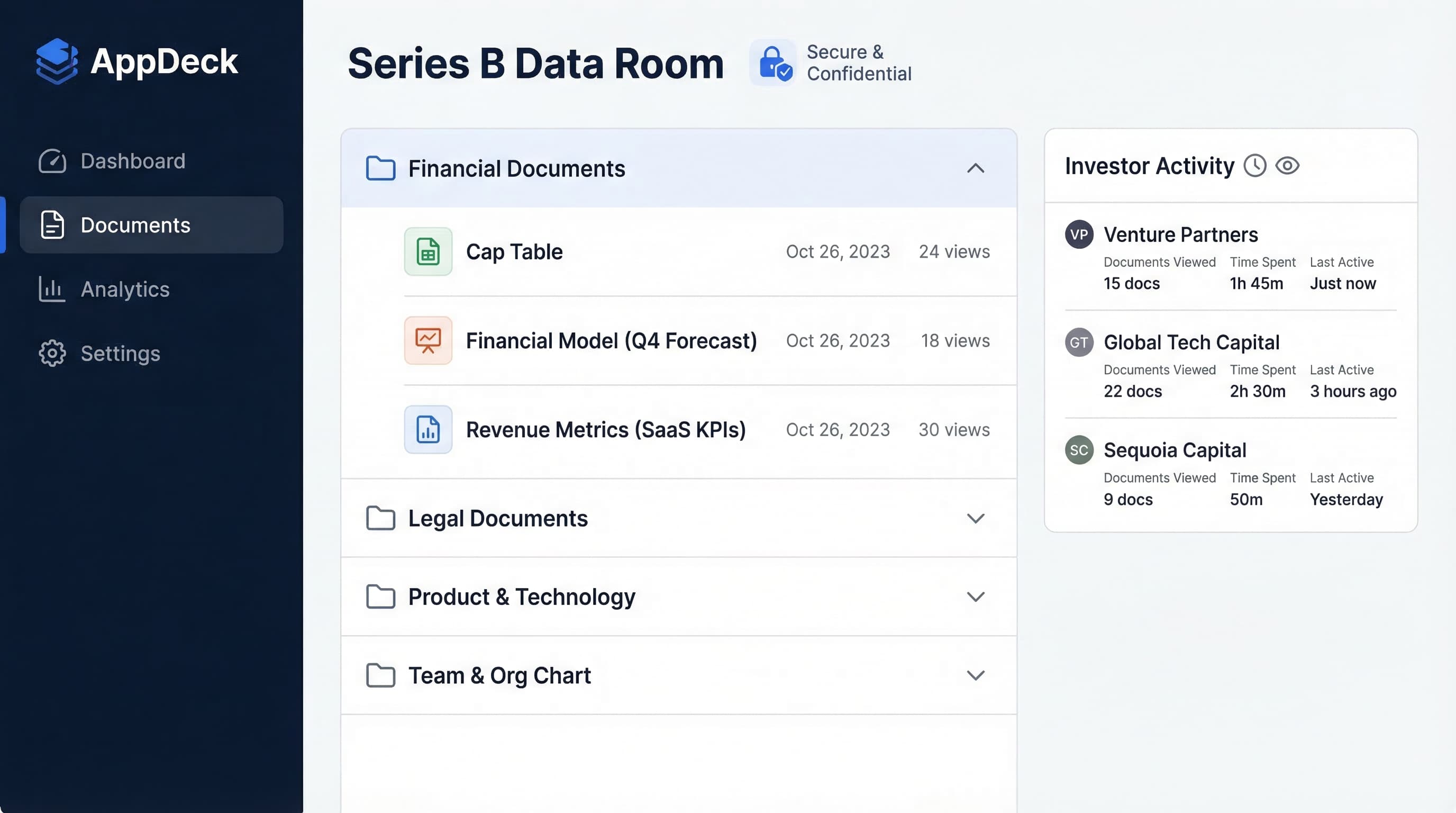
TL;DR: Everything about virtual data rooms (VDRs): use cases, features, security, pricing, and how to set one up for M&A, fundraising, and due diligence.
Introduction
If you've ever been through a fundraise, an acquisition, or a complex audit, you know the pain. Hundreds of sensitive documents. Dozens of external parties who need access. A ticking clock. And the terrifying possibility that someone downloads your cap table and forwards it to a competitor.
That's where a virtual data room comes in.
I've been on both sides of the table—raising capital for my own companies and advising on M&A transactions. I've seen deals close in three weeks because the data room was airtight, and I've watched deals die because a founder shared financials through a Google Drive link with no access controls.
This guide covers everything you need to know about virtual data rooms in 2026: what they are, who uses them, which features actually matter, how much they cost, and exactly how to set one up. Whether you're a first-time founder preparing for a seed round, a CFO managing a sell-side M&A process, or a board director who needs a secure space for governance documents, this is the guide I wish I'd had when I started.
What you'll learn:
- What a virtual data room is and how it differs from cloud storage
- The 7 most common VDR use cases (with specific examples)
- 10 features every data room must have
- Security requirements and compliance standards
- Step-by-step setup instructions with folder templates
- Pricing models and what to expect to pay
- How to choose the right VDR for your situation
Raising capital specifically? Pair this with our investor data room guide, which drills into the fundraising use case.
Let's get into it.
What Is a Virtual Data Room?
A virtual data room (VDR) is a secure online repository used to store, share, and manage confidential documents during high-stakes business transactions. Think of it as a digital vault with a guest list, security cameras, and a bouncer at the door.
The concept isn't new. Before the internet, "data rooms" were physical rooms—usually at a law firm or investment bank—where potential buyers would go to review boxes of documents during an acquisition. You'd fly to New York, sit in a windowless room for three days, take handwritten notes (no photocopies allowed), and fly home.
Virtual data rooms replaced those physical rooms in the early 2000s, and the market has evolved significantly since then. Modern VDR software does far more than store files. It controls exactly who can see what, tracks every action every user takes, prevents unauthorized downloads or screenshots, and gives the data room administrator a real-time dashboard of engagement.
Here's the key distinction: A virtual data room isn't just a place to store files. It's a controlled environment for sharing sensitive information with external parties under strict terms.
A VDR gives you:
- Document-level permissions — Investor A sees the pitch deck; Investor B sees the full financials
- Complete audit trail — Know who viewed what, when, for how long, and from which IP address
- Security controls — Watermarking, download restrictions, remote access revocation
- Professional presentation — Branded portal that signals competence and trustworthiness
- Compliance documentation — Evidence trail for regulators and auditors
If you're sharing sensitive business documents with anyone outside your organization, you should be using a virtual data room. Full stop.
Virtual Data Room vs. Cloud Storage
This is the question I get most often: "Why can't I just use Google Drive or Dropbox?"
You can. And many early-stage founders do. But here's what you're giving up:
❌ Google Drive / Dropbox:
- Anyone with the link can access files (or forward the link to others)
- No document-level permissions—it's all or nothing
- No audit trail showing who viewed which document
- No watermarking on sensitive files
- No ability to revoke access to already-downloaded files
- No Q&A workflow for managing due diligence questions
- No NDA gate before granting access
- No compliance certifications (SOC 2, GDPR)
- Looks unprofessional to sophisticated investors and acquirers
✅ Virtual Data Room:
- Granular access control down to the individual document level
- Complete audit trail with timestamps, IP addresses, and duration
- Dynamic watermarking that embeds the viewer's name and email
- Remote shred capability to revoke access even after download
- Built-in Q&A workflows for structured due diligence
- NDA or Terms of Access gate before any document is visible
- SOC 2, GDPR, CCPA compliance certifications
- Professional, branded experience that builds confidence
The real cost of using cloud storage for deals:
I've seen this play out multiple times. A Series B company shared their financials through a Dropbox folder. One of the VCs on their list forwarded the link to a portfolio company—a direct competitor. The founder had no audit trail, no way to know who had accessed what, and no ability to revoke access.
That deal fell apart. The competitive intelligence leak cost them months of strategic advantage.
Bottom line: Cloud storage is for collaboration. A virtual data room is for controlled disclosure. They serve fundamentally different purposes.
Who Uses Virtual Data Rooms?
Virtual data rooms aren't just for Wall Street M&A deals. Here are the most common users:
Investment Banks and M&A Advisors
Every sell-side and buy-side M&A transaction requires a data room. Investment banks manage data rooms as a core part of the deal process, often running multiple rooms simultaneously for different transactions.
Startups and Growth-Stage Companies
From seed rounds to Series D, fundraising requires sharing sensitive information with multiple investors simultaneously. A well-organized investor data room is table stakes for serious fundraising.
Private Equity and Venture Capital Firms
PE and VC firms live in data rooms—both as buyers reviewing deal flow and as portfolio managers sharing information with LPs.
Public Companies
IPO preparation, quarterly board materials, regulatory filings, and shareholder communications all benefit from the security and audit capabilities of a VDR.
Law Firms
Legal discovery, litigation support, real estate closings, and contract management are natural VDR use cases. Many law firms maintain standing data rooms for their largest clients.
Real Estate Developers and REITs
Commercial real estate transactions involve mountains of documents—leases, environmental reports, title documents, zoning permits—shared with multiple potential buyers simultaneously.
Boards of Directors
Board members need secure access to sensitive governance documents, meeting materials, and financial reports. Many companies use a board portal alongside their data room for ongoing governance, then spin up a VDR for specific transactions.
CFOs and Finance Teams
CFOs use data rooms for audit preparation, compliance documentation, and financial reporting to stakeholders. Pairing a data room with an executive dashboard lets you share real-time financial metrics alongside static documents.
Key Features of a Virtual Data Room
Not all VDR software is created equal. Here are the 10 features that actually matter:
1. Document Management and Organization
Your data room needs to handle hundreds or thousands of documents without becoming a mess.
Must-haves:
- Hierarchical folder structure with unlimited nesting
- Drag-and-drop uploads (including entire folder structures)
- Bulk upload capability (uploading 500 files one at a time is a dealbreaker)
- Automatic file numbering and indexing
- Version control with clear version history
- Support for all common file types (PDF, Excel, Word, PowerPoint, images)
2. Granular Permission Controls
This is the feature that separates a real VDR from a glorified file share.
You need to control access at four levels:
- Folder level — Which folders can each user or group see?
- Document level — Within a visible folder, which specific files are accessible?
- Action level — Can the user view only, download, print, or edit?
- Time level — Does access expire after a specific date?
Example: In a fundraise, you might give all prospective investors view-only access to your pitch deck and executive summary. But only investors who've signed a term sheet get download access to your detailed financials and legal documents.
3. Dynamic Watermarking
Every document viewed or downloaded should be watermarked with the viewer's name, email, and a timestamp. This creates accountability and deters leaks.
Why it matters: If a watermarked document ends up where it shouldn't, you know exactly who leaked it. The psychological deterrent alone reduces unauthorized sharing by over 90%.
4. Audit Trail and Activity Tracking
Your data room should log every single action:
- Who logged in and when
- Which documents they viewed
- How long they spent on each page
- Whether they downloaded or printed anything
- Their IP address and device information
This data is gold for deal-makers. During a fundraise, if an investor spends 45 minutes reviewing your financial model but only 2 minutes on your pitch deck, that tells you they're doing serious diligence—and where their focus is. I wrote about leveraging this data in our guide to investor data room best practices.
5. Q&A Workflows
During due diligence, buyers and investors will have hundreds of questions. A built-in Q&A system lets you:
- Receive questions linked to specific documents
- Assign questions to the right internal team member
- Track response status and turnaround time
- Maintain a complete record of all Q&A for compliance
Without this: Questions come via email, Slack, text messages, and phone calls. Answers get lost. The same question gets asked three times by different people. It's chaos.
6. Full-Text Search
Users should be able to search across every document in the data room—not just file names, but the actual content inside PDFs, Word docs, and Excel files. When an investor wants to find every mention of "revenue recognition" across 800 documents, they need to do it in seconds.
7. Customizable NDA and Terms of Access
Before anyone sees a single document, they should be required to agree to your terms. A good VDR lets you:
- Require NDA acceptance before granting access
- Customize the NDA or terms for different user groups
- Track who has and hasn't accepted
- Enforce click-through agreements on sensitive sections
8. Bulk Operations
Data rooms often contain thousands of files. You need to be able to:
- Upload entire folder structures via drag-and-drop
- Apply permissions to groups of users at once
- Move or reorganize hundreds of files without losing permissions
- Export audit reports in bulk
9. Integrations
Your VDR should connect with the tools your team already uses:
- E-signature (DocuSign, HelloSign) for executing agreements within the data room
- Email for automated notifications and access invitations
- SSO (Okta, Azure AD) for enterprise authentication
- Financial tools for pulling in live data alongside static documents
10. Mobile Access
Deal-makers, investors, and board members don't sit at desks all day. Your data room needs a responsive mobile experience—or a dedicated app—that maintains full security controls on mobile devices.
Security Requirements for a Virtual Data Room
Security isn't a feature list to check off. It's the foundation everything else is built on. Here's what to look for:
Encryption
At rest: AES-256 encryption for all stored documents. This is the same standard used by the U.S. government for classified information.
In transit: TLS 1.3 encryption for all data moving between the user's browser and the data room servers. Anything less than TLS 1.2 is unacceptable in 2026.
Authentication
- Two-factor authentication (2FA) should be mandatory, not optional
- Single sign-on (SSO) for enterprise deployments
- Password complexity requirements enforced automatically
- Session timeouts after periods of inactivity
Access Controls
- IP address restrictions — Limit access to specific IP ranges or geographic regions
- Device restrictions — Control which devices can access the data room
- Time-based access — Set automatic expiration dates for user access
- Remote access revocation — Immediately revoke access for any user, including the ability to remotely shred downloaded documents on managed devices
Compliance Certifications
Non-negotiable:
- ✅ SOC 2 Type II — Demonstrates ongoing security controls, not just a point-in-time audit
- ✅ GDPR compliance — Required if any users are in the EU
- ✅ CCPA compliance — Required for California-related transactions
Industry-specific:
- ✅ HIPAA — Required for healthcare-related transactions
- ✅ ITAR — Required for defense and aerospace
- ✅ FedRAMP — Required for U.S. government contracts
For a deeper dive into security, see our board portal security checklist—the same principles apply to any data room.
Data Residency
Know where your data is physically stored. For cross-border transactions, you may need data centers in specific regions to comply with local data sovereignty laws. Ask your VDR provider about data center locations and whether you can choose your storage region.
Virtual Data Room Use Cases (Detailed)
Fundraising: Seed to Growth Stage
The scenario: You're raising a Series B. You have 30 VCs in your pipeline at various stages of interest. Each needs different levels of access to your confidential information.
How a VDR helps:
- Tiered access: Initial conversations get the pitch deck and high-level metrics. Firms in diligence get full financials. Lead investors get legal documents and employment agreements.
- Engagement tracking: See which firms are spending the most time in your data room. A firm that's viewed your financial model 12 times is more serious than one that glanced at the pitch deck once.
- Speed: When a partner at a VC firm asks for your last three years of audited financials at 9 PM on a Friday, you don't need to scramble. You grant access and they're reading within minutes.
Pro tip: Pair your investor data room with an executive dashboard to share real-time financial dashboards with investors alongside your static documents. Live metrics are far more compelling than stale spreadsheets.
For detailed guidance on structuring a fundraising data room, read our investor data room best practices guide.
M&A: Sell-Side
The scenario: Your company is being acquired. The buyer's diligence team—lawyers, accountants, and analysts—needs access to every corner of your business.
How a VDR helps:
- Organized disclosure: A well-structured sell-side data room with 500+ documents organized into clear categories (financial, legal, IP, HR, operations, commercial) signals that your company is well-managed.
- Multiple bidder management: In a competitive auction, you can run a single data room with different permission groups for each bidder. Bidder A sees everything; Bidder B (who's earlier in the process) sees a subset.
- Negotiation leverage: The audit trail shows you which sections each bidder focuses on. If a bidder is spending all their time in your IP folder, you know patent strength matters to them—and you can prepare accordingly.
M&A: Buy-Side
The scenario: You're acquiring a company and need to conduct thorough due diligence on their operations, finances, and legal standing.
How a VDR helps:
- Structured Q&A: Submit questions linked to specific documents. Track response times. Identify areas where the seller is slow to respond (often a red flag).
- Team coordination: Your legal, finance, and operations teams can all work in the same data room with role-based access. Everyone sees the documents relevant to their review area.
- Risk identification: Full-text search lets you find every reference to "litigation," "warranty claim," or "regulatory action" across thousands of pages in seconds.
IPO Preparation
The scenario: You're preparing for an initial public offering. Underwriters, auditors, legal counsel, and regulators all need access to different subsets of your corporate documents.
How a VDR helps:
- Compliance trail: Every document shared, every access granted, every Q&A exchange is logged. This audit trail becomes part of your IPO documentation.
- Parallel workstreams: Legal counsel reviews corporate governance documents while auditors review financials—simultaneously, in the same data room, without seeing each other's Q&A.
- Version control: When the S-1 goes through 47 revisions, the data room maintains a clear version history.
Board Governance
The scenario: Your board of directors needs ongoing access to board meeting materials, financial reports, and strategic documents.
How a VDR helps:
- Secure distribution: Board materials contain some of the most sensitive information in your company. A board portal or data room ensures these documents are shared securely—not via email attachments.
- Preparation tracking: See which board members have reviewed materials before the meeting. Gentle nudge those who haven't.
- Historical archive: Every board package, every set of minutes, every resolution—all organized and searchable.
Many companies start with a data room for a specific transaction (like a fundraise) and then expand into a board portal for ongoing governance. The two work hand-in-hand. Learn more in our board portal guide.
Legal Discovery and Litigation
The scenario: Your company is involved in litigation. Opposing counsel has requested document production, and you need to share thousands of documents under strict court-ordered protocols.
How a VDR helps:
- Controlled production: Share only the documents required by the production request—nothing more.
- Privilege logging: Track which documents are withheld on privilege grounds, with clear documentation.
- Court-admissible audit trail: Every access, view, and download is logged with timestamps for court submission.
Real Estate Transactions
The scenario: A commercial real estate portfolio is being sold. Multiple potential buyers need to review leases, environmental reports, building inspections, zoning documents, and financial performance data for 15 properties.
How a VDR helps:
- Property-level organization: Organize by property, with sub-folders for each document category.
- Bidder management: Each potential buyer sees only the properties they've expressed interest in.
- Speed: In competitive real estate markets, the ability to get documents in front of buyers fast can be the difference between closing and losing.
How to Set Up a Virtual Data Room
Here's the step-by-step process I recommend:
Step 1: Choose Your Provider
Select a VDR that matches your use case, budget, and security requirements. (I'll cover how to evaluate providers in detail below.) If you're setting up a data room for fundraising or board governance, AppDeck's investor data room is purpose-built for these use cases.
Step 2: Create Your Folder Structure
Don't improvise. Use a proven template (see the next section) and create your entire folder structure before uploading a single document. A clear hierarchy makes the difference between a data room that inspires confidence and one that creates confusion.
Step 3: Upload and Organize Documents
Best practices for uploading:
- Use consistent file naming:
[Category]_[Document Name]_[Date]_v[Version]- Example:
Financial_AuditedStatements_2025_v1.pdf
- Example:
- Upload in bulk using drag-and-drop folder upload
- Remove duplicates before uploading
- Convert documents to PDF where possible (prevents editing, ensures consistent rendering)
- Enable OCR (optical character recognition) for scanned documents so they're searchable
Step 4: Set Permissions
Define user groups first:
- Administrators — Full control over the data room
- Internal team — View and upload access to all folders
- External group A (e.g., lead investor) — View and download access to all folders
- External group B (e.g., prospective investors) — View-only access to selected folders
- External group C (e.g., legal counsel) — View and download access to legal and financial folders only
Then assign permissions at the folder level and override at the document level where needed.
Step 5: Configure Security Settings
- Enable two-factor authentication (mandatory, not optional)
- Set up dynamic watermarking
- Configure download and print restrictions per user group
- Set session timeout limits
- Restrict access to approved IP ranges if appropriate
- Set access expiration dates for time-limited transactions
Step 6: Invite Users
Send customized invitation emails with:
- Clear instructions for accessing the data room
- NDA or Terms of Access they must accept before viewing documents
- Point of contact for questions
- Expected timeline for the transaction
Step 7: Monitor and Manage
Once users are active in the data room:
- Check the activity dashboard daily during active transactions
- Respond to Q&A inquiries within 24 hours
- Update documents as new versions become available
- Revoke access for users who are no longer involved
- Generate weekly engagement reports for your deal team
Data Room Folder Structure Templates
Fundraising Data Room Structure
📁 1. Company Overview
   ├── Executive Summary
   ├── Pitch Deck (current version)
   ├── Company History & Milestones
   ├── Org Chart
   └── Key Team Bios

📁 2. Financial Information
   ├── Audited Financial Statements (3 years)
   ├── Monthly P&L (trailing 12 months)
   ├── Balance Sheet (current)
   ├── Cash Flow Statement
   ├── Financial Model & Projections (3-5 years)
   ├── Budget vs. Actuals (current year)
   ├── Revenue Breakdown by Product/Segment
   ├── Unit Economics Analysis
   └── Key Financial Metrics Dashboard

📁 3. Cap Table & Ownership
   ├── Current Cap Table
   ├── Option Pool Summary
   ├── Convertible Note/SAFE Details
   ├── Prior Funding History
   └── Shareholder Agreements

📁 4. Legal & Corporate
   ├── Certificate of Incorporation
   ├── Bylaws
   ├── Board Resolutions
   ├── Material Contracts
   ├── IP Assignments & Patents
   ├── Regulatory Licenses
   └── Pending/Threatened Litigation

📁 5. Product & Technology
   ├── Product Roadmap
   ├── Technical Architecture Overview
   ├── Security & Compliance Documentation
   ├── Key Integrations
   └── Competitive Landscape

📁 6. Customers & Revenue
   ├── Customer List (anonymized if needed)
   ├── Top 10 Customer Profiles
   ├── Customer Retention/Churn Data
   ├── Sales Pipeline Summary
   ├── Pricing Strategy
   └── Case Studies / Testimonials

📁 7. Team & HR
   ├── Employee Roster (anonymized)
   ├── Key Employee Agreements
   ├── Stock Option Plan (ESOP)
   ├── Benefits Summary
   └── Hiring Plan
M&A Sell-Side Data Room Structure
📁 1. Corporate Overview
   ├── Management Presentation
   ├── Company History
   ├── Corporate Structure Chart
   ├── Subsidiary & Entity List
   └── Material Subsidiaries

📁 2. Financial Information
   ├── Audited Financial Statements (5 years)
   ├── Monthly Management Accounts (24 months)
   ├── Financial Projections & Assumptions
   ├── Working Capital Analysis
   ├── Debt Schedule & Terms
   ├── CapEx History & Forecast
   ├── Tax Returns (3 years)
   ├── Transfer Pricing Documentation
   └── Quality of Earnings Report

📁 3. Legal & Regulatory
   ├── Articles of Incorporation & Bylaws
   ├── Board Minutes (3 years)
   ├── Material Contracts & Agreements
   ├── Litigation History & Pending Matters
   ├── Regulatory Filings & Compliance
   ├── Environmental Reports
   ├── Insurance Policies
   └── Government Permits & Licenses

📁 4. Intellectual Property
   ├── Patent Portfolio
   ├── Trademark Registrations
   ├── Copyright Registrations
   ├── IP Assignment Agreements
   ├── License Agreements (in & out)
   └── Trade Secret Protections

📁 5. Commercial
   ├── Top 20 Customer Contracts
   ├── Customer Concentration Analysis
   ├── Revenue by Customer (3 years)
   ├── Pricing History & Strategy
   ├── Sales Pipeline & Forecast
   ├── Distribution Agreements
   └── Marketing Spend & ROI

📁 6. Human Resources
   ├── Org Chart
   ├── Executive Employment Agreements
   ├── Employee Census
   ├── Compensation & Benefits Summary
   ├── Stock Option Plan & Grants
   ├── Key Person Dependencies
   └── Non-Compete Agreements

📁 7. Technology & Operations
   ├── System Architecture
   ├── Third-Party Software Licenses
   ├── SLA Agreements
   ├── Disaster Recovery Plan
   ├── Security Audit Reports
   └── Data Processing Agreements

📁 8. Real Estate & Assets
   ├── Lease Agreements
   ├── Property Valuations
   ├── Equipment List
   └── Asset Depreciation Schedule
Pro tip: Number your top-level folders so they always appear in the right order. Use sub-numbering (1.1, 1.2, 1.3) for sub-folders when the data room gets large.
Virtual Data Room Pricing
VDR pricing is notoriously opaque. Here's what the market actually looks like in 2026:
Pricing Models
Per-page pricing:
- Charged based on the number of pages uploaded
- Typical cost: $0.40–$0.85 per page
- Best for: Small, document-heavy transactions (real estate, legal)
- Watch out for: Costs balloon fast. A 10,000-page data room at $0.75/page = $7,500
Per-user pricing:
- Charged based on the number of users with access
- Typical cost: $100–$250 per user per month
- Best for: Transactions with few users but many documents
- Watch out for: Adding users mid-deal gets expensive
Flat-rate / subscription pricing:
- Fixed monthly or annual fee regardless of pages or users
- Typical cost: $400–$2,500 per month
- Best for: Ongoing use cases (board governance, recurring fundraising)
- Watch out for: Storage limits and feature tiers
Transaction-based pricing:
- Fixed fee for the duration of a specific deal
- Typical cost: $5,000–$25,000 per transaction
- Best for: One-time M&A deals with clear timelines
- Watch out for: Overages if the deal takes longer than expected
What You'll Actually Pay
| Use Case | Typical Monthly Cost | Typical Deal Cost |
|---|---|---|
| Seed/Series A fundraise | $400–$800/mo | $2,000–$5,000 |
| Growth-stage fundraise | $800–$2,000/mo | $5,000–$15,000 |
| Mid-market M&A ($50M–$500M) | $1,500–$5,000/mo | $10,000–$40,000 |
| Enterprise M&A ($500M+) | $5,000–$15,000/mo | $30,000–$100,000+ |
| Board governance (ongoing) | $400–$1,500/mo | N/A (subscription) |
| Legal discovery | $1,000–$5,000/mo | Varies by case |
The hidden costs to watch for:
- Setup fees ($500–$5,000)
- Per-page overage charges
- Additional user fees mid-transaction
- Training and support fees
- Data migration fees when switching providers
- Archive storage fees after the transaction closes
For a detailed comparison of investor data room providers and pricing, see our investor data room software comparison.
How to Choose the Right Virtual Data Room
Start With Your Use Case
Different use cases have different requirements. A seed-stage founder doesn't need the same VDR as a bulge-bracket investment bank.
For fundraising (startup to growth stage):
- Prioritize ease of use and speed of setup
- You need engagement analytics (which investors are most active?)
- Tiered access is essential for managing multiple investors
- Look for flat-rate pricing to avoid surprises
- A platform like AppDeck's investor data room is built specifically for this
For M&A transactions:
- Prioritize security certifications and audit trail depth
- You need Q&A workflows for managing diligence questions
- Bulk upload and advanced document management are critical
- Transaction-based pricing may make more sense than subscriptions
For board governance:
- Prioritize ongoing usability over transaction features
- Integration with board meeting workflows matters
- You need a solution your board members (who may not be tech-savvy) can actually use
- Consider a dedicated board portal with data room capabilities
For legal proceedings:
- Prioritize compliance certifications and court-admissible audit trails
- Redaction tools are essential
- You need robust search and tagging capabilities
Evaluate These 8 Criteria
Here's the decision framework I use:
1. Security and compliance Does the provider have SOC 2 Type II certification? What encryption standards do they use? Where are data centers located?
2. Ease of use How long does it take to set up a data room from scratch? Can non-technical users manage it? Is the interface intuitive for external users who've never seen it before?
3. Permission granularity Can you control access at the folder, document, and action level? Can you set time-based access restrictions?
4. Audit and analytics How detailed is the activity log? Can you export engagement reports? Do you get real-time notifications for important events?
5. Q&A and collaboration Is there a built-in Q&A system? Can you assign questions to team members? Is there a history of all exchanges?
6. Pricing transparency Is the pricing model clear? Are there hidden fees for storage, users, or pages? What happens if you need to extend the timeline?
7. Support What's the support SLA? Is there 24/7 support for active deals? Do they help with data room setup?
8. Track record How many transactions has the provider supported? Do they have experience in your specific industry or deal type?
Red Flags to Watch For
❌ No SOC 2 certification (or only Type I, not Type II) ❌ Per-page pricing without clear caps ❌ No two-factor authentication option ❌ Audit trail that only shows logins, not document-level activity ❌ No ability to revoke access after documents are downloaded ❌ Requires IT involvement to set up or manage ❌ No mobile access ❌ Long-term contracts with no early termination option
Frequently Asked Questions
What is a virtual data room used for?
A virtual data room is used to securely share confidential business documents with external parties during transactions like fundraising, M&A, IPOs, audits, and legal proceedings. It provides controlled access, audit trails, and security features that regular file-sharing tools lack.
How is a virtual data room different from Dropbox or Google Drive?
The key differences are security and control. A VDR offers document-level permissions, dynamic watermarking, complete audit trails, NDA enforcement, remote access revocation, and compliance certifications (SOC 2, GDPR). Cloud storage tools are designed for collaboration, not controlled disclosure of sensitive information.
How much does a virtual data room cost?
Pricing varies widely based on the model (per-page, per-user, flat-rate, or transaction-based). Expect to pay $400–$2,000/month for fundraising, $1,500–$15,000/month for M&A transactions, and $400–$1,500/month for ongoing board governance. Transaction-based pricing for mid-market M&A typically runs $10,000–$40,000 per deal.
How long does it take to set up a virtual data room?
With a modern VDR platform, you can have a basic data room up and running in 30–60 minutes. A fully loaded M&A data room with hundreds of documents, multiple user groups, and detailed permissions typically takes 1–2 weeks to set up properly.
What documents should be in a fundraising data room?
At minimum: pitch deck, executive summary, audited financial statements (3 years), financial projections, cap table, material contracts, incorporation documents, and key team bios. See the full folder structure template above, or read our investor data room best practices guide for a detailed checklist.
Is a virtual data room secure enough for M&A transactions?
Yes—if you choose a provider with the right certifications. Look for SOC 2 Type II, AES-256 encryption at rest, TLS 1.3 in transit, two-factor authentication, and dynamic watermarking. The major VDR providers are specifically designed for high-stakes M&A transactions.
Can I use a virtual data room for board governance?
Absolutely. Many companies use a VDR or board portal for secure distribution of board meeting materials, financial reports, and governance documents. The access controls and audit trails are ideal for maintaining confidentiality around sensitive board discussions.
What's the difference between a virtual data room and a board portal?
A virtual data room is optimized for time-limited transactions (fundraising, M&A, audits) with a focus on external user access and document security. A board portal is designed for ongoing board governance with features like meeting scheduling, voting, and minutes management. Many organizations use both—a board portal for day-to-day governance and a VDR for specific transactions.
Do I need a virtual data room for a seed round?
For a seed round with 2–3 angels, you might get away with a well-organized Google Drive folder. But once you're talking to institutional investors (even at seed), a proper data room signals professionalism. At Series A and beyond, a virtual data room is expected. The cost of a modern VDR ($400–$800/month) is trivial relative to the amount you're raising.
Can multiple parties access a virtual data room simultaneously?
Yes. One of the primary benefits of a VDR is supporting multiple external parties at the same time—each with their own permission levels. In a competitive M&A auction, for example, you might have 5–10 potential bidders accessing the same data room, each seeing a different subset of documents based on where they are in the process.
Conclusion
A virtual data room is one of those tools that seems optional until you need it—and then it's absolutely critical. Whether you're raising your first round of funding, navigating an acquisition, preparing for an IPO, or managing confidential board materials, a well-organized VDR protects your information, accelerates your transaction, and signals that your organization is professionally managed.
The key takeaways:
- A VDR is for controlled disclosure, not collaboration—don't confuse it with cloud storage
- Security features (encryption, 2FA, watermarking, audit trails) are non-negotiable
- Match your VDR to your use case—fundraising, M&A, board governance, and legal all have different requirements
- Set up your data room before you need it—scrambling mid-deal is a recipe for mistakes
- Use the folder structure templates in this guide to organize your documents from day one
- Track engagement analytics to understand who's seriously interested
Ready to set up your data room?
If you're preparing for a fundraise, explore AppDeck's investor data room—built specifically for founders and CFOs who need a professional, secure data room without enterprise pricing.
If you need ongoing board governance alongside your data room, take a look at our board portal solution.
Related reading:
- Fundraising for Startups: Complete Guide
- Investor Data Room Best Practices: A CFO's Complete Guide
- Investor Data Room Software Comparison 2026
- Due Diligence Checklist
- Board Portal Guide
- Secure Board Portal Security Checklist

Founder & CEO, AppDeck
Serial entrepreneur with 20+ years building B2B software companies. Former executive managing 2,800+ employees across three continents. Vik reviews all AppDeck content for accuracy and practical relevance.
Share this article
Explore Related Solutions
Related Articles
Investor Data Room Software Comparison 2026: 8 Best Platforms Reviewed
Compare the best virtual data room software for 2026. Intralinks, Datasite, Box, AppDeck, and 4 others. Features, pricing, and user reviews.
Due Diligence Checklist: Complete Guide for M&A, Fundraising & Investors
The definitive due diligence checklist for fundraising, M&A, and investor review. 100+ items organized by category with templates and data room setup tips.
Investor Data Room Best Practices: A CFO's Complete Guide for 2026
Learn the essential best practices for creating and managing investor data rooms. Complete guide with checklist, templates, and real-world examples from successful fundraising rounds.